Introduction
This manual provides essential information for operating your Holy Stone HS720R GPS Drone. Please read it thoroughly before first use to ensure safe and optimal performance. Keep this manual for future reference.
Package Contents

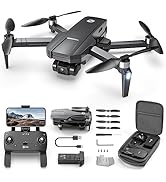
The Holy Stone HS720R package typically includes the foldable drone, a remote controller, a rechargeable drone battery, spare propellers, a USB charging cable, and a carrying case. Please verify all components are present upon unboxing.
Drone Overview

The HS720R is a foldable quadcopter equipped with a 4K EIS camera and a 3-axis gimbal for stable aerial photography and videography. It features powerful brushless motors and an advanced GPS positioning system for enhanced flight stability and intelligent functions.
Camera and Gimbal

The integrated 4K EIS (Electronic Image Stabilization) camera with a 3-axis gimbal provides ultimate stability for capturing high-quality photos (3840x2160P) and videos (4K@30fps). The camera offers a 140° wide-angle view and 70° adjustable tilt.
Remote Controller

The remote controller features an advanced intelligent control system designed for ease of use. It includes a phone holder to display real-time FPV (First Person View) footage via the Holy Stone Ophelia FLY App. The controller allows direct control over camera functions and flight modes.
Battery Installation and Charging
The drone is powered by an intelligent 2950mAh modular battery, providing up to 26 minutes of flight time. Ensure the battery is fully charged before each flight. The package includes a rechargeable battery. Some product variants may include additional batteries.
Charging
Connect the provided USB charging cable to the drone battery and a suitable USB power adapter. The battery indicator lights will show the charging status. Fully charge the battery before its first use and after each flight.
Pre-Flight Checklist
- Ensure the drone battery and remote controller are fully charged.
- Install propellers correctly according to the markings (A/B).
- Remove the gimbal protector before flight.
- Insert a compatible TF (Micro SD) card into the drone for 4K photo/video storage.
- Power on the drone and remote controller.
- Connect your mobile device to the drone's Wi-Fi network and open the Holy Stone Ophelia FLY App.
- Perform GPS calibration as instructed by the app.
- Ensure you are in an open area free from obstacles, people, and animals.
Flight Operations
The HS720R features a cutting-edge GPS positioning system for precise and reliable flight. It includes beginner mode, auto hover, and optical flow positioning to assist new pilots.
Takeoff and Landing

Utilize the one-key takeoff button on the remote controller for automatic ascent. The drone will automatically hover at a stable altitude. For landing, use the one-key landing button or manually descend using the throttle stick.
GPS Positioning and Auto Return

The drone is equipped with GPS for accurate positioning. It can automatically return to its takeoff point if the battery runs low, the connection is lost, or the Return-to-Home (RTH) button is pressed. Ensure a clear takeoff area for precise return.
Camera and Video Functions

Capture stunning 4K photos and videos directly to a TF card inserted into the drone. The remote controller also features dedicated buttons for starting/stopping video recording and taking pictures, eliminating the need to use your phone for these actions.
Time-Lapse Photography

The Holy Stone Ophelia FLY App supports Time-Lapse Photography, allowing you to capture dynamic sequences of events over time.
Smart Flight Modes
Enhance your flying experience with various intelligent flight modes accessible via the Holy Stone Ophelia FLY App.
- Follow Me: The drone automatically follows the remote controller, allowing you to capture hands-free footage.
- Waypoint Flight: Plan a custom flight path by setting multiple waypoints on the app's map. The drone will automatically follow the designated route.
- Point of Interest: Select a point on the map, and the drone will circle around it, keeping the camera focused on the chosen subject.
Specifications
| Feature | Specification |
|---|---|
| Brand | Holy Stone |
| Model Name | HS720R |
| Color | Black |
| Item Weight | 389 Grams (13.7 ounces) |
| Product Dimensions | 11.61"L x 8.39"W x 3.54"H |
| Skill Level | All |
| Video Capture Resolution | 2160P (4K@30fps) |
| Effective Still Resolution | 8.3 MP (3840x2160P) |
| Camera Features | 3-Axis Gimbal, EIS, 140° Wide-Angle, 70° Adjustable |
| Video Capture Format | MP4 |
| Connectivity Technology | Wi-Fi, RF |
| Maximum Range | 10000 Feet |
| Battery Capacity | 2950 Milliamp Hours |
| Flight Time | Up to 26 minutes |
| Optical Sensor Technology | Optical Flow, CMOS |
Maintenance
- Regularly inspect propellers for damage and replace if necessary.
- Keep the camera lens clean and free from dust or debris.
- Store the drone and batteries in a cool, dry place away from direct sunlight.
- Charge batteries periodically if not in use for extended periods to maintain battery health.
Troubleshooting
- Drone not powering on: Ensure the battery is fully charged and correctly inserted.
- Loss of control/connection: Move to an open area away from interference. The drone should initiate Auto Return.
- Unstable flight: Perform GPS calibration. Ensure propellers are undamaged and correctly installed.
- Poor image quality: Ensure the gimbal protector is removed. Clean the camera lens. Check if a high-speed TF card is used for recording.
Warranty and Support
Holy Stone is committed to continuous product improvement and customer satisfaction. If you encounter any issues with your HS720R drone, please contact Holy Stone customer support for assistance. Support is always available to help resolve any drone-related concerns.
Contact information for Holy Stone support can typically be found in the product packaging or on the official Holy Stone website.


