
1. Product Overview
The Checkme BP2A Blood Pressure Monitor is an FDA-cleared upper arm device designed for accurate blood pressure measurement at home. It features built-in storage, a compact rechargeable design, an adjustable arm cuff, and Bluetooth connectivity for app integration.
- Accurate Measurement: Provides precise blood pressure readings.
- Built-in Storage: Stores multiple measurement records directly on the device.
- Compact and Rechargeable: Portable design with a long-lasting battery, offering approximately 3 months of use on a single charge.
- Adjustable Arm Cuff: Fits upper arm circumferences from 8.6 to 16.5 inches (22-42 cm).
- Bluetooth Connectivity: Connects to the ViHealth app for iOS and Android devices, enabling multi-user record management, trend tracking, and report sharing.

Image: The Checkme BP2A Blood Pressure Monitor positioned on an arm, displaying a measurement result.
2. Setup Instructions
2.1 Charging the Device
Before first use, ensure the device is fully charged. Connect the provided Type-C charging cable to the device and a suitable power adapter. The charging indicator will show the charging status.

Image: The Checkme BP2A monitor being charged, illustrating its compact and rechargeable nature.
2.2 Cuff Placement
- Apply the cuff to your left upper arm, ensuring it is 1-2 cm (approximately 0.5 inches) above the elbow bend.
- The cuff should fit snugly. You should be able to insert one or two fingers between the cuff and your skin.
- Position the device on the inside of your arm, with the display facing upwards.

Image: Visual guide demonstrating the correct placement of the arm cuff for accurate measurement.
2.3 App Installation and Bluetooth Pairing (Optional)
- Download the ViHealth app from your smartphone's app store (iOS App Store or Google Play Store).
- Open the app and follow the prompts to create an account or log in.
- Ensure Bluetooth is enabled on your smartphone and the Checkme BP2A device is turned on.
- The app should automatically detect and pair with the device. If not, navigate to the 'Devices' section within the app and manually add the BP2A monitor.

Image: Illustration of the Checkme BP2A monitor connecting via Bluetooth to a smartphone running the ViHealth app.
3. Operating Instructions
3.1 Taking a Blood Pressure Measurement
- Sit comfortably with your back supported and your feet flat on the floor. Rest your arm on a table or flat surface so the cuff is at heart level.
- Remain still and avoid talking during the measurement.
- Press the Start/Stop button on the device. The cuff will begin to inflate automatically.
- The measurement will complete in approximately 30 seconds, and your Systolic, Diastolic, and Pulse Rate will be displayed on the OLED screen.
3.2 Reviewing On-Device History
To view previous measurements stored on the device, press the Review History button (often indicated by a menu icon) to navigate through the stored records.

Image: The Checkme BP2A monitor's display showing stored blood pressure and pulse rate data.
3.3 Using the ViHealth App
When the device is paired with the ViHealth app, measurements will automatically sync to your smartphone. The app provides enhanced features:
- Historical Trends: View your blood pressure data over time in graphical or list formats.
- Multi-User Management: Create and manage profiles for multiple users, allowing each individual to track their own data.
- Report Sharing: Export and share your measurement records and reports in PDF or CSV formats, which can be useful for sharing with healthcare professionals.
- Notes: Add contextual notes to your measurements within the app.

Image: Screenshots of the ViHealth app showing historical blood pressure trends and options for data management and sharing.

Image: The ViHealth app displaying its multi-user management feature, allowing different individuals to track their health data.
4. Maintenance
4.1 Cleaning
Wipe the device and cuff with a soft, dry cloth. Do not use abrasive cleaners, solvents, or immerse the device in water. Ensure no liquid enters the device casing.
4.2 Storage
Store the Checkme BP2A Blood Pressure Monitor in a cool, dry place, away from direct sunlight, extreme temperatures, and high humidity. Keep it out of reach of children and pets.
4.3 Battery Care
Recharge the device when the battery indicator is low. Use only the provided Type-C charging cable or a compatible, certified charger. Avoid overcharging or completely draining the battery for extended periods to prolong its lifespan.
5. Troubleshooting
- No Power: Ensure the device is adequately charged. Connect it to a power source using the Type-C cable. If the issue persists, contact customer support.
- Inaccurate Readings:
- Verify correct cuff placement (1-2 cm above elbow, snug fit).
- Ensure proper posture: sit still, relaxed, with arm supported at heart level.
- Avoid talking or moving during measurement.
- Wait at least 5 minutes between consecutive measurements.
- App Connectivity Issues:
- Confirm Bluetooth is enabled on your smartphone and the BP2A device is turned on.
- Restart the ViHealth app.
- If problems persist, try unpairing and re-pairing the device within the app's settings.
- Cuff Not Inflating/Deflating: Check for any obstructions or damage to the cuff or its connection points. Ensure the cuff is securely attached to the main unit.
6. Specifications
| Model Number | BP2A |
| Product Dimensions | 5.9 x 1.9 x 1.18 inches |
| Item Weight | 8.16 ounces |
| Cuff Size Range | 8.6 - 16.5 inches (22 - 42 cm) |
| Power Source | Rechargeable Battery (1 Nonstandard Battery included) |
| Display Type | Digital OLED |
| Connectivity | Bluetooth |
| Manufacturer | Shenzhen Viatom Technology Co., Ltd |
| UPC | 850063708784 |
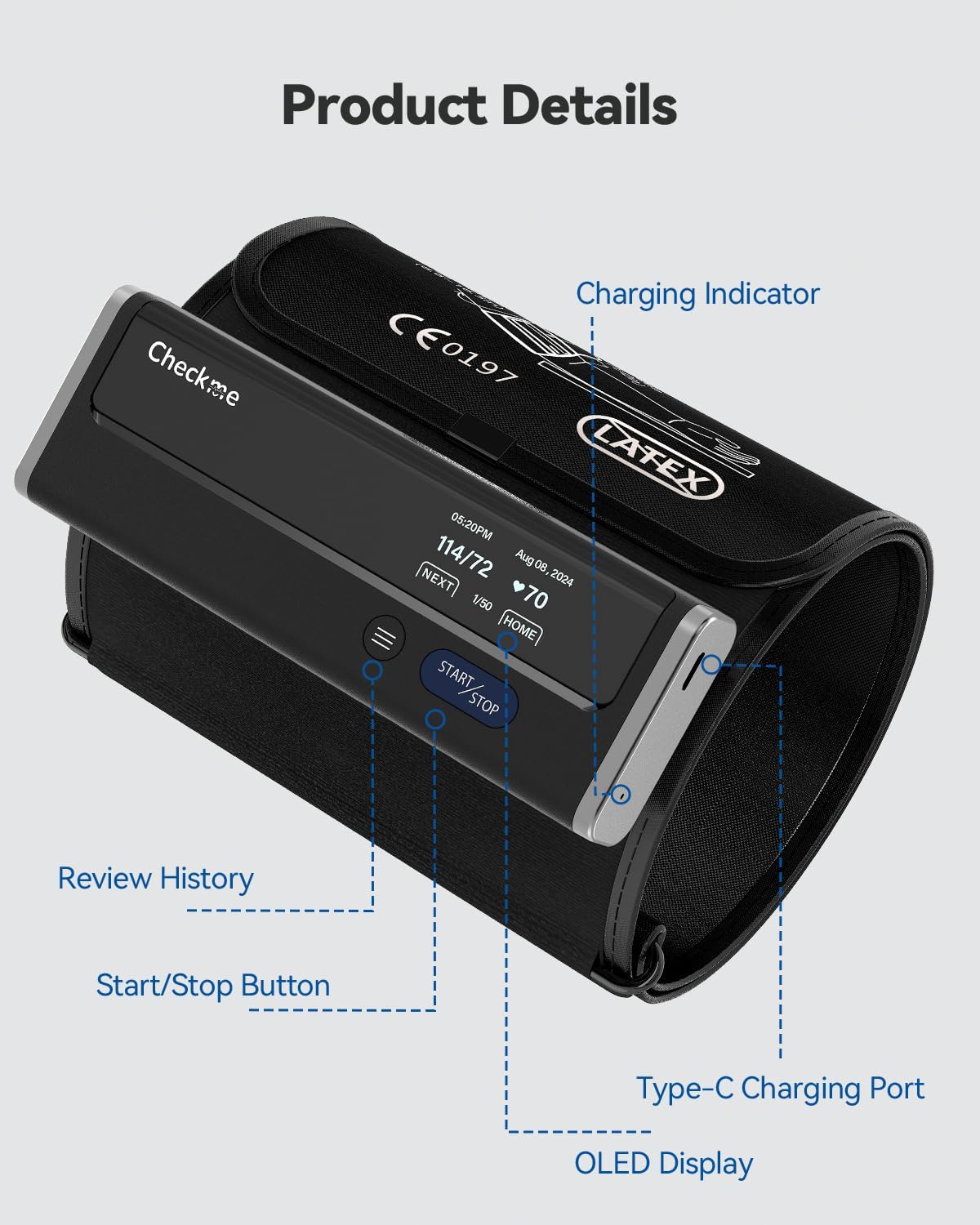
Image: Detailed view of the Checkme BP2A monitor, labeling its key components and ports.
7. Warranty and Support
For detailed warranty information, please refer to the warranty card or documentation included with your Checkme BP2A Blood Pressure Monitor. If you require technical assistance, have questions about product operation, or need to report an issue, please contact Checkme customer support through their official website or the contact information provided in your product packaging.


