
FREDEES B0DWJVP4H3
FREDEES Display Cabinet with Glass Doors (Model B0DWJVP4H3) - User Manual
Brand: FREDEES
Model: B0DWJVP4H3
Introduction
This manual provides detailed instructions for the assembly, operation, and maintenance of your FREDEES Display Cabinet with Glass Doors. Please read this manual thoroughly before assembly and use to ensure proper function and safety.

Image: The FREDEES Display Cabinet, featuring glass doors and internal LED lighting, displaying collectibles.
Important Safety Information
- Use caution when installing glass components. It is recommended that two people collaborate on the installation of glass parts to ensure safety and proper alignment.
- Do not install alone.
- Keep away from heat sources.
- Do not exceed the load limit of 50 lbs (22.7 kg) per shelf. Overloading shelves can lead to structural failure and injury.
- Keep away from children and pets to prevent accidents.
- Ensure the cabinet is placed on a stable, level surface to prevent tipping.
Package Contents
Before beginning assembly, verify that all components listed below are present and undamaged. If any parts are missing or damaged, please contact customer support.
- Cabinet Panels (Wood/Composite)
- Tempered Glass Shelves
- Glass Doors
- Drawer Components (Panels, Glides, Handles)
- LED Light Strips with Controller
- Human Body Sensor Module
- Assembly Hardware (Screws, dowels, hinges, shelf pins, etc.)
- Assembly Tools (Basic tools may be included, but a screwdriver is generally recommended)
- Instruction Manual
Setup and Assembly
The FREDEES Display Cabinet requires assembly. Detailed installation instructions and necessary tools are included with your product. Please follow these instructions carefully, step-by-step, to ensure correct and safe assembly.
- Unpack all components: Lay out all parts on a clean, soft surface to prevent scratches. Verify against the package contents list.
- Assemble the main frame: Follow the provided diagrams to connect the wood panels.
- Install drawer glides and assemble drawers: Ensure glides are installed correctly for smooth operation.
- Install LED light strips: Adhere the LED strips according to the instructions, ensuring proper cable management.
- Install glass shelves: Insert shelf pins into desired height positions. Carefully place glass shelves.
- Install glass doors: This step requires caution. It is highly recommended that two people collaborate to safely install the glass doors and hinges. Ensure the black plastic ring on the hinge is installed correctly for stability.
- Connect human body sensor: Follow wiring instructions for the sensor and light controller.
- Final placement: Position the assembled cabinet on a level surface.
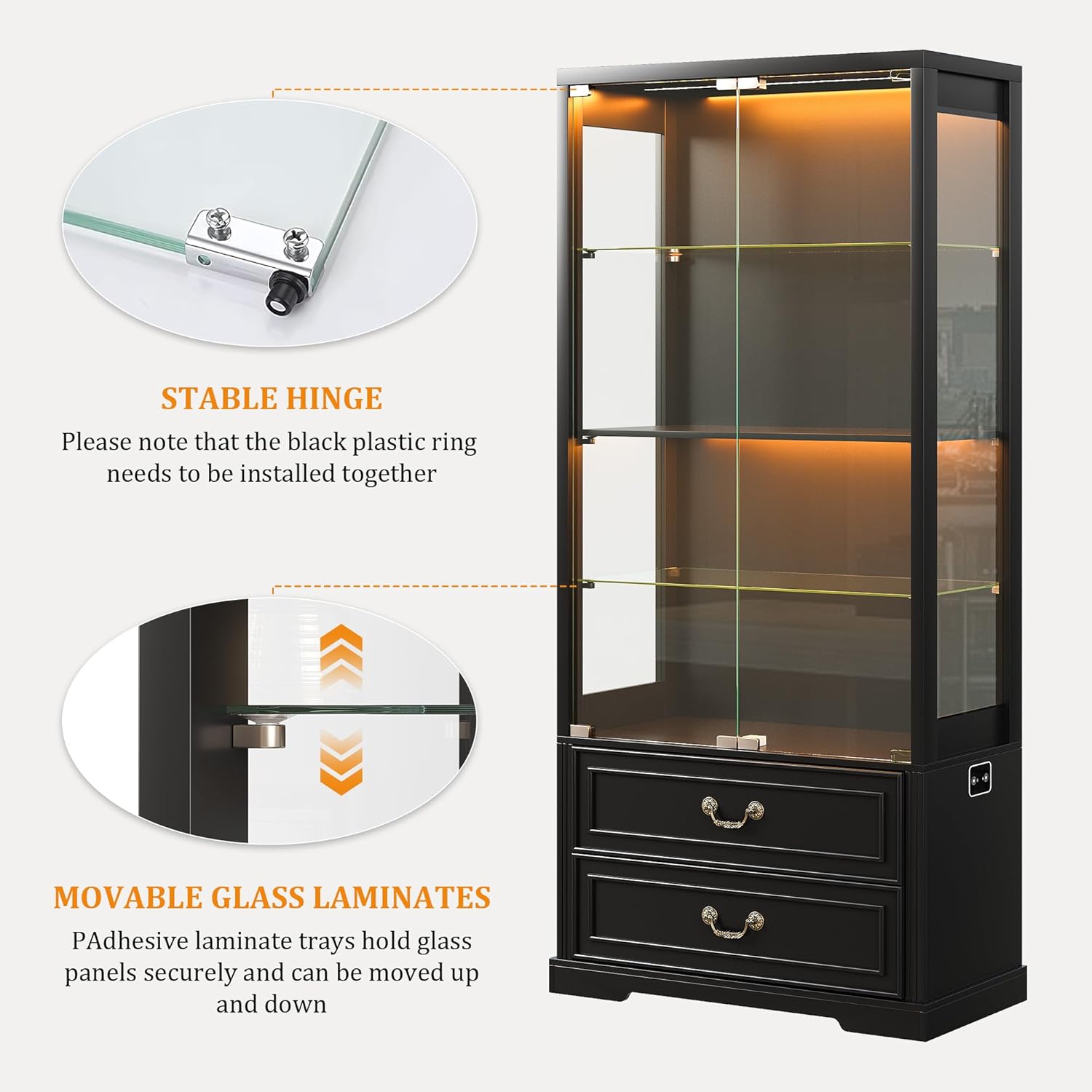
Image: Close-up view illustrating the stable hinge mechanism and the adjustable glass shelf laminates.
Operating Instructions
LED Lighting System
Your display cabinet is equipped with a tri-color LED lighting system and a human body sensor for convenience and ambiance control.
- Color Selection: The LED lights offer three color options: blue, white, and warm light. Cycle through these colors by pressing the control button.
- Brightness Adjustment: To adjust the brightness, long press the control button. The brightness will cycle from 0% to 100%. Release the button when the desired brightness is reached.
- Human Body Sensor: Activate the human body sensor mode. When enabled, the lights will automatically turn on when a person is detected nearby and turn off after a set period of inactivity. This feature enhances safety in low-light conditions and conserves energy.

Image: Illustration of the three available LED light modes (white, yellow, blue) for the display cabinet.

Image: Visual guide demonstrating the adjustable brightness feature of the LED lighting system.

Image: A person interacting with the display cabinet, highlighting the intelligent human body sensing system that activates the lights.
Pop-up Glass Doors
The cabinet features a pop-up design for its glass doors, allowing for easy opening and a sleek, handleless appearance.
- To open the door, gently press on the door panel. The pop-up mechanism will release the door, allowing it to swing open.
- To close, push the door firmly until the pop-up mechanism engages and holds it shut.

Image: Close-up showing the "Press to Open" feature for the handleless glass doors.
Adjustable Shelves
The glass shelves are adjustable, allowing you to customize the display space according to the size of your items.
- To adjust a shelf, carefully remove all items from the shelf.
- Lift the glass shelf out of its current position.
- Relocate the shelf pins to the desired height. Ensure all four pins are at the same level.
- Carefully place the glass shelf back onto the pins, ensuring it is stable before placing items on it.
Drawers
The two integrated drawers provide concealed storage for items you prefer not to display.
- Pull the drawer handle to open.
- Push the drawer firmly to close.
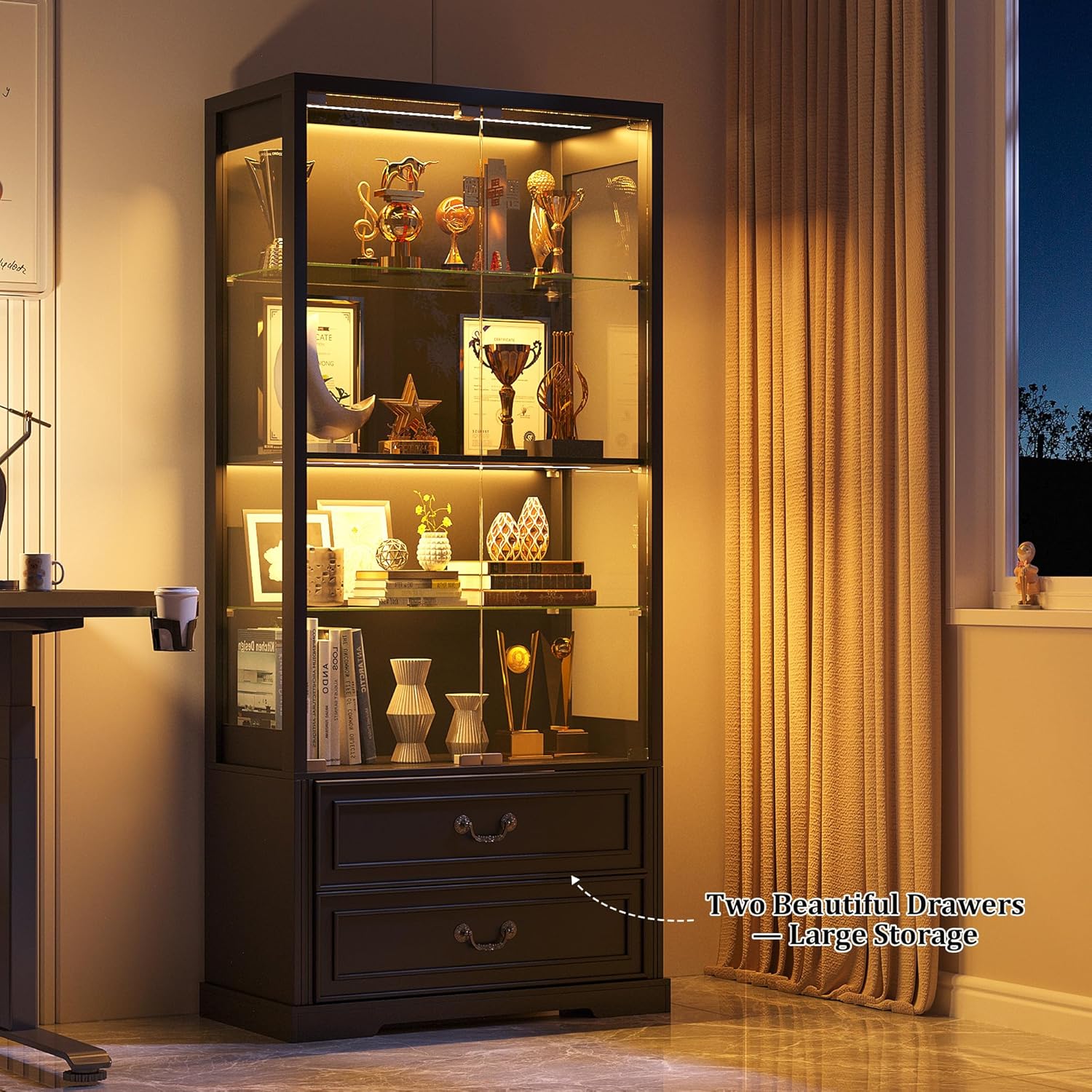
Image: The two spacious drawers at the bottom of the cabinet, designed for additional storage.
Maintenance
- Cleaning Glass Surfaces: Use a soft, lint-free cloth and a non-abrasive glass cleaner. Spray cleaner onto the cloth, not directly onto the glass, to avoid dripping onto wood components or electrical parts.
- Cleaning Wood Surfaces: Wipe wood surfaces with a soft, damp cloth. Avoid harsh chemicals or abrasive cleaners that can damage the finish. Dry immediately with a clean, dry cloth.
- LED Lights: The LED lights are designed for long-term use and generally require no maintenance. If dust accumulates, gently wipe with a dry, soft cloth. Do not attempt to disassemble the LED strips.
- General Care: Regularly check all screws and fittings to ensure they remain tight. Retighten as necessary. Avoid exposing the cabinet to direct sunlight or extreme temperature changes, which can affect wood and glass integrity.
Troubleshooting
| Problem | Possible Cause | Solution |
|---|---|---|
| LED lights do not turn on. | Power cable disconnected; LED strip connection loose; faulty power adapter. | Ensure power cable is securely plugged into an outlet and the cabinet. Check all LED strip connections. If problem persists, contact customer support. |
| Human body sensor not working correctly (lights turn on/off randomly or not at all). | Sensor obstructed; incorrect sensitivity setting; sensor malfunction. | Ensure the sensor is clear of obstructions. Refer to the detailed assembly instructions for sensor settings. If the issue persists, the sensor may be faulty; contact customer support. |
| Glass doors do not close properly or pop open unexpectedly. | Hinges misaligned; pop-up mechanism faulty; obstruction. | Check for any obstructions. Inspect hinges for proper alignment and tightness. If the pop-up mechanism is damaged, contact customer support. |
| Drawers are stiff or do not slide smoothly. | Drawer glides misaligned; obstruction in glides; loose screws. | Ensure drawers are not overloaded. Check for obstructions in the glides. Verify that drawer glides are correctly installed and screws are tight. |
| Cabinet feels unstable or wobbly. | Uneven floor; loose assembly screws. | Ensure the cabinet is on a level surface. Use shims if necessary. Retighten all assembly screws. |
Specifications
| Feature | Detail |
|---|---|
| Brand | FREDEES |
| Model | B0DWJVP4H3 |
| Color | Black |
| Product Dimensions (D x W x H) | 14.9"D x 29.5"W x 66.9"H (37.8 cm D x 74.9 cm W x 170 cm H) |
| Material | Tempered Glass, Acrylic, Wood Composite |
| Number of Shelves | 3 (Adjustable Glass) |
| Number of Drawers | 2 |
| Lighting | Tri-color LED (Blue, White, Warm), Adjustable Brightness |
| Special Feature | Human Body Sensor for LED Lights |
| Assembly Required | Yes |
| Max Shelf Load Capacity | 50 lbs (22.7 kg) per shelf |

Image: Detailed dimensions of the FREDEES Display Cabinet.
Warranty and Support
For any questions, concerns, or issues regarding your FREDEES Display Cabinet, please contact FREDEES customer support. Refer to your purchase documentation for specific warranty details and contact information. If you encounter any problems during assembly or operation, please reach out to us first for assistance.
Contact Information: Please refer to the contact details provided with your purchase or visit the official FREDEES website for support.
Ask a question about this manual
Ask about setup, troubleshooting, compatibility, parts, safety, or missing instructions. Manuals+ will review the question and use this page’s manual context to help answer it.