
Introduction
The Acebeam X20-R is a compact yet powerful high-output tactical flashlight designed for various demanding applications. It offers extreme brightness in a palm-sized body, optimized for one-handed operation. This manual provides essential information for the proper setup, operation, and maintenance of your X20-R flashlight.
The X20-R is available with two high-performance LED options:
- 8× SFT-25R HI LEDs: Delivers a maximum of 8,000 lumens with an impressive 645-meter throw, making it ideal for long-range visibility.
- 8× HL4X LEDs: Boosts output to 10,000 lumens with a 440-meter throw, perfect for wide-area illumination.
Its robust construction from AL6061-T6 aluminum alloy with a HA III hard-anodized finish ensures resistance to scratches, corrosion, and impacts up to 1.5 meters. The IP68 waterproof/dustproof rating allows for submersion up to 2 meters for 30 minutes, making it suitable for extreme environments.

Image: ACEBEAM X20-R Tactical Flashlight, showcasing its compact design and desert color finish.
Setup
1. Battery Installation
The X20-R uses dual 3000mAh Lithium-Ion batteries. To install or replace batteries:
- Unscrew the tail cap of the flashlight by turning it counter-clockwise.
- Insert the two 3000mAh batteries with the positive (+) end facing towards the head of the flashlight.
- Screw the tail cap back on clockwise until it is securely tightened.

Image: Illustration of the X20-R with its tail cap removed, showing the battery compartment and the USB-C charging port.
2. Charging
The X20-R features a USB-C direct charging port for convenient recharging. The built-in battery indicator light provides real-time power level monitoring.
- Connect the provided USB-C charging cable to the flashlight's charging port.
- Connect the other end of the cable to a compatible USB power source (e.g., wall adapter, power bank, computer USB port).
- The battery indicator light will show charging status:
- Green: Battery level > 30%
- Orange: Battery level 10% ~ 30%
- Red: Battery level < 10%
- Charging is complete when the indicator light turns solid green.
Operating Instructions
The X20-R features intuitive controls for quick access to various lighting modes.
1. Mode Selection
Switch seamlessly between Duty, Ultra Low/SOS, and Tactical Modes using the simple toggle switch located near the tail cap.
- Duty Mode: Cycles through 5 brightness levels (Low, Med 1, Med 2, High, Turbo).
- Ultra Low & SOS Mode: Provides softer light for close-range tasks or the SOS signal for emergencies.
- Tactical Mode: Offers instant access to Turbo and Strobe functions, critical for emergencies or self-defense.
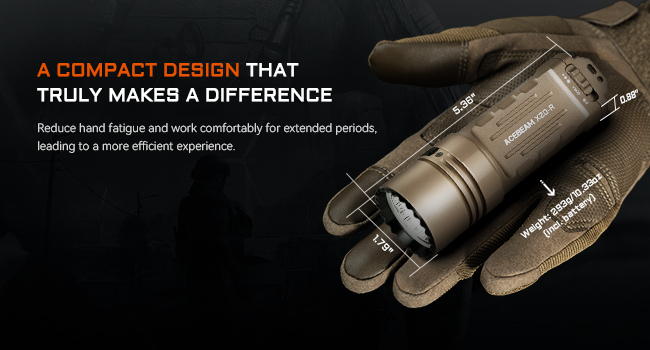
Image: Close-up of the X20-R's toggle switch, illustrating the three distinct operating modes.
2. Dual-Stage Tactical Tail Switch
The dual-stage tactical tail switch provides immediate access to critical functions:
- First Press (half-press): Activates momentary Turbo.
- Second Press (full-press): Activates momentary Strobe.
3. Patented Mechanical Lock
To prevent accidental activation during transport or storage, the X20-R features a patented mechanical lock.
- Lockout: Push the mechanical lock inward.
- Unlock: Push the mechanical lock outward.

Image: Detailed view of the X20-R's patented mechanical lock, showing its engaged and disengaged positions.
Maintenance
Proper maintenance ensures the longevity and optimal performance of your ACEBEAM X20-R flashlight.
- Cleaning: Regularly clean the threads and O-rings with a clean cloth. Apply a thin layer of silicone grease to the O-rings periodically to maintain water resistance.
- Battery Care: If the flashlight will not be used for an extended period, remove the batteries to prevent leakage and damage. Store batteries in a cool, dry place.
- Lens Cleaning: Use a soft, clean cloth and lens cleaning solution to clean the tempered glass lens. Avoid abrasive materials that could scratch the anti-reflective coating.
- General Care: Avoid dropping the flashlight from excessive heights. While it is impact-resistant up to 1.5 meters, extreme impacts can still cause damage.
Troubleshooting
If you encounter issues with your ACEBEAM X20-R, try the following steps:
- Flashlight not turning on:
- Check if the batteries are inserted correctly with the positive (+) end facing the head.
- Ensure the batteries are fully charged.
- Verify that the tail cap is fully tightened. A loose tail cap can prevent electrical contact.
- Check if the mechanical lock is disengaged (pushed outward).
- Light is dim or flickers:
- The battery level may be low. Recharge the batteries.
- Clean the battery contacts and threads with an alcohol swab to ensure good electrical conductivity.
- Charging issues:
- Ensure the USB-C cable is securely connected to both the flashlight and the power source.
- Try a different USB-C cable or power adapter.
- Check the charging port for any debris or damage.
If problems persist after attempting these steps, please contact ACEBEAM customer support for further assistance.
Specifications
| Feature | Detail |
|---|---|
| Brand | ACEBEAM |
| Model Number | ACEBEAM X20 Flashlight |
| Special Feature | Adjustable Light Modes, Compact, High Lumens, Long Range, Rechargeable |
| Color | Desert, SFT-25R 6500K LED, Max Output 8,000lms/645M/104,006cd |
| Power Source | Battery Powered |
| Light Source Type | LED |
| Material | Anodized Aluminum |
| White Brightness | 8000 Lumens (SFT-25R HI LED version) |
| Light Path Distance | 645 Meters (SFT-25R HI LED version) |
| Battery Cell Composition | Lithium Ion |
| Number of Batteries | 2 Nonstandard Battery batteries required (included) |
| Water Resistance Level | Waterproof (IP68, 2 meters for 30 minutes) |
| Product Dimensions | 5.36"D x 1.79"W x 0.88"H |
| Item Weight | 10.3 ounces |
| Runtime | Up to 28 hours (Ultra Low mode) |
| Impact Resistance | 1.5 meters |

Image: Technical parameter table for the SFT-25R HI 6500K LED version, detailing lumens, runtime, distance, and intensity across various modes.

Image: Technical parameter table for the HL4X 6500K LED version, detailing lumens, runtime, distance, and intensity across various modes.
Official Product Videos
Video: ACEBEAM X20-R Super Bright 10000 Lumen Tactical Flashlight. This video demonstrates the flashlight's features, including its dual LED options, patented mechanical lock, tactical tail switch, and various use scenarios, highlighting its durability and powerful illumination.
Warranty and Support
The ACEBEAM X20-R Tactical Flashlight comes with a 10-year manufacturer warranty.
For warranty claims, technical support, or any inquiries regarding your product, please contact ACEBEAM customer service directly. You can find contact information on the official ACEBEAM website or through the retailer where you purchased the product.
Visit the official ACEBEAM Store for more information: ACEBEAM Store


