
Whubefy XD MUGPRESS_87
Whubefy Auto Tumbler Heat Press Machine User Manual
Model: XD MUGPRESS_87
Introduction
Thank you for choosing the Whubefy Auto Tumbler Heat Press Machine. This automatic press is designed for efficient and even heat transfer onto various drinkware, including mugs, tumblers, water bottles, and sippy cups. Featuring smart auto-adjust technology and safety auto-shutoff, this machine simplifies the sublimation process for both beginners and experienced crafters. Please read this manual thoroughly before operation to ensure safe and optimal use.
Important Safety Information
- Always wear heat-resistant gloves when handling hot items or surfaces.
- The heating surface is hot during operation. Do Not Touch the hot surface directly.
- Ensure the machine is placed on a stable, heat-resistant surface.
- Keep children and pets away from the machine during operation.
- Unplug the machine when not in use or before cleaning.
- Do not operate the machine if the power cord or plug is damaged.
- The machine features an automatic shut-off after 30 minutes of inactivity to prevent overheating and save energy.
Package Contents
Verify that all items are present in your package:
- 1 x Whubefy Auto Tumbler Heat Press Machine
- 5 x Sublimation Paper (with pattern)
- 2 x Heat Resistance Gloves
- 1 x Heat-Resistant Tape
- 1 x Power Cord
- 1 x User Manual (this document)

Image: The Whubefy Auto Tumbler Heat Press Machine shown with all included accessories: sublimation paper, heat-resistant gloves, heat-resistant tape, power cord, and user manual.
Product Overview
The Whubefy Auto Tumbler Heat Press features a compact design with an intuitive control panel. The machine automatically adjusts pressure for various drinkware sizes and includes safety features like auto-shutoff.
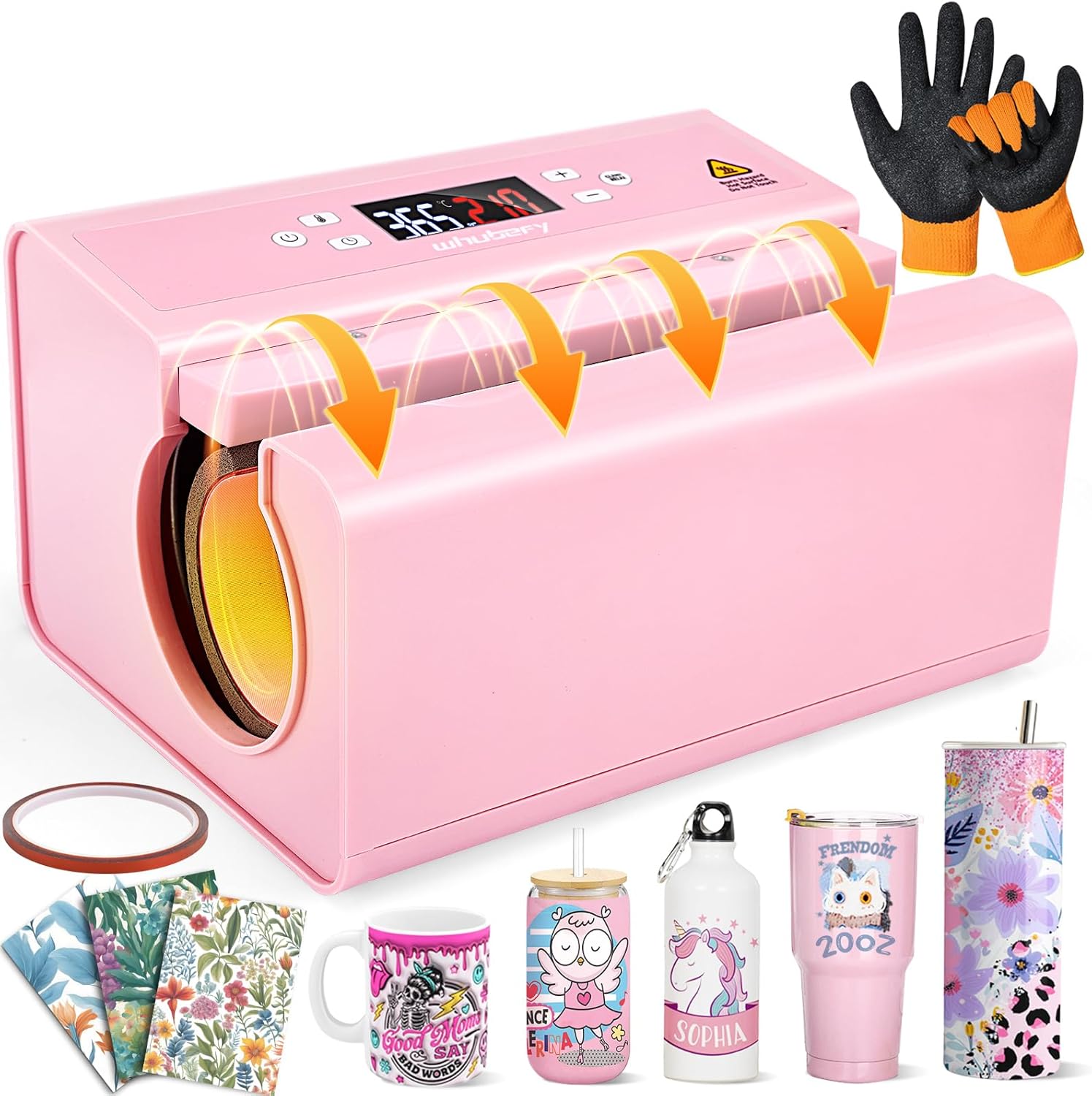
Image: Front view of the pink Whubefy Auto Tumbler Heat Press Machine, highlighting its sleek design.

Image: The heat press demonstrating its automatic pressure adjustment feature, showing how it clamps down on a tumbler and mug. Note: The machine automatically opens and closes but does not rotate automatically.
Specifications
| Feature | Detail |
|---|---|
| Brand | Whubefy |
| Model Number | XD MUGPRESS_87 |
| Material | ABS shell, Copper-nickel alloy winding, Teflon cloth |
| Product Dimensions | 11.6"L x 8.9"W x 6.4"H |
| Voltage | 120 Volts |
| Wattage | 550 Watts |
| Temperature Range | 104°F to 374°F (40°C to 190°C) |
| Timing Range | 1-999 seconds |
| Compatible Diameter | 2.85 - 3.34 inches |
| Max Cup Height | 9.8 inches (250 mm) |
| Auto Shut-Off | After 30 minutes of inactivity |

Image: Visual representation of the heat press's compatibility with various drinkware sizes, including mugs, tumblers, water bottles, and sippy cups, along with maximum diameter and length specifications.
Setup
- Unpack the Machine: Carefully remove the heat press machine and all accessories from the packaging.
- Placement: Place the machine on a flat, stable, and heat-resistant surface. Ensure there is adequate ventilation around the machine.
- Power Connection: Connect the power cord to the machine and then plug it into a standard 120V electrical outlet.
- Initial Power On: Press the power button to turn on the machine. The display will show "- - -" indicating standby mode.
- Temperature Unit Conversion (Optional): To change between Celsius (°C) and Fahrenheit (°F), hold the temperature button for 6 seconds. Use the +/- buttons to select your desired unit.
Video: This video demonstrates how to set the time and temperature on the digital control panel of the Whubefy Auto Tumbler Heat Press. It shows the process of powering on, converting temperature units, and adjusting settings.
Operation
- Set Temperature: Short press the temperature button (thermometer icon) on the left side. Use the +/- buttons on the right to adjust the temperature. Recommended settings:
- Sublimation Ceramic Mugs: 365°F-400°F (185°C-204°C)
- Sublimation Tumblers: 360°F-400°F (182°C-204°C)
- Set Time: Short press the time button (clock icon) on the left side. Use the +/- buttons on the right to adjust the time in seconds. Recommended settings:
- Sublimation Ceramic Mugs: 210 seconds
- Sublimation Tumblers: 120 seconds
- Preheat: The machine will automatically begin heating to the set temperature. It will buzz when the target temperature is reached.
- Prepare Drinkware: Wrap your sublimation paper design tightly around your mug or tumbler, ensuring the design faces the surface of the drinkware. Secure it with heat-resistant tape. For full-width designs, print one side first, then rotate to print the other.
- Insert Drinkware: Wearing heat-resistant gloves, carefully place the prepared mug or tumbler into the heating chamber. Ensure the handle (if applicable) is positioned to allow for even pressing.
- Start Pressing: Short press the operation button (clamp/relax icon) on the right side. The machine will automatically close, adjust pressure, and begin the heat transfer process. The timer will count down.
- Mid-Process Adjustment (Optional): If you need to adjust the drinkware mid-process, short press the operation button. The press will open automatically. Press it again to auto-close and resume printing.
- Completion: The machine will buzz when the timer reaches zero and automatically release the pressure.
- Remove Drinkware: Wearing heat-resistant gloves, carefully remove the hot mug or tumbler. Place it on a heat-resistant surface to cool down completely before removing the sublimation paper.

Image: A visual step-by-step guide showing how to secure transfer paper, place the blank tumbler, set and auto-adjust pressure, and the final result.
Video: This video demonstrates the practical application of the Whubefy Auto Mug Heat Press Machine, showing how to prepare and press designs onto mugs.
Video: A demonstration of creating custom tumblers using the auto press, showcasing the ease of use for personalized projects.
Maintenance
- Cleaning: Ensure the machine is unplugged and completely cool before cleaning. Wipe the exterior with a soft, damp cloth. Do not use abrasive cleaners or solvents.
- Heating Element: Gently wipe the heating element with a soft, dry cloth to remove any residue. Avoid scratching the surface.
- Storage: Store the machine in a dry, dust-free environment when not in use.
Troubleshooting
- Uneven Heating/Fading: Ensure the sublimation paper is wrapped tightly around the drinkware and secured with heat-resistant tape. Verify that the correct temperature and time settings are used for your specific material.
- Machine Not Powering On: Check the power cord connection to both the machine and the electrical outlet. Ensure the outlet is functional.
- Press Not Clamping/Releasing: Ensure no obstructions are in the heating chamber. If the issue persists, power cycle the machine.
- Error Codes: Refer to the digital display for any error codes. Consult the Whubefy support for specific code interpretations.
Warranty and Support
The Whubefy Auto Tumbler Heat Press Machine comes with a 180-day warranty from the date of purchase, covering manufacturing defects.
For any questions, technical support, or warranty claims, please contact Whubefy customer service. Providing videos and photos of any issues can help expedite the resolution process.
Contact information can typically be found on the product packaging or the official Whubefy website.
Ask a question about this manual
Ask about setup, troubleshooting, compatibility, parts, safety, or missing instructions. Manuals+ will review the question and use this page’s manual context to help answer it.