
msi FORGEGK600B
MSI Forge GK600 TKL Wireless Sky Mechanical Keyboard User Manual
Model: FORGEGK600B | Brand: MSI
Introduction
This manual provides comprehensive instructions for the MSI FORGE GK600 TKL WIRELESS SKY mechanical gaming keyboard. Designed for precision and responsive feedback, this keyboard offers versatile connectivity options and customizable features to enhance your gaming and typing experience.
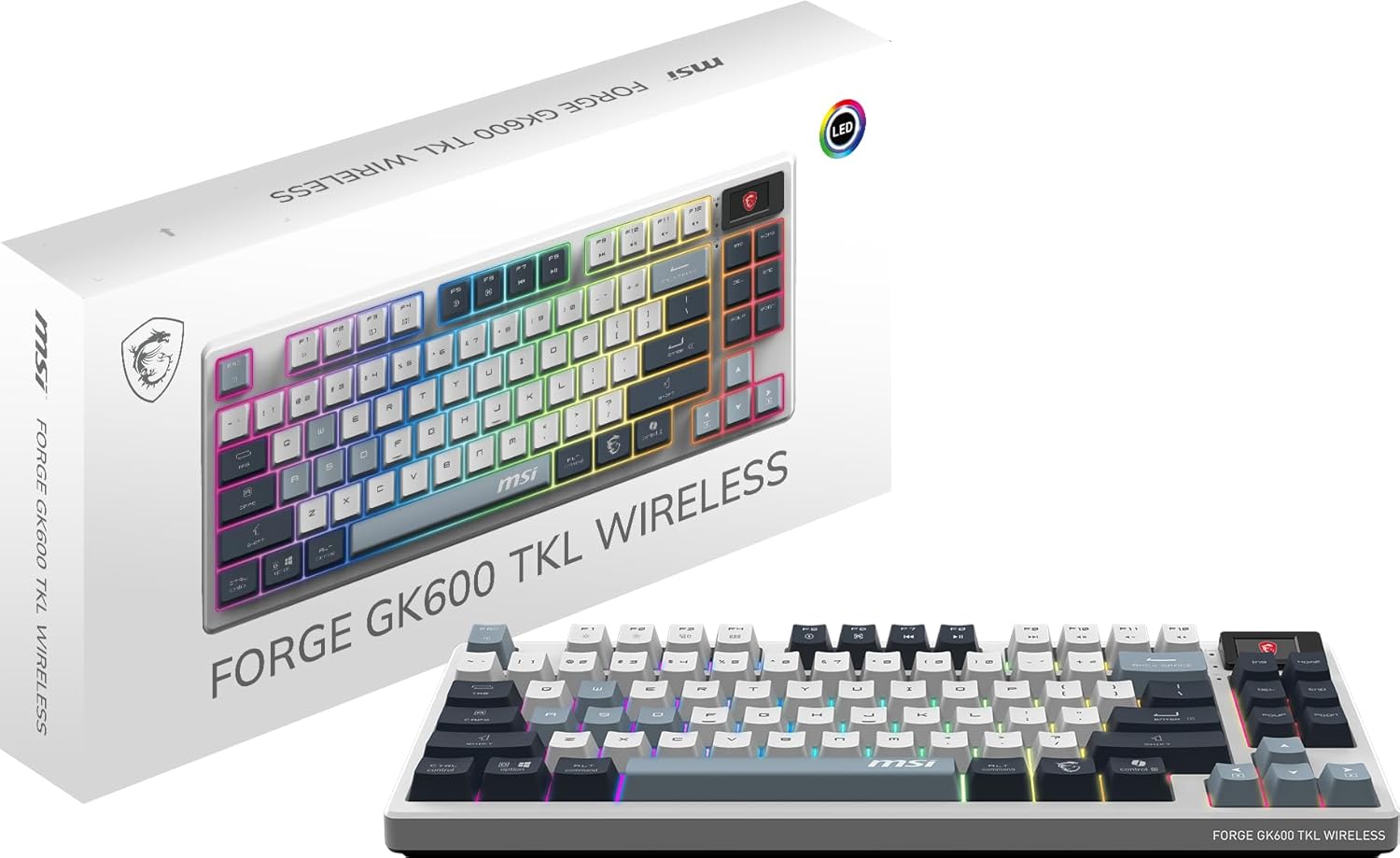
The MSI Forge GK600 TKL Wireless Sky keyboard shown with its product packaging.
Key Features
- Durable Mechanical Switches: Features mechanical Linear switches with a lifespan of 50+ million keystrokes, providing crisp, audible, and linear actuation.
- Dye-Sublimated PBT Keycaps: Employs a tenkeyless-sized keyboard layout with high-quality dye-sublimated PBT keycaps for improved durability and comfort.
- Tri-Mode Connectivity: Supports wired (1.8m USB 2.0), 2.4 GHz wireless, and Bluetooth connectivity. Equipped with a 4000mAh rechargeable battery, offering up to 20 days of continuous gameplay with RGB LED turned off.
- Intuitive Control & Display: A 1.06-inch screen provides key details such as battery status, RGB lighting profiles, and brightness settings for quick access to essential information.

The 1.06-inch display screen and surrounding function keys on the MSI Forge GK600 TKL keyboard.
- Hot-Swappable Design: Easily swap default mechanical switches with 5-pin compatible ones without soldering, allowing for customization and lasting durability.

A visual guide demonstrating the hot-swappable switch feature of the keyboard.
- Enhanced Acoustics: Multiple layers of sound-dampening foam and precision-crafted gaskets isolate and maintain the authentic sound of each key switch, delivering a clear and satisfying acoustic experience.

An exploded diagram illustrating the various layers and components designed for sound dampening within the keyboard.
- Anti-Slip Base: Includes an enhanced base with tilt-adjustable feet to provide extra support and prevent slipping during use.

The adjustable feet on the keyboard's base allow for preferred typing angles.
- Note: MSI Center software is not supported for this model.
Package Contents
- MSI Forge GK600 TKL Wireless Sky Mechanical Keyboard
- 1.8m USB 2.0 Cable
- Wireless USB Dongle (for 2.4 GHz connectivity)
- Keycap Puller
- Switch Puller
- User Manual
Setup Guide
Initial Charging
Before first use, connect the keyboard to a USB power source using the provided 1.8m USB 2.0 cable to fully charge the internal 4000mAh battery. The 1.06-inch screen will display battery status. A full charge can provide up to 20 days of use with RGB lighting off.

Battery endurance indicators for the keyboard.
Connectivity Options
2.4 GHz Wireless Connection
- Insert the 2.4 GHz USB dongle into an available USB port on your computer.
- Switch the keyboard to 2.4 GHz wireless mode. Refer to the keyboard's hotkey section for specific instructions on mode switching.
- The keyboard should automatically connect. The screen will indicate connection status.
Bluetooth Connection
- Ensure Bluetooth is enabled on your computer or device.
- Switch the keyboard to Bluetooth mode. Refer to the keyboard's hotkey section for specific instructions on mode switching and pairing.
- On your device, search for new Bluetooth devices and select "MSI GK600 TKL" to pair.
- The screen will confirm successful pairing.
Wired USB Connection
- Connect the provided 1.8m USB 2.0 cable from the keyboard to an available USB port on your computer.
- The keyboard will automatically switch to wired mode and begin charging.
Operating Instructions
Basic Keyboard Functions
The MSI Forge GK600 TKL Wireless Sky functions as a standard tenkeyless keyboard. All standard key inputs are available.
1.06-inch Display Screen
The integrated 1.06-inch screen provides real-time information. Use the dedicated hotkeys or controls near the screen to navigate through:
- Battery life indicator
- Current RGB lighting mode
- Brightness levels
- Connectivity status (2.4 GHz, Bluetooth, Wired)
RGB Lighting Control
The keyboard features fixed pattern RGB lighting with predefined effects. These can be cycled and adjusted directly from the keyboard using hotkeys or via the 1.06-inch screen. Consult the hotkey section for specific combinations to change lighting modes and brightness.

The keyboard displaying its customizable RGB lighting effects.
Hot-Swappable Switches
The keyboard supports 5-pin compatible mechanical switches, allowing for customization without soldering. To replace a switch:
- Gently remove the keycap using the provided keycap puller.
- Use the switch puller to carefully extract the mechanical switch from its socket.
- Align the pins of the new 5-pin compatible switch with the holes on the PCB and press firmly until it clicks into place.
- Reattach the keycap.

A detailed view of a mechanical switch, highlighting the keyboard's sensational typing experience.
Anti-Ghosting and N-Key Rollover
The keyboard supports 6+N-key rollover and full key anti-ghosting, ensuring that all simultaneous key presses are registered accurately, which is crucial for fast-paced gaming.
Maintenance and Care
Cleaning
To clean the keyboard, disconnect it from all power sources. Use a soft, dry cloth to wipe down the surface. For deeper cleaning, remove keycaps and use compressed air to clear debris from between switches. Avoid using harsh chemicals or abrasive materials.
Battery Care
To prolong battery life, avoid fully discharging the keyboard frequently. Store the keyboard in a cool, dry place when not in use for extended periods.
Troubleshooting
Keyboard Not Responding
- Ensure the keyboard is charged.
- Verify the correct connectivity mode (2.4 GHz, Bluetooth, Wired) is selected.
- For wireless connections, ensure the USB dongle is properly inserted or Bluetooth is paired.
- Try connecting via the wired USB cable to rule out wireless issues.
- Restart your computer.
RGB Lighting Not Working
- Check the brightness settings via the 1.06-inch screen or hotkeys.
- Cycle through different RGB modes using the hotkeys.
- Ensure the keyboard is not in a low-power mode that disables lighting.
Keys Not Registering Correctly
- Check if the keycap or switch is properly seated. If hot-swapped, ensure the new switch is fully inserted.
- Clean any debris around the affected key.
MSI Center Not Supported
Please note that this keyboard does not support MSI Center software for customization. All settings and controls are managed directly via the keyboard's onboard functions and display screen.
Technical Specifications
| Feature | Detail |
|---|---|
| Model Number | FORGEGK600B |
| Connectivity | 2.4 GHz Wireless, Bluetooth, USB 2.0 Wired |
| Switch Type | Mechanical Linear Switches |
| Keycap Material | Dye-Sublimated PBT |
| Layout | Tenkeyless (TKL) |
| Battery Capacity | 4000mAh |
| Battery Life (RGB Off) | Up to 20 days |
| Display | 1.06-inch Screen |
| Rollover | 6+N-Key Rollover |
| Anti-Ghosting | Full Key Anti-Ghosting |
| Cable Length | 1.8m USB 2.0 |
| Dimensions | 15.4 x 7.7 x 2.3 inches |
| Weight | 2.73 Pounds (approx. 1.24 kg) |
| Manufacturer | MSI |
| Release Date | February 7, 2025 |
Warranty and Support
Warranty Information
MSI provides a standard warranty for this product. Please refer to the official MSI website or your purchase documentation for detailed warranty terms and conditions. Registering your product may extend the warranty period.
Customer Support
For technical assistance, troubleshooting, or product inquiries, please visit the official MSI support website or contact their customer service. You can find contact information and FAQs at www.msi.com/support.
Ask a question about this manual
Ask about setup, troubleshooting, compatibility, parts, safety, or missing instructions. Manuals+ will review the question and use this page’s manual context to help answer it.