1. Introduction
This manual provides instructions for the proper setup, operation, and maintenance of your Timex Men's Waterbury Classic 40mm Chronograph Watch (Model TW2Y29400VQ). This watch features a 40mm stainless-steel case, a cream dial with Arabic numerals, a date window, luminant hands, and a black natural leather strap. It includes a chronograph function and INDIGLO backlight for enhanced visibility.
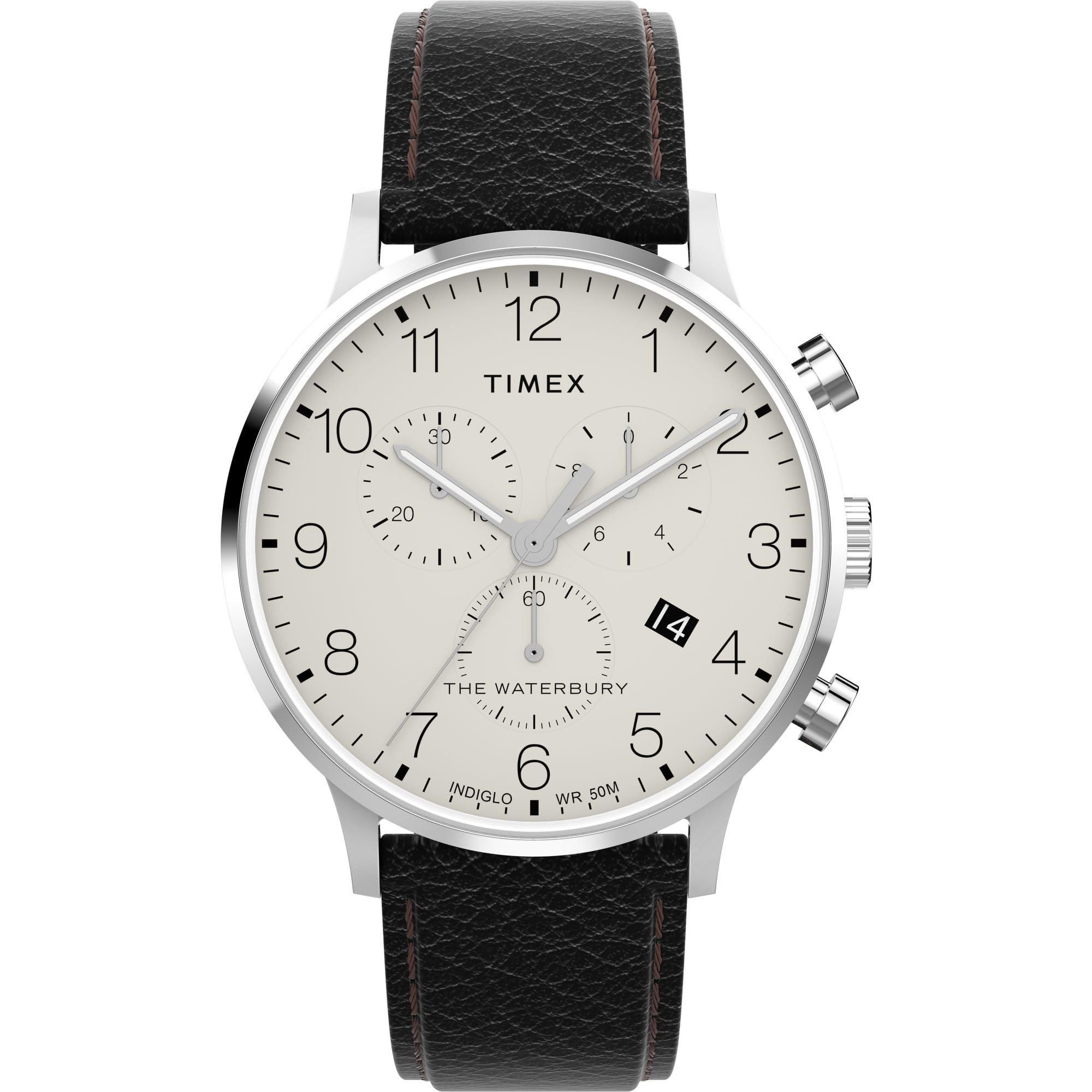
Image 1.1: Front view of the Timex Waterbury Classic Chronograph watch.
This image shows the watch face, including the cream dial, Arabic numerals, chronograph subdials, and the date window. The black leather strap is also visible.
2. Watch Components
Familiarize yourself with the key components of your watch:
- Crown: Used for setting time and date, and activating INDIGLO.
- Pushers (A & B): Used to operate the chronograph functions.
- Dial: Displays time, date, and chronograph measurements.
- Hands: Hour, minute, second, and chronograph hands.
- Date Window: Displays the current date.
- Leather Strap: Secures the watch to your wrist.
- Case Back: Protects the internal movement and often contains model information.

Image 2.1: Side view illustrating the crown and pushers.
This image provides a clear view of the watch's right side, showing the main crown in the center and the two chronograph pushers above and below it.

Image 2.2: Close-up of the watch case back.
This detailed image displays the stainless steel case back, featuring engravings such as "TIMEX," "WATERBURY COLLECTION," and water resistance information.
3. Initial Setup
3.1 Setting the Time
- Pull the crown out to position 3 (farthest out). The second hand will stop.
- Turn the crown to move the hour and minute hands clockwise until the desired time is set. Ensure AM/PM is correctly set if your watch has a 24-hour indicator or date changes at midnight.
- Push the crown back in to position 1 (normal operating position). The second hand will resume movement.
3.2 Setting the Date
- Pull the crown out to position 2 (intermediate position).
- Turn the crown either clockwise or counter-clockwise (depending on the movement) until the correct date appears in the date window.
- Push the crown back in to position 1.
- Note: Avoid setting the date between 9 PM and 3 AM, as this may interfere with the automatic date change mechanism. If the date needs to be set during this period, first set the time outside this range, adjust the date, then reset the time.
4. Operating Instructions
4.1 Chronograph Function
The chronograph allows you to measure elapsed time. Your watch features a 1/10 second chronograph accuracy.
- To start the chronograph, press pusher A (top pusher). The chronograph second hand will begin to move.
- To stop the chronograph, press pusher A again. The elapsed time will be displayed.
- To reset the chronograph, press pusher B (bottom pusher) while the chronograph is stopped. All chronograph hands will return to their zero positions.
- To measure split time (intermediate time), press pusher B while the chronograph is running. The chronograph hands will stop to show the split time. Press pusher B again to resume timing.
4.2 INDIGLO Night-Light
The INDIGLO night-light illuminates the entire watch dial for easy reading in low-light conditions.
- To activate the INDIGLO night-light, simply press and hold the crown. The light will remain on as long as the crown is pressed.
4.3 Water Resistance
Your Timex Waterbury Classic Chronograph watch is water resistant to 100 meters (330 feet). This means it is suitable for showering, swimming, and snorkeling. However, it is not suitable for scuba diving.
- Do not operate the crown or pushers while the watch is wet or submerged. This can compromise the water resistance.
- After exposure to salt water, rinse the watch with fresh water and wipe it dry with a soft cloth.
5. Strap Adjustment
The watch comes with a natural leather strap. To adjust the fit, simply use the buckle to select the appropriate hole for your wrist size. The leather strap will soften and conform to your wrist over time.

Image 5.1: Rear view showing the leather strap and buckle.
This image displays the watch from the back, focusing on the black leather strap and its silver-tone buckle, which is used for securing the watch.
5.1 Understanding Watch Case Sizing
To help visualize how different watch case sizes appear on various wrist sizes, please refer to the following informational video:
Video 5.1: Timex Watch Sizing Chart.
This video demonstrates how various watch case sizes (from 16mm to 50mm) appear on a 7-inch wrist and a 6-inch wrist, providing a visual guide for understanding watch proportions.
6. Care and Maintenance
- Cleaning: Wipe the watch case and crystal with a soft, damp cloth. For the leather strap, avoid excessive moisture and harsh chemicals.
- Battery Replacement: When the watch stops or the second hand begins to jump every few seconds, it indicates a low battery. Have the battery replaced by a qualified watch technician to ensure water resistance is maintained.
- Temperature Extremes: Avoid exposing your watch to extreme temperatures (hot or cold) for prolonged periods, as this can affect accuracy and battery life.
- Chemicals: Keep the watch away from solvents, detergents, perfumes, and cosmetics, which can damage the case, strap, or gaskets.
- Magnetic Fields: Strong magnetic fields can affect the watch's accuracy. Keep it away from strong magnets.
7. Troubleshooting
| Problem | Possible Cause | Solution |
|---|---|---|
| Watch not running or running intermittently. | Low or dead battery. | Replace the battery. |
| Date not changing at midnight. | Time set incorrectly (AM/PM). | Reset the time, ensuring the date changes at 12 AM. |
| Chronograph hands do not reset to zero. | Requires calibration. | Consult Timex support or a qualified watch technician for calibration instructions. |
| Watch gains or loses time significantly. | Exposure to strong magnetic fields or internal movement issue. | Keep away from magnets. If problem persists, seek professional service. |
8. Specifications
| Feature | Detail |
|---|---|
| Model Name | Waterbury Classic Chronograph |
| Model Number | TW2Y29400VQ |
| Brand | Timex |
| Display Type | Analog |
| Watch Movement | Quartz |
| Power Source | Battery Powered |
| Case Material | Stainless Steel |
| Case Diameter | 40 Millimeters |
| Case Thickness | 11 Millimeters |
| Crystal Type | Mineral Glass |
| Band Material | Leather |
| Band Color | Black |
| Band Width | 20 Millimeters |
| Band Length | 8 Inches |
| Dial Color | Beige (Cream) |
| Clasp Type | Buckle |
| Water Resistance Depth | 100 Meters (330 Feet) |
| Water Resistance Level | Waterproof (suitable for swimming/snorkeling, not diving) |
| Special Features | Chronograph, Date Window, INDIGLO Night-Light, Luminant Hands |
| Item Weight | 0.21 Kilograms (approx. 7.41 ounces) |
| Included Components | Watch with Leather Strap, Watch Box |
9. Warranty and Support
Your Timex Waterbury Classic Chronograph Watch comes with a Limited Warranty. Please refer to the warranty information included in your watch packaging for specific terms and conditions.
For further assistance, troubleshooting, or warranty claims, please contact Timex Customer Support:
- Online Support: Visit the official Timex Support Website.
- Contact Information: Refer to your product packaging or the Timex website for regional contact details.
When contacting support, please have your watch model number (TW2Y29400VQ) and purchase details readily available.


