
De'Longhi EM450.M
De'Longhi Linea Classic EM450.M Manual Coffee Machine User Manual
Model: EM450.M | Brand: De'Longhi
1. Product Overview
The De'Longhi Linea Classic EM450.M is a manual espresso machine designed for home use, offering a blend of classic design and modern functionality. It features a 15-bar pump for optimal espresso extraction, a Thermoblock heating system for rapid heating, and a versatile steam wand for milk frothing. This machine allows users to prepare single or double espressos and customize beverage length. Its durable metal body with chrome accents ensures longevity and a premium aesthetic. The intuitive control panel and pressure gauge provide precise control over the brewing process.
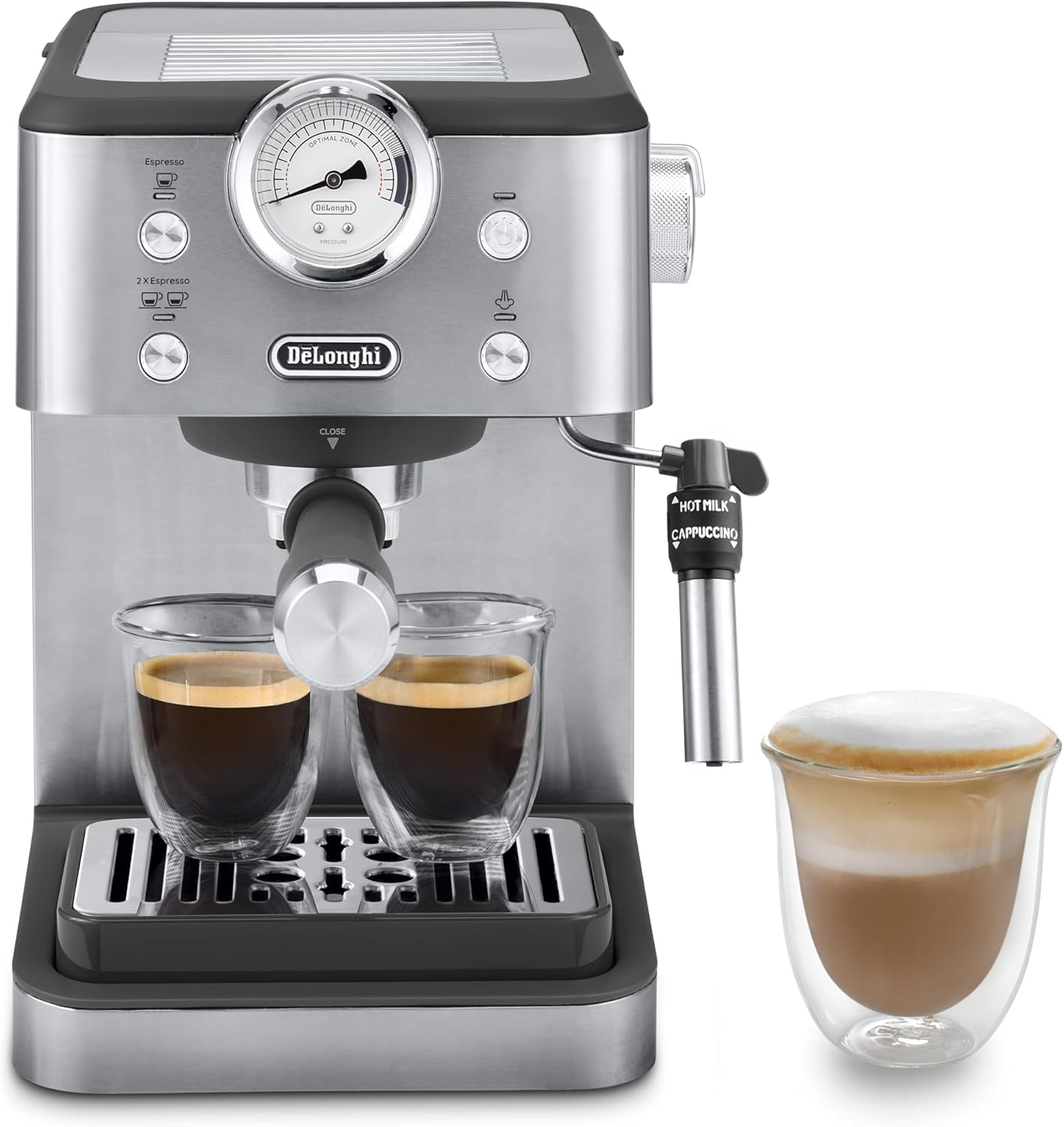
Image 1.1: Front view of the De'Longhi Linea Classic EM450.M espresso machine, showcasing its stainless steel finish, control panel, portafilter, and steam wand. Two espresso cups are placed on the drip tray, and a glass of latte is shown next to the machine.
2. Setup and First Use
2.1 Unboxing and Placement
Carefully remove all packaging materials. Place the machine on a stable, flat surface, away from heat sources and water. Ensure there is enough space around the machine for ventilation and operation.
2.2 Filling the Water Tank
Remove the water tank from the back of the machine. Fill it with fresh, cold drinking water up to the MAX level indicated. Replace the tank securely.
2.3 Initial Rinse and Priming
- Ensure the water tank is filled.
- Place a container under the coffee spout and the steam wand.
- Plug the machine into a suitable power outlet. The power button will illuminate.
- Press the power button to turn on the machine. Wait for the indicator lights to stop flashing, indicating the machine has reached operating temperature.
- Turn the steam knob to the hot water position and dispense hot water for approximately 30 seconds to prime the pump and rinse the internal circuits. Close the steam knob.
- Press the single espresso button to dispense water through the coffee spout for about 30 seconds. Repeat for the double espresso button.
- The machine is now ready for use.

Image 2.1: The De'Longhi Linea Classic EM450.M showing the removable drip tray, which allows for the use of taller cups or glasses up to 13 cm in height. This feature enhances versatility for various beverage sizes.
3. Operating Instructions
3.1 Preparing Espresso
- Grind Coffee: Use freshly ground coffee suitable for espresso machines. The grind should be fine, but not powdery.
- Fill Portafilter: Select the appropriate double-walled filter basket (single or double shot). Place it in the portafilter. Fill the basket with ground coffee. For a single shot, use approximately 7-10g; for a double shot, use 14-20g.
- Tamp Coffee: Use the provided tamper to press the coffee firmly and evenly. Ensure the surface is level.
- Attach Portafilter: Insert the portafilter into the group head from left to right, twisting it firmly until it is securely locked in the "CLOSE" position.
- Brew Espresso: Place one or two cups under the portafilter spouts. Press the single or double espresso button. The machine will begin brewing. The pressure gauge will indicate the optimal brewing pressure. Press the button again to stop the flow when the desired volume is reached.

Image 3.1: Close-up view of the De'Longhi Linea Classic EM450.M's control panel, showing the espresso and 2x espresso buttons, the pressure gauge, and the steam/hot water knob. The portafilter is shown inserted into the group head.

Image 3.2: Included accessories for the De'Longhi Linea Classic EM450.M, featuring the portafilter, single and double shot filter baskets, and a plastic tamper with a measuring spoon.
3.2 Steaming Milk for Cappuccinos and Lattes
- Fill a milk jug with cold milk (dairy or non-dairy).
- Press the steam button on the control panel. Wait for the steam indicator light to illuminate steadily, indicating the machine is ready for steaming.
- Purge the steam wand: Place a container under the steam wand and briefly turn the steam knob to release any condensed water. Close the knob.
- Insert the steam wand into the milk, just below the surface. Turn the steam knob to the steam position.
- Move the jug slowly up and down to create foam. Once the desired texture and temperature are reached, close the steam knob and remove the jug.
- Immediately clean the steam wand with a damp cloth to prevent milk residue from drying.

Image 3.3: The De'Longhi Linea Classic EM450.M's steam wand being used to froth milk in a stainless steel pitcher, demonstrating its capability for preparing milk-based coffee beverages like cappuccinos and lattes.
3.3 Dispensing Hot Water
To dispense hot water, ensure the machine is on and heated. Place a cup under the steam wand. Turn the steam knob to the hot water position. Hot water will be dispensed. Turn the knob back to close the flow.
4. Maintenance and Cleaning
4.1 Daily Cleaning
- Drip Tray: Empty and rinse the drip tray and grid daily.
- Portafilter and Filter Baskets: After each use, remove the portafilter, discard the coffee grounds, and rinse the portafilter and filter basket under hot water.
- Steam Wand: Immediately after steaming milk, wipe the steam wand with a damp cloth to remove any milk residue. Briefly purge steam to clear the nozzle.
4.2 Regular Cleaning and Descaling
- Water Tank: Clean the water tank regularly with a mild detergent and rinse thoroughly.
- Descaling: Over time, mineral deposits can build up inside the machine. Descale the machine every 2-3 months, or more frequently if you have hard water. Use a commercial descaling solution designed for coffee machines and follow the product's instructions.
- Group Head: Use a brush to clean any coffee grounds from the group head seal and shower screen.
5. Troubleshooting
| Problem | Possible Cause | Solution |
|---|---|---|
| No coffee dispenses. | Water tank empty; machine not primed; coffee too finely ground or tamped too hard. | Fill water tank; prime the machine; adjust grind size or tamping pressure. |
| Coffee brews too slowly or drips. | Coffee too finely ground; too much coffee in filter; machine needs descaling. | Use coarser grind; reduce coffee amount; descale the machine. |
| Coffee brews too quickly or is watery. | Coffee too coarsely ground; not enough coffee; tamping too light. | Use finer grind; increase coffee amount; tamp more firmly. |
| No steam from the steam wand. | Steam button not pressed; steam wand clogged; machine not hot enough. | Press steam button and wait for readiness; clean steam wand nozzle; wait for machine to heat up. |
| Machine leaks water. | Water tank not seated correctly; drip tray full; seal issues. | Reseat water tank; empty drip tray; contact support if seals are damaged. |
6. Specifications
- Brand: De'Longhi
- Model Number: EM450.M
- Color: Metal
- Product Dimensions: 28.3D x 22.6W x 31H cm
- Item Weight: 4.44 Kilograms
- Capacity: 1.7 Liters (Water Tank)
- Power / Wattage: 1325 watts
- Voltage: 240V
- Pressure: 15 Bar Pump
- Special Features: Thermoblock heating system, Milk Frother (Cappuccino System), Pressure Gauge, Removable Drip Tray, Double-walled filter baskets.
- Material: Metal
- Filter Type: Reusable
- Specific Uses: Espresso, Latte, Cappuccino
7. Warranty and Support
This De'Longhi product is covered by a manufacturer's warranty. For specific warranty terms and conditions, please refer to the warranty card included with your product or visit the official De'Longhi website.
For technical support, spare parts, or service inquiries, please contact De'Longhi customer service. You can find contact information on the official De'Longhi website or through the retailer where you purchased the product.
Additional information and products can be found at the De'Longhi Store on Amazon.
Consider purchasing extended warranty or accidental damage protection plans for additional peace of mind, if available from your retailer.
Related documentsEM450.M


Ask a question about this manual
Ask about setup, troubleshooting, compatibility, parts, safety, or missing instructions. Manuals+ will review the question and use this page’s manual context to help answer it.