
1. Introduction
Thank you for choosing the Kiwi Ksc-4270 Wet-Dry Vacuum Cleaner and Floor Cleaner Mop. This manual provides essential information for the safe operation, maintenance, and troubleshooting of your appliance. Please read it thoroughly before first use and keep it for future reference.
Important Safety Instructions
- Read all instructions before using the appliance.
- Do not immerse the appliance, battery, or charging base in water or other liquids.
- Keep hair, loose clothing, fingers, and all parts of the body away from openings and moving parts.
- Use only as described in this manual. Use only manufacturer's recommended attachments.
- Do not use to pick up flammable or combustible liquids, such as gasoline, or use in areas where they may be present.
- Do not pick up anything that is burning or smoking, such as cigarettes, matches, or hot ashes.
- Always turn off the appliance before connecting or disconnecting the motorized brush.
- Store the appliance indoors in a cool, dry place.
2. Product Overview
The Kiwi Ksc-4270 is a versatile rechargeable wet-dry vacuum cleaner designed for efficient cleaning of various floor types. It features voice command functionality for ease of use and offers both wet and dry cleaning modes.

Figure 2.1: The Kiwi Ksc-4270 Wet-Dry Vacuum Cleaner. This image displays the main unit of the vacuum cleaner, including the handle, motor unit, clean water tank, dirty water tank, and the floor head with its roller brush. An additional filter is shown next to the main unit.
Package Contents
- Kiwi Ksc-4270 Main Unit
- Charging Base
- Power Adapter
- Clean Water Tank
- Dirty Water Tank
- Roller Brush
- Filter (Pre-installed)
- Additional Filter (Spare)
- Additional Roller Brush (Spare)
- Cleaning Tool
- User Manual
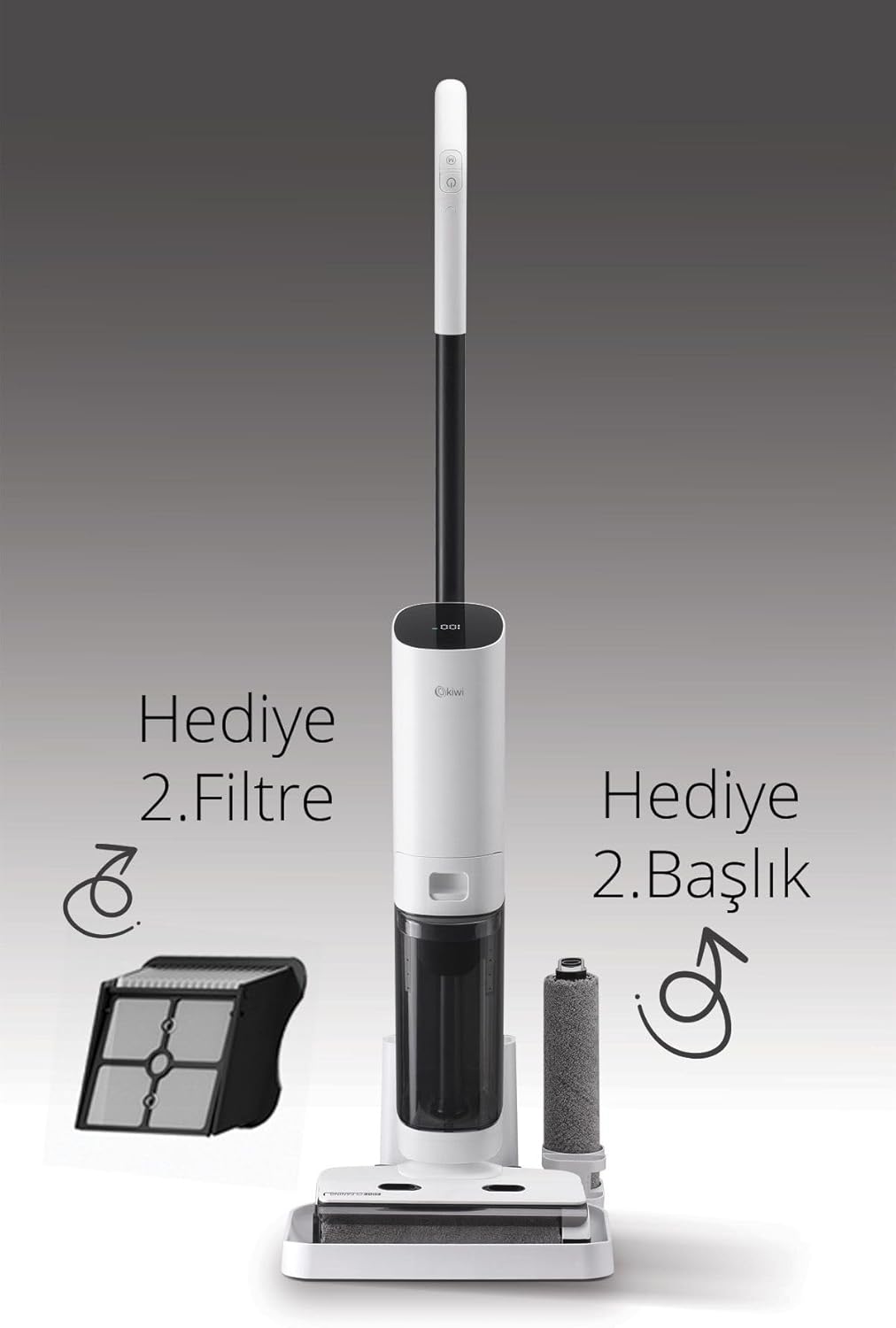
Figure 2.2: Included accessories for the Kiwi Ksc-4270. This image highlights that the product comes with an additional filter and an additional roller brush, emphasizing the complete package for extended use.
3. Setup
3.1 Assembly
- Attach the Handle: Insert the handle into the main unit until it clicks securely into place.
- Install Water Tanks: Ensure the clean water tank and dirty water tank are correctly seated in their respective compartments.
- Check Roller Brush and Filter: Verify that the roller brush is properly installed in the floor head and the filter is in place in the dirty water tank.
3.2 Charging the Appliance
- Place the charging base on a flat, stable surface near a power outlet.
- Connect the power adapter to the charging base and plug it into the power outlet.
- Place the Kiwi Ksc-4270 onto the charging base. The indicator lights on the appliance will illuminate to show charging status.
- For first use, charge the appliance for approximately 4-5 hours until fully charged.
Note: The appliance will not operate while charging. Always ensure the appliance is fully charged for optimal performance.
4. Operating Instructions
4.1 Filling the Clean Water Tank
- Remove the clean water tank from the main unit.
- Open the tank cap and fill with clean tap water. For enhanced cleaning, a small amount of non-foaming floor cleaning solution suitable for wet vacuums can be added. Do not exceed the MAX fill line.
- Close the cap securely and re-insert the tank into the appliance.
4.2 Powering On and Selecting Modes
- Press the Power button on the handle to turn on the appliance. The default mode is usually Automatic.
- Automatic Mode: The appliance intelligently adjusts suction power and water flow based on floor conditions.
- ECO Wet Cleaning Mode: For lighter cleaning tasks or when conserving battery, select the ECO mode. This mode uses less water and power.
- Dry Vacuum Mode: For dry debris only, the appliance can be used without water. Ensure the clean water tank is empty for dry-only operation.

Figure 4.1: Illustration of wet and dry cleaning capabilities. The top part of the image shows the self-cleaning mode with water flushing the roller, preventing odor. The bottom part illustrates the vacuum's ability to handle both dry debris and wet spills.
4.3 Voice Command Functionality
The Kiwi Ksc-4270 supports voice commands for convenient operation. Specific commands may vary, but common commands include:
- "Start Cleaning"
- "Stop Cleaning"
- "Change Mode"
- "Return to Base" (if applicable)
Refer to the display on the appliance for visual confirmation of voice command recognition.
4.4 Self-Cleaning Mode
After each wet cleaning session, it is recommended to activate the self-cleaning mode to maintain hygiene and prevent odors. Place the appliance on its charging base and press the dedicated self-clean button (or activate via voice command if available). The appliance will automatically clean the roller brush and internal pathways.
5. Maintenance
Regular maintenance ensures optimal performance and extends the lifespan of your Kiwi Ksc-4270.
5.1 Emptying and Cleaning the Dirty Water Tank
- After each use, remove the dirty water tank from the appliance.
- Carefully open the tank and dispose of the dirty water and collected debris.
- Rinse the tank thoroughly with clean water. Use the provided cleaning tool to remove any stubborn residue.
- Allow the tank to air dry completely before re-installing.
5.2 Cleaning the Roller Brush
- Turn off the appliance and remove the dirty water tank.
- Open the roller brush cover on the floor head and remove the roller brush.
- Use the cleaning tool to remove any hair, threads, or debris tangled around the brush.
- Rinse the roller brush under running water.
- Allow the roller brush to air dry completely before re-installing. It is recommended to have a spare brush to use while one is drying.
5.3 Cleaning the Filter
- Remove the filter from the dirty water tank.
- Tap the filter gently to dislodge dry dust and debris.
- Rinse the filter under running water until clean. Do not scrub vigorously.
- Allow the filter to air dry completely for at least 24 hours before re-installing. Using a wet filter can damage the motor. It is recommended to have a spare filter to use while one is drying.
5.4 General Cleaning
Wipe the exterior of the appliance with a soft, damp cloth. Do not use abrasive cleaners or solvents.
6. Troubleshooting
If you encounter any issues with your Kiwi Ksc-4270, please refer to the following table for common problems and solutions.
| Problem | Possible Cause | Solution |
|---|---|---|
| Appliance does not turn on. | Battery is depleted. Not properly charged. | Charge the appliance fully. Ensure the power adapter is connected correctly. |
| Poor suction power. | Dirty water tank is full. Filter is clogged. Roller brush is tangled. | Empty and clean the dirty water tank. Clean or replace the filter. Clean the roller brush. |
| Water is not dispensed. | Clean water tank is empty. Nozzle is clogged. | Fill the clean water tank. Check and clear any blockages in the water dispensing nozzle. |
| Appliance leaks water. | Water tanks not properly installed. Tank caps not sealed. | Ensure both clean and dirty water tanks are securely in place. Check that all caps are tightly sealed. |
| Voice commands not recognized. | Too much background noise. Speaking too softly or unclear. | Reduce background noise. Speak clearly and directly towards the appliance. |
If the problem persists after trying these solutions, please contact customer support.
7. Specifications
| Feature | Detail |
|---|---|
| Brand | KIWI |
| Model | Ksc-4270 |
| Key Feature | Automatic Mode and ECO Wet Cleaning |
| Surface Recommendation | General surfaces and upholstery |
| Power Source | Battery Powered |
| Voltage | 21.6 Volts |
8. Warranty and Customer Support
8.1 Warranty Information
The Kiwi Ksc-4270 comes with a standard manufacturer's warranty. Please refer to the warranty card included in your product packaging for specific terms, conditions, and duration. Keep your proof of purchase for warranty claims.
8.2 Customer Support
For technical assistance, spare parts, or any questions regarding your appliance, please contact Kiwi customer support. Contact details can typically be found on the official Kiwi website or on your product packaging.
When contacting support, please have your model number (Ksc-4270) and purchase date ready.