1. Safety Information
Your safety is paramount. Please read and understand all safety instructions before operating the RCB D7 Electric Scooter.
General Safety Guidelines
- Always wear a helmet and appropriate protective gear (knee pads, elbow pads) when riding.
- Ensure you are familiar with and adhere to all local laws and regulations regarding electric scooter use in your area. In some regions, such as the UK, e-scooters are prohibited from use on public roads or spaces.
- Do not allow children under the age of 16 to operate the scooter.
- Do not ride in adverse weather conditions (heavy rain, snow, ice) or on slippery surfaces.
- Maintain a safe distance from other vehicles and pedestrians.
- Avoid riding under the influence of alcohol or drugs.
- Perform a pre-ride inspection to ensure all components are secure and functioning correctly.
Battery Safety
- Use only the original charger provided with the scooter.
- Do not attempt to open or modify the battery pack.
- Charge the scooter in a well-ventilated area, away from flammable materials.
- Do not leave the scooter charging unattended for extended periods.
2. Product Overview
The RCB D7 Electric Scooter is designed for powerful and comfortable urban and off-road commuting. Familiarize yourself with its components and features.
Components Included
- 1 x D7 Electric scooter
- 1 x Charger
- 1 x User Manual
- Toolkits
Key Features
- Powerful Battery Capacity: Equipped with a high-capacity 20.8AH battery for a MAX.Range of 80-90KM.
- High-Performance Motor: 500W motor providing a Max speed of 25KM/H (15.5mph).
- Robust Load Capacity: Max.Load of 150KG (330 LBS).
- Safe Driving System: Double braking system (front and rear disc brakes + electronic brake) and comprehensive lighting (headlight, taillight, turn signals, body lighting).
- High-Performance Tires: 10-inch explosion-proof, self-repairing, anti-slip, and wear-resistant vacuum tires.
- Double Suspension: Ensures a safe, smooth ride even on uneven terrain.
- App and Large LED Display: Control via app with clear access to cruise control, speed mode, battery life, trip data, lights, and error codes.
- Foldable Design: Compact dimensions (120.8 x 24 x 55 cm folded) for easy storage and transport.

Image: The RCB D7 Electric Scooter showcasing its sleek design and integrated display.

Image: Visual representation of the D7 scooter highlighting its 80-90KM range, 20.8AH battery, 150KG max load, 25KM/H max speed, and 500W motor.

Image: A rider with the D7 scooter, illustrating the 80-90KM range and 48V/20.8Ah battery capacity, with a map overlay.

Image: A rider on the D7 scooter demonstrating safe riding, with insets showing the front and rear lights and turn signals.

Image: The D7 scooter emphasizing its double braking system, showing the front and rear disc brakes.
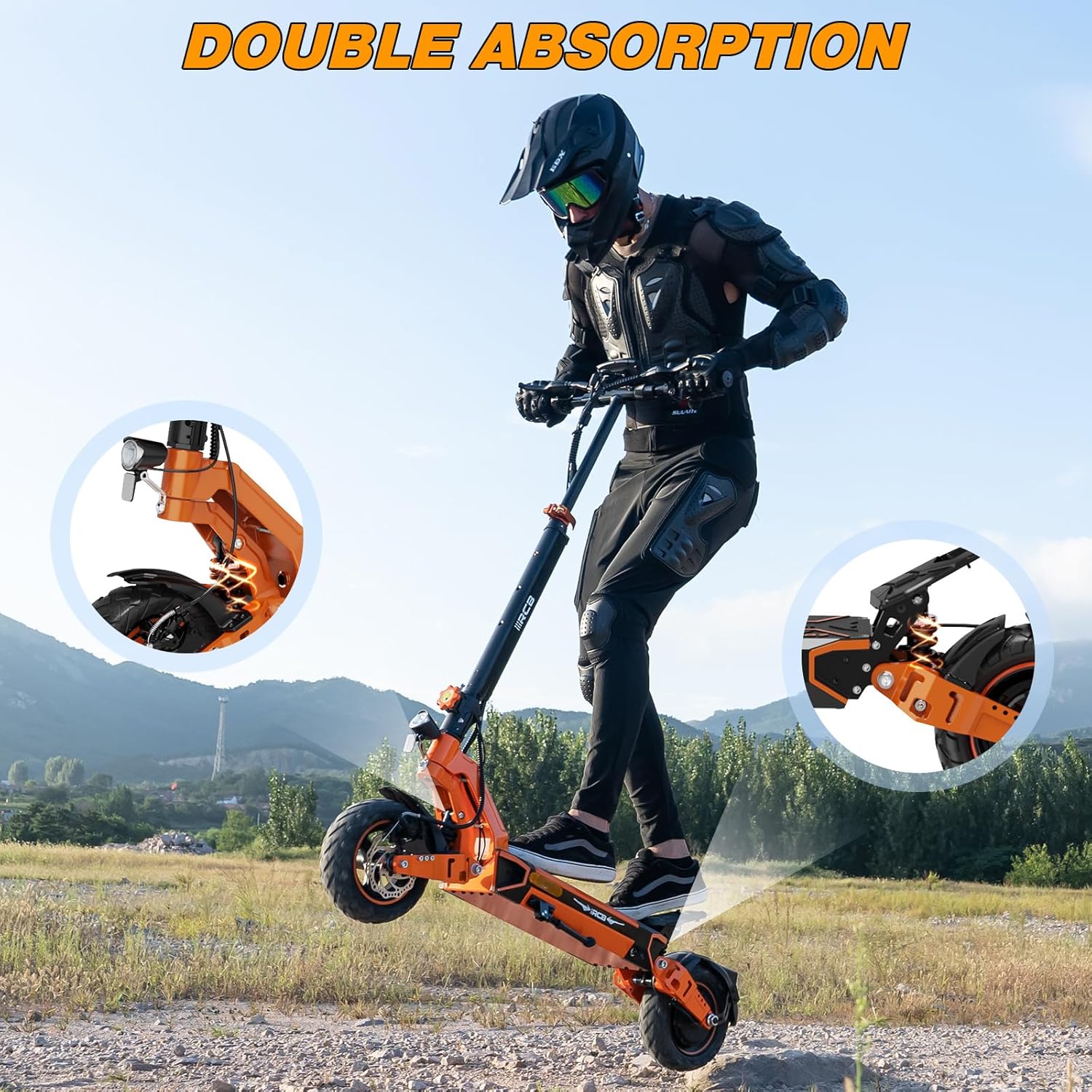
Image: The D7 scooter highlighting its double absorption system, with insets showing the front and rear suspension mechanisms.
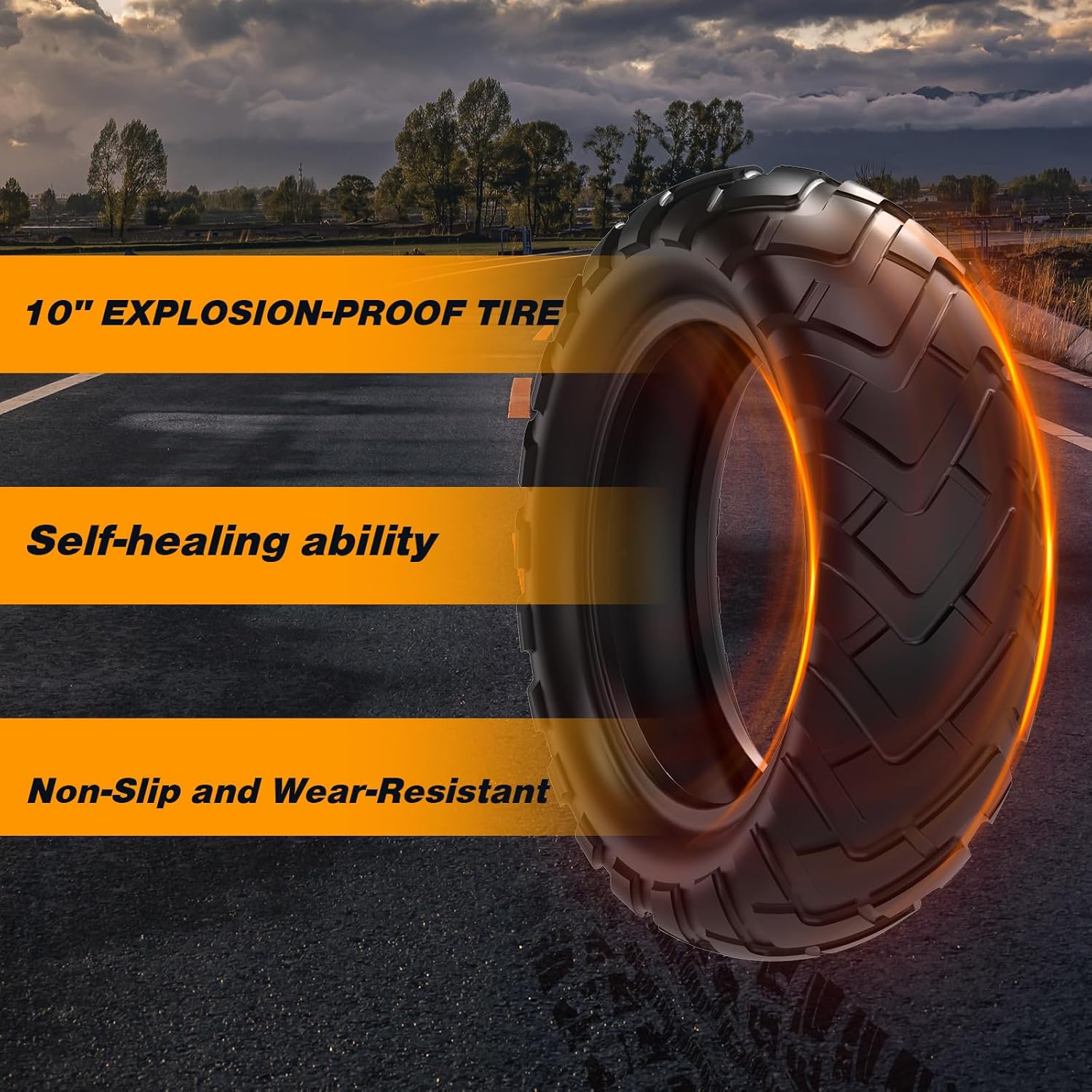
Image: A close-up of the 10-inch explosion-proof tire, detailing its self-healing ability and non-slip, wear-resistant properties.
3. Setup and Assembly
Unboxing
- Carefully open the packaging box.
- Remove the scooter and all accessories from the box.
- Check the contents against the 'Components Included' list to ensure everything is present.

Image: The RCB D7 Electric Scooter's packaging box as it arrives.
Initial Charge
- Before first use, fully charge the scooter's battery.
- Locate the charging port, usually near the battery compartment.
- Connect the charger to the scooter and then plug it into a power outlet.
- The charging indicator light on the charger will change (e.g., from red to green) when fully charged. Charging time is approximately 7-9 hours.
Folding and Unfolding
The D7 scooter features a convenient folding mechanism for portability and storage.
To Unfold:
- Place the scooter on a flat surface.
- Release the folding latch/clamp.
- Lift the handlebar stem until it locks securely into the upright position.
- Ensure all locking mechanisms are engaged before riding.
To Fold:
- Ensure the scooter is powered off.
- Locate the folding latch/release mechanism on the stem.
- Press or pull the release and carefully fold the handlebar stem downwards until it clicks into place.
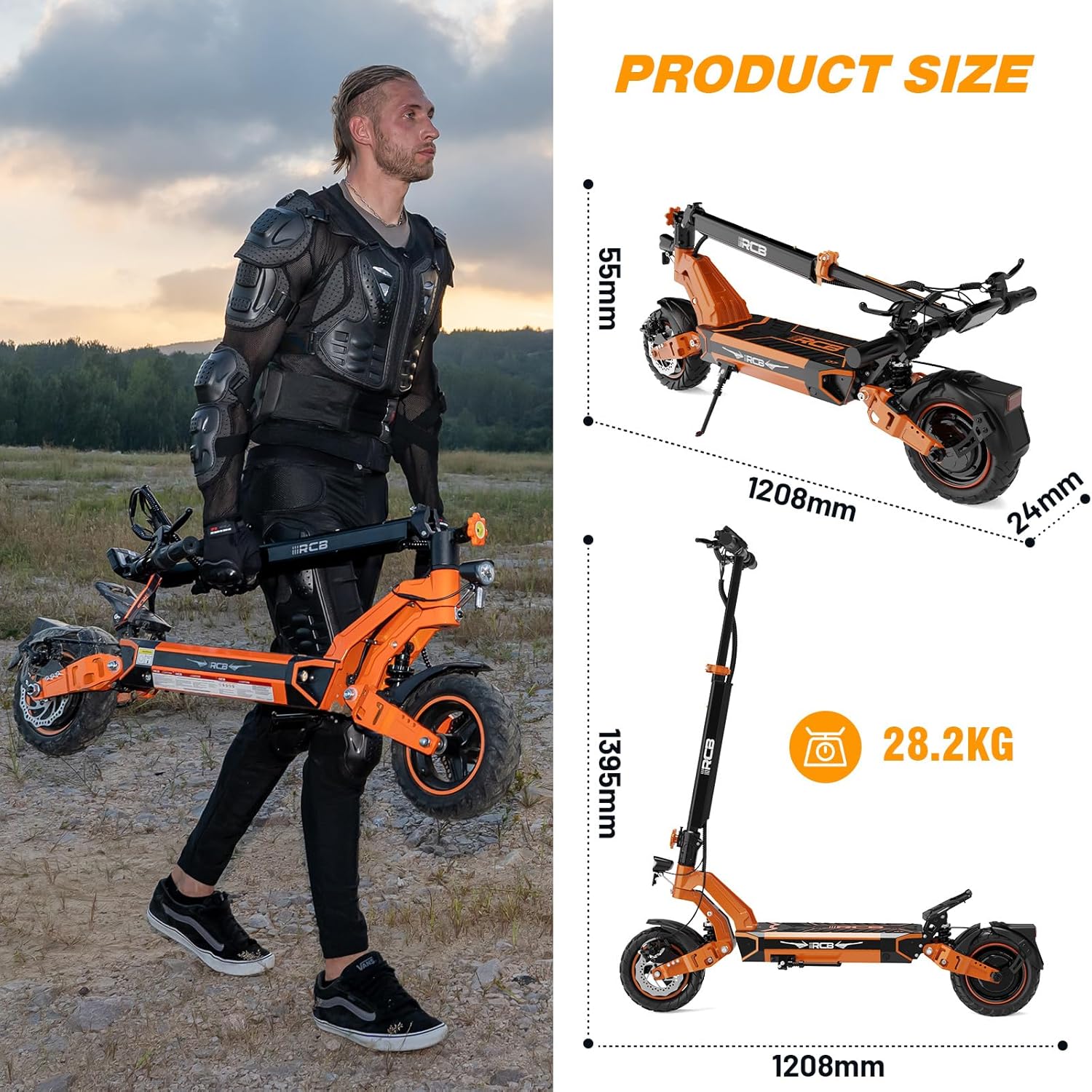
Image: A person carrying the folded D7 scooter, with diagrams illustrating the scooter's unfolded and folded dimensions and weight.
4. Operating Instructions
Learn how to operate your RCB D7 Electric Scooter safely and efficiently.
Power On/Off
- Power On: Press and hold the power button on the display for a few seconds until the screen illuminates.
- Power Off: Press and hold the power button again until the display turns off.
LED Display and Controls
The large LED display provides essential information and allows control over various functions.

Image: A detailed view of the D7's LED display and handlebar controls, with labels for power button, gear switches, turn signal switches, M function key, error/brake indicator, turn icons, pedestrian mode, speed, and power display.
- Power Button: Turns the scooter on/off.
- Gear +/- Headlight Switch: Adjusts speed modes and controls the headlight.
- Left/Right Turn Signal Switch: Activates the respective turn signals.
- M Function Key: Used for various settings and menu navigation.
- Display Indicators: Shows speed, battery level, current gear, error codes, and turn signal activation.
Speed Modes
The D7 offers three adjustable speed settings:
- Mode 1: 10 km/h
- Mode 2: 15 km/h
- Mode 3: 25 km/h (Max Speed)
Adjust the speed mode using the Gear +/- switch on the handlebar.
App Control
Enhance your riding experience by connecting the scooter to the dedicated mobile application.
- Download the RCB app from your smartphone's app store.
- Turn on the scooter and enable Bluetooth on your phone.
- Open the app and follow the instructions to pair with your D7 scooter.
- The app allows you to view real-time data, adjust speed modes, activate cruise control, monitor battery life, and check for error codes.

Image: A person riding the D7 scooter, with an inset showing the intelligent app control interface displaying speed modes, headlights, battery life, and driving data.
Braking System
The D7 is equipped with a dual braking system for effective stopping power.
- Front and Rear Disc Brakes: Operate the brake levers on the handlebars to engage the mechanical disc brakes.
- Electronic Brake: Provides additional braking assistance.
- Always apply both brakes simultaneously for optimal stopping performance.
Lighting System
Ensure visibility and safety with the integrated lighting system.
- Headlight: Turn on the headlight for illumination during low-light conditions.
- Taillight: The taillight automatically activates when the scooter is on, improving rear visibility.
- Turn Signals: Use the left and right turn signal switches to indicate your turning intentions to others.
5. Maintenance and Care
Regular maintenance ensures the longevity and optimal performance of your RCB D7 Electric Scooter.
Battery Care
- Charge the battery regularly, even if the scooter is not in use, to maintain battery health.
- Avoid completely draining the battery before recharging.
- Store the scooter with a partially charged battery (around 50-70%) if not used for extended periods.
- Do not expose the battery to extreme temperatures.
Tire Maintenance
- Regularly check tire pressure to ensure it is within the recommended range for optimal performance and safety.
- Inspect tires for any signs of wear, punctures, or damage. While the tires are self-repairing, severe damage may require professional attention.
Cleaning
- Wipe down the scooter with a damp cloth after each ride to remove dirt and debris.
- Do not use high-pressure water jets or corrosive cleaning agents, as this can damage electronic components.
- Ensure the charging port cover is securely closed before cleaning.
Storage
- Store the scooter in a cool, dry place, away from direct sunlight and extreme temperatures.
- If storing for a long period, ensure the battery is partially charged and recharge it every 1-2 months.
6. Troubleshooting
This section addresses common issues you might encounter with your RCB D7 Electric Scooter.
| Problem | Possible Cause | Solution |
|---|---|---|
| Scooter does not power on | Low battery; Power button not pressed correctly; Loose connections | Charge the battery fully; Press and hold the power button firmly; Check all visible cable connections. |
| Reduced range or power | Undercharged battery; Old battery; Riding uphill frequently; Overload | Ensure battery is fully charged; Consider battery replacement if old; Avoid continuous uphill riding; Do not exceed max load. |
| Brakes feel loose or ineffective | Brake cables need adjustment; Worn brake pads | Adjust brake cable tension; Inspect and replace worn brake pads. Consult a professional if unsure. |
| Unusual noises during operation | Loose components; Debris in wheels/brakes; Motor issue | Check for loose screws or parts; Inspect wheels and brakes for obstructions; If noise persists, contact customer support. |
| App connectivity issues | Bluetooth off; App not updated; Scooter not in pairing mode | Ensure Bluetooth is on; Update app to latest version; Restart scooter and app; Try re-pairing. |
7. Technical Specifications
Detailed specifications for the RCB D7 Electric Scooter (D7-20.8AH model).
| Feature | Specification |
|---|---|
| Model Name | D7-20.8AH |
| Motor Power | 500W |
| Battery Capacity | 20.8AH |
| Max. Range | 80-90KM |
| Max. Speed | 25 km/h (15.5 mph) |
| Max. Load | 150 kg (330 LBS) |
| Wheel Size | 10 Inches |
| Tire Type | Vacuum, Explosion-proof, Self-repairing, Anti-slip, Wear-resistant |
| Brake Type | Front disc brake + Rear disc brake + Electronic brake |
| Suspension | Dual Suspension |
| Frame Material | Aluminium |
| Product Dimensions (Unfolded) | 120.8 x 60 x 139.5 cm |
| Product Dimensions (Folded) | 120.8 x 24 x 55 cm |
| Item Weight | 28.2 kg (62.2 LBS) |
| Charging Time | 7-9 hours |
| Recommended Age | 16+ |
8. Warranty and Customer Support
For warranty information and customer support, please refer to the documentation included with your purchase or contact the seller directly.
- Keep your proof of purchase for warranty claims.
- For technical assistance, troubleshooting beyond this manual, or spare parts, please reach out to RCB customer service.


