
k speaker B0DWFJTJYT
k speaker Golf Cart UTV ATV Sound Bar Bluetooth Waterproof Audio System Instruction Manual
Model: B0DWFJTJYT
Introduction
Thank you for choosing the k speaker Golf Cart UTV ATV Sound Bar. This manual provides essential information for the proper installation, operation, and maintenance of your new audio system. Please read this manual thoroughly before use to ensure optimal performance and safety.
Description: The k speaker Golf Cart UTV ATV Sound Bar, model B0DWFJTJYT, shown mounted on a vehicle, ready for use.
Safety Information
Always observe the following safety precautions:
- Ensure proper wiring and connections to prevent electrical hazards.
- Do not operate the sound bar in extreme conditions beyond its specified waterproof rating.
- Keep the volume at a safe level to avoid hearing damage and maintain awareness of your surroundings.
- Consult a professional for installation if you are unsure about any steps.
Package Contents
Verify that all items are present in the package:
- k speaker Sound Bar
- Remote Control
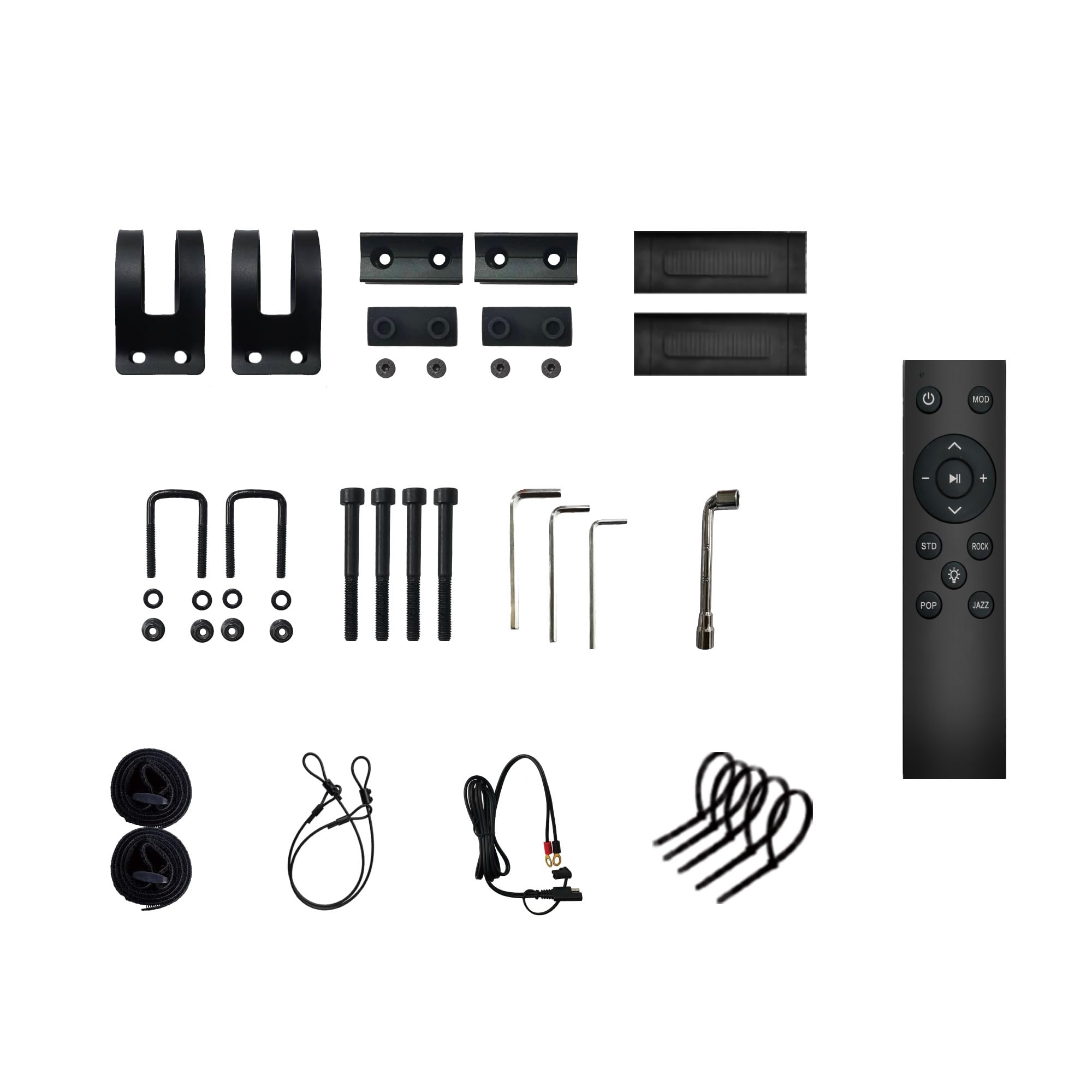
- Mounting Hardware (brackets, screws, gaskets)
- Power Cable
- Auxiliary Input Cable
- Cigarette Lighter Adapter
Setup and Installation
Mounting the Sound Bar
The sound bar is designed for easy installation on various roll bar sizes (1" to 2" diameter). Follow these steps for secure mounting:
Description: This video demonstrates the RGB color transformation, the fixed card slot feature, and the general installation steps for the sound bar.
- Prepare the Mounting Brackets:
Slide the fixed gasket into one side of the slot on the sound bar. Use screws to tighten the lower half of the fixed buckle (with a threaded hole in the middle) with the fixed gasket. This secures the gasket firmly.

Description: A close-up view of the k speaker sound bar's mounting bracket, illustrating the design for secure attachment to a roll bar.
- Attach to Roll Bar:
Position the sound bar on your vehicle's roll bar. The adjustable clamps are designed to adapt to various bar types, typically ranging from 40mm-55mm (1.57-2.16 inches) in diameter. Ensure the clamps fit snugly around the bar.
- Secure the Clamps:
Use the provided screws and an Allen wrench to tighten the clamps around the roll bar. Ensure the sound bar is firmly fixed and does not move. The gasket helps to provide a more secure and stable fit.
Power Connection
Connect the power cable to the sound bar and then to your vehicle's 12V power source, typically via the cigarette lighter adapter. Ensure a secure connection to prevent power interruptions.
Audio Connections
The sound bar supports Bluetooth and auxiliary input. For wired connections, use the provided AUX input cable.
Operating Instructions
Power On/Off
Press and hold the power button on the sound bar or use the remote control to turn the unit on or off.
Bluetooth Pairing
Description: This video demonstrates the Bluetooth pairing process, showing a mobile device connecting to the sound bar, along with LED light features and waterproof capabilities.
- Turn on the sound bar.
- Activate Bluetooth on your mobile device.
- Search for available devices and select "ADVESI SoundBar" or a similar name.
- Once connected, the sound bar will indicate successful pairing.
Audio Playback
- Use the volume buttons (+/-) on the sound bar or remote to adjust the audio level.
- Use the track skip buttons (<< / >>) to navigate between songs.
- Press the play/pause button to control playback.
LED Light Control
The sound bar features RGB multi-color illumination. Use the remote control to change light colors and modes.

Description: A close-up of the k speaker sound bar showing its LED lights illuminated in a vibrant color, highlighting the multi-color illumination feature.
Maintenance
- Cleaning: Use a soft, damp cloth to clean the exterior of the sound bar. Avoid harsh chemicals or abrasive cleaners.
- Water Resistance: The sound bar is designed to be waterproof. However, avoid submerging it for extended periods or exposing it to high-pressure water jets.
- Storage: When not in use for extended periods, store the sound bar in a cool, dry place away from direct sunlight.
- Connections: Periodically check all cable connections for tightness and signs of wear.
Troubleshooting
| Problem | Possible Cause | Solution |
|---|---|---|
| No power | Loose power connection, blown fuse, vehicle power issue. | Check power cable and cigarette lighter adapter connection. Inspect vehicle fuse. |
| No sound | Volume too low, incorrect input mode, Bluetooth not connected. | Increase volume. Switch input mode. Re-pair Bluetooth device. |
| Bluetooth not pairing | Sound bar not in pairing mode, device too far, interference. | Ensure sound bar is discoverable. Move device closer. Turn off other Bluetooth devices. |
| Remote control not working | Dead battery, obstruction, out of range. | Replace remote battery. Remove obstructions. Use remote within range. |
Specifications
- Brand: k speaker
- Model Number: B0DWFJTJYT
- Connectivity Technology: Wireless (Bluetooth)
- Special Feature: Remote control, RGB Multi-color Illumination
- Compatible Devices: Stereo System
- Item Weight: 3 pounds
- Package Dimensions: 9.5 x 7.5 x 2.8 inches
- Roll Bar Compatibility: 1" - 2" diameter (40mm-55mm)
- Waterproof Rating: IP65 (Waterproof & Dustproof)
- Peak Power: 400 Watts
- Speakers: 2x Full-range Speakers, 2x Soft Dome Tweeters
Warranty and Support
For warranty information and technical support, please refer to the contact details provided with your purchase or visit the official k speaker website. Keep your proof of purchase for warranty claims.
Manufacturer: k speaker
Date First Available: February 7, 2025
Related documentsB0DWFJTJYT

Ask a question about this manual
Ask about setup, troubleshooting, compatibility, parts, safety, or missing instructions. Manuals+ will review the question and use this page’s manual context to help answer it.