
1. Introduction and Overview
The Alpicool LGMP8 Portable Refrigerator Freezer is a versatile and compact cooling solution designed for various outdoor and travel applications. Engineered for convenience and efficiency, this unit allows you to keep food and beverages chilled or frozen, making it ideal for fishing trips, camping adventures, RV travel, and other outdoor activities. Its robust construction and wide temperature range ensure reliable performance in diverse environments.

Image: The Alpicool LGMP8 Portable Refrigerator Freezer, showcasing its compact design and integrated handle.
2. Package Contents
Please check the package carefully to ensure all items are present and in good condition:
- 1 x Alpicool LGMP8 Car Refrigerator
- 1 x 100-240V AC Adapter & Cord
- 1 x 2.5m 12/24V DC Power Cord
- 1 x Shoulder Girdle (Strap)
- 1 x User Manual

Image: Visual representation of the Alpicool LGMP8 package contents, including the refrigerator, power cords, shoulder strap, and user manual.
3. Product Features
- Digital Display: Features an LCD screen showing precise temperature control and settings for optimal cooling performance.
- Portable Design: Sturdy carrying handle and compact construction make it perfect for outdoor activities and travel. Includes shoulder straps for easy transport.
- Compact Capacity: 8 Quart (7.2 Liter) capacity, capable of holding up to 9 cans of 12 fl oz Coke.
- Durable Construction: Heavy-duty gray exterior shell with reinforced corners for enhanced durability and protection.
- Wide Temperature Range: Digital thermostat allows precise temperature adjustments for keeping contents properly chilled, from -4°F (-20°C) to 122°F (50°C) for heating.
- Dual Power Supply: Equipped with 12/24V DC for car use and 110~240V AC for home use, offering flexible power options.
- Built-in LED Light: Provides convenient access to contents in the dark.
- External Bottle Opener: A convenient feature for opening beverages on the go.
- Optional Lithium Battery: Supports an optional built-in lithium battery for extended portable use without external power.
- 3-Level Battery Protection: When powered by a car, the low voltage protection system prevents excessive car battery discharge.

Image: Close-up of the Alpicool LGMP8 control panel, USB port, and various features like the bottle opener, handle, AC/DC input, door hinge, inner light, and door latch.

Image: Illustration of the Alpicool LGMP8's wide temperature range operation, highlighting ECO mode (energy saving), MAX mode (quick cooling), and HEAT mode (up to 122°F).
4. Setup
- Unpacking: Carefully remove the refrigerator from its packaging. Retain the packaging for future storage or transport.
- Initial Cleaning: Before first use, wipe the interior and exterior surfaces with a damp cloth and mild detergent. Ensure the unit is completely dry before plugging it in.
- Placement: Place the refrigerator on a flat, stable surface. Ensure there is adequate ventilation around the unit, especially near the air vents, to allow for proper heat dissipation. Avoid placing it in direct sunlight or near heat sources.
- Power Connection:
- DC Power (Car): Connect the 12/24V DC power cord to the refrigerator's DC input port and then to your vehicle's cigarette lighter socket.
- AC Power (Home): Connect the 100-240V AC adapter to the refrigerator's AC input port, then plug the AC cord into a standard wall outlet.
- Optional Battery: If using the optional built-in lithium battery, ensure it is properly inserted and charged according to its separate instructions.

Image: Diagram illustrating the three power connection options for the Alpicool LGMP8: car cigarette lighter (DC), home outlet (AC), and optional power station/solar panel.
5. Operating Instructions
5.1 Control Panel Overview
The intelligent LED control panel allows for easy operation and temperature management.
- + Button: Increase Temperature
- - Button: Decrease Temperature
- ⏻ Button: Power On/Off
- ⚙ Button: Setting (Mode selection)
Image: Detailed view of the Alpicool LGMP8's digital control panel, showing the temperature display, battery indicator, and control buttons.
5.2 Temperature Setting
- Press the ⏻ button to turn the unit on.
- Use the + or - buttons to adjust the desired temperature. The display will show the set temperature.
- The unit will automatically adjust its cooling/heating to reach and maintain the set temperature.
5.3 Mode Selection (ECO/MAX/HEAT)
- With the unit on, press the ⚙ (Setting) button to cycle through available modes.
- ECO Mode: Energy-saving mode for efficient operation, suitable for maintaining temperature over longer periods.
- MAX Mode: Provides quick cooling for rapid temperature reduction.
- HEAT Mode: Allows the unit to function as an insulated container, keeping contents warm up to 122°F (50°C).
5.4 Recommended Temperatures for Common Food Items
| Item | Recommended Temperature |
|---|---|
| Drink | 41°F (5°C) |
| Fruits | 41~46°F (5~8°C) |
| Vegetable | 37~50°F (3~10°C) |
| Milk | 50°F (10°C) |
| Ice cream | 14°F (-10°C) |
| Seafood | 0°F (-18°C) |
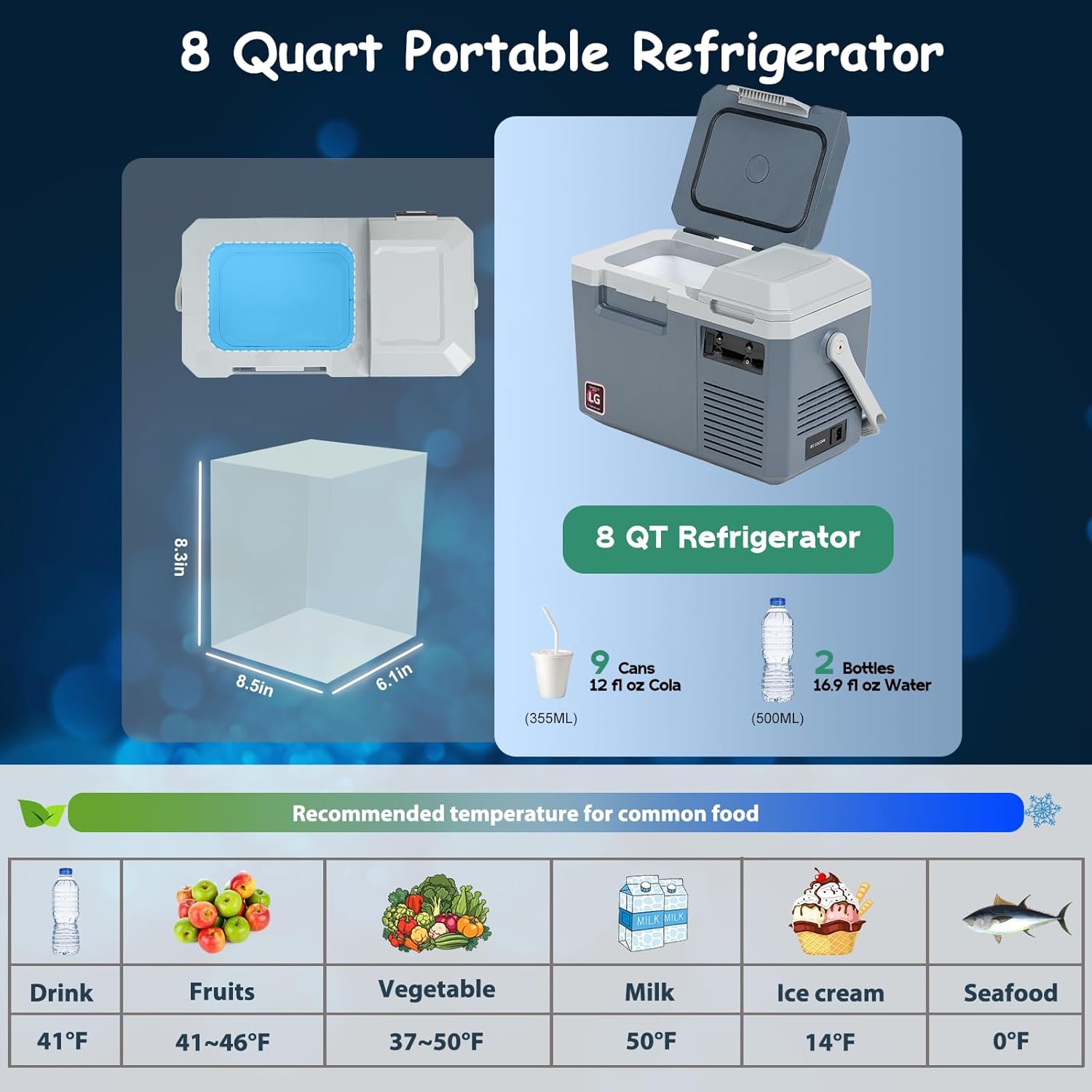
Image: Visual guide showing the internal capacity of the 8-quart refrigerator and a table of recommended temperatures for various food items.
6. Maintenance
- Cleaning: Regularly clean the interior and exterior of the refrigerator with a soft cloth and mild detergent. Do not use abrasive cleaners or harsh chemicals. Ensure the unit is unplugged before cleaning.
- Defrosting: The unit features automatic defrost. If a significant layer of ice builds up, manually defrost by turning off the unit and leaving the lid open until the ice melts. Wipe away any water.
- Ventilation: Keep the ventilation openings clear of any obstructions to ensure proper airflow and efficient operation.
- Storage: When not in use for extended periods, ensure the unit is clean, dry, and unplugged. Store it in a cool, dry place with the lid slightly ajar to prevent odors and mold growth.
7. Troubleshooting
If you encounter issues with your Alpicool LGMP8, please refer to the following common troubleshooting steps:
| Problem | Possible Cause | Solution |
|---|---|---|
| Refrigerator not turning on | No power supply; loose connection; blown fuse. | Check power cord connection; ensure power source is active; check vehicle's fuse. |
| Not cooling sufficiently | Temperature setting too high; poor ventilation; too much content; lid not sealed properly. | Lower temperature setting; ensure clear vents; do not overfill; check lid seal. |
| Display error codes | Internal fault or sensor issue. | Refer to the detailed user manual for specific error code meanings or contact customer support. |
| Excessive noise | Unit not level; fan obstruction. | Ensure unit is on a flat surface; check for debris in fan area. |
For more detailed troubleshooting or issues not listed here, please consult the complete user manual or contact Alpicool customer support.
8. Specifications
| Specification | Detail |
|---|---|
| Model Name | LGMP8 |
| Capacity | 8 Quarts (7.2 Liters) |
| Cooling Range | -4°F ~ 68°F (-20°C ~ 20°C) |
| Heating Range | Up to 122°F (50°C) (based on 77°F/25°C ambient) |
| Power Source | 12/24V DC | 100-240V AC |
| Rated Power | 45W |
| Net Weight | 15.9 Pounds (7.2 kg) |
| Product Dimensions (L x W x H) | 17.7 x 10.6 x 12 inches (45 x 27 x 30.5 cm) |
| Annual Energy Consumption | 160 Kilowatt Hours Per Year |
| Installation Type | Freestanding |
| Special Features | Compact |
| Color | Grey & Blue |
| Defrost System | Automatic |
| Number of Doors | 2 (main compartment and smaller top compartment) |
| Batteries Required? | No (optional external battery available) |

Image: Diagram showing the physical dimensions of the Alpicool LGMP8 and a table detailing voltage reference cut-in/cut-out values for DC 12V and DC 24V modes.
9. Official Product Video
Video: Official product video showcasing the features, portability, and various functionalities of the Alpicool LGMP8 Portable Refrigerator.
10. Warranty and Support
Alpicool products are designed for reliability and performance. For warranty information, product registration, or technical support, please refer to the warranty card included in your package or visit the official Alpicool website. Please have your model number (LGMP8) and purchase details ready when contacting support.
For further assistance, you may contact the seller directly through the platform where the product was purchased.