
1. Introduction
The PGYTECH OneGo 2 Camera Backpack 20L is designed for photographers and travelers seeking a versatile, comfortable, and secure solution for carrying camera equipment and personal items. This manual provides comprehensive instructions for its proper use, configuration, and care.
2. Key Features
- Ergonomic Carrying System: Features integrated back padding and adjustable shoulder straps for optimal ventilation and reduced strain during extended wear.
- Dual Quick Access System: Offers a 180° main access and magnetic top and side camera pockets for efficient gear retrieval.
- Smart Storage Details: Includes removable compartment dividers, a separate top compartment, and additional pockets for organized storage. The 20L model can accommodate up to 2 mirrorless cameras and 5 lenses.
- Urban Design & Flight-Ready: Constructed with water-resistant material and a minimalist design, meeting most airline carry-on baggage standards.
- Reinforced Protection & Anti-Theft: Equipped with a stable, reinforced base, a hidden pocket, and anti-theft zippers for enhanced security.
Visual Overview

Figure 2.1: Overview of the PGYTECH OneGo 2 Backpack's core features.
Product Video
Video 2.1: Official product video demonstrating the PGYTECH OneGo 2 Camera Backpack's features and functionality.
3. Setup and Configuration
3.1 Adjusting the Carrying System
The backpack features an ergonomically designed back panel and adjustable straps for personalized comfort and weight distribution.
- Shoulder Straps: Adjust the length of the shoulder straps to ensure the backpack sits comfortably on your back, distributing weight evenly across your shoulders and hips.
- Chest Strap: Fasten the adjustable chest strap across your chest to further stabilize the backpack and prevent shoulder fatigue, especially during active movement.

Figure 3.1: The ergonomic back panel and padded shoulder straps designed for maximum comfort.
3.2 Customizing Internal Dividers
The main compartment features removable and adjustable dividers, allowing you to customize the layout to fit your specific gear.
- Open the 180° rear clamshell access to fully expose the main compartment.
- Rearrange the hook-and-loop dividers to create custom compartments for cameras, lenses, drones, and other accessories.

Figure 3.2: The 180° clamshell opening provides full access for organizing gear with customizable dividers.
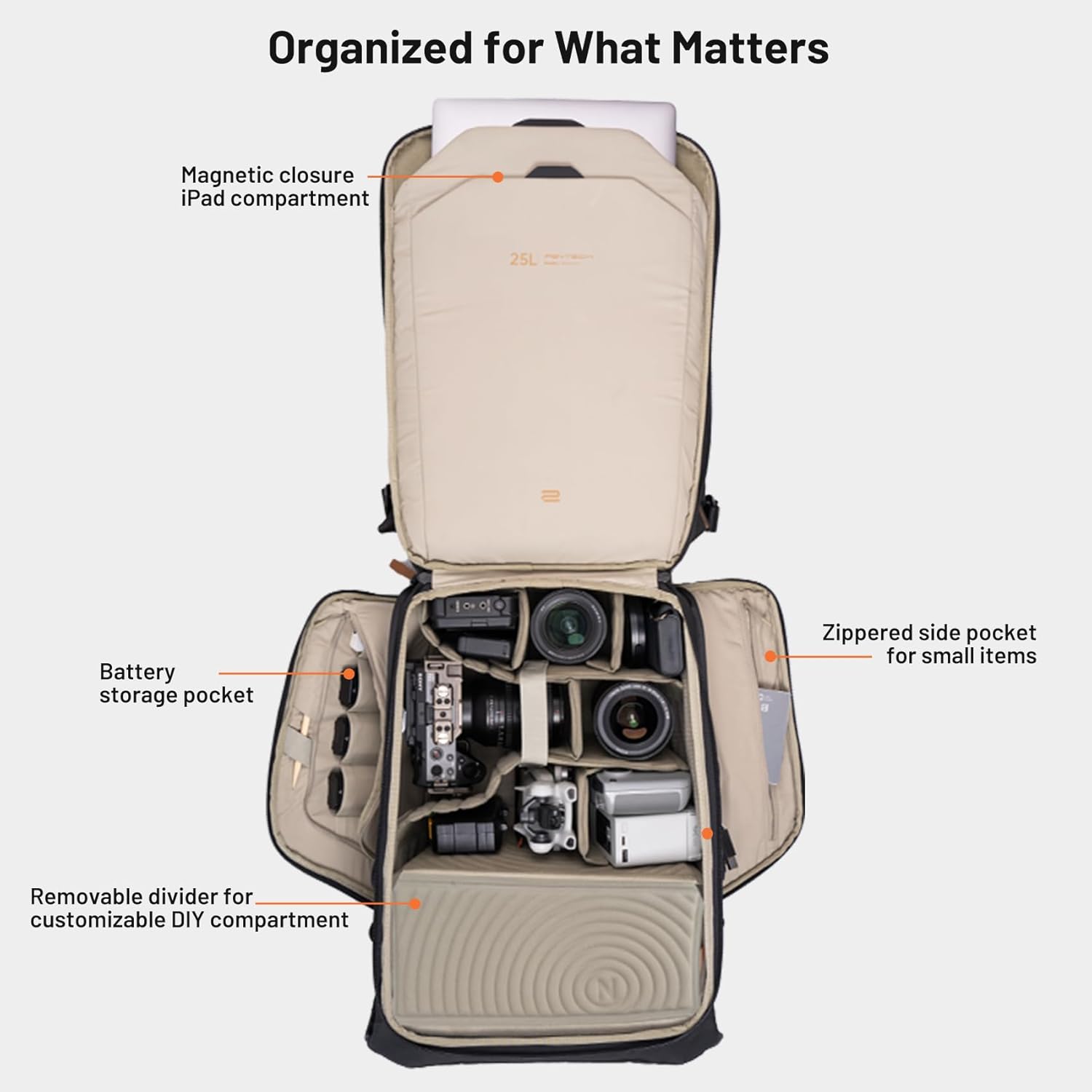
Figure 3.3: Detailed view of the backpack's internal organization, including a magnetic closure iPad compartment and battery storage pockets.
3.3 Attaching a Tripod
The backpack includes straps at the bottom for securely attaching a tripod or other larger accessories.
- Locate the attachment straps at the bottom of the backpack.
- Secure your tripod using these straps, ensuring it is tightly fastened to prevent movement during transport.
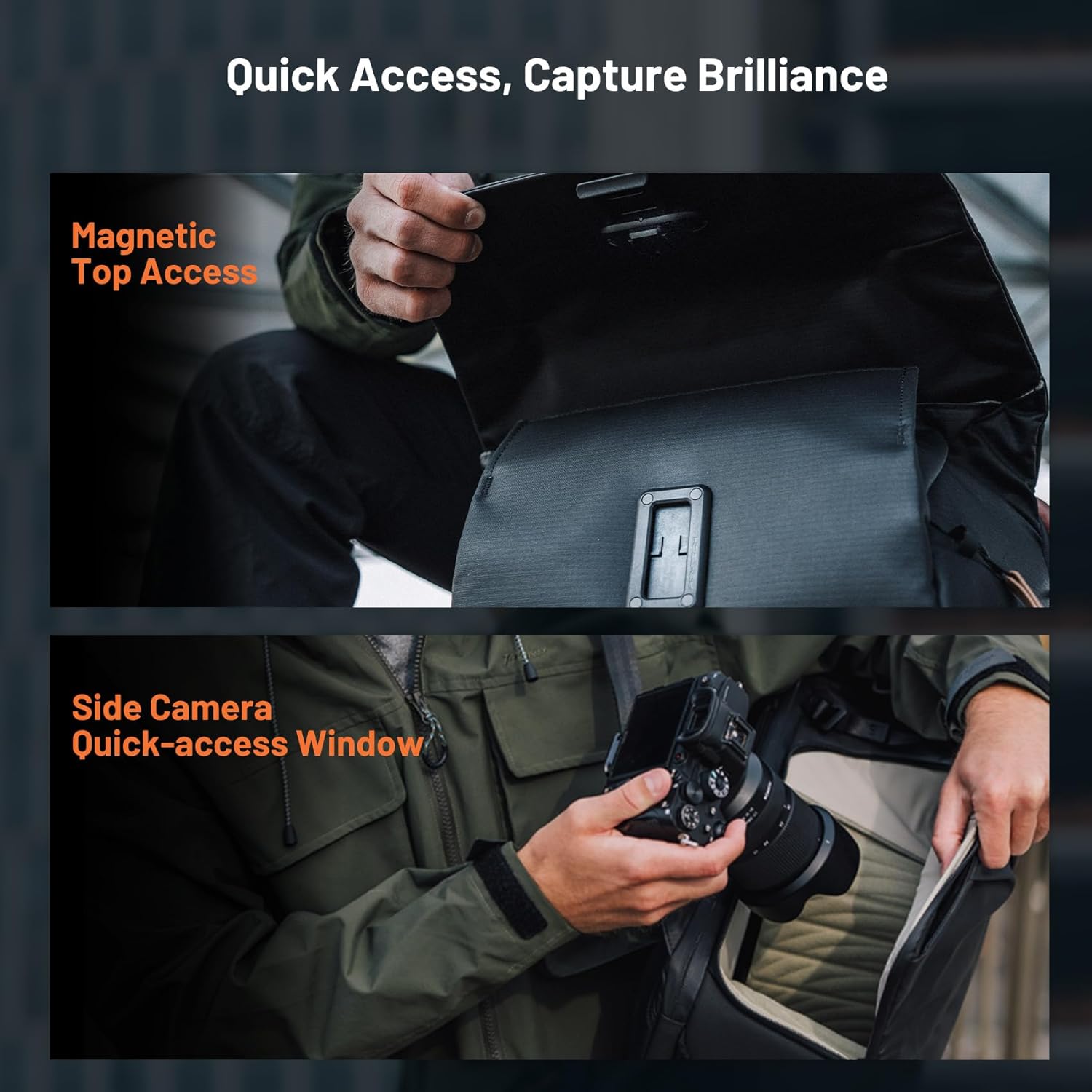
Figure 3.4: The backpack features a side handle, durable metal hardware, a thickened base, and straps for external tripod attachment.
4. Operating Instructions
4.1 Quick Access to Gear
The OneGo 2 backpack offers multiple quick access points for efficient gear retrieval.
- Magnetic Top Access: The top flap features a magnetic closure for quick, one-handed access to frequently used items in the upper compartment.
- Side Camera Quick-Access Window: A zippered side pocket allows for rapid access to your camera without needing to remove the backpack.

Figure 4.1: Magnetic top access and side camera quick-access window for capturing moments efficiently.
4.2 Using the Laptop/iPad Compartment
A dedicated compartment with magnetic closure is provided for secure storage of a laptop and iPad.
- The compartment can accommodate a 16-inch MacBook Pro and a 12.9-inch iPad Pro.
- The magnetic buckle ensures quick and secure access to your devices.
4.3 Battery Storage and Power Indication
The backpack includes specialized pockets for battery storage, some with a power indication system to help you track battery status.
- Utilize the designated battery pockets to keep your power sources organized and easily accessible.
- The battery note panel can also serve as a quick-release plate tool.
4.4 Side Pockets
Both sides of the backpack feature pockets suitable for water bottles or additional small accessories.
- These pockets can also be used to hold smaller tripods or monopods.
5. Maintenance
5.1 Cleaning Instructions
To maintain the backpack's appearance and durability:
- Wipe the exterior with a damp cloth.
- For stubborn dirt, use a mild soap solution and a soft brush, then wipe clean with a damp cloth.
- Allow the backpack to air dry completely before storing or using. Do not machine wash or tumble dry.

Figure 5.1: The backpack's splash-resistant fabric is designed for durability and easy cleaning.
5.2 Zipper Care
The backpack features water-resistant YKK® zippers. To ensure smooth operation:
- Periodically clean zippers with a small brush to remove dirt or debris.
- Apply a zipper lubricant if they become stiff.
6. Troubleshooting
6.1 General Issues
- Discomfort during wear: Ensure shoulder straps and chest strap are properly adjusted for even weight distribution. Avoid overloading the backpack beyond its intended capacity.
- Difficulty with closures: Check for any obstructions in zippers or magnetic closures. Clean as per maintenance instructions if necessary.
- Stability issues: Ensure heavy items are placed closer to your back and evenly distributed. The reinforced base is designed for stable standing.
7. Specifications
The following table outlines the key specifications for the PGYTECH OneGo 2 Camera Backpack 20L.
| Feature | Detail |
|---|---|
| Model Name | OneGo 2 |
| Style Number | P-CB-200 |
| Size | 20L Camera Backpack |
| Color | Matte Black |
| Material Type | Polyurethane (PU) |
| Outer Material | Polyurethane |
| Water Resistance Level | Waterproof |
| Item Weight | 2 Kilograms |
| Storage Volume | 20 Liters |
| Number of Compartments | 5 |
| Number Of Pockets | 5 |
| Recommended Uses | Travel, Photography, Work |
| Product Care Instructions | Wipe with Damp Cloth |
Capacity and Dimensions

Figure 7.1: Detailed product information including capacity, dimensions, and compatibility for 20L and 25L models.

Figure 7.2: Visual comparison of the 20L and 25L OneGo 2 backpacks, illustrating their respective capacities for cameras, lenses, and drones.
8. Warranty and Support
For warranty information, product support, or to inquire about replacement parts, please refer to the official PGYTECH website or contact their customer service directly. Keep your purchase receipt as proof of purchase for warranty claims.


