
Product Overview
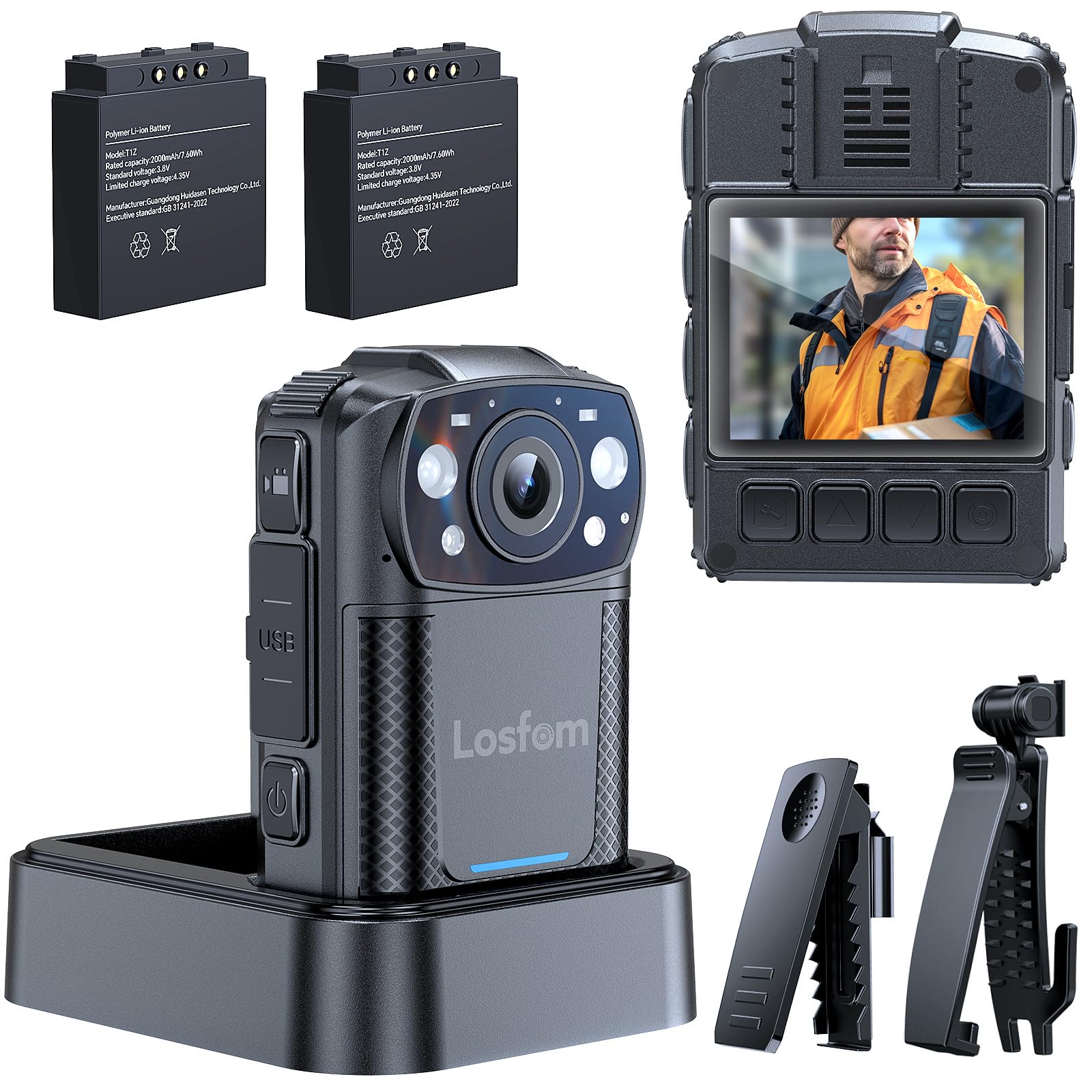
The Losfom WD11 2K Body Camera is a versatile and robust recording device designed for various applications including law enforcement, security, and outdoor activities. It captures sharp 2K resolution video with audio, features clear night vision, and offers flexible mounting options. The camera is equipped with two 2000mAh batteries for extended recording times and includes a convenient charging dock.
What's in the Box
- WD11 Body Camera
- 360° Rotatable Long Clip
- 360° Rotatable Short Clip
- Two Rechargeable Batteries (2000mAh each)
- Charging Base
- USB-C Cable
- User Manual

Setup
1. Charging the Batteries
The WD11 body camera comes with two 2000mAh rechargeable batteries and a dedicated charging base. To charge, insert the batteries into the charging base and connect the USB-C cable to the base and a power source. The charging base allows for convenient charging without constantly plugging and unplugging the camera, ensuring it's always ready for use.
2. Inserting/Replacing Memory Card
The WD11 body camera comes with a 128GB memory card. To insert or replace the memory card, locate the memory card slot on the side of the camera. Gently push the card into the slot until it clicks into place. Ensure the camera is powered off before inserting or removing the memory card.

3. Attaching Mounting Clips
The camera includes 360° rotatable long and short clips for various attachment needs. Select the appropriate clip for your intended use (e.g., uniform, backpack, belt). Attach the clip securely to the back of the camera. The rotatable design allows for optimal camera angle adjustment.

Operating Instructions
1. Power On/Off
To power on the camera, press and hold the power button located on the side until the screen illuminates. To power off, press and hold the power button again until the device shuts down.
2. Video Recording
Once powered on, the camera is ready to record. Press the dedicated video recording button to start capturing footage. The camera records in 2K resolution with audio. Press the button again to stop recording. Ensure sufficient memory card space and battery life before starting a recording session.
3. Night Vision Activation
The WD11 features clear night vision with IR lights. These lights can turn on automatically in low-light conditions or be activated manually. Refer to the user manual for specific instructions on toggling automatic/manual night vision mode.

4. Dash Cam Mode
The camera supports a dash cam mode, allowing it to continuously record when powered by a vehicle's power source. This feature is ideal for documenting journeys or for security purposes while driving. Consult the user manual for detailed setup of dash cam mode.
5. Motion Detection
The WD11 body camera includes motion detection functionality. When enabled, the camera will automatically begin recording when motion is detected within its field of view, conserving battery and storage space. This feature is useful for surveillance or capturing unexpected events.
Battery Management
The Losfom WD11 is equipped with two 2000mAh batteries, providing up to 8 hours of 1080P recording. The easy battery swap system ensures continuous operation for long shifts or extended activities. Always ensure batteries are fully charged before use.

Storage Options
The WD11 body camera includes a 128GB memory card. It supports user-replaceable Micro SD cards, allowing for easy expansion of storage capacity. This is beneficial for users requiring extensive footage storage without frequent data transfers.
Media Transfer
To transfer recorded footage, connect the camera to a computer using the provided USB-C cable. The camera will appear as a removable storage device, allowing you to access and copy your video and audio files. Alternatively, you can remove the Micro SD card and insert it into a compatible card reader for direct data transfer.
Maintenance
To ensure optimal performance and longevity of your Losfom WD11 Body Camera, follow these maintenance guidelines:
- Cleaning: Use a soft, dry cloth to clean the camera body. For the lens, use a specialized lens cleaning cloth and solution to avoid scratches.
- Storage: Store the camera in a cool, dry place away from direct sunlight and extreme temperatures. Remove batteries if storing for extended periods.
- Battery Care: Avoid fully discharging the batteries regularly. Charge them periodically even when not in use to maintain battery health.
- Firmware Updates: Check the official Losfom website periodically for any available firmware updates to improve performance and add new features.
Troubleshooting
If you encounter any issues with your Losfom WD11 Body Camera, refer to the following common troubleshooting steps:
- Camera not powering on: Ensure the battery is fully charged and correctly inserted. Try using the spare battery.
- Recording issues (e.g., not starting, poor quality): Check if the memory card is properly inserted and has sufficient free space. Ensure the lens is clean. Verify recording settings.
- Night vision not working: Check if night vision is enabled (automatic or manual mode). Ensure there are no obstructions blocking the IR lights.
- Device not recognized by computer: Try a different USB port or cable. Ensure the camera is powered on when connected.
- Short battery life: Ensure batteries are fully charged. Reduce video resolution or disable non-essential features to extend battery life.
For further assistance, please contact Losfom customer support.
Specifications
| Feature | Detail |
|---|---|
| Brand Name | Losfom |
| Item Model Number | WD11 |
| Video Capture Resolution | 2K |
| Batteries | 2 A batteries required (included) |
| Special Features | Night Vision |
| Item Weight | 3.67 ounces |
| Package Dimensions | 3.94 x 3.94 x 3.15 inches |
| Photo Sensor Technology | CMOS |
| Maximum Focal Length | 105 |
| Maximum Aperture | 2 f |
| Flash Memory Type | Micro SD |
| Video Capture Format | MOV |
| Supported Audio Format | AAC, MP3, PCM |
| Screen Size | 2 Inches |
| Connectivity Technology | Wired |
Warranty & Support
For warranty information and technical support, please refer to the official Losfom website or contact their customer service directly. Keep your purchase receipt for warranty claims.