
CREWORKS KZ-F2
CREWORKS 2L Digital Ultrasonic Cleaner User Manual
Model: KZ-F2
Introduction
This manual provides essential information for the safe and efficient operation of your CREWORKS 2L Digital Ultrasonic Cleaner. This ultrasonic cleaner is designed to effectively clean various items such as jewelry, glasses, coins, and makeup brushes by utilizing ultrasonic waves and a heating function. Please read this manual thoroughly before initial use and retain it for future reference.
Safety Instructions
Failure to follow these safety instructions may result in injury or damage to the unit.
- DO NOT disassemble the unit.
- DO NOT use the cleaner unattended.
- ALWAYS use sufficient fluid in the tank.
- Unplug the unit before filling or draining the tank.
- ALWAYS place items to be cleaned in the provided basket.
- DO NOT let items to be cleaned directly touch the bottom of the tank.
- Ensure the unit is placed on a stable, level surface.
- Keep the unit away from children and pets.
- Do not immerse the main unit in water or other liquids.
What's in the Box
- 1x CREWORKS Ultrasonic Cleaner
- 1x Cleaning Basket
- 1x Power Cord
- 1x User Manual

Image: The CREWORKS 2L Digital Ultrasonic Cleaner shown with its included accessories: the main unit, a stainless steel cleaning basket, a power cord, and the user manual.
Setup
- Placement: Place the ultrasonic cleaner on a stable, flat, and dry surface, ensuring adequate ventilation around the unit.
- Fill the Tank: Open the lid and carefully fill the stainless steel tank with water or an appropriate cleaning solution. Do not exceed the "MAX" fill line indicated inside the tank. Ensure the fluid level is above the "MIN" line.
- Insert Basket: Place the cleaning basket into the tank. This basket is designed to hold items and prevent them from directly touching the tank's bottom, which is crucial for effective and safe cleaning.
- Connect Power: Plug the power cord into the back of the unit and then into a grounded electrical outlet (110-120V AC, 60Hz).
- Power On: Flip the main power switch located on the back of the unit to the "ON" position. The control panel will illuminate.
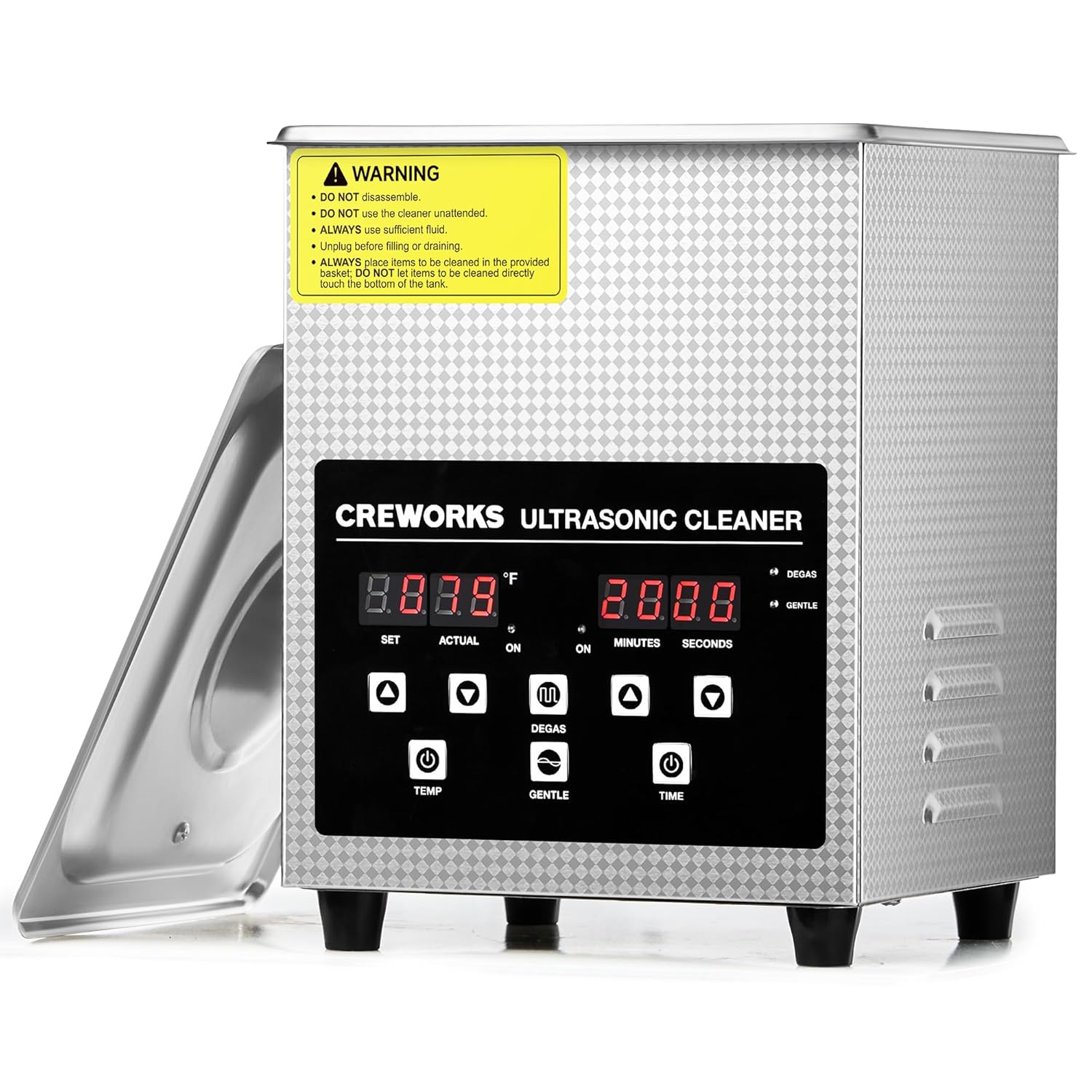
Image: The main unit of the CREWORKS 2L Digital Ultrasonic Cleaner, showing the front control panel and the open lid revealing the stainless steel tank.
Operating Instructions
Control Panel Overview

Image: A detailed view of the digital control panel, showing the temperature display (SET/ACTUAL), timer display (MINUTES/SECONDS), and control buttons for temperature, time, Degas mode, and Gentle mode.
- Temperature Display: Shows set and actual temperature in Fahrenheit.
- Timer Display: Shows set and remaining cleaning time in minutes and seconds.
- TEMP Buttons (▲/▼): Adjust the desired cleaning fluid temperature (32°F to 176°F).
- TIME Buttons (▲/▼): Adjust the cleaning duration (1 to 30 minutes).
- DEGAS Button: Activates the degas mode to remove dissolved gases from the cleaning solution, enhancing cleaning efficiency.
- GENTLE Button: Activates the gentle mode, reducing ultrasonic intensity for delicate items.
Cleaning Procedure
- Add Items: Place the items to be cleaned into the cleaning basket. Ensure items are fully submerged in the cleaning solution but do not overcrowd the basket.
- Set Temperature: Use the TEMP ▲/▼ buttons to set the desired cleaning temperature. The unit will begin heating the solution. For optimal cleaning, it is recommended to use warm water or allow the unit to pre-heat.
- Activate Degas Mode (Optional): Press the DEGAS button. This mode removes dissolved gases from the cleaning solution, which can improve cavitation and cleaning effectiveness. Run for 1-2 minutes before starting the main cleaning cycle.
- Select Cleaning Mode:
- For general cleaning, no special mode is needed after degas.
- For delicate items (e.g., circuit boards, Invisaligns, fragile jewelry), press the GENTLE button to reduce the ultrasonic intensity.
- Set Time: Use the TIME ▲/▼ buttons to set the desired cleaning duration. The recommended cleaning time varies depending on the item and level of dirt.
- Start Cleaning: The unit will automatically start the ultrasonic cleaning process once the temperature and time are set. The timer will count down.
- Completion: Once the timer reaches zero, the ultrasonic cleaning will stop automatically.
- Remove Items: Carefully lift the basket out of the tank. Rinse the cleaned items under clean water and dry them thoroughly.
- Drain Tank: Unplug the unit from the power outlet before draining the used cleaning solution.

Image: Visual representation of the Degas mode, showing gas bubbles being removed, and a graph illustrating the reduced sound pressure of the Gentle mode compared to the standard mode.

Image: A comparison showing the effectiveness of the ultrasonic cleaner on various items, including eyeglasses, a razor, and a circuit board, before and after cleaning.
Maintenance
- Draining: After each use, unplug the unit and drain the used cleaning solution from the tank.
- Cleaning the Tank: Wipe the inside of the stainless steel tank with a soft cloth. Do not use abrasive cleaners or scouring pads, as they may scratch the surface.
- Exterior Cleaning: Clean the exterior of the unit with a soft, damp cloth. Avoid getting water into the control panel or electrical components.
- Storage: Store the unit in a cool, dry place away from direct sunlight and moisture. Ensure the tank is completely dry before storage.
- Basket Care: The stainless steel basket can be rinsed with water and dried.
Troubleshooting
| Problem | Possible Cause | Solution |
|---|---|---|
| Unit does not power on. | Power cord not properly connected; Power switch off; No power from outlet. | Ensure power cord is securely plugged in. Turn the main power switch on. Check the power outlet with another device. |
| No ultrasonic sound/vibration. | Insufficient water/solution; Unit not powered on; Malfunction. | Ensure fluid level is between MIN and MAX lines. Verify unit is powered on and timer is set. If problem persists, contact customer support. |
| Cleaning results are poor. | Incorrect cleaning solution; Overcrowding; Insufficient cleaning time/temperature; Air bubbles in solution. | Use appropriate cleaning solution. Clean fewer items at a time. Increase cleaning time or temperature. Use Degas mode before cleaning. |
| Unit is too noisy. | Normal operation sound; Items touching tank bottom. | Some operational noise is normal. Ensure items are placed in the basket and not directly touching the tank bottom. |
Specifications
| Feature | Detail |
|---|---|
| Model | KZ-F2 |
| Total Volume | 2L (0.5 gal.) |
| Input Voltage | 110-120V AC, 60Hz |
| Ultrasonic Frequency | 40 kHz |
| Ultrasonic Power | 60W |
| Heating Power | 150W |
| Temperature Range | 32-176°F (0-80°C) |
| Timer Range | 1-30 minutes |
| Tank Material | 304 Stainless Steel |
| Tank Dimensions (L x W x H) | 6 x 5.5 x 4.7 inches |
| Overall Dimensions (L x W x H) | 6.9 x 6.5 x 9.1 inches |
| Net Weight | Approx. 5.56 lbs |
| Manufacturer | CREWORKS |

Image: A visual guide to the dimensions of the CREWORKS 2L Digital Ultrasonic Cleaner, including the overall unit size and the internal tank dimensions, along with the cleaning basket.
Warranty & Support
CREWORKS stands behind the quality of its products. This ultrasonic cleaner comes with a 1-Year Promise. For any questions, technical assistance, or warranty claims, please contact CREWORKS customer service. Our dedicated support team is available 24/7 to assist you.
Please refer to the contact information provided in the included user manual or visit the official CREWORKS website for support details.
Ask a question about this manual
Ask about setup, troubleshooting, compatibility, parts, safety, or missing instructions. Manuals+ will review the question and use this page’s manual context to help answer it.