
Introduction
Thank you for choosing the usmile Y10 PRO Sonic Electric Toothbrush. This manual provides essential information for the proper setup, operation, and maintenance of your new toothbrush. The usmile Y10 PRO is designed to deliver a superior cleaning experience with its smart display, missed spot detection, and pressure sensor, ensuring comprehensive oral hygiene.

Figure 1: usmile Y10 PRO Sonic Electric Toothbrush and included brush heads.
Package Contents
- usmile Y10 PRO Electric Toothbrush Handle
- 4 x Brush Heads
- USB-C Charging Cable
- User Manual
Setup
Initial Charging
Before first use, fully charge your usmile Y10 PRO toothbrush. The toothbrush features a long-lasting battery, providing up to 180 days of runtime on a single charge.
- Connect the provided USB-C charging cable to the charging port at the bottom of the toothbrush handle.
- Connect the other end of the USB-C cable to a compatible USB power adapter (not included) or a USB port.
- The smart screen will indicate the charging status. A full charge typically takes 4-5 hours.

Figure 2: The usmile Y10 PRO features a universal USB-C charging port for convenient charging without a separate base.
Attaching a Brush Head
Align the brush head with the metal shaft on the toothbrush handle and push it down firmly until it clicks into place.
Operating Instructions
Basic Brushing
- Wet the brush head and apply a small amount of toothpaste.
- Place the brush head against your teeth at a slight angle towards the gumline.
- Press the power button to turn on the toothbrush.
- Gently move the brush head across all surfaces of your teeth. The toothbrush will pause briefly every 30 seconds to indicate when to move to the next quadrant of your mouth, and automatically turn off after 2 minutes.
Smart Features
The usmile Y10 PRO is equipped with advanced features to optimize your brushing experience:
- Smart Screen: Provides real-time feedback on brushing performance, including missed spots and pressure alerts.
- Missed Spot Detection: A six-axis sensor identifies areas that require more attention, displayed on the smart screen, ensuring a comprehensive clean.
- Pressure Sensor: Alerts you when brushing too hard by displaying a warning on the screen and reducing vibration intensity, protecting your gums from damage.
- 2-Minute Timer: Ensures you brush for the dentist-recommended duration.

Figure 3: The smart screen provides real-time feedback for perfect brushing.

Figure 4: The screen guides you to missed spots, indicating areas that need more brushing.
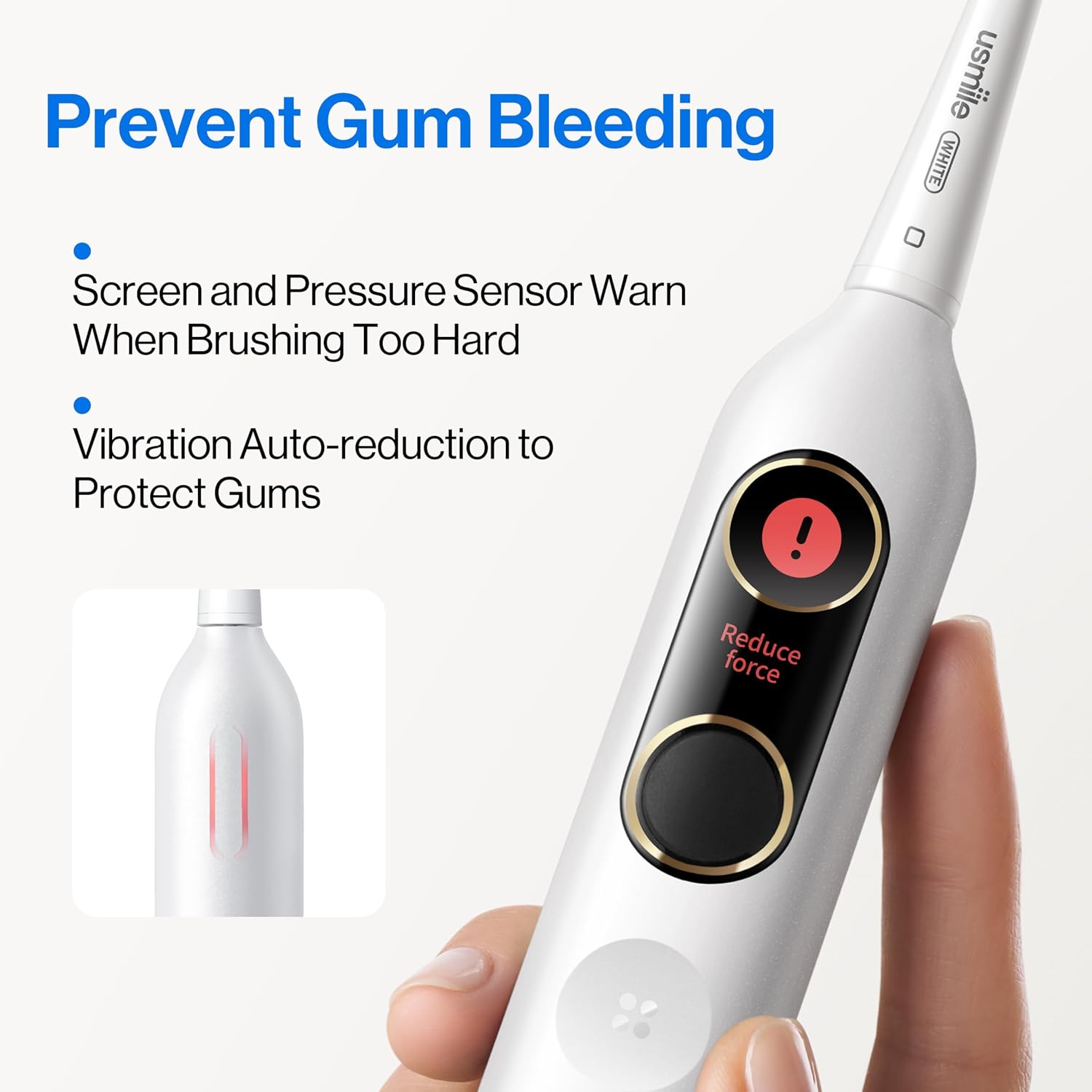
Figure 5: The pressure sensor warns you when brushing too hard, helping to prevent gum bleeding.
Language Selection and Change
You can select or change the language displayed on your usmile Y10 PRO toothbrush's smart screen.
To Select Language (Initial Setup or After Reset):
- Short press the power button to activate the toothbrush.
- Short press the function button to cycle through available languages: Chinese, English, or Japanese.
- Short press the power button again to confirm your language selection.

Figure 6: Steps for selecting the display language on your toothbrush.
To Change Language:
- Long press the power button for 5 seconds until "Reset" appears on the screen. This will reset the toothbrush.
- After the reset, follow the steps above ("To Select Language") to choose your desired language again.

Figure 7: Steps for changing the display language by performing a reset.
Maintenance
Cleaning Your Toothbrush
To maintain optimal performance and hygiene, clean your toothbrush regularly.
- After each use, rinse the brush head thoroughly under running water.
- Wipe the toothbrush handle with a damp cloth. The usmile Y10 PRO is IPX8 waterproof, allowing for safe rinsing.
- Periodically remove the brush head and rinse the metal shaft area to prevent toothpaste buildup.
Brush Head Replacement
For best results and hygiene, replace your brush head every 3 months, or sooner if the bristles become frayed.
Troubleshooting
| Problem | Possible Cause | Solution |
|---|---|---|
| Toothbrush does not turn on. | Battery is depleted. | Charge the toothbrush using the USB-C cable. |
| Vibration feels weak. | Low battery or brush head needs replacement. | Charge the toothbrush. Replace the brush head if it's old or worn. |
| Screen display is not clear or unresponsive. | Temporary software glitch. | Perform a language reset (long press power button for 5 seconds) to reset the device. |
| Toothbrush stops before 2 minutes. | Battery is critically low. | Charge the toothbrush immediately. |
Specifications
- Model: usmile Y10 PRO
- Power Source: Battery Powered
- Battery Life: Up to 180 days (based on typical usage)
- Charging: USB-C
- Waterproof Rating: IPX8
- Special Features: Smart Display, Missed Spot Detection, Pressure Sensor, 2-Minute Timer, QuadPacer
- Brush Head Firmness: Soft
- Age Range: Adult

Figure 8: The usmile Y10 PRO is certified by ADA and TÜV, ensuring quality and effectiveness.
Warranty and Support
For warranty information and customer support, please refer to the official usmile website or contact usmile customer service directly. Keep your purchase receipt as proof of purchase.
For further assistance, you may visit the usmile Store on Amazon: usmile Store


