
WALKINGPAD Z3-side handrails
WALKINGPAD Z3-side Handrails Treadmill User Manual
Model: Z3-side Handrails (WP400Q42)
1. Introduction
This manual provides essential instructions for the safe and effective operation, maintenance, and troubleshooting of your WALKINGPAD Z3-side Handrails Treadmill. Please read this manual thoroughly before initial use and retain it for future reference.
The WALKINGPAD Z3-side Handrails Treadmill is designed for both walking and running, offering a versatile exercise experience. Its innovative folding design allows for compact storage, making it suitable for various home environments. Key features include a clear LED display for tracking workout data, a powerful brushless motor for quiet operation, and a multi-layer running belt for enhanced comfort and joint protection.
2. Important Safety Instructions
WARNING: To reduce the risk of burns, fire, electric shock, or injury to persons, read all instructions before operating the treadmill.
- Always place the treadmill on a flat, stable surface.
- Keep children and pets away from the treadmill during operation.
- Ensure adequate clear space around the treadmill (at least 2 meters behind and 0.6 meters on each side).
- Do not operate the treadmill if it has a damaged cord or plug, or if it is not working properly.
- Wear appropriate athletic footwear and clothing.
- Use the safety key at all times. In case of emergency, the safety key will stop the treadmill.
- Do not attempt to service the treadmill yourself. Contact qualified service personnel for repairs.
- Unplug the treadmill from the power outlet when not in use, before cleaning, and before performing maintenance.
3. Package Contents
Carefully unpack all components and verify that you have received the following items:
- WALKINGPAD Z3-side Handrails Treadmill Unit
- Handles (x2)
- Power Cord (x1)
- Wristband (x1)
- Allen Key (x1)
- Remote Control (x1)
- Safety Key (x1)
- User Manual (this document)

Figure 3.1: Package Contents. This illustration details the items included in the product package: two handles, a power cord, a wristband, an Allen key, a remote control, a safety key, and the user manual, alongside the treadmill itself.
4. Setup
4.1 Unfolding the Treadmill
- Place the folded treadmill on a flat, stable surface.
- Gently lift the rear section of the treadmill deck until it locks into place, forming the full running surface.
- Raise the handrails to the upright position and secure them using the locking mechanisms.

Figure 4.1: Treadmill in use and folded. This image shows the WALKINGPAD Z3-side Handrails Treadmill in two states: a woman running on it with the handrails extended, and the treadmill folded and being moved for storage.
4.2 Connecting Power
- Connect the power cord to the treadmill's power input port.
- Plug the power cord into a grounded electrical outlet.
- Ensure the power switch (if present) is in the 'ON' position.
5. Operating Modes
The WALKINGPAD Z3-side Handrails Treadmill offers two primary operating modes:
5.1 Walking Mode (Handrails Down)
- When the handrails are folded down, the treadmill operates in walking mode.
- The speed range in this mode is typically 1-4 MPH (1.6-6.4 km/h).
- This mode is ideal for light exercise, walking under a desk, or gentle warm-ups.
5.2 Running Mode (Handrails Up)
- When the handrails are raised and secured, the treadmill transitions to running mode.
- The speed range in this mode is typically 1-6.5 MPH (1.6-10.5 km/h).
- This mode is suitable for brisk walking, jogging, and light running.

Figure 5.1: Walking and Running Modes. This image demonstrates the treadmill's dual functionality: a man walking on it with the handrails down (walking mode, 1-4 MPH) and a woman running on it with the handrails up (running mode, 1-6.5 MPH).
6. Display and Controls
6.1 LED Display
The treadmill features a large LED display, tilted at 15 degrees for optimal viewing, which shows real-time workout data:
- Time: Duration of your workout.
- Calories: Estimated calories burned.
- Speed: Current speed in MPH.
- Distance: Total distance covered.
- Step: Number of steps taken.
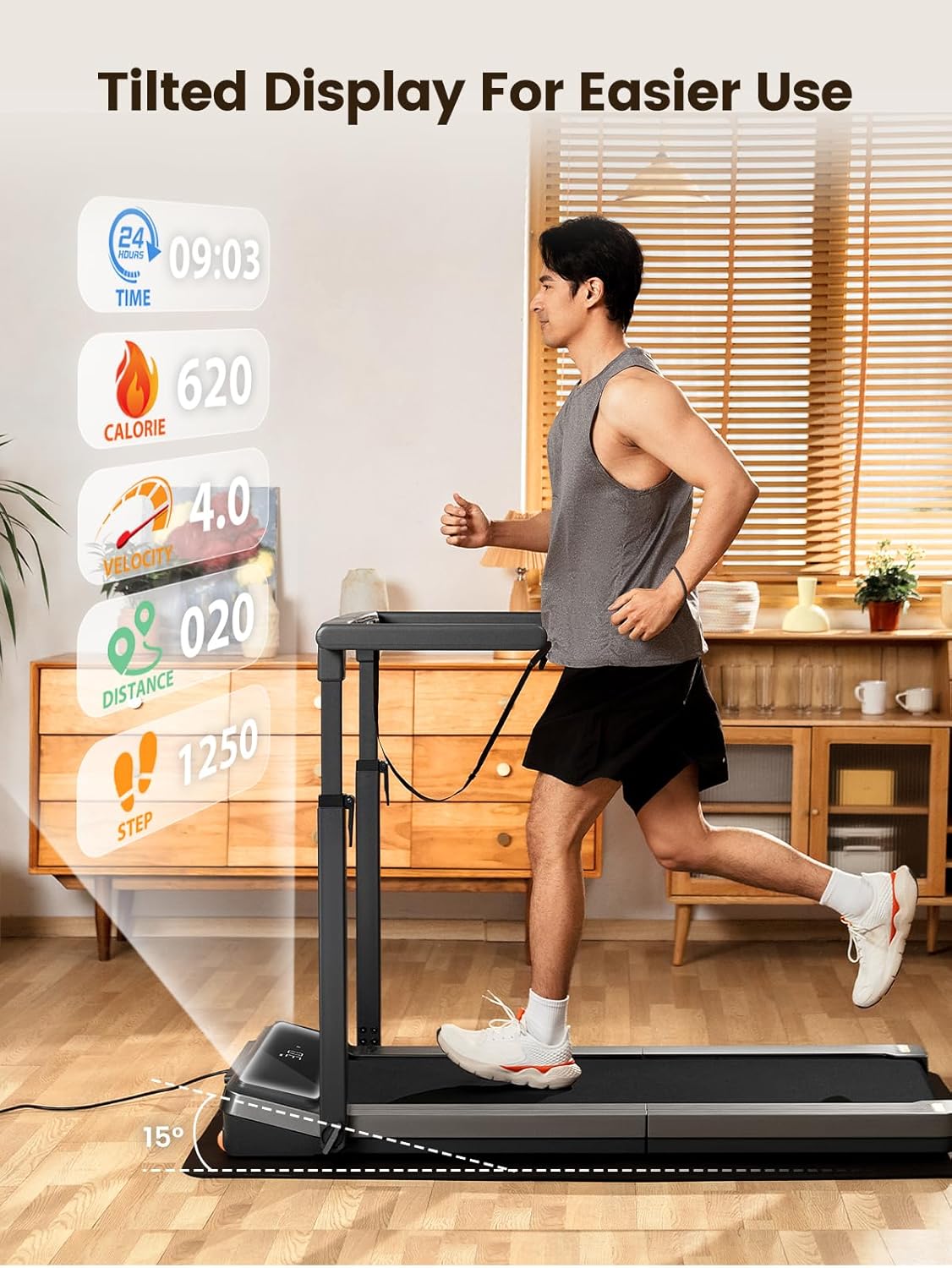
Figure 6.1: Tilted LED Display. A man is shown running on the treadmill, highlighting the 15-degree tilted LED display which shows real-time data such as time, calories, velocity, distance, and steps for easy viewing during exercise.
6.2 Remote Control
The treadmill is controlled via a wireless remote control. Use the remote to start/stop the treadmill, adjust speed, and switch between modes. Ensure the remote control battery is functional for proper operation.
7. Folding and Storage
The WALKINGPAD Z3-side Handrails Treadmill features a patented folding technology for convenient storage.
- Ensure the treadmill is stopped and unplugged.
- Lower the handrails by disengaging their locking mechanisms.
- Fold the treadmill deck in half. The design allows for a compact footprint, reducing space by approximately 90%.
- Once folded, the treadmill can be easily moved using its integrated transport wheels and stored vertically against a wall or under furniture.

Figure 7.1: Efficient Use of Space. A series of three images illustrating the compact folding design of the treadmill. It shows a woman folding the deck, a man lifting the folded unit, and the treadmill being stored upright, emphasizing its space-saving capability.
8. Maintenance
Regular maintenance ensures the longevity and optimal performance of your treadmill.
8.1 Cleaning
- Always unplug the treadmill before cleaning.
- Wipe down the display and frame with a soft, damp cloth. Avoid abrasive cleaners.
- Periodically vacuum dust from around the motor cover.
8.2 Running Belt Lubrication
The running belt requires periodic lubrication to reduce friction and extend its lifespan. Refer to the specific instructions provided with your treadmill's lubrication kit or contact customer support for guidance on the correct lubricant and application frequency.
8.3 Belt Adjustment
If the running belt becomes misaligned or slips, it may require adjustment. Use the provided Allen key to make small adjustments to the tension bolts at the rear of the treadmill. Adjust gradually and test the belt alignment after each adjustment. Consult the full user manual for detailed belt adjustment procedures.
9. Troubleshooting
If you encounter issues with your treadmill, refer to the following common problems and solutions:
| Problem | Possible Cause | Solution |
|---|---|---|
| Treadmill does not power on. | Power cord not connected; power switch off; safety key not in place. | Check power connections; ensure power switch is on; insert safety key. |
| Running belt slips or stops. | Belt too loose; insufficient lubrication; excessive user weight. | Adjust belt tension; lubricate the belt; ensure user weight is within limits. |
| Unusual noise during operation. | Loose components; motor issue; belt friction. | Check for loose screws; lubricate belt; if noise persists, contact support. |
| Remote control not responding. | Battery depleted; remote out of range; pairing issue. | Replace battery; ensure proximity to treadmill; re-pair remote if necessary. |
If the problem persists after attempting these solutions, please contact WALKINGPAD customer support for further assistance.
10. Specifications
| Feature | Detail |
|---|---|
| Model Number | WP400Q42 |
| Product Dimensions (Unfolded) | 147.2 x 76.5 x 103 cm (57.95 x 30.12 x 40.55 inches) |
| Packed Size (Folded) | 39.7 x 30.1 x 7.6 inches |
| Item Weight | 38.6 kg (85.1 lbs) |
| Frame Material | Aluminum |
| Horsepower | 2 Horsepower (Maximum) |
| Maximum Speed | 6.5 Miles per Hour |
| Display Type | LED |
| Meter Functions | Calories Burned, Distance, Speed, Step, Time |
| Power Source | Corded Electric |
| Special Features | Foldable, 2-in-1 Walking/Running |
| Running Belt Layers | 8-layer high elasticity |

Figure 10.1: Powerful Brushless Motor. An internal view of the treadmill illustrating the powerful brushless motor, emphasizing its quiet operation (under 65dB) and 2.0HP power, designed for smooth and efficient performance.

Figure 10.2: Knee & Ankle Protection. This image focuses on the treadmill's eight-layer high-elasticity running belt, designed to reduce impact and provide comfort, protecting knees and ankles during exercise. It also indicates a running area of 47.2 x 15.7 inches.
11. Warranty and Support
11.1 Warranty Information
For detailed warranty information, please refer to the warranty card included with your product or the purchase documentation. The warranty typically covers manufacturing defects under normal use conditions for a specified period from the date of purchase.
11.2 Customer Support
Should you require assistance with setup, operation, maintenance, or troubleshooting that is not covered in this manual, please contact WALKINGPAD customer support. You can typically find contact information on the official WALKINGPAD website or through your retailer.
When contacting support, please have your model number (WP400Q42) and purchase date readily available.
Related documentsZ3-side handrails


Ask a question about this manual
Ask about setup, troubleshooting, compatibility, parts, safety, or missing instructions. Manuals+ will review the question and use this page’s manual context to help answer it.