
Introduction
This manual provides essential instructions for the safe and effective operation of your Pentax Optio Z10 digital camera. Please read this manual thoroughly before using the camera and retain it for future reference.
Package Contents
Verify that all items are present in your package. The standard package for the Pentax Optio Z10 typically includes:
- Pentax Optio Z10 Digital Camera Body
- Rechargeable Lithium-Ion Battery
- Battery Charger
- USB Cable
- Wrist Strap
- Software CD-ROM (if applicable)
- User Manual (this document)
- SD/SDHC Memory Card (may be included depending on retailer/bundle)
- Memory Card Reader (may be included depending on retailer/bundle)
- Camera Case (may be included depending on retailer/bundle)
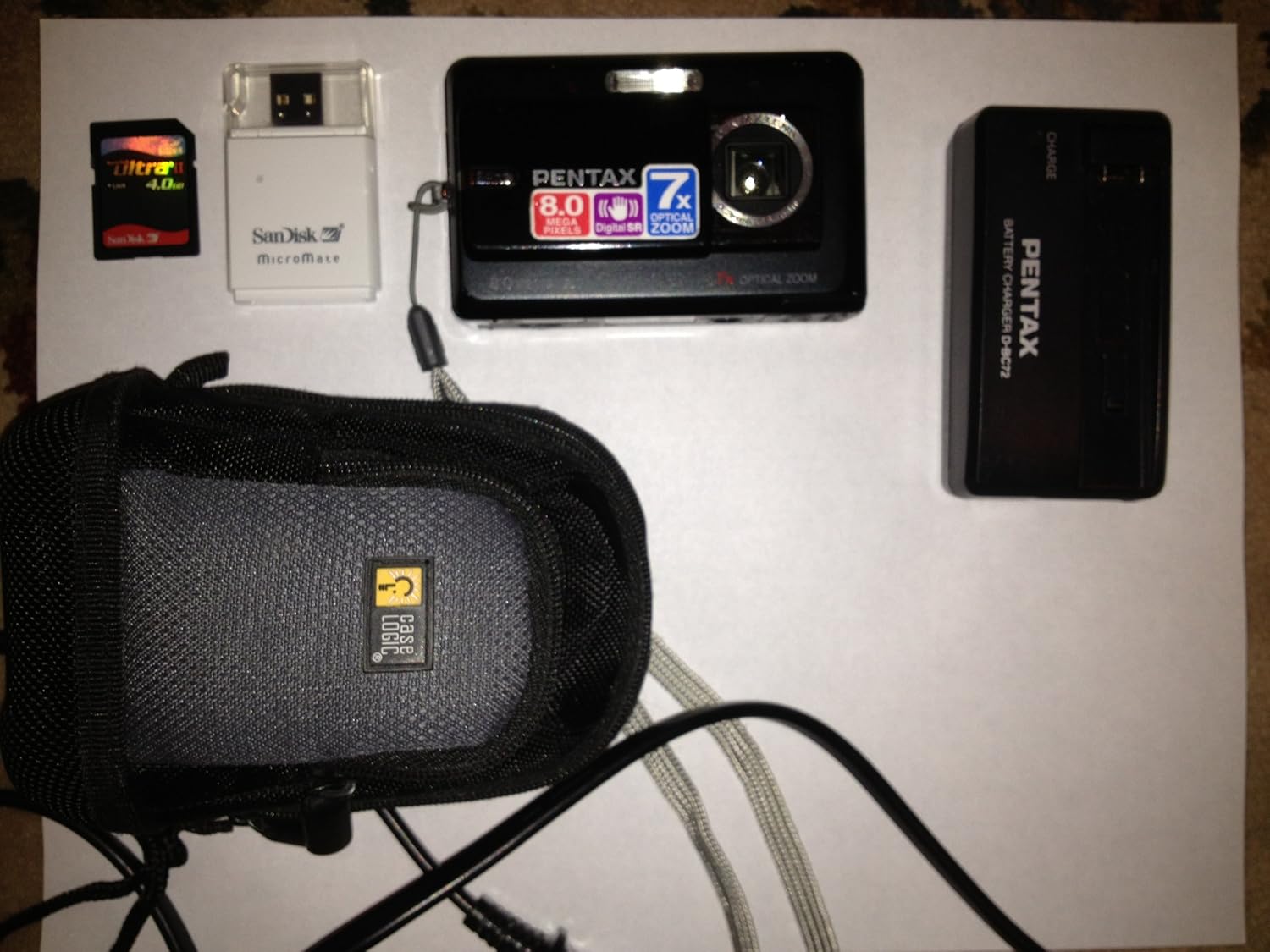
Figure 1: Pentax Optio Z10 Camera and Accessories. This image displays the Pentax Optio Z10 digital camera, an SD memory card, a SanDisk MicroMate USB card reader, a Pentax D-BC72 battery charger, and a Case Logic camera case. These items represent typical components that may be included with the camera.
Setup
1. Charging the Battery
- Insert the rechargeable lithium-ion battery into the provided battery charger. Ensure correct orientation.
- Connect the battery charger to a power outlet using the appropriate power cable.
- The charging indicator light on the charger will illuminate (e.g., orange or red) during charging.
- Once charging is complete, the indicator light will change color (e.g., green) or turn off. Remove the battery from the charger.
2. Inserting the Battery and Memory Card
- Open the battery/memory card compartment cover on the camera.
- Insert the charged battery into the compartment, ensuring the correct polarity.
- Insert an SD or SDHC memory card into the designated slot. Push until it clicks into place.
- Close the compartment cover securely.
3. Initial Camera Settings
Upon first power-on, you may be prompted to set the date, time, and language. Follow the on-screen instructions using the camera's navigation buttons and LCD monitor.
Operating the Camera
1. Powering On/Off
Press the POWER button to turn the camera on or off. The lens will extend when powered on.
2. Basic Photography Modes
The Pentax Optio Z10 features various shooting modes, accessible via the mode dial or menu:
- Auto Picture Mode: The camera automatically detects the scene type and applies optimal settings.
- Program AE Mode: Allows manual adjustment of some settings while the camera sets aperture and shutter speed.
- Scene Modes: Pre-set modes for specific situations (e.g., Portrait, Landscape, Night Scene).
- Movie Mode: For recording video.
3. Taking a Photo
- Turn on the camera.
- Frame your shot using the 2.5-inch LCD monitor.
- Press the shutter button halfway down to activate autofocus and exposure. The focus frame will turn green when focus is achieved.
- Press the shutter button fully down to capture the image.
4. Zoom Operation
Use the zoom lever (typically around the shutter button) to adjust the 7x optical zoom. Push towards 'W' for wide-angle and 'T' for telephoto.
5. Playback Mode
Press the PLAYBACK button to review captured images and videos. Use the navigation buttons to scroll through files.
6. Connecting to a Computer
Connect the camera to a computer using the supplied USB cable. The camera will appear as a removable disk, allowing you to transfer photos and videos.
Maintenance and Care
- Cleaning the Lens: Use a soft, lint-free cloth specifically designed for camera lenses. Avoid touching the lens with fingers.
- Cleaning the LCD Monitor: Gently wipe with a soft, dry cloth. Do not use abrasive cleaners.
- Battery Care: Store batteries in a cool, dry place. Do not expose to extreme temperatures.
- Storage: When not in use for extended periods, remove the battery and store the camera in a dry, dust-free environment.
- Water Resistance: The Pentax Optio Z10 is not water resistant. Avoid exposure to water or high humidity.
Troubleshooting
| Problem | Possible Cause / Solution |
|---|---|
| Camera does not power on. | Battery is discharged. Charge the battery. Battery is inserted incorrectly. Reinsert with correct polarity. |
| Cannot take pictures. | Memory card is full. Delete unnecessary images or insert a new card. Memory card is not inserted. Insert an SD/SDHC card. Battery is low. Charge the battery. |
| Images are blurry. | Subject is too close. Ensure minimum focus distance. Camera shake. Use Digital Shake Reduction or a tripod. Lens is dirty. Clean the lens. |
| LCD monitor is blank. | Camera is in power-saving mode. Press any button to wake. Brightness setting is too low. Adjust in menu. |
Specifications
- Image Sensor: 8.0 Megapixel CCD (1/2.5-inch)
- Effective Pixels: 8.0 Megapixels
- Lens: Pentax Zoom Lens, 7x Optical Zoom (equivalent to 38-266mm in 35mm format)
- Digital Zoom: Approx. 5.1x
- LCD Monitor: 2.5-inch TFT color LCD, approx. 230,000 dots
- Storage Media: SD/SDHC memory card, 52 MB built-in memory
- File Format: Still images: JPEG (Exif 2.21), Movies: AVI (Motion JPEG)
- Video Resolution: 640 x 480 / 320 x 240, 30 fps
- ISO Sensitivity: Auto, Manual (80-3200)
- Shutter Speed: 1/1440 to 4 seconds
- Power Source: Rechargeable Lithium-Ion Battery
- Dimensions (W x H x D): Approximately 97 x 58 x 22 mm (3.8 x 2.3 x 0.9 inches)
- Weight: Approximately 145g (5.12 oz) without battery and memory card
- Connectivity: USB 2.0
- Special Features: Digital Shake Reduction, High-speed Face Recognition, Auto Picture mode
Warranty and Support
This Pentax Optio Z10 camera, if purchased as "Renewed," typically comes with a 90-day limited warranty. Please refer to your purchase documentation or contact your retailer for specific warranty terms and conditions.
For technical support or service inquiries, please visit the official Pentax support website or contact their customer service department. Keep your proof of purchase handy when seeking support.
Note: As this is a renewed product, warranty terms may differ from new products.


