
Enbrighten 81795
Enbrighten One-Touch Sync Remote Control (Model 81795) Instruction Manual
Wireless Remote Control for Enbrighten Under Cabinet Lights
Introduction
The Enbrighten One-Touch Sync Remote Control (Model 81795) is designed to provide convenient wireless control for compatible Enbrighten plug-in light fixtures. This remote allows users to manage multiple lights simultaneously, offering functions such as ON/OFF, dimming, and color temperature selection. Its wireless radio frequency (RF) technology enables control within a 60-foot range, and it can be optionally mounted to a wall for easy access.

Image: Enbrighten One-Touch Sync Remote Control, showing the product packaging and the remote control with its wall-mount cradle.
Setup and Installation
This section details the steps for installing and pairing your Enbrighten One-Touch Sync Remote Control with compatible lighting fixtures.
1. Battery Installation
The remote control is powered by a CR2025, 3V lithium cell battery. Ensure the battery is correctly inserted according to the polarity markings inside the battery compartment.
2. Pairing with Enbrighten Light Fixtures
- Ensure your compatible Enbrighten plug-in light fixtures are powered on.
- Press and hold the "ON/OFF" button on the remote control for approximately 3-5 seconds until the connected light fixtures respond (e.g., flash or change brightness). This indicates successful pairing.
- Repeat this process for any additional compatible light fixtures you wish to control with this remote. The remote can control multiple fixtures simultaneously once paired.
3. Optional Wall Mounting
The remote control includes a wall-mount cradle and hardware for optional installation. No direct wiring is required, allowing flexible placement within the 60-foot operating range.
- Select a convenient location for the wall-mount cradle.
- Use the included screws or adhesive strips to secure the cradle to the wall.
- Insert the remote control into the cradle. A rocker-style wallplate is provided to create a finished appearance.
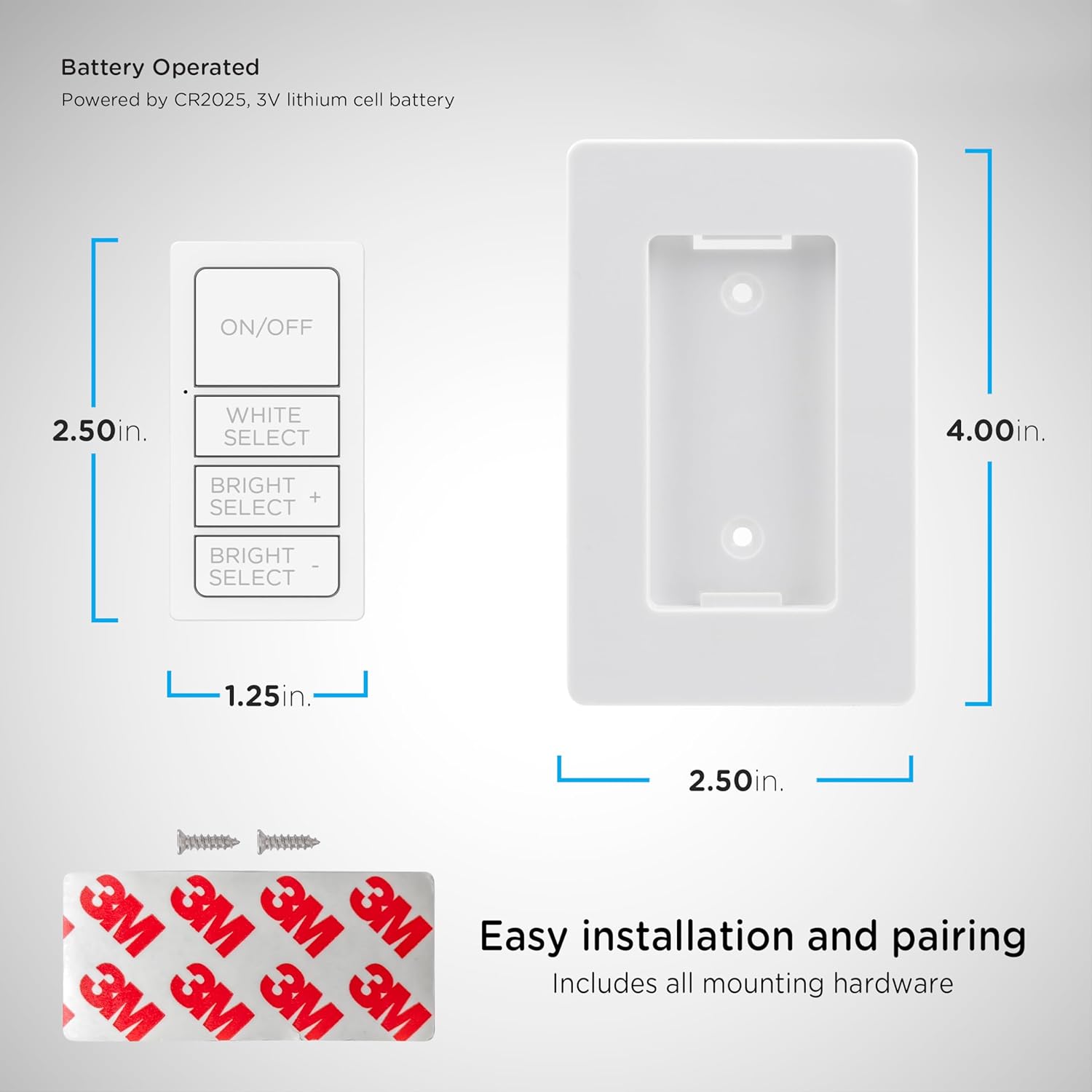
Image: Diagram illustrating the dimensions of the Enbrighten remote control and its wall-mount cradle, along with the included mounting screws and adhesive strips.

Image: The Enbrighten remote control installed in its wall-mount cradle within a kitchen setting, demonstrating its integrated appearance.
Operating Instructions
The Enbrighten One-Touch Sync Remote Control features clearly labeled buttons for intuitive operation of your compatible lighting system.

Image: Close-up view of the Enbrighten remote control, highlighting the ON/OFF, WHITE SELECT, BRIGHT SELECT + and BRIGHT SELECT - buttons.
- ON/OFF Button: Press this button to turn all paired lights ON or OFF.
- WHITE SELECT Button: Press this button to cycle through five different color temperature options, ranging from soft white to bright daylight.
- BRIGHT SELECT + Button: Press and hold this button to increase the brightness of the paired lights (10-100% dimmability).
- BRIGHT SELECT - Button: Press and hold this button to decrease the brightness of the paired lights (10-100% dimmability).

Image: A hand holding the Enbrighten remote control, demonstrating its use to adjust under-cabinet lighting in a kitchen setting, showcasing customizable lighting options.

Image: The Enbrighten remote control displayed in a kitchen environment, illustrating its "One-Touch Sync Control" capability to manage multiple under-cabinet lights wirelessly.
Maintenance
The Enbrighten One-Touch Sync Remote Control requires minimal maintenance.
- Cleaning: Wipe the remote with a soft, dry cloth. Do not use abrasive cleaners or solvents.
- Battery Replacement: If the remote's range or responsiveness decreases, replace the CR2025, 3V lithium cell battery. Refer to the "Battery Installation" section for guidance.
- Storage: Store the remote in a dry environment, away from extreme temperatures.
Troubleshooting
If you encounter issues with your Enbrighten One-Touch Sync Remote Control, refer to the following common solutions:
| Problem | Possible Cause | Solution |
|---|---|---|
| Remote does not control lights. |
|
|
| Lights do not dim or change color temperature. |
|
|
| Intermittent control. |
|
|
Specifications
| Feature | Detail |
|---|---|
| Model Number | 81795 |
| Brand | Enbrighten |
| Operation Mode | Manual |
| Controller Type | Remote Control |
| Control Method | Remote |
| Connectivity Protocol | Radio Frequency (RF) |
| Item Dimensions (L x W x H) | 1.25 x 6 x 6 inches (Product) |
| Item Weight | 3.1 ounces |
| Mounting Type | Wall Mount (optional) |
| Power Source | Battery Operated (CR2025, 3V lithium cell battery) |
| Special Features | Adjustable Color Temperature, Dimmable (10-100%) |
| Included Components | Remote Control, Wall-Mount Cradle, Mounting Hardware |
| Color | White |
| UPC | 030878817950 |
Warranty Information
The Enbrighten One-Touch Sync Remote Control (Model 81795) comes with a Limited-Lifetime Warranty. For specific terms and conditions, please refer to the official Enbrighten website or contact customer support.
Customer Support
For further assistance, technical support, or warranty claims, please contact Enbrighten customer service. Visit the official Enbrighten website for contact details and additional product information.
Manufacturer: Jasco Products Company, LLC
Website: www.enbrighten.com
Ask a question about this manual
Ask about setup, troubleshooting, compatibility, parts, safety, or missing instructions. Manuals+ will review the question and use this page’s manual context to help answer it.