
Introduction
Thank you for choosing Walker's Recon Bluetooth Digital Electronic Earmuffs. This manual provides essential information for the proper setup, operation, maintenance, and troubleshooting of your new hearing protection device. Please read this manual thoroughly before using the product to ensure optimal performance and safety.
Safety Information
Your Walker's Recon Bluetooth Earmuffs are designed to protect your hearing from harmful noise levels while enhancing ambient sounds. Adherence to these safety guidelines is crucial:
- Noise Reduction Rating (NRR): These earmuffs provide a Noise Reduction Rating (NRR) of 26dB. Proper fit is essential to achieve the stated NRR.
- Proper Fit: Ensure the earmuffs fit snugly over your ears, completely sealing out external noise. Adjust the headband for a comfortable yet secure fit.
- Maintenance: Regularly inspect the earmuffs for any damage to the ear cups, cushions, or headband. Damaged earmuffs may not provide adequate protection.
- Children: Keep the device and its components, especially small parts and batteries, out of reach of children.
- Environmental Conditions: The earmuffs are IPX4 water-resistant, meaning they are protected against splashing water from any direction. They are not designed for submersion.
Always prioritize your hearing safety. If you suspect your hearing protection is compromised, discontinue use and inspect the device.
Package Contents
Verify that all items are present in your package:
- Walker's Recon Bluetooth Digital Electronic Earmuffs
- 2 x AAA Batteries
- 3.5mm Audio Jack Cable
Product Features
The Walker's Recon Bluetooth Earmuffs offer advanced features for superior hearing protection and situational awareness:
- Bluetooth 5.0 Connectivity: Seamlessly pair with mobile devices for audio streaming and calls.
- Walker's Link 2.0 App Compatibility: Control earmuff settings and features via the dedicated mobile application (available for iOS and Android).
- 26dB Noise Reduction Rating (NRR): Provides effective hearing protection in loud environments.
- Sound Activated Compression (SAC): Reacts instantly to loud noises, compressing them to a safe level while allowing normal conversation.
- Advanced Digital Audio Circuit: Delivers clear and balanced sound.
- Full Dynamic Range HD Speakers: Ensures high-quality audio output.
- Integrated Microphone: For two-way communication via smartphone.
- Sound-Dampening Composite Housing & Bonded Rubber Coating: Enhances durability and noise reduction.
- IPX4 Water-Resistant: Protected against splashing water.
- Adjustable Auto Shutoff: Settings for 2, 4, or 6 hours to conserve battery life.
- 3.5mm Audio Jack: For connecting to external audio devices.
- Recon Hybrid Comms Walkie-Talkie Compatible: Integrates with the Recon Comms walkie-talkie for hands-free radio communication.
Setup
1. Battery Installation
- Locate the battery compartment on one of the ear cups.
- Open the battery compartment cover.
- Insert two (2) AAA batteries, ensuring correct polarity (+/-).
- Close the battery compartment cover securely.
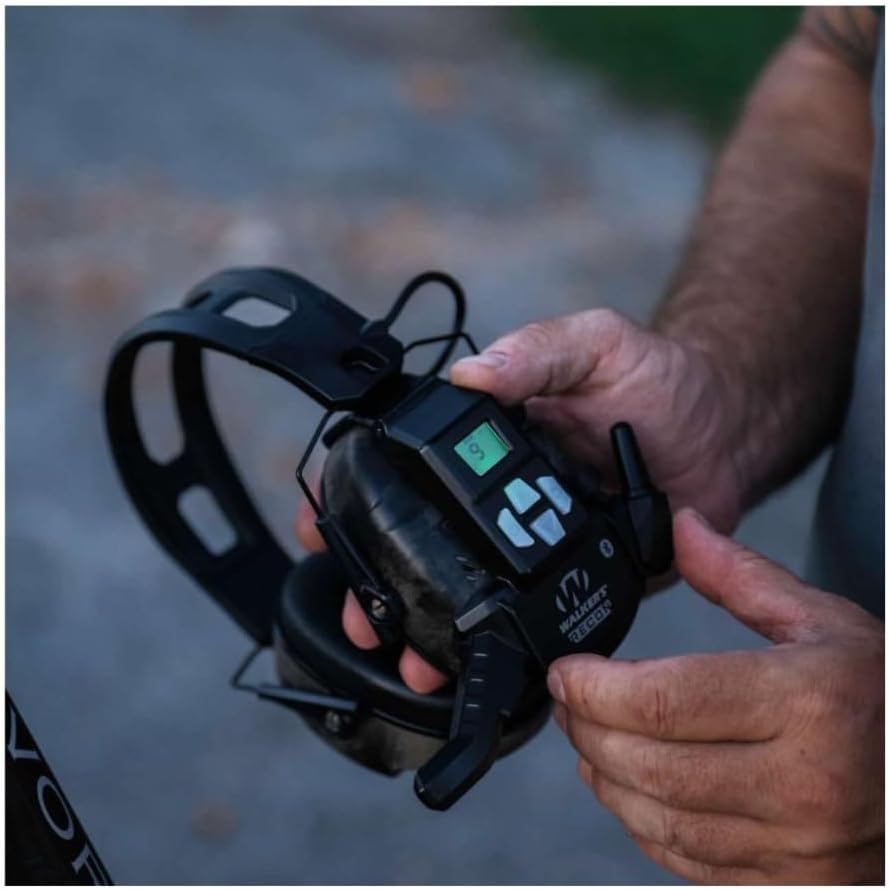
Image: Hands adjusting the Walker's Recon Bluetooth earmuffs, highlighting the control panel and ear cup for battery access or general adjustment.
2. Fitting the Earmuffs
- Extend the headband fully.
- Place the ear cups over your ears, ensuring they completely cover your outer ears.
- Adjust the headband by sliding the ear cups up or down until a snug and comfortable seal is achieved around your ears. The headband should rest over the top of your head.
- Ensure no hair or clothing interferes with the seal between the ear cups and your head, as this can reduce the effectiveness of the hearing protection.

Image: A person wearing Walker's Recon Bluetooth earmuffs and sunglasses, illustrating the correct way to wear the earmuffs for optimal hearing protection.
Operating Instructions
1. Power On/Off
- To power on, press and hold the power button (usually marked with a power symbol) for a few seconds until an indicator light or audio cue confirms activation.
- To power off, press and hold the power button again until the device shuts down.
2. Volume Control
- Use the '+' and '-' buttons on the earmuffs to adjust the volume of ambient sound amplification and Bluetooth audio.
3. Bluetooth Pairing
- Ensure the earmuffs are powered on.
- Activate Bluetooth on your mobile device.
- Open the Walker's Link 2.0 app (download from your device's app store if not already installed).
- Follow the in-app instructions to search for and pair with your Recon Bluetooth earmuffs.
- Once paired, you can stream audio and take calls through the earmuffs.
4. Audio Input (3.5mm Jack)
- Connect the provided 3.5mm audio cable to the audio input jack on the earmuffs and to your external audio device (e.g., smartphone, MP3 player, two-way radio).
- Audio from the connected device will play through the earmuffs.
5. Sound Activated Compression (SAC)
- The SAC feature automatically activates when loud impulse noises (like gunshots) are detected, instantly compressing them to a safe listening level.
- This feature operates automatically when the earmuffs are powered on.
6. Auto Shutoff
- The earmuffs feature an adjustable auto shutoff function to conserve battery life. Settings include 2, 4, or 6 hours of inactivity. Refer to the Walker's Link 2.0 app or product controls for specific adjustment methods.

Image: Close-up view of the Walker's Recon Bluetooth earmuff control panel, showing the power button, volume controls, and digital display for operational settings.
Maintenance and Care
- Cleaning: Wipe the earmuffs with a damp cloth. Do not use abrasive cleaners or immerse the device in water.
- Storage: Store the earmuffs in a cool, dry place away from direct sunlight and extreme temperatures.
- Battery Replacement: Replace batteries when the low battery indicator appears or when performance degrades. Always use fresh AAA batteries.
- Ear Cushions: Periodically check ear cushions for wear and tear. Replace them if they become hardened, cracked, or damaged to maintain optimal NRR.
Troubleshooting
| Problem | Possible Cause | Solution |
|---|---|---|
| No power | Dead or incorrectly inserted batteries | Replace batteries with fresh ones, ensuring correct polarity. |
| No sound amplification | Volume too low; earmuffs not powered on | Increase volume using '+' button; ensure earmuffs are powered on. |
| Bluetooth not connecting | Earmuffs not in pairing mode; device Bluetooth off; too far from device | Ensure earmuffs are in pairing mode (refer to app); enable Bluetooth on your device; move closer to the device. |
| Poor sound quality | Low battery; damaged audio cable; interference | Replace batteries; try a different 3.5mm audio cable; move away from potential interference sources. |
| Reduced hearing protection | Improper fit; worn ear cushions | Adjust earmuffs for a snug fit; replace ear cushions if damaged or worn. |
Specifications
- Model: GWP-RECM-BT
- Noise Reduction Rating (NRR): 26dB
- Bluetooth Version: 5.0
- Water Resistance: IPX4
- Auto Shutoff: Adjustable (2, 4, or 6 hours)
- Power Source: 2 x AAA Batteries (included)
- Dimensions: 9.1 x 9.1 x 9.1 inches
- Item Weight: 1.07 pounds
- Included Components: Recon Bluetooth Earmuffs, 3.5mm Audio Cable
Warranty and Support
For warranty information and customer support, please refer to the documentation included with your product packaging or visit the official Walker's website. You may also contact Walker's customer service directly for assistance with product inquiries, technical support, or warranty claims.