
1. Introduction
This manual provides essential information for the safe and efficient use of your Cecotec IronHero V-2400 Station Vertical Steam Iron. Please read these instructions carefully before operating the appliance and retain them for future reference. The IronHero V-2400 Station is a powerful vertical steam ironing center designed for quick and effective wrinkle removal from various fabrics.
2. Important Safety Instructions
- Always ensure the appliance is unplugged from the power outlet before filling with water, cleaning, or performing any maintenance.
- Do not immerse the appliance, power cord, or plug in water or any other liquid.
- Keep the appliance out of reach of children and individuals with reduced physical, sensory, or mental capabilities.
- Use the appliance only for its intended household purpose as described in this manual.
- Never leave the appliance unattended when it is switched on or connected to the power supply.
- The soleplate and steam emitted are extremely hot and can cause burns. Avoid direct contact with skin.
- Place the iron on a stable, heat-resistant surface when not in use.
- Do not operate the appliance if the power cord or plug is damaged, or if the appliance malfunctions or has been dropped or damaged in any way.
- Only use tap water for filling the tank. Distilled water is recommended to prolong the life of the appliance, especially in areas with hard water.
3. Product Overview and Components
Familiarize yourself with the main parts of your Cecotec IronHero V-2400 Station.
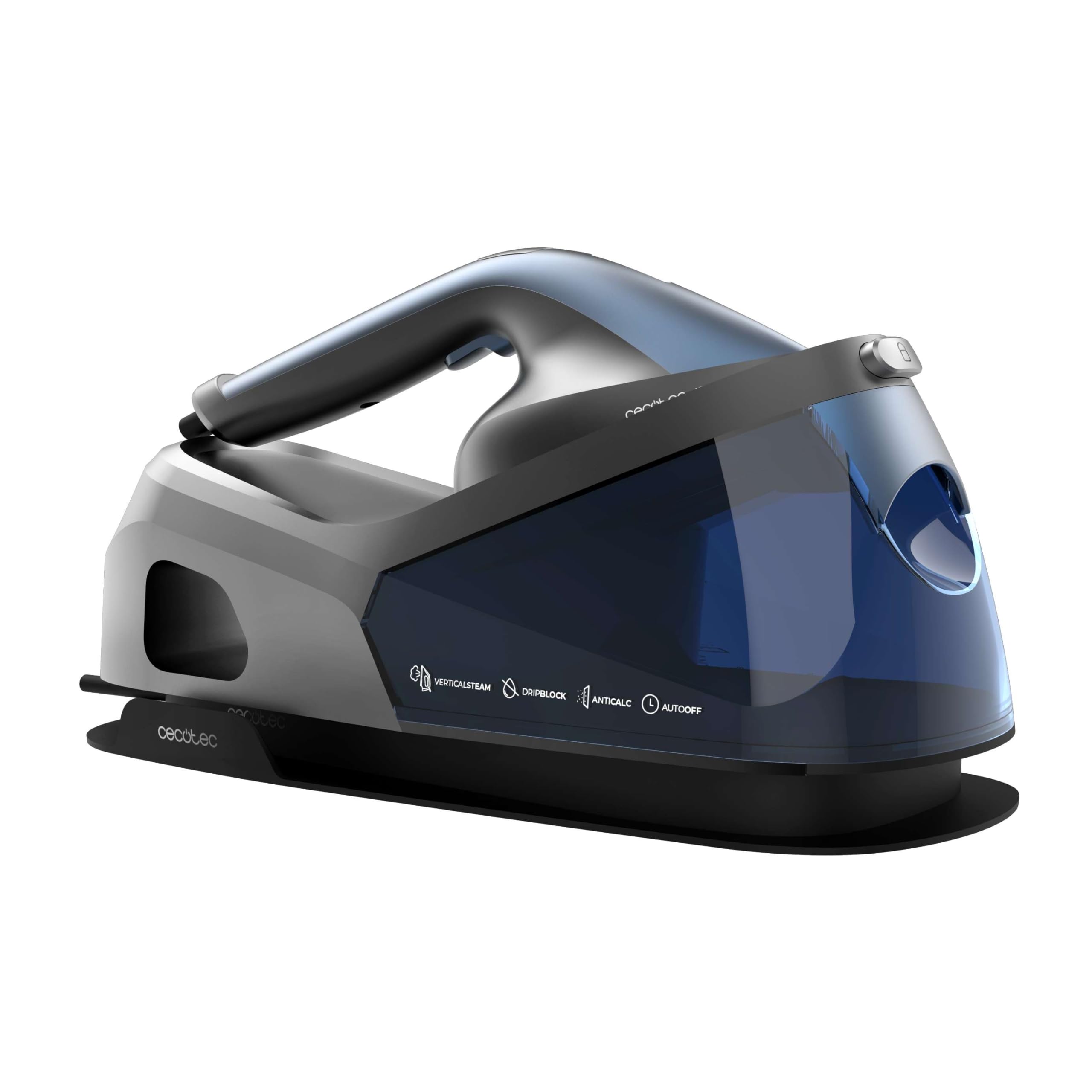


Key Components:
- Iron Unit: Lightweight and ergonomic for comfortable handling.
- Turbo Slide Ceramic Soleplate: Provides smooth gliding and even heat distribution.
- Water Tank (1.2 L): Removable for easy refilling.
- Base Station: Houses the water tank and provides power and steam generation.
- Control Panel: With LED display for mode selection and indicators.
- Steam Hose: Connects the iron to the base station.
4. Setup
- Unpacking: Carefully remove all packaging materials and check for any damage. Keep packaging for future storage or transport.
- Positioning: Place the base station on a stable, flat, and heat-resistant surface. Ensure there is enough space around the unit for ventilation.
- Filling the Water Tank:
- Ensure the appliance is unplugged.
- Remove the water tank from the base.
- Fill the tank with clean tap water up to the 'MAX' level indicator. Distilled water is recommended for optimal performance and longevity.
- Securely replace the water tank into the base.

Figure 4.1: Filling the water tank. - Connecting to Power: Plug the power cord into a suitable grounded electrical outlet. The appliance will emit a sound and the LED display will light up.
5. Operation
The IronHero V-2400 Station offers versatile ironing options with powerful steam.
5.1. Initial Heating
After plugging in, press the power button on the control panel. The appliance will begin to heat up. The LED indicator on the iron will flash during heating and become solid when ready for use (approximately 2 minutes).
5.2. Selecting Steam Modes
Use the mode selection buttons on the control panel to choose the appropriate steam setting for your fabric:
- ECO Mode: For delicate fabrics and energy saving.
- SMART Mode: Standard steam for most garments.
- TURBO Mode: Maximum steam for stubborn wrinkles and thick fabrics.
5.3. Vertical Steaming
For quick refreshing of hanging garments, curtains, or upholstery:
- Hold the iron vertically, keeping it a few centimeters away from the fabric.
- Press the steam trigger on the iron handle. Steam will be continuously released.
- Move the iron slowly up and down the fabric.


5.4. Horizontal Ironing
For traditional ironing on an ironing board:
- Place the garment on an ironing board.
- Press the steam trigger and glide the iron over the fabric.
- For stubborn wrinkles, use the steam boost function by pressing the trigger multiple times rapidly.
5.5. Smart Auto Off
For safety and energy saving, the appliance features a Smart Auto Off function. If the iron is left unattended for a period (e.g., 30 seconds horizontally or 8 minutes vertically), it will automatically switch off. To restart, simply move the iron or press any button.
5.6. Product in Use Video
Watch this video for a demonstration of the Cecotec IronHero V-2400 Station in action, showcasing its vertical and horizontal ironing capabilities.
Video 5.5: Cecotec IronHero V-2400 Station product demonstration.
6. Maintenance and Cleaning
Regular maintenance ensures optimal performance and extends the lifespan of your steam iron.
6.1. Descaling (Cyclo Clean System)
The IronHero V-2400 Station is equipped with a Cyclo Clean anti-calc system to prevent limescale buildup. The 'Anti-Calc' indicator on the control panel will illuminate when descaling is recommended.
- Ensure the appliance is unplugged and cooled down.
- Remove the Calc Collector from the base unit (refer to diagram in section 3).
- Rinse the Calc Collector under running water to remove any accumulated limescale.
- Reinsert the clean Calc Collector firmly into its position.
6.2. Cleaning the Soleplate
- Allow the iron to cool completely.
- Wipe the soleplate with a damp cloth and a non-abrasive cleaner if necessary.
- Do not use abrasive pads, scouring powders, or harsh chemicals as they can damage the ceramic coating.
6.3. Draining the Water Tank
After each use or before storing, it is recommended to empty the water tank.
- Unplug the appliance and allow it to cool.
- Remove the water tank and empty any remaining water.
- Wipe the tank dry before replacing it.
6.4. Storage
Store the appliance in a dry, safe place, out of reach of children. Ensure the iron is cool and the water tank is empty before storage.
7. Troubleshooting
If you encounter issues with your IronHero V-2400 Station, refer to the following table for common problems and solutions.
| Problem | Possible Cause | Solution |
|---|---|---|
| No steam is produced. | Water tank is empty. Appliance not heated. Steam mode not selected. | Fill the water tank. Wait for the iron to heat up (LED solid). Select a steam mode (ECO, SMART, TURBO). |
| Water leaks from the soleplate. | Iron not hot enough. Steam mode too high for fabric. | Allow the iron to heat completely. Select a lower steam mode or use the iron horizontally. |
| Iron does not heat up. | Not plugged in. Power button not pressed. Smart Auto Off activated. | Check power connection. Press the power button. Move the iron or press a button to reactivate. |
| Anti-Calc indicator is on. | Limescale buildup in the Calc Collector. | Clean the Calc Collector as described in section 6.1. |
If the problem persists after attempting these solutions, please contact customer support.
8. Technical Specifications
| Feature | Specification |
|---|---|
| Model Name | IronHero V-2400 Station |
| Model Number | A01_EU01_102084 |
| Power | 2400 W |
| Voltage | 230 Volts (AC) |
| Continuous Steam Flow | 180 g/min |
| Steam Boost | 370 g/min |
| Water Tank Capacity | 1.2 Liters |
| Soleplate Type | Turbo Slide Ceramic |
| Dimensions (L x W x H) | 45.5 x 19 x 25 cm |
| Weight | 3.85 kg |
| Country of Origin | Spain |
9. Warranty and Customer Support
Your Cecotec IronHero V-2400 Station comes with a manufacturer's warranty. Please refer to the warranty card included with your purchase for specific terms and conditions. For technical assistance, spare parts, or any inquiries regarding your product, please visit the official Cecotec website or contact their customer support service.
Cecotec Official Website: www.cecotec.com