
1. Introduction
Thank you for choosing the COMHOMA Electric Height Adjustable Desk. This manual provides essential information for the safe and efficient assembly, operation, and maintenance of your new desk. Please read these instructions carefully before use and retain them for future reference.
This desk is designed to offer a flexible and ergonomic workspace, allowing you to switch between sitting and standing positions with ease. It features a spacious desktop, integrated monitor stand, convenient drawer, and a smart control panel with memory presets.
2. Safety Information
To ensure safe operation and prevent damage, please observe the following safety precautions:
- Ensure all components are securely fastened before use.
- Keep children and pets away from the desk during height adjustment.
- Do not place hands or other objects near moving parts during operation.
- Do not overload the desk. The maximum recommended load capacity is 80 kg (176 lbs).
- Avoid spilling liquids on the control panel or electrical components.
- If any unusual noise or movement occurs, stop operation immediately and consult the troubleshooting section.
- Only use the provided power adapter and cable.
3. Package Contents
Please check that all parts are present and undamaged before beginning assembly. Assembly tools are not included.
- Desktop sections
- Desk frame (legs, crossbar)
- Electric lifting mechanism and motor
- Control panel with power cable
- Drawer
- Monitor stand
- Headphone hooks (set of 2)
- Cable management tray
- Assembly hardware (screws, bolts, etc.)
- User Manual
4. Setup and Assembly
Assembly of this product is required. Follow the detailed instructions provided in the separate assembly guide for step-by-step installation. Ensure you have adequate space and the necessary tools (e.g., screwdriver, wrench) before starting.
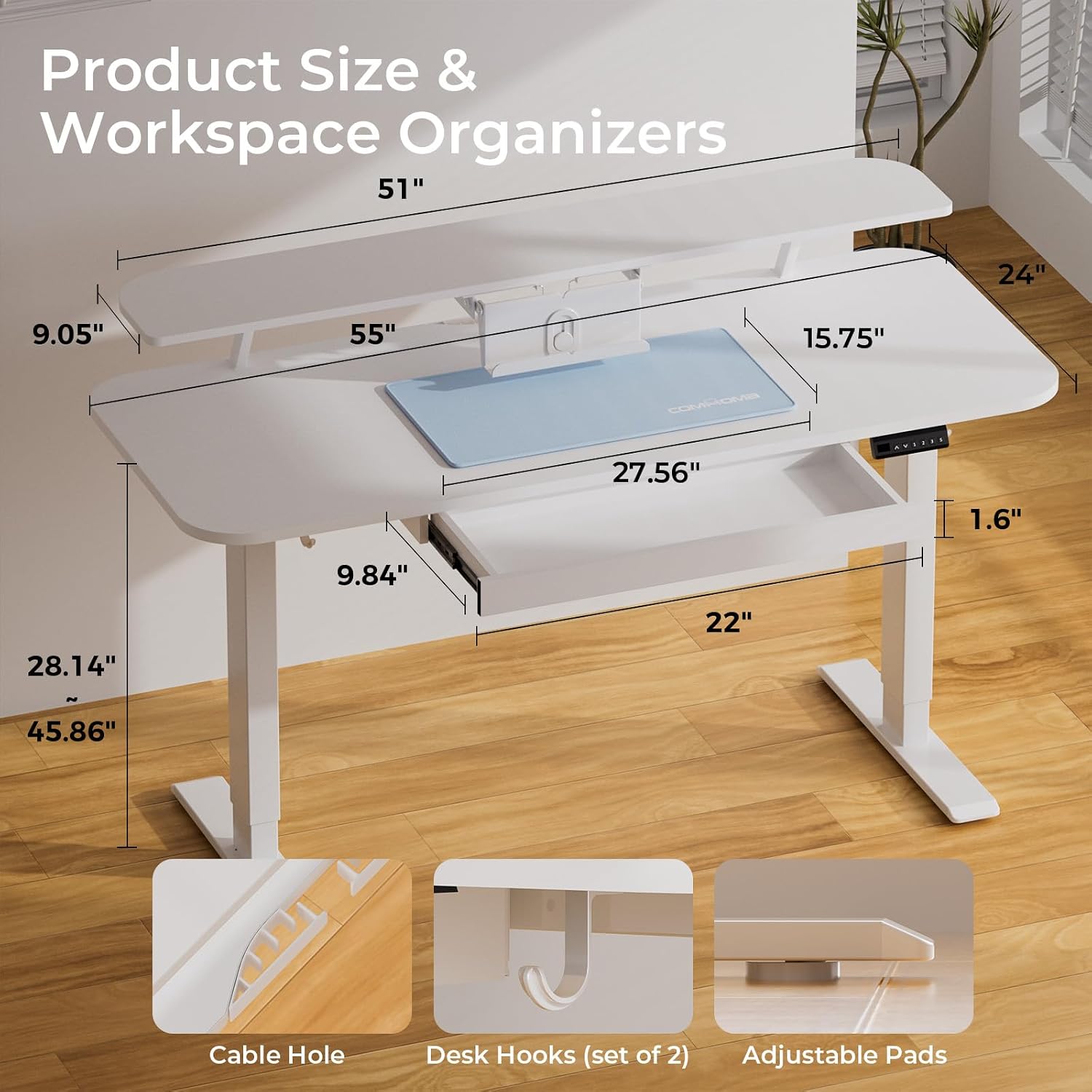
4.1 Key Components and Dimensions
Familiarize yourself with the desk's dimensions and key features before assembly.

4.2 Installing Accessories
After assembling the main desk structure, attach the drawer, monitor stand, headphone hooks, and cable management tray as per the assembly guide.


5. Operating Instructions
5.1 Control Panel Overview
The desk is operated via an intuitive control panel located on the front edge of the desktop.

5.2 Height Adjustment
Use the Up (▲) and Down (▼) arrow buttons on the control panel to manually adjust the desk height. The digital display will show the current height in centimeters.

5.3 Memory Presets
The control panel allows you to save up to three preferred height positions:
- Adjust the desk to your desired height using the Up/Down buttons.
- Press the S button. The display will flash.
- Press one of the numbered memory buttons (1, 2, or 3) within 3 seconds. The current height is now saved to that preset.
- To recall a saved height, simply press the corresponding numbered memory button. The desk will automatically adjust to the stored position.
5.4 Ergonomic Monitor Stand
The integrated monitor stand helps maintain an ergonomic posture by elevating your screen to eye level, reducing strain on your neck and eyes.

5.5 Quiet Operation
The electric lifting mechanism operates quietly, ensuring minimal disturbance in your workspace.

6. Maintenance
Regular maintenance helps prolong the life of your desk:
- Cleaning: Wipe the desktop and frame with a soft, damp cloth. Avoid abrasive cleaners or harsh chemicals that could damage the finish.
- Inspection: Periodically check all screws and bolts to ensure they are tight. Retighten if necessary.
- Cable Management: Ensure cables are not pinched or tangled, especially during height adjustments.
- Load Capacity: Do not exceed the maximum load capacity of 80 kg (176 lbs) to prevent damage to the motor and frame.
7. Troubleshooting
If you encounter any issues with your desk, please refer to the following table:
| Problem | Possible Cause | Solution |
|---|---|---|
| Desk does not move | Power cable disconnected; Motor overload; Control panel error. | Check power connection; Reduce load on desk; Unplug and replug power after 10 minutes. |
| Uneven height adjustment | Uneven load; Obstruction. | Distribute weight evenly; Remove any obstructions under or around the desk. |
| Desk stops mid-adjustment | Overload protection activated; Overheating. | Reduce load; Allow motor to cool down for 20 minutes before resuming operation. |
| Error code on display | Specific system error. | Refer to the detailed error code list in the full assembly manual or contact customer support. |
If the problem persists after attempting these solutions, please contact COMHOMA customer support.
8. Product Specifications
| Feature | Detail |
|---|---|
| Brand | COMHOMA |
| Model Number | EU-DTS118-WT-NEW |
| Product Dimensions (L x W x H) | 120 x 60 x 116 cm (47.2 x 23.6 x 45.7 inches) |
| Item Weight | 28 Kilograms (61.7 lbs) |
| Minimum Height | 72 Centimeters (28.3 inches) |
| Maximum Height | 116 Centimeters (45.7 inches) |
| Recommended Max Load | 80 Kilograms (176 lbs) |
| Color | White |
| Material Type | Wood, Metal (Alloy Steel Frame) |
| Top Material Type | Wood |
| Finish Type | Lacquered |
| Desk Design | Standing Desk (T-shape) |
| Special Features | Ergonomic, Height Adjustable, Integrated USB Socket, Monitor Stand, Electric |
| Number of Drawers | 1 |
| Included Components | Headphone Hook, Cable Management Tray |
| Assembly Required | Yes (Assembly tools not included) |
| Recommended Uses | Gaming, Drafting, Work, Writing |
9. Warranty and Support
9.1 Warranty Information
COMHOMA products are manufactured to high-quality standards. For specific warranty details regarding your electric height adjustable desk, please refer to the warranty card included in your package or visit the official COMHOMA website. The warranty typically covers manufacturing defects and malfunctions under normal use.
9.2 Customer Support
If you have any questions, require assistance with assembly, or experience issues not covered in the troubleshooting guide, please contact COMHOMA customer support. Have your model number (EU-DTS118-WT-NEW) and purchase date ready when contacting support.
Contact information can typically be found on the COMHOMA website or on the product packaging.