
Introduction
This manual provides instructions for the safe and efficient use of your OnePlus AIRVOOC 50W Magnetic Charger OAWV08. Please read this manual thoroughly before using the product and retain it for future reference.
The OnePlus AIRVOOC 50W Magnetic Charger OAWV08 is designed for powerful wireless flash charging, delivering a rapid 50W charge to compatible devices. It incorporates multiple cooling technologies, including a centrifugal fan, TEC (Thermoelectric Cooler) technology, and cooling fins, to ensure efficient heat dissipation and protect your device during charging. The aluminum construction enhances heat conductivity and durability.
Setup
Follow these steps to set up your OnePlus AIRVOOC 50W Magnetic Charger:
- Unpack the Charger: Carefully remove the magnetic charger from its packaging. Ensure all components are present.
- Connect to Power: Connect the charger to a compatible power adapter (not included) using a USB-C cable (not included). For optimal 50W charging, use a power adapter that supports the required wattage and charging protocols.
- Placement: Place the charger on a stable, flat surface, away from direct sunlight, heat sources, and liquids. Ensure adequate ventilation around the charger.

Image: Angled view of the OnePlus AIRVOOC 50W Magnetic Charger OAWV08. The charger is white and circular, with a central black fan and a red accent. The text "AIRVOOC 50W MAGNETIC CHARGER" and "OnePlus" are visible on the top surface. Vents are visible on the side.
Operating Instructions
The OnePlus AIRVOOC 50W Magnetic Charger is designed for user-friendly operation:
- Initiating Charge: Simply place your compatible smartphone onto the magnetic charging surface. The charger will automatically align with the device and begin charging.
- Magnetic Case Compatibility: For enhanced efficiency and optimal charging speed, it is recommended to use a OnePlus magnetic case with your device. This helps maintain consistent contact and reduces power loss.
- Charging Status: The charger will indicate when charging is active. Refer to your smartphone's display for detailed charging status and battery percentage.
- Ending Charge: To stop charging, simply remove your smartphone from the magnetic charging surface. The charger will automatically enter a standby mode.
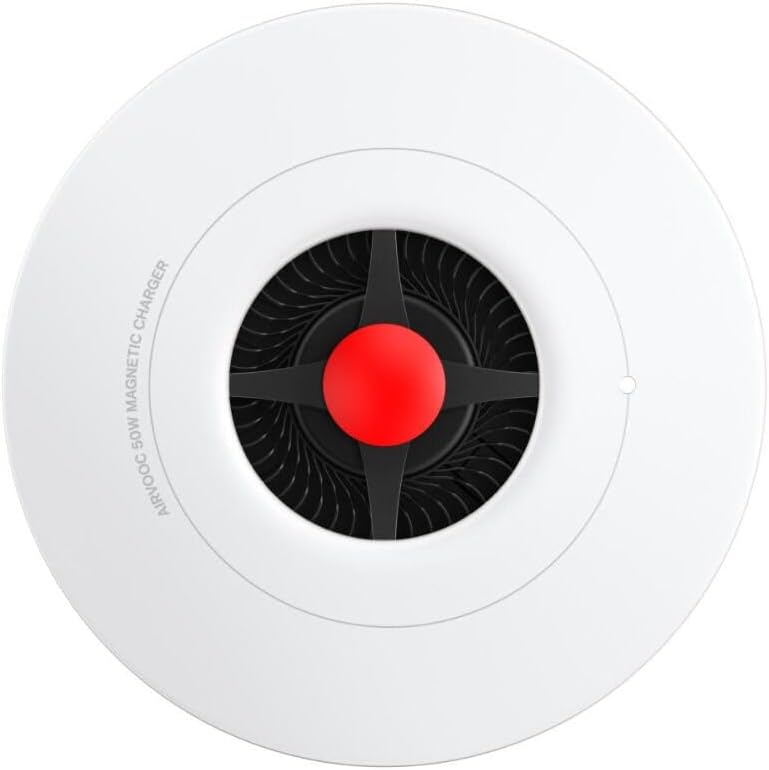
Image: Top-down view of the OnePlus AIRVOOC 50W Magnetic Charger OAWV08. The circular white charger features a central black fan with a red hub. The text "AIRVOOC 50W MAGNETIC CHARGER" is visible along the edge.
Compatibility
- OnePlus Devices: Optimized for OnePlus 13, providing 50W AIRVOOC fast wireless charging.
- iPhone Devices: Compatible with iPhone models that support wireless charging, offering a convenient standby charging mode.
- Other Wireless Charging Devices: May support other Qi-compatible devices at standard wireless charging speeds.
Maintenance
To ensure the longevity and optimal performance of your charger, follow these maintenance guidelines:
- Cleaning: Disconnect the charger from the power source before cleaning. Use a soft, dry, lint-free cloth to wipe the surface of the charger. Do not use abrasive cleaners, solvents, or chemical sprays.
- Storage: When not in use, store the charger in a cool, dry place, away from extreme temperatures and humidity.
- Avoid Obstructions: Ensure the cooling vents and fan are free from dust and obstructions to maintain efficient heat dissipation.
Troubleshooting
If you encounter issues with your OnePlus AIRVOOC 50W Magnetic Charger, refer to the following common solutions:
- Charger Not Working:
- Ensure the charger is securely connected to a functional power adapter and outlet.
- Verify that the power adapter provides sufficient wattage for the charger.
- Try a different power adapter or USB-C cable.
- Device Not Charging:
- Ensure your device is properly aligned on the magnetic charging surface.
- Remove any non-magnetic or excessively thick phone cases that might interfere with wireless charging.
- Confirm that your device supports wireless charging.
- Restart your device.
- Slow Charging:
- Ensure you are using a power adapter capable of delivering the full 50W output.
- Check for any background applications on your phone that might be consuming excessive power.
- Ensure the charger's cooling vents are not obstructed.
- Overheating:
- Ensure the charger is placed in a well-ventilated area.
- Remove any foreign objects from the charging surface or cooling vents.
- If overheating persists, discontinue use and contact customer support.
Specifications
| Brand | OnePlus |
| Model | OAWV08 |
| Type | Magnetic Wireless Charger |
| Wireless Charging Output | Up to 50W (AIRVOOC) |
| Power Source | Induction |
| Compatible Devices | OnePlus 13, iPhone models supporting wireless charging, other Qi-compatible cellular phones |
| Special Features | Wireless Charging, Magnetic Alignment, Advanced Cooling (Centrifugal Fan, TEC, Cooling Fins) |
| Material | Plastic, Aluminum (for cooling) |
| Color | White |
| Dimensions | 10 x 10 x 1.27 cm |
| Weight | 160 g |
Note: A compatible power adapter and USB-C cable are required and sold separately.
Warranty Information
Specific warranty details for the OnePlus AIRVOOC 50W Magnetic Charger OAWV08 are typically provided with the product packaging or available on the official OnePlus website. Please refer to these resources for the most accurate and up-to-date warranty terms and conditions.
Customer Support
For further assistance, technical support, or inquiries regarding your OnePlus AIRVOOC 50W Magnetic Charger OAWV08, please visit the official OnePlus support website or contact their customer service department. Contact information can usually be found on the OnePlus official website or in the product packaging.
Online Support: www.oneplus.com/support (Example link, please verify official support page)


