
1. Introduction
Thank you for choosing the JOINICE S5777 70-inch TV Stand. This entertainment center is designed to accommodate TVs up to 75 inches and features a modern farmhouse aesthetic with a live edge design. It includes integrated power outlets and ample storage to enhance your living space. Please read this manual thoroughly before assembly and use to ensure proper installation and safe operation.
2. Safety Information
Please observe the following safety precautions to prevent injury or damage to the product:
- Assembly Required: This product requires assembly. Follow all instructions carefully.
- Weight Limit: Do not exceed the maximum weight capacity of 110 pounds (50 kg) for the top surface. The lower shelves have a weight limit of 22 pounds (10 kg) each.
- Two-Person Assembly: Due to the size and weight of components, assembly is recommended for two people.
- Stable Placement: Place the TV stand on a flat, stable, and level surface to prevent tipping.
- Power Outlet Safety: Ensure all devices connected to the built-in power strip are within the specified voltage and current limits. Do not overload the outlets. Keep liquids away from the power strip.
- Child Safety: Keep small parts and packaging materials away from children. Do not allow children to climb on or play with the TV stand.
3. Package Contents
Before beginning assembly, verify that all components listed below are present and undamaged. If any parts are missing or damaged, please contact customer support.
- Wood panels (various sizes)
- Metal legs
- Hardware pack (screws, dowels, cam locks, etc.)
- Built-in power strip with USB, Type-C, and AC outlets
- Adjustable shelf pins
- Assembly instructions manual
4. Assembly Instructions
Assembly is required for this TV stand. Detailed step-by-step instructions with diagrams are included in the product packaging. Please follow them carefully.
- Preparation: Clear a spacious area for assembly. Lay out all parts and hardware. Use the provided diagrams to identify each component.
- Frame Assembly: Begin by assembling the main frame of the TV stand, attaching the metal legs as instructed.
- Panel Installation: Secure the side, back, and top panels using the designated hardware.
- Power Strip Integration: Install the built-in power strip into its designated slot on the top panel. Ensure the power cord is routed safely.
- Door and Shelf Installation: Attach the cabinet doors using the magnetic-press hinges. Insert the adjustable shelf pins and place the adjustable shelves at your desired height.
- Final Check: Ensure all screws are tightened and the stand is stable before placing any items on it.
For visual guidance, refer to the diagrams in your packaged instruction manual.
5. Features and Functions
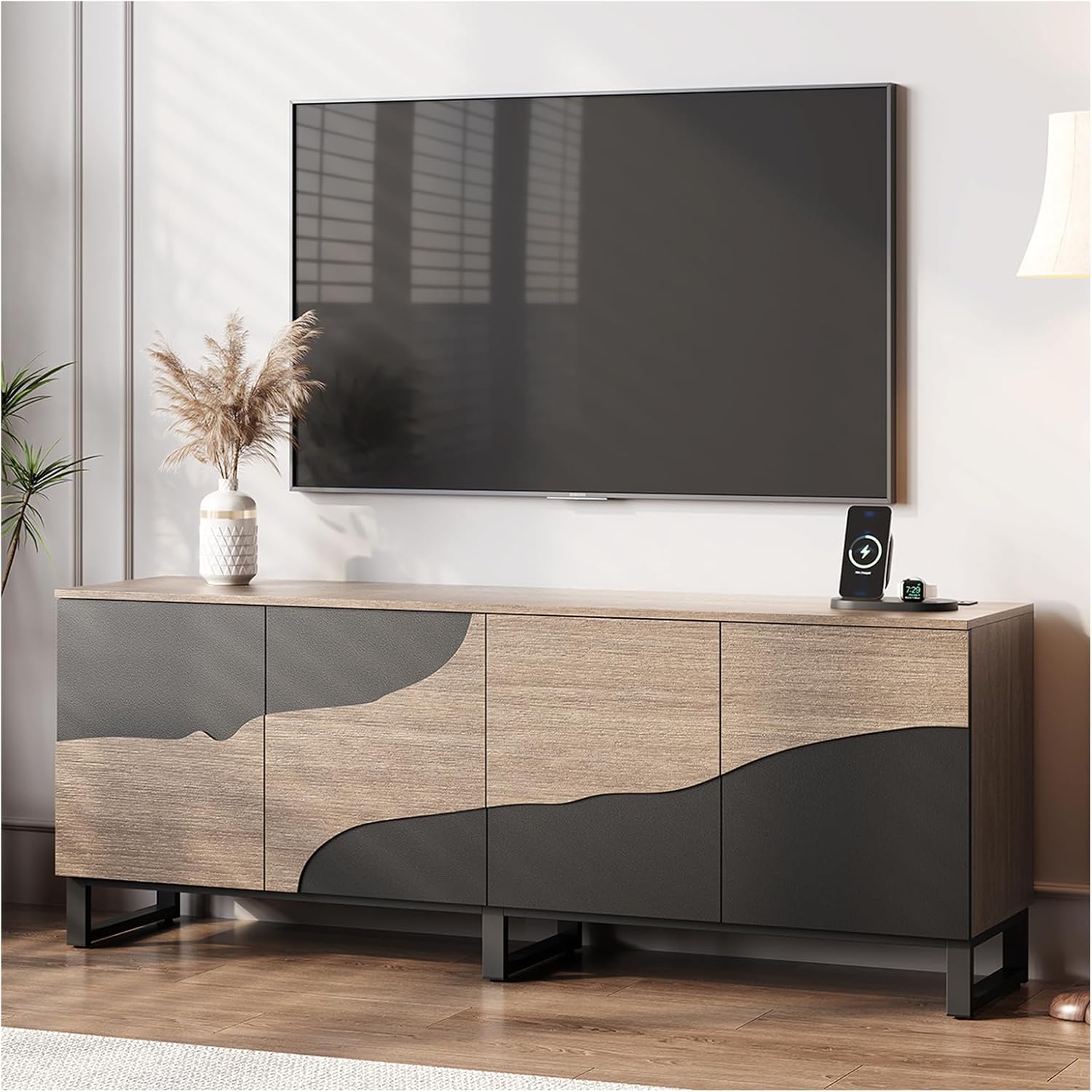
The JOINICE S5777 TV Stand, showcasing its live edge design and overall aesthetic in a modern living room.

Detailed dimensions of the TV stand (66.9"W x 15.7"D x 25.6"H) and weight capacity (110 lbs top, 22 lbs per shelf).

The integrated power strip featuring 1 USB port, 1 Type-C outlet, and 3 AC outlets for convenient device charging.

The magnetic-press door system allows for quiet and handle-free opening with a gentle push.

Adjustable shelves provide flexible storage options, while robust metal legs ensure stability.
5.1. Live Edge Design
The TV stand features an authentic live edge wood design, providing a unique and natural aesthetic that blends modern and farmhouse styles.
5.2. Built-in Power Outlet
A convenient power strip is integrated into the top surface, offering:
- 1 USB Port (5V/2A)
- 1 Type-C Outlet (9V/2A)
- 3 AC Outlets (125V/12A)
- 4.9-Foot Power Cord
This allows for easy charging of devices and powering of media equipment without additional extension cords.
5.3. Storage Compartments
The stand includes four storage compartments, ideal for organizing media essentials, gaming consoles, or decorative items. The cabinet doors feature a magnetic-press opening system for quiet and easy access.
5.4. Adjustable Shelf
One adjustable shelf is provided, allowing you to customize the storage space to accommodate items of various heights.
5.5. Durable Construction
Constructed with engineered wood and supported by sturdy metal legs, the TV stand is designed for stability and durability.
6. Usage Guidelines
- Place your television centrally on the stand, ensuring its base fits within the top surface dimensions.
- Distribute weight evenly across the top surface and shelves to maintain stability.
- Utilize the power outlets for electronic devices as needed, ensuring not to exceed the maximum load.
- Adjust shelves to suit your storage requirements for media players, game consoles, or other items.
7. Maintenance
- Cleaning: Wipe surfaces with a soft, damp cloth. Avoid harsh chemicals or abrasive cleaners that may damage the finish.
- Spills: Clean up spills immediately to prevent staining or damage to the wood.
- Hardware: Periodically check and tighten all assembly hardware to ensure the stand remains stable.
- Sunlight: Avoid prolonged exposure to direct sunlight to prevent fading or warping of the wood.
8. Troubleshooting
- Stand is Wobbly: Ensure all screws and fasteners are securely tightened. Verify the stand is on a level surface.
- Doors Not Aligning: Adjust the hinge screws on the cabinet doors. Refer to the assembly manual for specific hinge adjustment instructions.
- Power Outlets Not Working: Check if the main power cord is securely plugged into a functional wall outlet. Ensure no circuit breakers have tripped. Do not exceed the maximum load for the power strip.
- Shelf Pins Falling Out: If adjustable shelf pins are loose, ensure they are fully inserted into the pre-drilled holes. For a permanent fix, a small amount of wood glue can be used to secure them if the shelf height will not be changed.
9. Specifications
| Attribute | Specification |
|---|---|
| Brand | JOINICE |
| Model Number | S5777 |
| Product Dimensions | 15.7"D x 66.9"W x 25.6"H (40cm D x 170cm W x 65cm H) |
| Material | Engineered Wood, Metal Legs |
| Color | Beige and Black |
| Weight Limit (Top) | 110 Pounds (50 kg) |
| Weight Limit (Shelves) | 22 Pounds (10 kg) per shelf |
| Power Outlets | 1 USB (5V/2A), 1 Type-C (9V/2A), 3 AC (125V/12A) |
| Power Cord Length | 4.9 Feet (1.5 meters) |
| Assembly Required | Yes |
10. Warranty and Support
For warranty information or customer support, please refer to the documentation included with your purchase or contact JOINICE customer service directly. Keep your purchase receipt for warranty claims.
Contact Information: Please visit the official JOINICE website or refer to your purchase platform for the most current customer support contact details.