
1. Introduction
Thank you for choosing the Casio CELVIANO AP-300 Digital Piano. This instrument combines advanced technology with elegant design to provide an exceptional grand piano experience. This manual provides essential information for setting up, operating, and maintaining your digital piano to ensure optimal performance and longevity.
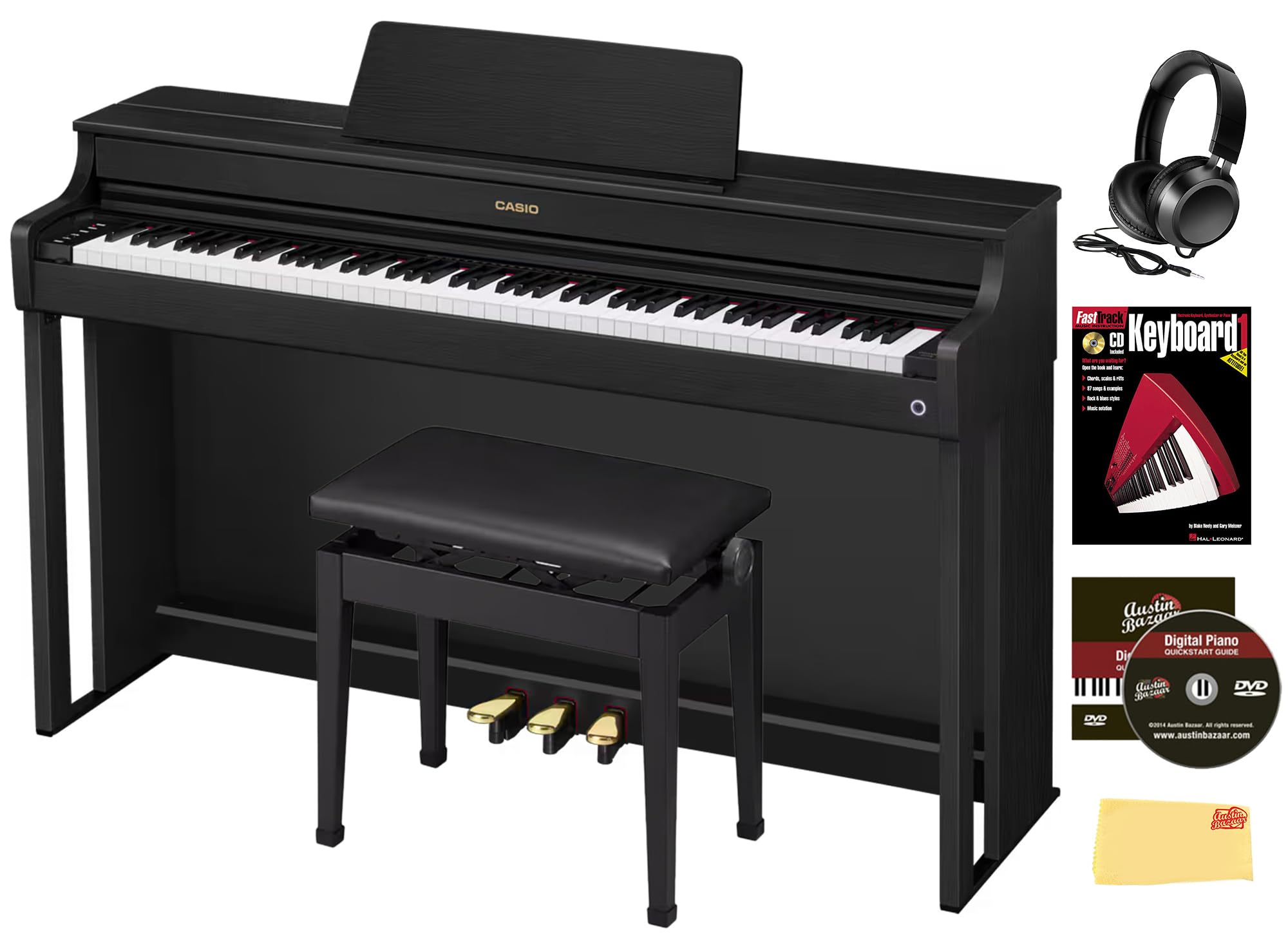
Figure 1: The Casio CELVIANO AP-300 Digital Piano, showcasing its sleek black finish and full 88-key keyboard.
2. Safety Information
Please read and understand all safety precautions before using your digital piano. Keep this manual in a safe place for future reference.
- Power Supply: Use only the specified AC adaptor. Ensure the voltage matches your local power supply.
- Placement: Place the piano on a stable, level surface to prevent tipping. Avoid locations with extreme temperatures, humidity, or direct sunlight.
- Ventilation: Do not block ventilation openings. Ensure adequate airflow around the unit.
- Liquid/Objects: Do not allow liquids or foreign objects to enter the unit. If this occurs, disconnect power immediately and contact customer support.
- Cleaning: Disconnect power before cleaning. Use a soft, dry cloth. Avoid abrasive cleaners.
3. What's in the Box
Your Casio CELVIANO AP-300 Digital Piano bundle includes the following items:
- Casio CELVIANO AP-300 Digital Piano
- Furniture Bench (adjustable height)
- Headphones
- Instructional Book
- Austin Bazaar Instructional DVD
- Polishing Cloth
- Wireless MIDI & Audio Adaptor
- Music Stand
- AC Adaptor
- Headphones Hook
4. Setup
Follow these steps to assemble and prepare your digital piano for use:
- Unpacking: Carefully remove all components from the packaging. Retain packaging materials for future transport or storage.
- Base Assembly: Assemble the piano stand according to the included assembly guide. Ensure all screws are tightened securely.
- Piano Placement: Gently place the main piano unit onto the assembled stand. Secure it using the provided fasteners.
- Pedal Unit Connection: Connect the three-pedal unit cable to the designated port on the underside of the piano.
- Music Stand: Insert the music stand into the slot on the top panel of the piano.
- Power Connection: Connect the AC adaptor to the DC IN jack on the piano and then plug it into a wall outlet.
- Bench Assembly: Assemble the furniture bench. Adjust its height for comfortable playing posture.
- Headphones Hook: Attach the headphones hook to a convenient location on the piano stand.

Figure 2: The Casio CELVIANO AP-300 Digital Piano fully assembled with its matching furniture bench, ready for playing.
5. Operating Instructions
5.1 Basic Operation
- Power On/Off: Press the [POWER] button to turn the piano on or off.
- Volume Adjustment: Use the [VOLUME] knob to adjust the overall sound level. The Volume Sync Equalizer ensures balanced sound even at low volumes.
- Tone Selection: The piano offers 19 built-in tones. Use the dedicated buttons or menu to select your desired instrument sound, including various grand piano tones.
- Headphones: For private practice, connect your headphones to the 3.5mm jack.
5.2 Advanced Features
- Multi-Dimensional Morphing AiR Sound Source: This technology delivers dynamic grand piano tones with expressive depth, responding to touch velocity and time with realistic resonance.
- Smart Scaled Hammer Action Keyboard: Experience an authentic playing feel with ivory-like white keys and ebony-textured black keys, providing comfort and expressive control.
- Three-Pedal System: The integrated three-pedal system offers stability and precise control, replicating the sustain, sostenuto, and soft pedals of an acoustic piano.
- String Resonance System & Mechanical Sound System: These features replicate the natural sounds and sympathetic resonances of an acoustic piano, enhancing realism.
- Lid Simulator: Mimics the tonal changes that occur when the lid of a grand piano is opened or closed, adding another layer of acoustic realism.
- Wireless MIDI & Audio Adaptor: Use the included adaptor for easy wireless connection to smart devices.
- Casio Music Space App: Enhance your learning and customization with advanced controls and features available through the dedicated Casio Music Space App.
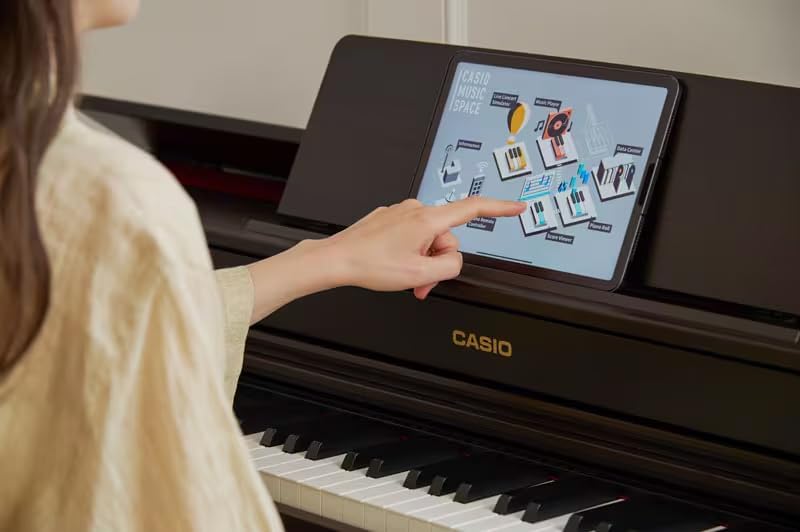
Figure 3: A tablet connected to the Casio CELVIANO AP-300, showing the Casio Music Space App interface for enhanced learning and control.
6. Maintenance
Proper care will ensure your Casio CELVIANO AP-300 remains in excellent condition:
- Cleaning the Cabinet: Use the provided polishing cloth to gently wipe the piano's surface. For stubborn dirt, use a soft cloth dampened with water and a mild, neutral detergent, then wipe dry. Avoid harsh chemicals.
- Cleaning the Keyboard: Wipe the keys with a soft, dry cloth. For deeper cleaning, use a cloth lightly dampened with water and a mild soap solution, then wipe dry immediately.
- Key Cover: The slow-closing key cover ensures quiet and safe use. Avoid forcing it open or closed.
- Storage: When not in use for extended periods, cover the piano to protect it from dust. Store in a stable environment away from extreme temperatures or humidity.
7. Troubleshooting
If you encounter any issues, refer to the following common solutions:
- No Sound: Check if the power is on, volume is up, and headphones are not connected (unless intended). Ensure all cables are securely connected.
- Distorted Sound: Lower the volume. Check for loose connections or interference from other electronic devices.
- Keys Not Responding: Ensure the piano is powered on. If specific keys are unresponsive, contact customer support.
- Wireless Adaptor Issues: Ensure the adaptor is correctly inserted and within range of your smart device. Refer to the Casio Music Space App instructions for connection details.
For persistent problems, please contact Casio customer support.
8. Specifications
| Feature | Specification |
|---|---|
| Number of Keys | 88 |
| Touch Response | 5 Sensitivity levels, off |
| Maximum Polyphony | 192 |
| Number of Tones | 19 |
| Amplifiers | 20W + 20W |
| Power Supply | AC Adaptor |
| Power Consumption | 20W |
| Dimensions (WxDxH) | 55.2 x 17.3 x 34.2 inches |
| Weight | 103.8 pounds |
| Connectivity Technology | Wireless (with included adaptor) |
| Supported Software | Casio Music Space App |
9. Warranty and Support
Your Casio CELVIANO AP-300 Digital Piano is covered by a manufacturer's warranty. Please refer to the warranty card included in your packaging for specific terms and conditions.
For technical support, service, or warranty claims, please contact Casio customer service or visit the official Casio website. Keep your proof of purchase handy when contacting support.


