
1. Introduction
Thank you for choosing the pTron Fusion Pro Retro Signature 20W Bluetooth Speaker. This manual provides essential information for the proper setup, operation, and maintenance of your device. Please read it thoroughly before use to ensure optimal performance and longevity.

Image 1.1: Front view of the pTron Fusion Pro Retro Signature Bluetooth Speaker, showcasing its retro design and integrated carry handle.
The Fusion Pro Retro Signature speaker combines a classic aesthetic with modern audio technology, offering 20W dynamic sound through dual drivers, versatile connectivity options, and a portable design for both indoor and outdoor use.
2. Package Contents
- pTron Fusion Pro Retro Signature Bluetooth Speaker
- Type-C Charging Cable
- Warranty Card
3. Device Layout and Controls
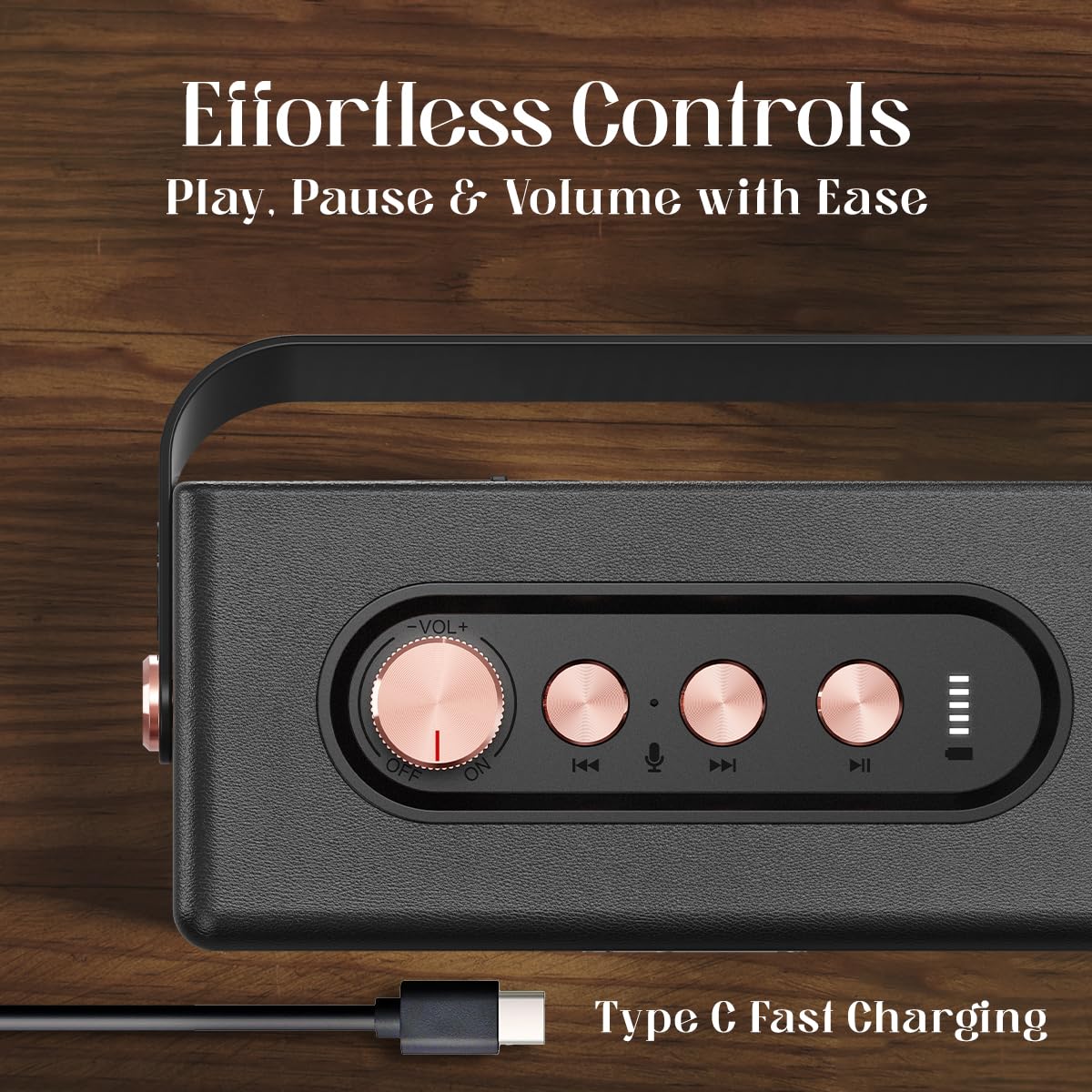
Image 3.1: Top panel controls including the volume knob, previous track, microphone, next track, and play/pause buttons, along with the Type-C charging port.
Controls Overview:
- Volume Knob: Rotate to adjust volume. Press and hold to power ON/OFF.
- Previous Track Button: Press to go to the previous track.
- Microphone Button: For hands-free calling.
- Next Track Button: Press to go to the next track.
- Play/Pause Button: Press to play or pause audio.
- Type-C Port: For charging the speaker.
4. Setup
4.1 Charging the Speaker
- Connect the provided Type-C charging cable to the speaker's Type-C port.
- Connect the other end of the cable to a compatible USB power adapter (DC 5V/1A max.) or a computer's USB port.
- The charging indicator will illuminate. A full charge typically takes approximately 2 hours.
- Once fully charged, the indicator light will change or turn off (refer to specific LED behavior in the quick start guide if available).
Note: Ensure the speaker is fully charged before first use for optimal battery life.
4.2 Powering On/Off
- To Power ON: Press and hold the Volume Knob for a few seconds until you hear an audible prompt or see the indicator light illuminate.
- To Power OFF: Press and hold the Volume Knob again for a few seconds until you hear an audible prompt or the indicator light turns off.
5. Operating Instructions
5.1 Bluetooth Pairing

Image 5.1: The speaker paired with a smartphone, demonstrating instant Bluetooth v5.3 connectivity for music streaming.
- Ensure the speaker is powered ON and in Bluetooth pairing mode (indicated by a flashing LED light).
- On your smartphone, tablet, or other Bluetooth-enabled device, navigate to the Bluetooth settings.
- Search for available devices and select "pTron Fusion Pro" from the list.
- Once connected, you will hear an audible confirmation, and the LED indicator will stop flashing.
- The speaker will automatically reconnect to the last paired device when powered on, if the device is within range (up to 10 meters) and Bluetooth is enabled.
5.2 True Wireless Stereo (TWS) Pairing

Image 5.2: Two pTron Fusion Pro Retro Signature speakers paired together using the TWS feature for enhanced stereo sound.
To achieve a stereo sound experience, you can pair two pTron Fusion Pro Retro Signature speakers together:
- Ensure both speakers are powered ON and not connected to any other Bluetooth device.
- On one of the speakers (this will be the primary speaker), double-press the Play/Pause button. The speaker will enter TWS pairing mode.
- The two speakers will automatically search for and connect to each other. You will hear an audible confirmation once TWS pairing is successful.
- Now, connect your Bluetooth device to the primary speaker as described in section 5.1. Audio will play simultaneously through both speakers.
5.3 Multi-Play Modes (USB/TF Card)

Image 5.3: The speaker supports multiple playback modes including Bluetooth v5.3, TF Card, and USB playback.
- USB Playback: Insert a USB flash drive containing audio files into the USB port. The speaker will automatically detect and begin playing music from the drive.
- TF Card Playback: Insert a TF (microSD) card containing audio files into the TF card slot. The speaker will automatically detect and begin playing music from the card.
- To switch between modes, briefly press the Play/Pause button (or refer to specific mode switching instructions if available in a quick start guide).
5.4 Hands-Free Calling
When connected to your smartphone via Bluetooth, the speaker can be used for hands-free calls:
- Answer Call: Press the Microphone button once.
- End Call: Press the Microphone button once during a call.
- Reject Call: Press and hold the Microphone button for 2 seconds.
6. Maintenance
- Clean the speaker with a soft, dry cloth. Do not use abrasive cleaners or solvents.
- Avoid exposing the speaker to extreme temperatures, direct sunlight, or high humidity.
- Do not immerse the speaker in water as it is not waterproof.
- Store the speaker in a cool, dry place when not in use for extended periods.
- Charge the battery at least once every three months to prevent deep discharge if stored for long durations.
7. Troubleshooting
| Problem | Possible Cause | Solution |
|---|---|---|
| Speaker does not power on. | Low battery. | Charge the speaker fully. |
| No sound. | Volume too low; device not connected; incorrect input mode. | Increase volume; ensure Bluetooth is connected or USB/TF card is inserted correctly; switch input mode. |
| Bluetooth pairing fails. | Speaker not in pairing mode; device too far; interference. | Ensure speaker is in pairing mode; move device closer (within 10m); turn off other Bluetooth devices. |
| TWS pairing fails. | One or both speakers already connected to another device. | Disconnect both speakers from any Bluetooth devices before attempting TWS pairing. |
8. Specifications

Image 8.1: The speaker's internal structure highlighting the 52mm dual drivers responsible for amplified sound output.
| Feature | Detail |
|---|---|
| Model Name | Fusion |
| Speaker Type | Portable Speaker |
| Connectivity Technology | Bluetooth v5.3, USB, TF Card |
| Audio Output Mode | Stereo |
| Speaker Maximum Output Power | 20 Watts |
| Audio Driver Size | 52 Millimetres (Dual Drivers) |
| Bluetooth Range | 10 Metres |
| Battery Average Life | 8 Hours (up to 10 hours depending on usage) |
| Charging Time | 2 Hours |
| Battery Type | Lithium Ion (1 x 9V battery included) |
| Material | Acrylonitrile Butadiene Styrene (ABS) |
| Product Dimensions | 7D x 16W x 9H Centimeters |
| Item Weight | 500 Grams |
| Water Resistance Level | Not Water Resistant |
| Control Method | Push Button, Rotary Knob |
| Special Features | Hi-Res Audio, Portable, Stereo Pairing (TWS), USB Port |
9. Warranty and Support
9.1 Warranty Information
The pTron Fusion Pro Retro Signature Bluetooth Speaker comes with a 1-Year Manufacturer Warranty from the date of purchase, covering manufacturing defects only. Please retain your purchase receipt for warranty claims.
9.2 Customer Support
For any queries, technical assistance, or warranty claims, please contact pTron customer support:
- Phone: 040-67138888
- Email: support@ptron.in
- Manufacturer: Palred Electronics Pvt. Ltd., SY.NO. 56, 1ST FLOOR, GUNDLAPOCHAMPALLY VILLAGE, TECH PARK MTP, TSIIC-IALA NACHARAM, HYDERABAD - 500076, TELANGANA, INDIA