
Introduction
Thank you for choosing the TeeGGi 16201pro Fast RC Car. This 1:16 scale remote control car is engineered for high performance, featuring a powerful brushless motor, 4WD system, and durable construction for off-road racing. Please read this manual thoroughly before operating your RC car to ensure safe and optimal performance.

Image: The TeeGGi 16201pro RC car, its remote control, and three lithium-ion batteries.
Safety Information
WARNING:
- Not suitable for children under three years old due to small parts.
- Always operate the RC car in open areas, away from people, pets, and obstacles.
- Do not operate in wet conditions or near water to prevent damage to electronics.
- Ensure batteries are charged safely and correctly. Do not overcharge or short-circuit batteries.
- The motor can become very hot during operation. Allow it to cool before handling or changing batteries.
- Regularly check and tighten screws, especially after off-road use, to prevent parts from loosening.
What's in the Box
Your TeeGGi 16201pro package includes the following components:
- TeeGGi 16201pro RC Car
- Remote Control Transmitter
- 3 x 2S 7.4V 1500mAh LiPo Batteries
- Charging Cable
- User Manual (this document)
- Additional parts (e.g., wheelie bar, rear deflector, extra clips) may be included.
Setup
1. Charging the Batteries
The RC car comes with three 2S 7.4V 1500mAh LiPo batteries. Before first use, fully charge all batteries using the provided charging cable.
- Connect the charging cable to a suitable USB power adapter (not included).
- Connect the battery to the charging cable.
- The indicator light on the charger will show the charging status (refer to charger's specific instructions for light indications).
- Charging typically takes [X] hours (refer to charger's specific instructions). Do not leave batteries unattended while charging.
2. Installing Batteries
RC Car Battery Installation:
- Locate the battery compartment on the RC car chassis.
- Carefully insert a charged 7.4V LiPo battery into the compartment.
- Connect the battery's T-type plug to the car's power connector.
- Secure the battery compartment cover.
Remote Control Battery Installation:
- Open the battery cover on the back of the remote control.
- Insert [X] AA batteries (not included) into the compartment, observing polarity (+/-).
- Close the battery cover.

Image: The 2.4GHz remote control, highlighting the steering wheel, accelerator, LED light button, and three-speed regulation switch.
3. Pairing the Remote Control
The RC car and remote control are typically pre-paired. If pairing is required:
- Turn on the RC car first.
- Then, turn on the remote control.
- The indicator lights on both devices should stabilize, indicating a successful connection.
- If connection fails, turn both off and repeat the process.
Operating Instructions
Basic Controls:
- Accelerator (Trigger): Pull the trigger to move forward. Push the trigger to brake or reverse. The full proportional throttle allows for precise speed control.
- Steering Wheel: Turn the wheel left or right to steer the car.
- Three-Speed Regulation Switch: Adjust the maximum speed of the car (High, Medium, Low). This is useful for beginners or for operating in smaller spaces.
- LED Light Button: Cycles through LED headlight modes: normal light, slow flashing, fast flashing.

Image: The RC car demonstrating its strong power and ability to reach speeds of 70km/h, suitable for various rugged road surfaces.
Driving Tips:
- Start with the lowest speed setting until you are comfortable with the controls.
- The 4WD system and independent suspension allow for excellent performance on various terrains, including flat surfaces, sand, mud, and grass.
- Practice smooth acceleration and braking to maintain control, especially at high speeds.
- Be mindful of the car's high speed (up to 45mph/70km/h) and avoid operating in confined spaces or near obstacles.
- The car's simulation structure and high toughness explosion-proof PVC shell provide durability, but extreme impacts should be avoided.

Image: The TeeGGi RC car demonstrating its off-road capabilities, kicking up dirt as it navigates uneven terrain.
Maintenance
Regular maintenance will extend the life and performance of your RC car.
- Cleaning: After each use, especially in dirty or dusty conditions, clean the car with a soft brush or cloth. Avoid using water directly on electronic components.
- Screw Check: Periodically check all screws, especially those on the chassis, suspension, and wheels. Tighten any loose screws to prevent parts from falling off during operation.
- Battery Care:
- Always disconnect batteries from the car when not in use.
- Store batteries in a cool, dry place.
- Do not fully discharge LiPo batteries; charge them before they are completely depleted.
- Allow batteries to cool down before recharging.
- Component Inspection: Regularly inspect the metal differential, metal differential cup, metal CVD front drive shaft, metal rear dogbone, metal wheel cups, metal second bottom plate, metal front and rear arm yards, and metal center drive shaft for any signs of wear or damage. These metal components enhance the car's durability and reliability.

Image: A detailed view of the RC car's professional-grade chassis, highlighting its composition of nylon material, metal parts, and electronic components.
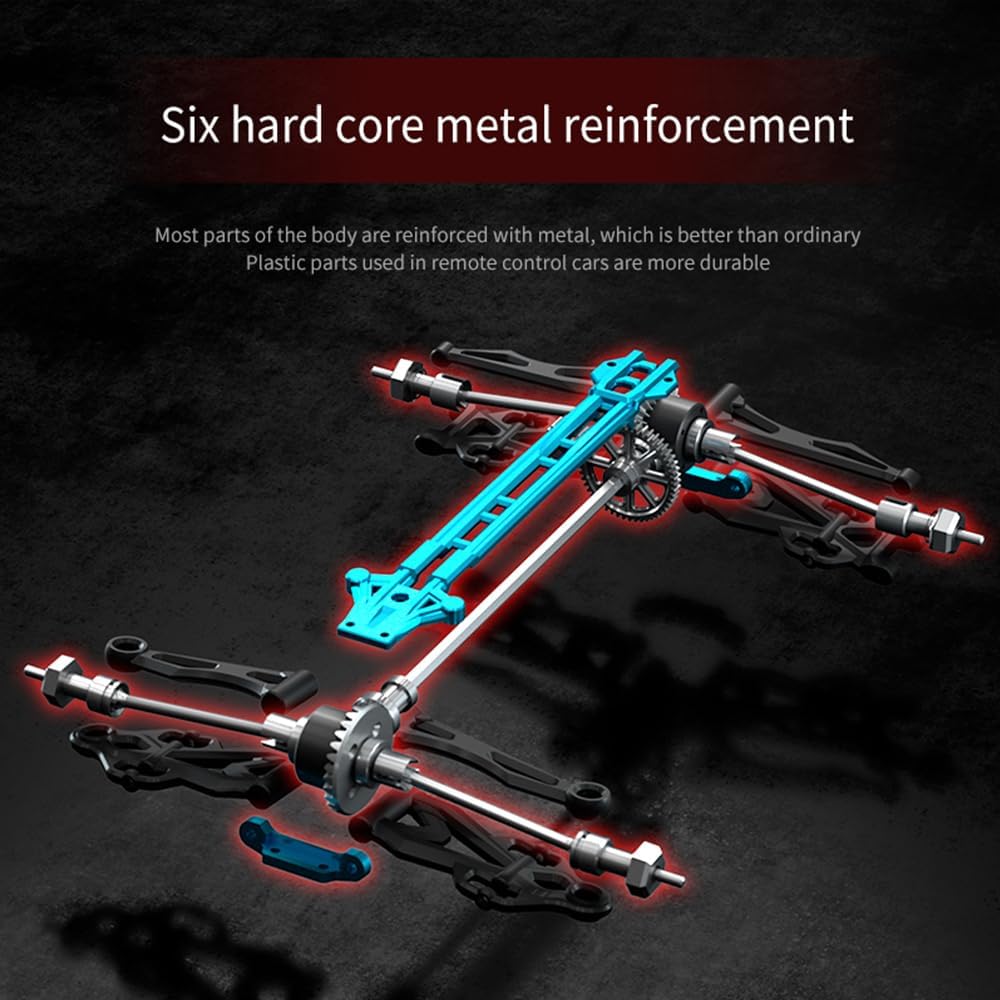
Image: Illustration of the six hard core metal reinforcement points within the RC car's body, indicating enhanced durability compared to plastic parts.

Image: A diagram illustrating the independent spring shock absorber system, designed to effectively alleviate bumps from small potholes on the road.
Troubleshooting
| Problem | Possible Cause | Solution |
|---|---|---|
| Car does not respond to remote. | Low battery in car or remote; not paired; interference. | Charge car battery, replace remote batteries, re-pair car and remote, move to an area with less interference. |
| Short operating time. | Battery not fully charged; old battery; continuous high-speed use. | Ensure batteries are fully charged, consider replacing old batteries, use lower speed settings for longer run times. |
| Car pulls to one side. | Steering trim not adjusted; damaged steering components. | Adjust steering trim on the remote control. Inspect steering linkages for damage. |
| Unusual noise during operation. | Loose gears; debris in drivetrain; damaged motor. | Inspect gears for damage or looseness, remove any debris, contact support if motor damage is suspected. |
| Car stops suddenly. | Overheat protection activated; battery depleted. | Allow car to cool down for 15-20 minutes. Recharge or replace battery. |
Specifications
| Feature | Detail |
|---|---|
| Model Number | 16201pro |
| Scale | 1:16 |
| Motor Type | Brushless Motor |
| Max Speed | Up to 45mph (70km/h) |
| Drive System | 4-Wheel Drive (4WD) |
| Remote Control Frequency | 2.4GHz |
| Remote Control Range | Up to 150 meters |
| Battery Type | 2S 7.4V 1500mAh LiPo (T-type plug) |
| Battery Discharge Rate | 15C |
| Approx. Single Battery Life | Up to 20 minutes |
| Chassis Material | Nylon, Metal parts, Electronic components |
| Shell Material | High toughness explosion-proof PVC |
| Suspension | Independent spring shock absorption, double wishbone independent suspension |
| Product Dimensions | 11.22 x 7.87 x 4.53 inches |
| Item Weight | 2.2 pounds |
| Recommended Age | 14 years and up |
Warranty and Support
TeeGGi stands behind the quality of its products. For any issues or inquiries regarding your 16201pro RC car, please contact TeeGGi customer support.
Additional protection plans may be available for purchase:
- 2-Year Protection Plan
- 3-Year Protection Plan
- Complete Protect (monthly subscription covering eligible purchases)
Please refer to your purchase documentation or the retailer's website for specific warranty terms and contact information.
