
1. Introduction
This manual provides detailed instructions for the installation, operation, maintenance, and troubleshooting of the MOLLOM G70-380V Variable Frequency Drive (VFD). This VFD is designed for controlling the speed of 0.75KW (1HP) motors with 380V input, supporting both single and three-phase input to three-phase output, and an output frequency range of 0-3000 Hz. Please read this manual thoroughly before use to ensure safe and efficient operation.
2. Safety Information
Important Safety Notes:
- The VFD must be directly connected to the motor. The start and stop functions of the motor must be controlled exclusively by the VFD to prevent damage.
- This VFD does not support external resistors.
- If your motor operates under heavy load conditions, consider selecting a VFD with a higher power rating or consult with a sales representative for model selection assistance.
- Avoid operating the VFD in environments with high humidity, water mist, water droplets, or where metal objects may fall into the unit, as this can cause short circuits and damage.
- Ensure proper grounding for safe operation.
3. Product Overview
The MOLLOM G70-380V VFD offers high performance and versatile control for various motor applications. Key features include:
- High Performance: Power: 0.75KW (1HP); Input voltage: AC 380V (±15%); Output voltage: AC 380V; Input frequency: 50/60 Hz; Output frequency: 0-3000 Hz. Supports both single or three-phase input to three-phase output.
- Versatile Control: Equipped with rich digital and analog control terminals, RS485 communication port, adopting standard international MODBUS main circuit control. Features strong anti-jamming capability.
- Smart Digital Display: User-friendly keyboard design with a clear digital display for intuitive operation. The detachable design allows for convenient remote control.
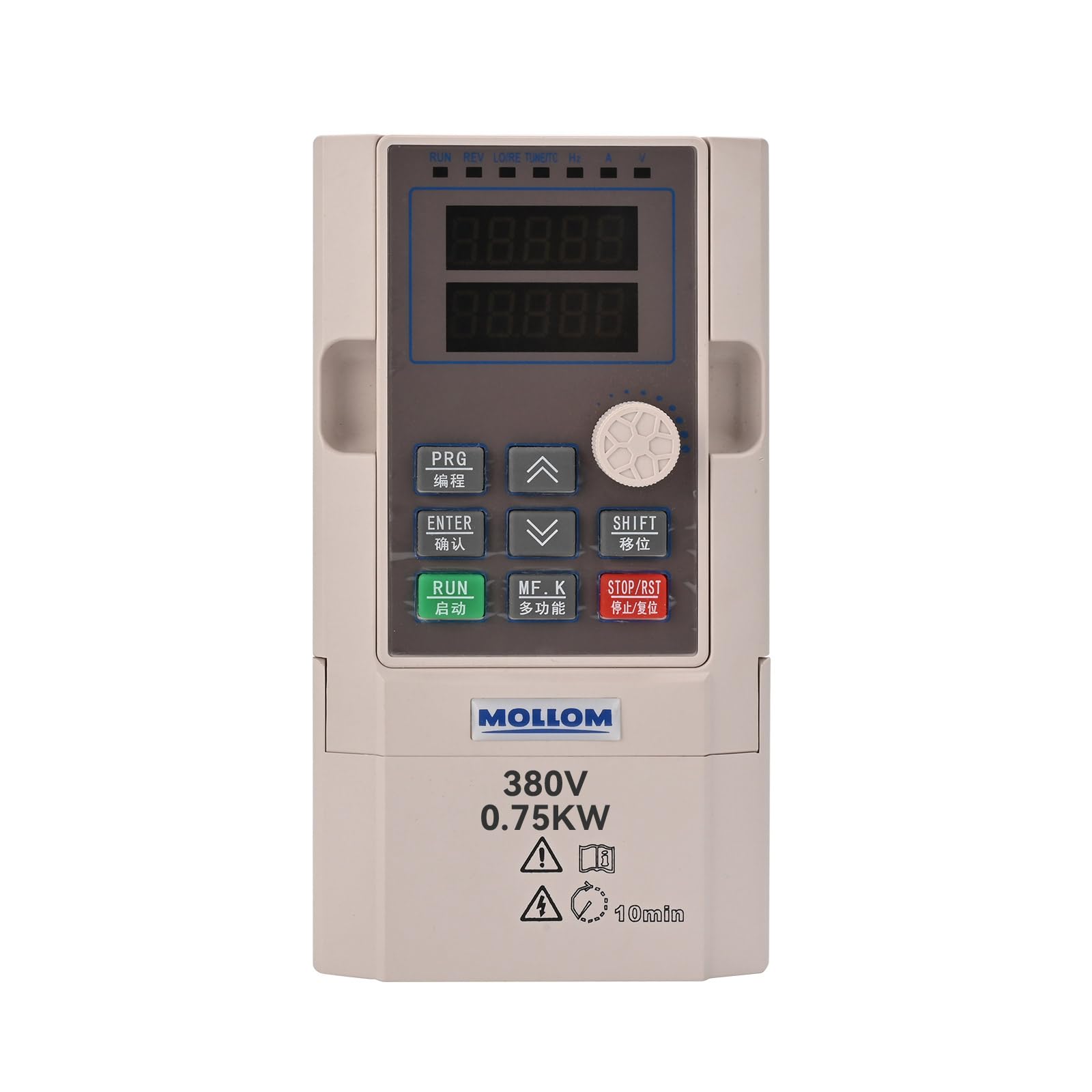
Figure 3.1: Front view of the MOLLOM G70-380V VFD.

Figure 3.2: Detailed view of the VFD control panel, showing buttons and display.

Figure 3.3: The VFD with its detachable keyboard, highlighting the remote control capability.

Figure 3.4: Illustration of the VFD's heat dissipation design for optimal performance.
4. Setup
4.1 Wiring Instructions
Proper wiring is crucial for the safe and correct operation of the VFD. Refer to the diagram and video for detailed connection steps.
- Input Power (R, S, T): For single-phase power, connect to any two of the R, S, T terminals. For three-phase power, connect to R, S, T terminals.
- Motor Connection (U, V, W): Connect the motor's three-phase output to the U, V, W terminals.
- Grounding: Ensure the VFD is properly grounded.
- RS485 Communication: Connect RS485+ and RS485- for communication.
- Control Device Power Supply: If an external control device requires power, connect GND and 24V terminals.

Figure 4.1: Wiring diagram for the MOLLOM VFD, showing input, output, and grounding connections.
4.2 Parameter Setting
The VFD requires specific parameter settings to match your motor's specifications. The following parameters are set for a 380V motor. Adjust according to your motor's nameplate data.
- Press the PRG button. The display will show F0.00.
- Use the SHIFT button to navigate to F1-01.
- Press the ENTER button. The display will show 0 to 2.2. Set F1-01 to the motor's power (e.g., 2.2 for 2.2KW).
- Press ENTER to confirm.
- Set F1-02 to the motor's voltage (e.g., 380 for 380V).
- Set F1-03 to the motor's current (AMP).
- Set F1-04 to the motor's frequency (HZ, e.g., 60 for 60Hz).
- Set F1-05 to the motor's RPM (e.g., 3450 for 3450 RPM).
- Press PRG to exit.
For detailed visual guidance on wiring and parameter setting, please watch the official product video below:
Video 4.1: MOLLOM VFD G75 and G70 Introduction and Setup Process. This video demonstrates the physical connections and initial parameter configuration for the VFD.
5. Operating Instructions
After successful setup and parameter configuration, the VFD is ready for operation. Use the control panel buttons to start, stop, and adjust motor speed. The digital display provides real-time feedback on operational status and parameters.
- RUN Button: Initiates motor operation.
- STOP/RST Button: Stops the motor or resets the VFD.
- UP/DOWN Arrows: Adjusts frequency or parameter values.
- Potentiometer: Provides fine-tuning for frequency adjustment.
- SHIFT Button: Used to shift digits during parameter input.
Always ensure the motor is connected and parameters are correctly set before initiating operation.
6. Maintenance
Regular maintenance helps ensure the longevity and reliable performance of your MOLLOM VFD.
- Cleaning: Keep the VFD clean and free from dust and debris. Use a soft, dry cloth for cleaning. Do not use liquid cleaners.
- Ventilation: Ensure adequate ventilation around the VFD to prevent overheating. Regularly check that cooling fans are clear and functioning.
- Connections: Periodically inspect all wiring connections for tightness and signs of wear or corrosion. Loose connections can lead to poor performance or damage.
- Environment: Maintain the VFD in a dry, clean environment, free from excessive humidity, corrosive gases, and extreme temperatures.
7. Troubleshooting
If you encounter issues with your VFD, refer to the following common troubleshooting steps. For complex problems, contact technical support.
- Motor Not Starting:
- Check power input connections.
- Verify motor parameters (F1-01 to F1-05) are correctly set according to the motor's nameplate.
- Ensure the RUN command is active.
- Overload/Overcurrent Error:
- Check if the motor is under heavy load. Consider a higher power VFD if consistently overloaded.
- Verify motor current (F1-03) setting.
- Inspect motor and wiring for short circuits or damage.
- No Output/Incorrect Frequency:
- Check motor wiring (U, V, W).
- Verify frequency settings (F1-04) and control mode.
- Display Errors:
- Refer to the VFD's specific error code manual (if available) or contact support.

Figure 7.1: Information regarding technical support. If you are unsure about parameter settings, provide motor parameters or a photo of the parameters for assistance.
8. Specifications
Detailed technical specifications for the MOLLOM G70-380V VFD:
| Feature | Specification |
|---|---|
| Manufacturer | Mollom |
| Product Dimensions | 4.5 x 3.5 x 6.5 inches (115x165x90mm) |
| Item Weight | 2.62 pounds |
| Item Model Number | G70-380V |
| Brand | Mollom |
| Voltage | 380 Volts |
| Material | Acrylonitrile Butadiene Styrene (ABS) |
| Display Type | Digital |
| Power | 0.75KW (1HP) |
| Input Frequency | 50/60 Hz |
| Output Frequency | 0-3000 Hz |
| Input Phase | Single or Three Phase |
| Output Phase | Three-phase |
| Included Components | 1x VFD |

Figure 8.1: Dimensions of the MOLLOM G70-380V VFD (115x165x90mm).
9. Warranty and Support
For warranty information, technical assistance, or further inquiries, please refer to the product packaging or contact Mollom customer support directly. Ensure you have your product model number (G70-380V) and purchase details available when seeking support.
You can visit the official Mollom store for more products and support: Mollom Store on Amazon.


