
Introduction
This manual provides comprehensive instructions for the setup, operation, maintenance, and troubleshooting of your TCL 98-Inch Class QM7K Series QD-Mini LED 4K UHD Google Smart TV. Please read this manual thoroughly before using your television to ensure proper functionality and safety.

Front view of the TCL 98-Inch Class QM7K Series TV, showcasing its large display and sleek design.
Package Contents and Dimensions
Before beginning the setup process, verify that all components are present and inspect them for any damage. The package should contain the following items:
- TCL TV with Google TV
- TV Stands
- Power Cable
- TV Remote + Batteries (2 AAA batteries included)
- Quick Start Guide
- User Manual (this document)

Diagram illustrating the dimensions of the TCL 98-Inch QM7K Series TV with and without its stand, alongside a list of included accessories.
The TV dimensions are approximately 85.8 inches (W) x 50.6 inches (H) x 2.4 inches (D) without the stand, and 85.8 inches (W) x 50.6 inches (H) x 16.5 inches (D) with the stand. The screen diagonal is 98 inches (97.5 inches actual diagonal).
Setup
1. Stand Installation
Carefully place the TV screen-down on a soft, flat surface to prevent damage. Attach the provided TV stands to the designated slots on the bottom of the television using the included screws. Ensure the stands are securely fastened.
2. Wall Mounting (Optional)
For wall mounting, refer to the instructions provided with your specific wall mount kit. The TCL QM7K Series features a seamless wall mounting design with side-facing ports for easy access and a slim profile against the wall.

Illustration of the TV's seamless wall mounting capability and integrated cable management for a clean setup.
3. Connecting Peripherals
Connect your external devices such as cable boxes, gaming consoles, or sound systems to the appropriate ports on the TV. The TV supports Ethernet, HDMI, RF, USB, and Wi-Fi connectivity.

Close-up view of the side-mounted connectivity ports on the TCL QM7K Series TV, including HDMI, USB, and Ethernet.
4. Initial Power-On and Google TV Setup
Plug the power cable into the TV and a power outlet. Press the power button on the remote control. Follow the on-screen instructions to complete the initial setup, including connecting to your Wi-Fi network and logging into your Google account for Google TV features.
Operating Instructions
Basic Operation
- Power On/Off: Press the power button on the remote control or the TV.
- Input Selection: Use the "Input" button on the remote to switch between connected devices (HDMI 1, HDMI 2, etc.).
- Volume Control: Use the Volume Up/Down buttons.
- Channel Navigation: Use the Channel Up/Down buttons for broadcast TV.
Google TV Smart OS
Your TCL QM7K TV runs on Google TV, providing access to a vast library of streaming apps, movies, and shows. The intuitive interface allows for easy content discovery based on your viewing habits and interests.

The Google TV home screen displaying various streaming applications and content recommendations.
- Voice Control: Use the built-in Google Assistant for hands-free voice commands. The remote also features a backlit voice control button for convenience in low-light conditions.
- App Access: Navigate to the "Apps" section to browse and launch your favorite streaming services.
Picture Settings and Technologies
The TCL QM7K Series incorporates advanced display technologies for an exceptional viewing experience:
- QD-Mini LED: Combines QLED and Mini-LED technologies for precise, pixel-level lighting control and stunning contrast.
- TCL Halo Control System: An advanced suite including Super High Energy LED Microchip, Super Condensed Micro Lens, Micro-OD Reduced Optical Distance, High Contrast HVA Panel, Enhanced QLED, Zero Delay Transient Response, Bi-direction 23-bit Backlight Controller, and Dynamic Light Algorithm for "Halo-Free" images.
- LD2500 Precise Dimming Series: Offers up to 2500 precisely controlled local dimming zones for pure black levels.
- HDR 3000 Nits: Provides high peak brightness for excellent picture quality in various lighting conditions.
- CrystGlow HVA Panel: An anti-reflective coating that ensures crisp and visible image details even in bright rooms, with ultra-wide viewing angles.
- Enhanced QLED: Features new, more vibrant quantum crystals for up to 97% of DCI-P3 Color Gamut.
- AIPQ Pro Processor: Utilizes AI to dynamically control picture clarity, contrast, color, motion, upscaling, and backlighting.
- Filmmaker Mode: A special picture mode that preserves the creative intent of the filmmaker by adjusting post-processing features, color, contrast, and brightness.

Visual representation of QD-Mini LED technology, showing high zone dimming for enhanced contrast.

Diagram illustrating the components of the TCL Halo Control System, including Micro-OD and Dynamic Light Algorithm.

Comparison showing the enhanced brightness and detail with HDR 3000 Nits compared to conventional HDR.
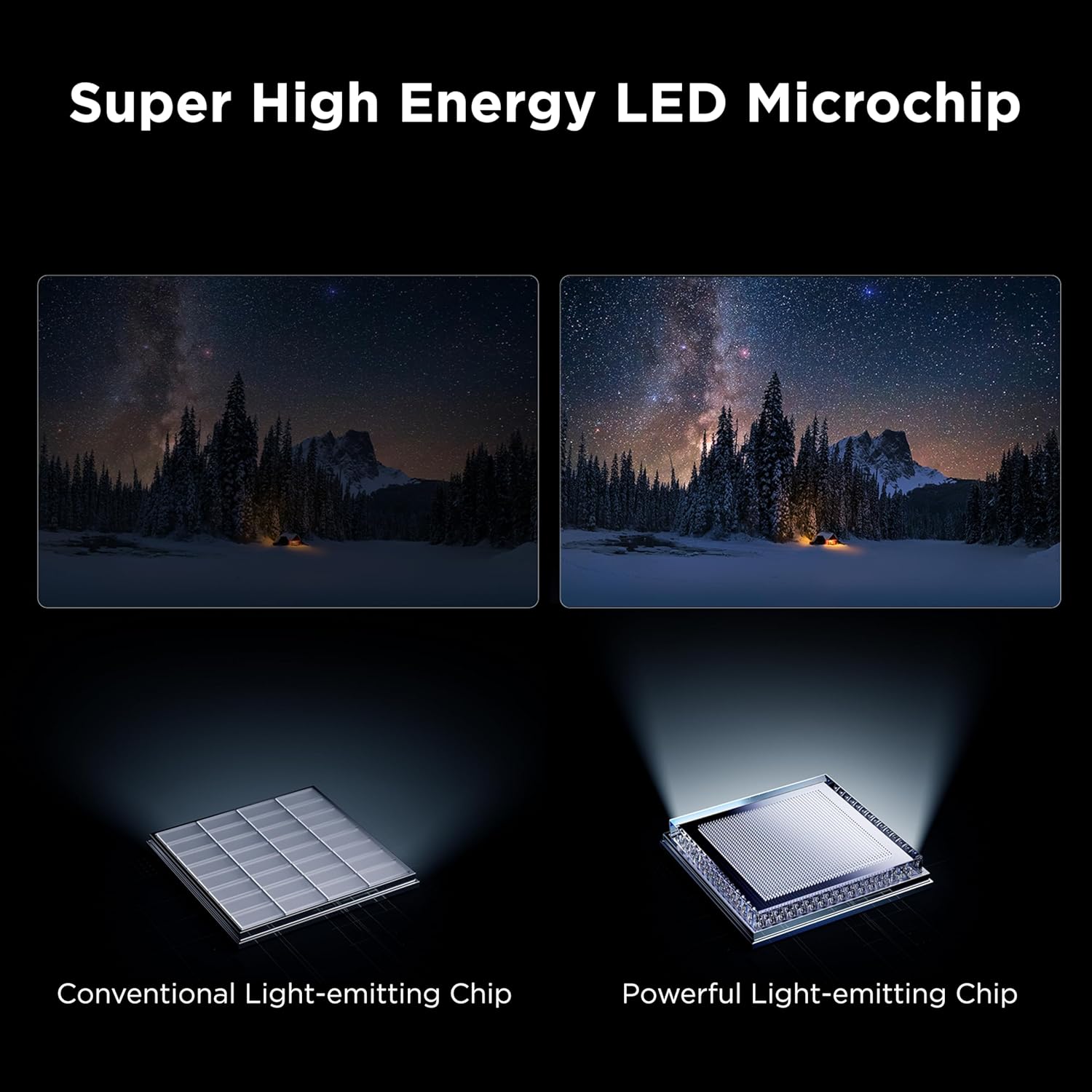
Visual demonstration of the CrystGlow HVA Panel's anti-reflective properties, showing improved clarity.

Detailed illustration of the AIPQ Pro Processor chip, highlighting its role in image processing.
Audio Settings and Features
Experience immersive sound with the following audio technologies:
- Audio by Bang & Olufsen: Delivers elevated sound experiences.
- Dolby Atmos Audio: Advanced spatial audio processing for movies, TV shows, and video games.
- DTS Virtual:X: Advanced audio post-processing offering immersive 3D sound from your TV speakers.

Visual representation of sound waves emanating from the TV, indicating the Bang & Olufsen audio experience.
Gaming Features
The TCL QM7K Series is optimized for gaming performance:
- 144Hz Native Panel Refresh Rate: Provides ultra-smooth motion for fast-paced action, sports, and video games without image blur.
- Game Accelerator 288: Offers more responsive, lag-free gameplay with blistering fast 288 VRR (Variable Refresh Rate).
- Auto Game Mode (ALLM) with AMD FreeSync Premium Pro: Automatically enables game mode for the lowest possible input lag and latency.

Dynamic image illustrating the smooth motion provided by the 144Hz native refresh rate, ideal for gaming and fast action scenes.

Action-packed image demonstrating the benefits of Game Accelerator 288 for responsive gaming.
Maintenance
Cleaning the Screen
To clean the screen, gently wipe it with a soft, lint-free cloth. For stubborn marks, slightly dampen the cloth with water or a specialized screen cleaner. Avoid using harsh chemicals, abrasive materials, or direct spraying of liquids onto the screen.
Cleaning the TV Body
Wipe the TV body and stand with a soft, dry cloth. Do not use solvents or alcohol-based cleaners, as they may damage the finish.
General Care
- Avoid placing the TV in direct sunlight or near heat sources.
- Ensure adequate ventilation around the TV.
- Unplug the TV during lightning storms or when it will be unused for extended periods.
Troubleshooting
This section addresses common issues you might encounter with your TCL QM7K Series TV. If the problem persists after trying these solutions, please contact TCL customer support.
| Problem | Possible Cause / Solution |
|---|---|
| No Power / TV does not turn on. |
|
| No Picture / Poor Picture Quality. |
|
| No Sound / Poor Sound Quality. |
|
| Remote Control Not Working. |
|
| TV Turns On/Off Randomly. |
|
| Wi-Fi Connection Issues. |
|
Specifications
| Feature | Detail |
|---|---|
| Brand | TCL |
| Model Number | 98QM7K |
| Screen Size | 98 Inches (97.5" diagonal) |
| Display Technology | 4K UHD, Mini LED, QLED |
| Resolution | 4K (3840 x 2160) |
| Refresh Rate | 144 Hz Native, 288 Hz Variable Gaming Refresh Rate |
| Peak Brightness | HDR 3000 Nits |
| Dimming Zones | Up to LD2500 Precise Dimming Series (2500 zones) |
| Panel Type | CrystGlow HVA Panel (Anti-Reflective) |
| Processor | AIPQ Pro Processor |
| Audio | Bang & Olufsen Audio, Dolby Atmos, DTS Virtual:X |
| Operating System | Google TV |
| Connectivity | Ethernet, HDMI, RF, USB, Wi-Fi |
| Product Dimensions (without stand) | 2.4"D x 85.8"W x 50.6"H |
| Item Weight | 121.9 Pounds |
| Included Components | Power Cable, Remote Control, Stand, User Manual |
| Batteries | 2 AAA batteries (included) |
Warranty and Support
For warranty information specific to your TCL QM7K Series TV, please refer to the warranty card included in your product packaging or visit the official TCL support website. TCL provides customer support for technical assistance and service inquiries.
You can typically find support contact details on the TCL website or within the TV's settings menu under "About" or "Support."
For additional resources and product information, visit the TCL Store on Amazon.


