
1. Introduction
This manual provides essential information for the safe and efficient installation, operation, and maintenance of the Tridonic Linear Excite USB Series 35 Watts Constant Current LED Driver. This device is designed for professional lighting applications, offering adjustable output current and 0-10V dimming capabilities.
Please read this manual thoroughly before installation and retain it for future reference.
2. Safety Information
WARNING: Risk of electric shock. Installation and servicing should only be performed by qualified personnel. Disconnect power before installation or servicing.
- This device is UL Listed (E345983), Class P, and Class 2 compliant, meeting UL8750 and UL1310 standards.
- Meets FCC Part 15 Class A for electromagnetic compatibility.
- Meets UL 8750 SF3.1 Isolation and strictest flicker-free performance standards.
- Suitable for dry and damp locations (IP20 rated).
- For connection, use wire rated for at least 90°C (194°F).
- CAUTION: Ensure only one power supply is present for the connected load to avoid damage or hazard.
3. Product Overview and Features
The Tridonic Linear Excite USB Series LED Driver is a high-performance constant current power supply for LED modules. Key features include:
- Constant Current Output: Adjustable between 150mA and 1,050mA in 1mA increments via USB programming.
- High Efficiency: Up to 90% efficiency, minimizing energy waste.
- 0-10V Dimming: Smooth, flicker-free dimming from 0% to 100% via a 0-10V interface.
- 12V AUX Output: Provides a 12V auxiliary output to power sensors or additional control devices.
- Robust Protection: Integrated safeguards against over-temperature, short-circuit, overload, no-load conditions, and improper input voltage.
- Durable Design: Housed in a white metal casing with IP20 protection, suitable for dry and damp environments.
- Long Lifespan: Nominal lifetime of up to 50,000 hours.
4. Setup and Installation
Before beginning installation, ensure the main power supply is disconnected.
4.1 Mounting
Mount the LED driver in a location that allows for adequate ventilation and is within its specified operating temperature range (tc = +75 °C max). The IP20 rating indicates suitability for dry and damp indoor locations. Secure the driver using appropriate fasteners through the designated mounting points on the metal casing.
4.2 Wiring Connections
Refer to the product label and the diagram below for correct wiring. All connections must be secure and comply with local electrical codes.
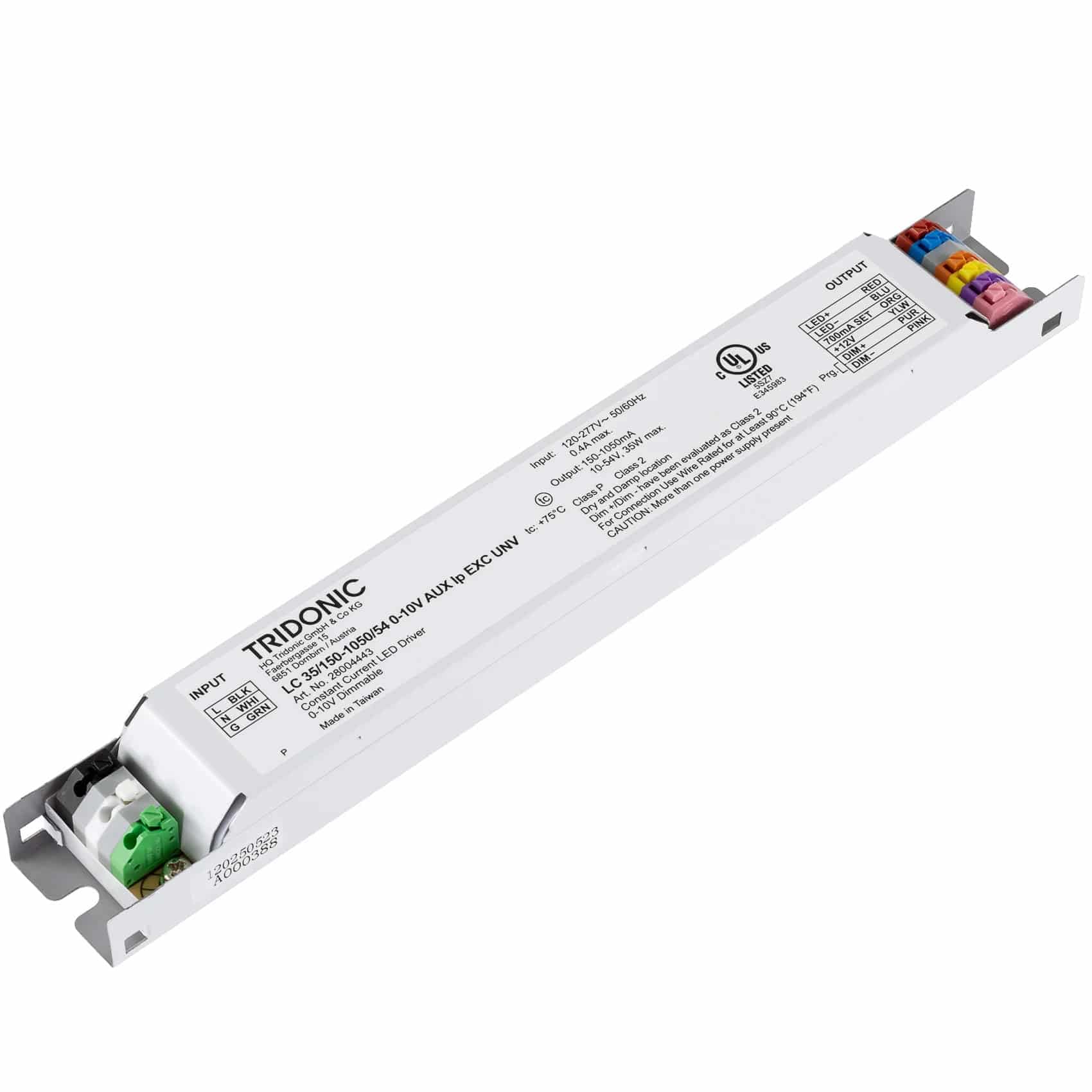
An overhead view of the Tridonic Linear Excite USB Series LED Driver. The image shows the input terminals (L BLK, N WHI, G GRN) on the left, the product model number (LC 35/150-1050/54 0-10V AUX lp EXC UNV), and the output terminals (LED+ RED, LED- BLU, 700mA SET ORG, +12V YLW, DIM+ PUR, DIM- PINK) on the right. Various specifications and certifications like UL and CE are printed on the device casing.
- Input (AC Mains):
- L (BLK): Connect to Live/Phase (Black wire).
- N (WHI): Connect to Neutral (White wire).
- G (GRN): Connect to Ground (Green wire).
- Output (DC to LED Module):
- LED+ (RED): Connect to the positive terminal of the LED module.
- LED- (BLU): Connect to the negative terminal of the LED module.
- Dimming Control (0-10V):
- DIM+ (PUR): Connect to the positive terminal of the 0-10V dimmer.
- DIM- (PINK): Connect to the negative terminal of the 0-10V dimmer.
- Auxiliary Output:
- +12V (YLW): Provides 12V DC output for external devices.
- Current Setting:
- 700mA SET (ORG): This terminal is for specific current setting configurations, typically used for factory default or specific programming. Refer to advanced programming instructions if needed.
5. Operating Instructions
5.1 Power On
Once all connections are securely made and verified, restore power to the LED driver. The connected LED module should illuminate.
5.2 0-10V Dimming
The driver supports 0-10V dimming. Connect a compatible 0-10V dimmer to the DIM+ and DIM- terminals. Adjusting the voltage from 0V to 10V will linearly control the LED output from 0% to 100% brightness. A 0V input will dim the LEDs to off.
5.3 Output Current Adjustment (USB Programming)
The output current of the LED driver can be precisely adjusted from 150mA to 1,050mA in 1mA steps using Tridonic's USB programming interface and software (sold separately). This allows for customization to match specific LED module requirements. Refer to the Tridonic programming guide for detailed instructions on using the USB interface.
5.4 12V AUX Output
The 12V AUX output (YLW wire) can be used to power low-voltage auxiliary devices such as sensors or control modules, provided their current draw does not exceed the driver's auxiliary output capacity.
6. Maintenance
The Tridonic LED driver is designed for long-term, maintenance-free operation. However, periodic inspection is recommended:
- Ensure the driver's casing is free from dust and debris to maintain proper heat dissipation.
- Check all wiring connections for tightness and integrity.
- Verify that the ambient temperature around the driver does not exceed its specified operating limits.
- Do not attempt to open or repair the driver. Refer servicing to qualified personnel.
7. Troubleshooting
If the LED driver or connected lighting system is not functioning as expected, consider the following:
- No Light Output:
- Check if the main power supply is connected and active.
- Verify all input and output wiring connections are correct and secure.
- Ensure the LED module is correctly connected and not faulty.
- Check the 0-10V dimmer setting; it might be set to 0V (off).
- Flickering or Unstable Light:
- Inspect wiring for loose connections or damage.
- Ensure the 0-10V dimmer is compatible and functioning correctly.
- Verify the input voltage is within the specified range (120-277V AC).
- Incorrect Brightness or Dimming Issues:
- Confirm the 0-10V dimmer is properly connected and calibrated.
- If output current was programmed via USB, ensure the correct current setting was applied.
- Driver Overheating:
- Ensure adequate ventilation around the driver.
- Verify the ambient temperature is within operating limits.
- Check if the load connected to the driver exceeds its maximum output power (35W).
If issues persist after troubleshooting, contact Tridonic technical support or an authorized service provider.
8. Specifications
| Parameter | Value |
|---|---|
| Model Number | LC 35/150-1050/54 (28004443) |
| Type | Constant Current LED Driver |
| Max Output Power | 35W |
| Output Current Range | 150-1,050mA (1mA Step), 150mA default |
| Dimming Control | 0-10V |
| Output Voltage | 10-54V DC |
| Rated Supply Voltage | 120–277 V AC |
| Mains Frequency | 50/60 Hz |
| IP Rating | IP20 Dry and Damp Location |
| Max Case Temperature (tc) | +75 °C |
| Certifications | UL Listed E345983, Class P, Class 2, FCC Part 15 Class A |
| Dimensions (L x W x H) | 9.00 x 1.20 x 0.90 inch |
| Product Weight | 8.6 oz |
| Nominal Lifetime | Up to 50,000 hours |
9. Warranty
This Tridonic LED driver comes with a 5-year warranty, valid for operating conditions where the maximum case temperature (tc) does not exceed 75 °C. Please retain your proof of purchase for warranty claims. For full warranty terms and conditions, refer to the official Tridonic website or contact customer support.
10. Support
For technical assistance, product inquiries, or service requests, please contact Tridonic customer support or your authorized Tridonic distributor. Visit the official Tridonic website for the latest product information, software updates, and contact details.


