
Introduction
This manual provides detailed instructions for the setup, operation, and maintenance of your Wildgame Innovations Terra XT 2.0 Cellular Camera. Please read this manual thoroughly before using the camera to ensure optimal performance and longevity. The Terra XT 2.0 is designed to capture high-quality images and videos in outdoor environments, offering remote monitoring capabilities through cellular connectivity.

Image: Front view of the Wildgame Innovations Terra XT 2.0 Cellular Camera.
Setup
1. Battery Installation
The Terra XT 2.0 camera is powered by an 8-piece battery tray. For best performance, use new, high-quality AA alkaline or lithium batteries.
- Open the camera housing latches and gently open the front cover.
- Locate the battery tray.
- Insert eight (8) AA batteries into the tray, ensuring correct polarity (+/-) as indicated.
- Close the battery tray securely.
Note: A 12V DC auxiliary jack is available for connecting external power packs for extended operation. Ensure the external power source is compatible with the camera's voltage requirements.
2. SD Card Installation
A compatible SD card (up to 32GB, Class 10 or higher recommended) is required to store photos and videos.
- With the camera powered off, locate the SD card slot.
- Insert the SD card into the slot until it clicks into place. Ensure the card is inserted in the correct orientation.
- To remove, press the SD card inward until it springs out.
3. Mounting the Camera
The Terra XT 2.0 features an integrated multi-position mount and a ¼-20 threaded insert for versatile mounting options.
- Tree Mount: Use the included strap to secure the camera to a tree or pole. Thread the strap through the designated slots on the camera housing and tighten securely.
- Tripod/Mounting Arm: Utilize the ¼-20 threaded insert on the bottom of the camera to attach it to a compatible tripod or mounting arm.

Image: A person adjusting the Terra XT 2.0 camera mounted on a pole in a field.
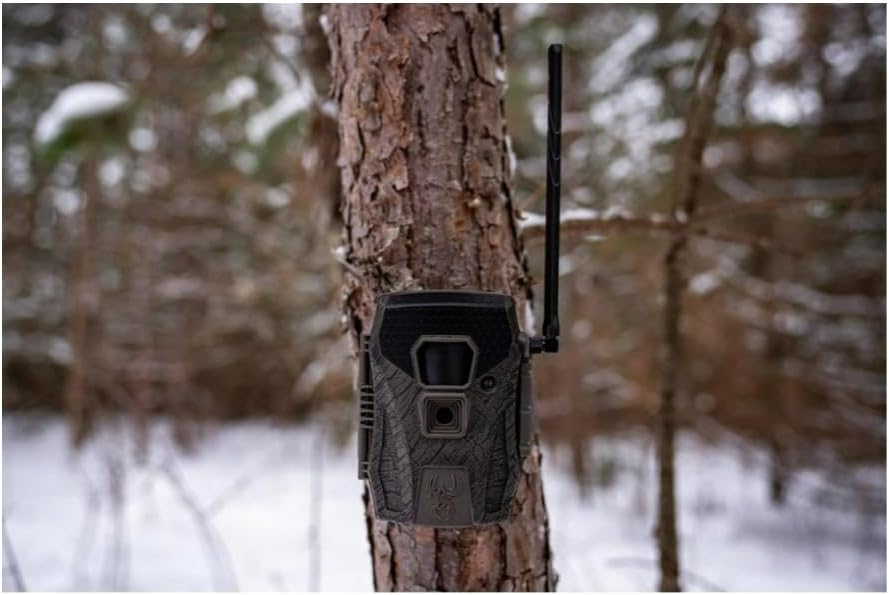
Image: The Terra XT 2.0 camera securely mounted to a tree trunk in a winter landscape.
4. Huntsmart App Integration
The Terra XT 2.0 is compatible with the Huntsmart App, allowing for remote control and access to photos and videos.
- Download the Huntsmart App from your smartphone's app store.
- Follow the in-app instructions to create an account and pair your Terra XT 2.0 camera.
- Once paired, you can remotely adjust settings, request photos/videos, and view captured media.
Operating Instructions
1. Powering On/Off
To power on the camera, slide the power switch to the 'ON' position. To power off, slide the switch to 'OFF'.
2. Basic Operation Modes
The camera offers various modes for capturing images and videos:
- Photo Mode: Captures still images at 24MP resolution.
- Video Mode: Records video footage at 720P resolution.
- Burst Mode: Captures 1-3 photos in quick succession, ideal for fast-moving subjects.

Image: A detailed view of the camera's internal display, showing various settings and options.
3. Customizable Settings
Adjust the camera settings to suit your specific monitoring needs:
- Time-Out Delays: Set the delay between captures from 2-59 seconds or 1-59 minutes. This controls how frequently the camera takes photos or videos after detecting motion.
- Trigger Speed: The camera features a quick 0.5-second trigger speed to capture action promptly.
- Detection and Flash Range: The camera has an 80ft detection and flash range, providing reliable performance in various environments.
4. Remote Control via Huntsmart App
Once connected to the Huntsmart App, you can:
- Request photos and videos on demand.
- Adjust camera settings remotely.
- Monitor camera status and battery life.
Maintenance
1. Battery Replacement
Regularly check battery levels, especially when using the cellular function, as it consumes more power. Replace all batteries in the 8-piece tray simultaneously to ensure consistent power delivery.
2. Cleaning
Keep the camera lens, PIR sensor, and flash clear of dirt, dust, and debris. Use a soft, dry cloth for cleaning. Avoid abrasive materials or harsh chemicals.
3. Storage
When not in use for extended periods, remove batteries and the SD card. Store the camera in a cool, dry place away from direct sunlight and extreme temperatures.
Troubleshooting
If you encounter issues with your Terra XT 2.0 camera, refer to the following common problems and solutions:
- Camera Not Powering On:
- Ensure batteries are inserted correctly with proper polarity.
- Replace old or depleted batteries with new ones.
- Check if the power switch is fully in the 'ON' position.
- Poor Battery Life:
- Cellular transmission and frequent captures (e.g., short time-out delays, burst mode) consume more power. Adjust settings to optimize battery life.
- Use high-quality lithium batteries for extended performance in cold weather.
- Consider using an external 12V DC power source for prolonged deployment.
- No Photos/Videos Captured:
- Verify the SD card is properly inserted and not full. Format the SD card if necessary (this will erase all data).
- Check the camera's detection range and ensure there are no obstructions in front of the PIR sensor.
- Ensure the camera is in an active capture mode (Photo or Video).
- No Cellular Connection/App Issues:
- Ensure the camera is in an area with adequate cellular signal.
- Verify your Huntsmart App account and subscription are active.
- Restart the camera and the Huntsmart App on your smartphone.
If problems persist, contact Wildgame Innovations customer support for further assistance.
Specifications
| Feature | Specification |
|---|---|
| Model Name | Terra XT 2.0 |
| Model Number | WGI-TERACC2 |
| Image Resolution | 24 Megapixels |
| Video Resolution | 720p |
| Trigger Speed | 0.5 seconds |
| Detection Range | 80 feet |
| Flash Range | 80 feet |
| Power Source | 8 AA Batteries (8-piece battery tray) or 12V DC external |
| Connectivity | Cellular, Wireless (App Controlled) |
| Compatible Devices | Smartphone (via Huntsmart App) |
| Mounting Type | Tree Mount, ¼-20 Threaded Insert |
| Special Features | HD Resolution, Motion Sensor, Night Vision, Weather Proof |
| Dimensions (L x W x H) | 7.48 x 5.51 x 3.15 inches |
| Item Weight | 1.17 pounds |
| UPC | 888151066850 |
Warranty and Support
Warranty Information
Wildgame Innovations products are designed for durability and performance. For specific warranty details regarding your Terra XT 2.0 Cellular Camera, please refer to the warranty card included with your purchase or visit the official Wildgame Innovations website. Keep your proof of purchase for warranty claims.
Customer Support
If you require technical assistance, have questions about your product, or need to report an issue, please contact Wildgame Innovations customer support. Contact information can typically be found on the product packaging, the official website, or within the Huntsmart App.
When contacting support, please have your model number (WGI-TERACC2) and any relevant purchase details ready to expedite the process.


