
ANCEL HD431, DS200
User Manual: ANCEL HD431 Heavy Duty Truck Scanner & DS200 Full Systems OBD2 Scanner
Model: HD431, DS200 | Brand: ANCEL
1. Introduction
This manual provides comprehensive instructions for the operation, maintenance, and troubleshooting of your ANCEL HD431 Heavy Duty Truck Scanner and ANCEL DS200 Full Systems OBD2 Scanner. These devices are designed to assist in vehicle diagnostics, maintenance, and repair, offering advanced features for both heavy-duty trucks and passenger vehicles.
The ANCEL HD431 specializes in heavy-duty truck diagnostics, particularly DPF regeneration and reset functions for Detroit and Paccar engines. The ANCEL DS200 is a versatile full-systems OBD2 scanner with over 15 reset services for a wide range of vehicles.

Image: The ANCEL HD431 heavy-duty truck scanner (bottom) and the ANCEL DS200 full-systems OBD2 scanner (top), showcasing their compact designs and user interfaces.
2. Setup
2.1 Unpacking and Initial Inspection
- Carefully unpack all components from the packaging.
- Verify that all items listed in the packing list are present.
- Inspect the devices and accessories for any signs of damage. If any damage is found, contact customer support immediately.
2.2 Charging the Device (DS200)
The ANCEL DS200 features a built-in 1500mAh battery. Before first use, ensure the device is fully charged.
- Connect the provided USB cable to the DS200 and a suitable power adapter (not included) or a computer USB port.
- The charging indicator will illuminate. A full charge typically takes 2-3 hours.
2.3 Software Updates
Both HD431 and DS200 offer lifetime free updates. It is recommended to update the software before first use to ensure access to the latest vehicle models and diagnostic functions.
- Connect the device to a Wi-Fi network (if applicable for DS200) or a computer with internet access.
- Navigate to the "Update" or "Settings" menu on the device.
- Follow the on-screen prompts to download and install available updates.
3. Operating Instructions
3.1 Connecting to the Vehicle
- Locate the vehicle's OBD-II port (typically under the dashboard on the driver's side for passenger vehicles, or in the cab for heavy-duty trucks).
- For HD431, use the appropriate 6-pin, 9-pin, or 16-pin connector for heavy-duty trucks.
- For DS200, use the standard 16-pin OBD-II connector.
- Ensure the vehicle's ignition is in the "ON" position (engine can be off or running, depending on the test).
- Connect the diagnostic cable from the scanner to the vehicle's OBD-II port. The scanner will power on automatically (if not battery-powered).
3.2 ANCEL DS200: Full Systems Diagnosis & Reset Services
The DS200 provides comprehensive diagnostics for all available vehicle modules and offers various reset functions.
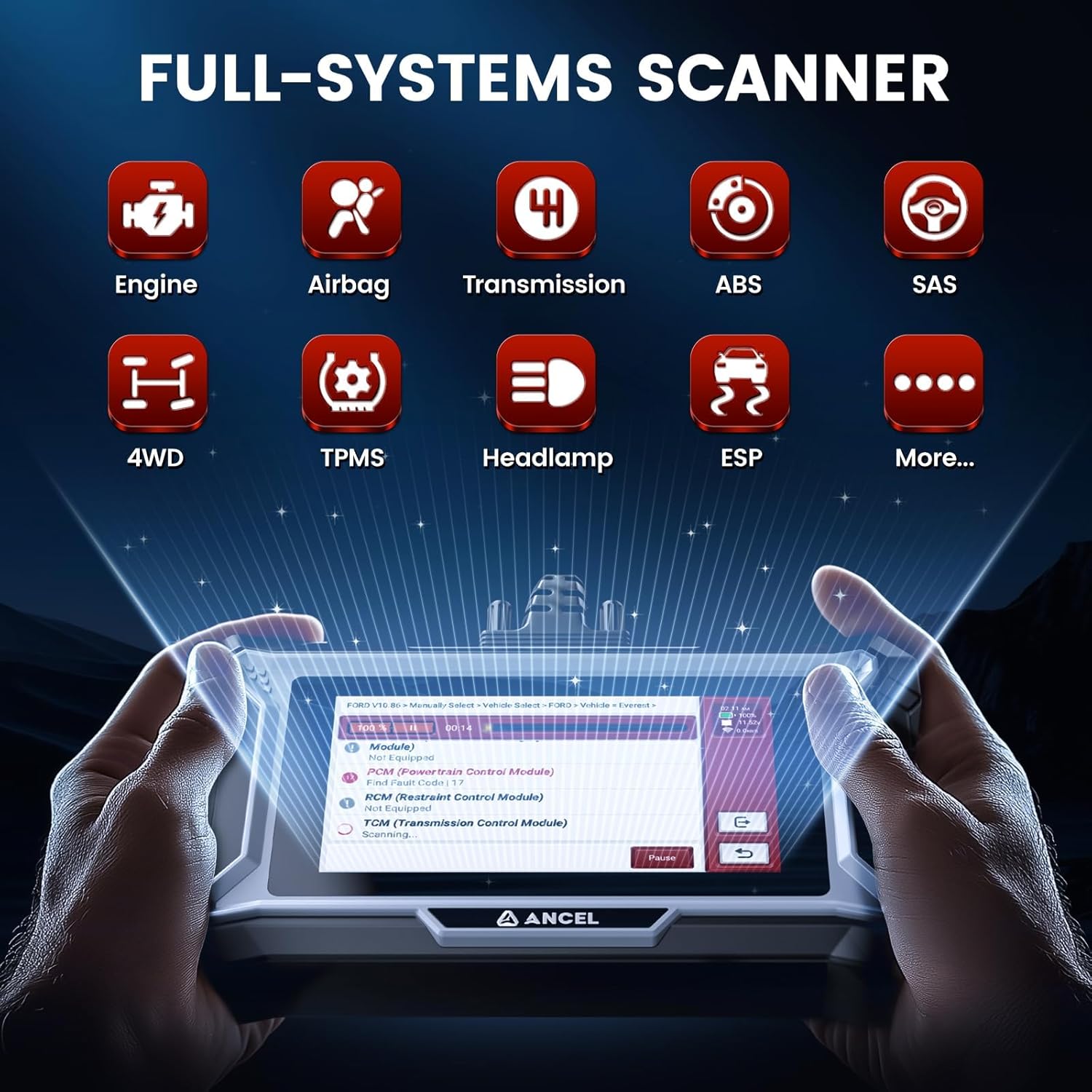
Image: The ANCEL DS200 interface displaying icons for various vehicle systems it can diagnose, including Engine, Airbag, Transmission, ABS, SAS, 4WD, TPMS, Headlamp, and ESP.
- From the main menu, select "Diagnosis" to begin a full system scan.
- The scanner will automatically identify the vehicle's VIN and establish communication.
- Once connected, you can select specific modules (e.g., Engine, ABS, SRS, Transmission) to read fault codes, view live data, or perform active tests.
- For reset services, navigate to the "Maintenance" or "Reset Services" menu.
- Select the desired function (e.g., ABS Bleeding, Oil Reset, DPF Regen Reset, TPMS Reset, Injector Coding, SAS Reset, Battery Matching, Throttle Relearn).
- Follow the on-screen instructions to complete the reset procedure.

Image: A visual representation of the 15+ hot reset services available on the ANCEL DS200, including Air/Fuel Ratio Reset, Gearbox Relearn, Brake Pad Reset, EGR Adaption, TPMS Reset, NOX Sensor Reset, Gear Learn, ABS Bleeding, Battery Matching, Oil Reset, SAS Reset, Injector Coding, Throttle Relearn, AdBlue Reset, and DPF Regen.

Image: Diagram illustrating the ABS Bleeding function, showing how it ensures safe driving by expelling air for optimal brake performance, addressing issues like soft brake pedals or bad braking after brake fluid addition/replacement or ABS parts repair/replacement.

Image: Diagram demonstrating the SAS (Steering Angle Sensor) Reset function, which helps re-align the steering column for better driving if the car is off course, showing a visual comparison of incorrect (270°-70° X) and correct (270°-90° ✓) alignment.
3.3 ANCEL HD431: Heavy Duty Truck Diagnostics & DPF Regeneration
The HD431 is specifically designed for heavy-duty truck diagnostics, with a focus on DPF functions for Paccar and Detroit engines.
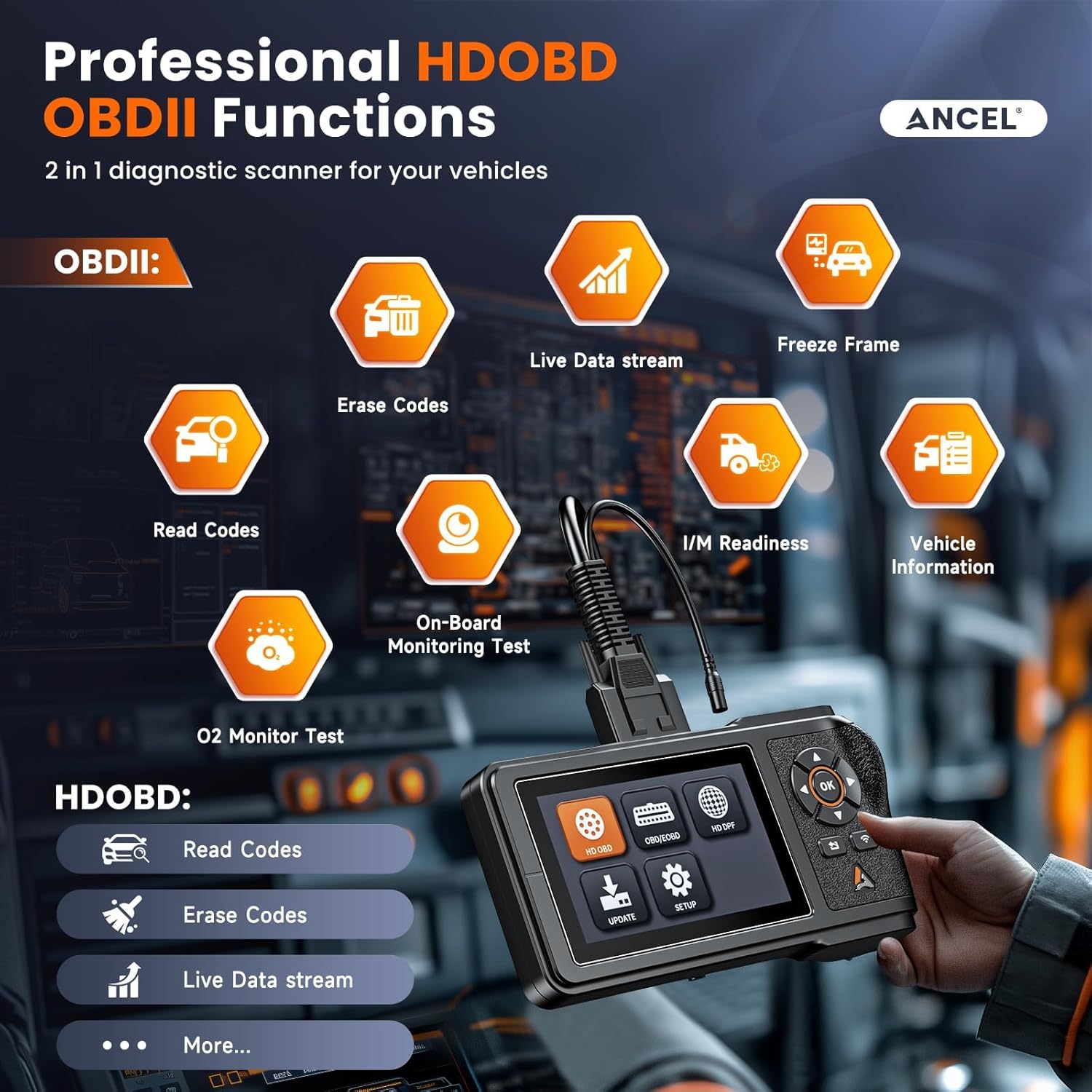
Image: The ANCEL HD431 interface showing both OBDII and HDOBD functions. OBDII functions include Read Codes, Erase Codes, Live Data stream, Freeze Frame, I/M Readiness, On-Board Monitoring Test, and O2 Monitor Test. HDOBD functions include Read Codes, Erase Codes, and Live Data stream.
- From the main menu, select "HD OBD" or "HD DPF" depending on the required function.
- For general diagnostics, select "HD OBD" to read/erase codes and view live data for heavy-duty systems.
- For DPF functions, select "HD DPF".
- Choose the specific DPF function:
- Forced Regeneration: Initiates a DPF regeneration cycle to burn off accumulated soot.
- DPF Replacement: Used after replacing the DPF filter to reset learned values.
- DPF Reset: Resets DPF-related parameters.
- Follow the on-screen prompts carefully during DPF procedures. Ensure the vehicle is in a safe, well-ventilated area and meets all conditions for regeneration (e.g., engine temperature, fuel level).

Image: Comparison showing a truck with excessive smoke from a clogged DPF (left) versus a clean exhaust after using the ANCEL HD431 for advanced DPF regeneration (right). It highlights the HD431's capability to solve DPF issues for Detroit and Paccar engines.

Image: A circular diagram illustrating the wide compatibility of the ANCEL HD431 with various truck types, including cement trucks, tow trucks, Mack trucks, vans, dump trucks, and garbage trucks, indicating its broad applicability for heavy-duty vehicles.
4. Maintenance
- Cleaning: Use a soft, damp cloth to clean the device's screen and casing. Avoid abrasive cleaners or solvents.
- Storage: Store the scanner in a dry, cool place away from direct sunlight and extreme temperatures.
- Cable Care: Handle diagnostic cables carefully. Avoid bending or crimping them excessively, as this can damage internal wires.
- Software Updates: Regularly check for and install software updates to ensure optimal performance and compatibility with new vehicle models.
5. Troubleshooting
| Problem | Possible Cause | Solution |
|---|---|---|
| Device does not power on. | No power from OBD-II port; DS200 battery drained. | Check vehicle's OBD-II port fuse. Ensure vehicle ignition is ON. Charge DS200 battery. |
| Communication error with vehicle. | Incorrect connection; incompatible protocol; damaged cable. | Ensure cable is securely connected. Verify vehicle compatibility. Try a different vehicle or cable if available. |
| DPF Regeneration fails (HD431). | Vehicle conditions not met (e.g., engine temp, fuel level); underlying engine fault. | Check all vehicle parameters required for DPF regen. Address any active engine fault codes before attempting regen. |
| Screen freezes or device is unresponsive. | Software glitch; low memory. | Perform a soft reset (refer to device manual for specific steps, usually holding power button). Ensure latest software updates are installed. |
6. Specifications
| Feature | Description |
|---|---|
| Brand | ANCEL |
| Model (HD431) | Heavy Duty Truck Scanner |
| Model (DS200) | Full Systems OBD2 Scanner |
| Display (HD431) | 4.3-inch HD screen |
| Display (DS200) | 5-inch touchscreen |
| Memory (HD431) | 8G |
| Battery (DS200) | Built-in 1500mAh |
| Operating System (DS200) | Android OS |
| Processor (DS200) | Quad-core processor |
| Connectivity (HD431) | 6 & 9 pin, 16 pin diverse connectors |
| Updates | Lifetime Free Updates |
7. Warranty and Support
ANCEL products are designed for reliability and performance. For specific warranty details, please refer to the warranty card included with your product or visit the official ANCEL website.
- Technical Support: For technical assistance, troubleshooting, or operational questions, please contact ANCEL customer support.
- Online Resources: Visit the ANCEL official website for FAQs, software downloads, and additional product information.
- Live Chat Support: The DS200 offers live chat support for immediate assistance.
Note: The reset functions may vary by car model and year. Provide your vehicle's details for assistance if you encounter compatibility issues.
Ask a question about this manual
Ask about setup, troubleshooting, compatibility, parts, safety, or missing instructions. Manuals+ will review the question and use this page’s manual context to help answer it.