
1. Introduction
This manual provides essential information for the safe and effective use of your GT POWER AC Adapter, Model 102. This adapter is specifically designed to provide power to the Cadence Blood Pressure Monitor TMB-2092-G. It features built-in protection mechanisms to ensure reliable operation and device safety.
2. Safety Information
WARNING: To reduce the risk of electric shock, fire, or injury, always follow these basic safety precautions.
- This adapter is designed for INDOOR USE ONLY. Do not expose to rain, moisture, or extreme temperatures.
- Ensure the adapter is connected to a power outlet with the correct voltage as specified on the adapter label.
- Do not disassemble, modify, or attempt to repair the adapter. Refer all servicing to qualified personnel.
- Keep the adapter and its cable away from heat sources, sharp edges, and excessive pressure.
- Unplug the adapter from the power outlet when not in use for extended periods or during electrical storms.
- Do not operate the adapter with a damaged cord or plug.
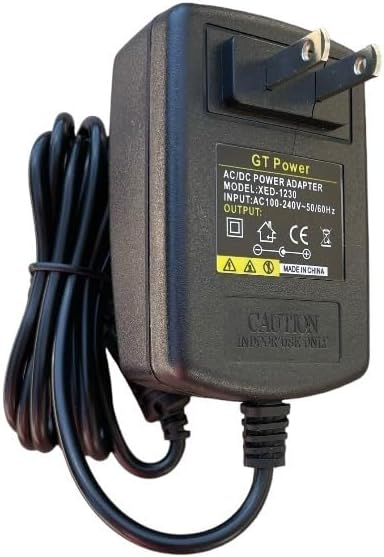
Figure 1: Front view of the GT POWER AC Adapter. The label indicates "GT Power AC/DC Power Adapter", "MODEL: XED-1230", "INPUT: AC100-240V~50/60Hz", and "OUTPUT: DC". A "CAUTION INDOOR USE ONLY" warning is visible.
3. Setup
- Inspect the Adapter: Before first use, visually inspect the AC adapter and its cable for any signs of damage. Do not use if damaged.
- Connect to Device: Locate the power input port on your Cadence Blood Pressure Monitor TMB-2092-G. Carefully insert the DC output plug of the GT POWER AC Adapter into this port. Ensure a secure connection.
- Connect to Power Outlet: Plug the two-prong AC input plug of the adapter into a standard wall power outlet (AC 100-240V, 50/60Hz).
- Verify Power: Once connected, your blood pressure monitor should receive power. Refer to your blood pressure monitor's manual for specific power indicators.

Figure 2: Close-up of the DC output connector, which plugs into the Cadence Blood Pressure Monitor.
4. Operating Instructions
Once properly connected, the GT POWER AC Adapter will continuously supply power to your Cadence Blood Pressure Monitor TMB-2092-G. The adapter is designed for continuous operation within its specified limits.
This adapter incorporates several protection features:
- OVP (Over Voltage Protection): Safeguards your device from damage due to excessive input voltage.
- OCP (Over Current Protection): Prevents damage from excessive output current.
- SCP (Short Circuit Protection): Automatically shuts down power in case of a short circuit, protecting both the adapter and the connected device.

Figure 3: Side view of the adapter, illustrating the compact design and the attached power cord.
5. Maintenance
- Cleaning: Disconnect the adapter from the power outlet and the device before cleaning. Use a soft, dry cloth to wipe the adapter. Do not use liquid cleaners or aerosols.
- Storage: When not in use, store the adapter in a cool, dry place, away from direct sunlight and moisture. Avoid tightly coiling the cable to prevent damage.
- Cable Care: Do not pull on the cable to disconnect the adapter. Always grasp the plug firmly. Avoid placing heavy objects on the cable or bending it sharply.

Figure 4: The 48-inch heavy-duty power cable, designed for durability.
6. Troubleshooting
If you experience issues with your GT POWER AC Adapter, refer to the following common solutions:
- No Power to Device:
- Ensure the adapter is securely plugged into both the wall outlet and the blood pressure monitor.
- Check if the wall outlet is functional by plugging in another device.
- Inspect the adapter cable and plugs for any visible damage. If damaged, discontinue use.
- Adapter Feels Warm:
- It is normal for the adapter to feel slightly warm during operation.
- If the adapter becomes excessively hot, unplug it immediately and discontinue use. This could indicate an internal fault or an overloaded circuit.
- Device Malfunction:
- If the blood pressure monitor is not functioning correctly even with power, consult the monitor's own instruction manual or contact its manufacturer for support.
7. Specifications
| Feature | Detail |
|---|---|
| Brand | GT POWER |
| Model Number | 102 |
| Input Voltage | AC 100-240V, 50/60Hz |
| Output Type | DC |
| Cable Length | 48 inches (approx. 1.2 meters) |
| Special Features | Over Voltage Protection (OVP), Over Current Protection (OCP), Short Circuit Protection (SCP) |
| Power Source | Corded Electric |
| Item Weight | 0.4 Pounds (approx. 181 grams) |
| Package Dimensions | 8 x 4.5 x 1.5 inches |
| UPC | 781834739976 |
8. Warranty and Support
Your GT POWER AC Adapter Model 102 comes with the following:
- 30 Days Money Back Guarantee: If you are not satisfied with your purchase, you may return it within 30 days for a full refund.
- One Year Warranty: This product is covered by a one-year warranty against manufacturing defects from the date of purchase.
For technical support or warranty claims, please contact your retailer or the manufacturer, GTPOWER, directly. Please have your purchase information and product model number (102) available.


