
Introduction
The Polygreen KP-6520 Arm Blood Pressure Monitor is designed for accurate and convenient blood pressure measurement at home. This manual provides essential information for safe and effective use of your device, including setup, operation, maintenance, and troubleshooting.
Please read this manual thoroughly before using the monitor and keep it for future reference.
Important Safety Information
Warning: Keep the device away from naked flames to prevent fire hazards.
- Consult your physician before using this device if you have any medical conditions.
- Do not self-diagnose or self-treat based on measurements from this device. Always consult a healthcare professional.
- Keep the device out of reach of children and pets.
- Use only approved accessories and replacement parts.
- Do not disassemble or attempt to repair the device yourself.
Package Contents
Verify that all items are present in the package:
- Polygreen KP-6520 Arm Blood Pressure Monitor unit
- Arm Cuff
- AA Battery (1 included)
- User Manual (this document)
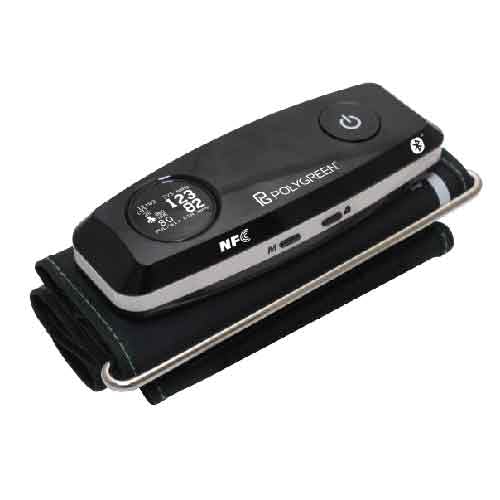
Image: The Polygreen KP-6520 Arm Blood Pressure Monitor, showing the main unit and the included arm cuff.
Setup
1. Battery Installation
- Open the battery compartment cover on the back of the monitor.
- Insert the included 1 AA battery, ensuring the correct polarity (+/-).
- Close the battery compartment cover securely.
- The monitor features an insufficient power indicator to alert you when battery replacement is needed.
2. Attaching the Arm Cuff
- Connect the air tube from the arm cuff to the air jack on the side of the monitor. Ensure a snug fit.
- The cuff should be placed directly on your bare upper arm, approximately 1-2 cm above the elbow joint.
- Ensure the air tube runs down the inside of your arm.
- Wrap the cuff firmly around your arm, making sure it is not too tight or too loose.
Operating Instructions
Taking a Measurement
- Sit comfortably with your back supported and feet flat on the floor.
- Rest your arm on a table so the cuff is at heart level.
- Press the START/STOP button to begin the measurement.
- The cuff will inflate automatically, then slowly deflate. Remain still and silent during this process.
- Once the measurement is complete, your systolic pressure, diastolic pressure, and pulse rate will be displayed on the digital screen.
- The monitor will automatically store the reading.
Multi-Person Measurement
The KP-6520 supports measurements for two users, each with 20 sets of memory functions. Refer to the on-screen user indicator to select the correct user profile before taking a measurement to ensure readings are stored correctly.
Irregular Pulse Beat Detection
If an irregular pulse beat is detected during measurement, a specific symbol will appear on the display. If this symbol appears frequently, consult your physician.
Bluetooth and NFC Connectivity
The device supports Bluetooth and NFC for seamless data transfer to compatible devices. Consult the specific instructions for pairing with your smartphone or other devices to manage your measurement data.
Automatic Energy Saving Shutdown
To conserve battery life, the monitor will automatically shut down after a period of inactivity.
Maintenance
Cleaning
- Wipe the monitor and cuff with a soft, dry cloth.
- If necessary, use a cloth lightly dampened with water or a mild detergent, then wipe dry.
- Do not use abrasive cleaners, alcohol, or organic solvents.
- Do not immerse the monitor or cuff in water.
Storage
- Store the device in a clean, dry place, away from direct sunlight, extreme temperatures, and humidity.
- Remove batteries if the device will not be used for an extended period.
Troubleshooting
| Problem | Possible Cause | Solution |
|---|---|---|
| Monitor does not turn on. | Batteries are low or incorrectly inserted. | Check battery polarity or replace with new AA batteries. |
| Cuff does not inflate or inflates incorrectly. | Cuff not properly connected or air leakage. | Ensure cuff air tube is securely connected to the monitor. Check cuff for damage. |
| Inaccurate readings. | Incorrect cuff placement, movement during measurement, or speaking. | Re-position cuff correctly. Remain still and silent during measurement. Ensure cuff size is appropriate for your arm. |
| Irregular pulse beat symbol appears frequently. | Detection of irregular heart rhythm. | Consult your physician for advice. This device is not for diagnosis. |
Specifications
- Model: KP-6520
- Display Type: Digital
- Power Source: Battery Powered (1 AA battery, included)
- Targeted Body Part: Arm
- Memory: 2 users, 20 sets of memory each
- Connectivity: Bluetooth, NFC (Near Field Communication)
- Special Features: Irregular Pulse Beat Detection, Automatic Energy Saving Shutdown, Insufficient Power Indicator
- Product Dimensions: 13.4 cm (Length) x 5 cm (Width) x 2.4 cm (Thickness)
- Item Weight: 122 grams
- Included Components: Cuff
Warranty and Support
Specific warranty information may vary by region and retailer. Please refer to the warranty card included with your purchase or contact your point of sale for details.
For technical support or service inquiries, please contact Polygreen customer service. Contact details can typically be found on the product packaging or the official Polygreen website.
