
Solid State Logic 729748X2
Solid State Logic SSL 18 User Manual
26-In and 28-Out USB Audio Interface
Model: 729748X2
Introduction
The Solid State Logic SSL 18 is a high-performance 26-input, 28-output USB audio interface designed for professional studio recording and production. It features cutting-edge 32-bit/192 kHz converters, eight SSL-designed mic preamps, and extensive connectivity options to deliver exceptional audio quality and flexibility for your creative workflow.

Setup
1. Unboxing and Inspection
Carefully remove the SSL 18 from its packaging. Verify that all components are present, including the interface unit, USB cable, and power supply. Inspect the unit for any signs of damage.
2. Software and Driver Installation
Before connecting the SSL 18 to your computer, visit the official Solid State Logic website to download and install the latest drivers and control software for your operating system (Windows or macOS). Follow the on-screen instructions provided by the installer.
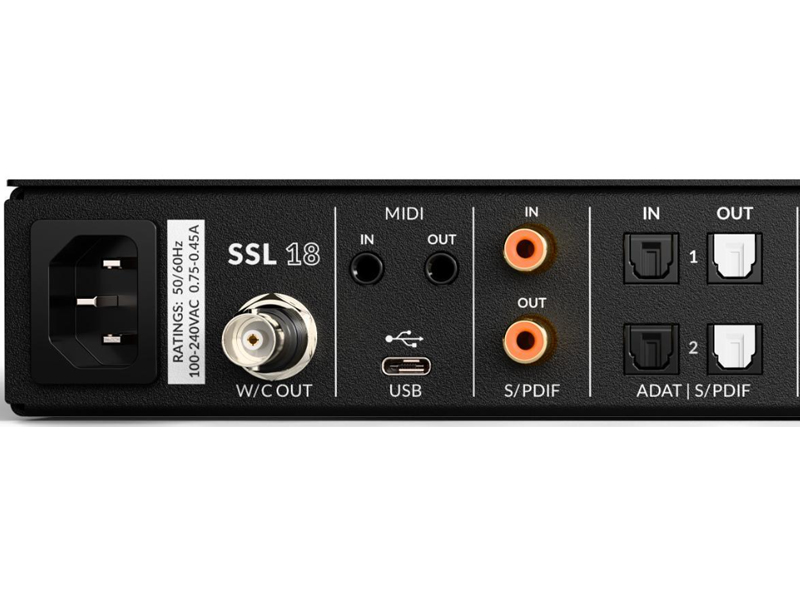
3. Connecting the Hardware
- Power Connection: Connect the included power supply to the 'DC IN' port on the rear of the SSL 18 and then plug it into a suitable power outlet.
- USB Connection: Connect the SSL 18 to your computer using the provided USB cable. Use a high-quality USB port on your computer for optimal performance.
- Audio Connections:
- Inputs: Connect microphones, line-level instruments, or other audio sources to the XLR/TRS combo jacks on the front and rear panels.
- Outputs: Connect your studio monitors to the balanced line outputs (1-2 for main monitors) on the rear panel. Additional line outputs are available for other monitoring or outboard gear.
- Headphones: Plug your headphones into the dedicated headphone jacks on the front panel.

Operating the SSL 18
1. Powering On and Initial Setup
Press the power button on the front panel to turn on the SSL 18. The unit will initialize, and the status indicators will illuminate. Ensure your computer recognizes the device in your Digital Audio Workstation (DAW) or system audio settings.
2. Input Gain Control
Each input channel features a dedicated 'GAIN' knob. Adjust this knob to set the input level for your connected microphone or instrument. Monitor the input meters on the front panel to ensure levels are healthy without clipping (red indicators).
3. 4K Analogue Enhancement
The SSL 18 includes a '4K' button on each input channel, which activates a legacy 4K analogue enhancement mode. This feature adds a subtle harmonic richness and high-frequency lift inspired by classic SSL 4000 series consoles. Experiment with this feature to enhance your sound.
4. Headphone Outputs
The SSL 18 provides two independent headphone outputs, each with its own volume control. These can be configured for different types of headphones (Standard, High Sensitivity, High Impedance) via the control software to optimize performance.
5. Monitor Control and Speaker Switching
The monitor section allows you to control the main output volume. The 'ALT' button enables alternative speaker switching, allowing you to quickly switch between two sets of monitors (connected to outputs 1-2 and 3-4) for critical listening. The 'CUT' button mutes the main outputs.
6. Talkback Function
The 'TALK' button activates the built-in talkback microphone, allowing you to communicate with artists in a separate recording space. The talkback signal can be routed to specific outputs as configured in the control software.


Maintenance
To ensure the longevity and optimal performance of your SSL 18, follow these maintenance guidelines:
- Cleaning: Use a soft, dry, lint-free cloth to clean the exterior of the unit. Avoid abrasive cleaners, solvents, or waxes. Do not spray liquids directly onto the unit.
- Ventilation: Ensure the unit has adequate ventilation. Do not block the ventilation slots on the sides of the chassis.
- Firmware Updates: Periodically check the Solid State Logic website for firmware and software updates. Keeping your device updated ensures compatibility and access to the latest features and bug fixes.
- Storage: When not in use for extended periods, store the unit in a cool, dry place, away from direct sunlight and extreme temperatures.
Troubleshooting
If you encounter issues with your SSL 18, try the following troubleshooting steps:
- No Power: Ensure the power cable is securely connected to both the unit and the power outlet. Verify the power outlet is active.
- No Sound Output:
- Check all audio cable connections (inputs, outputs, headphones).
- Verify the volume levels on the SSL 18 (main monitor, headphone) and in your DAW/computer's system settings.
- Ensure the correct audio device is selected in your DAW and operating system.
- Computer Not Recognizing Device:
- Try a different USB port on your computer.
- Ensure the latest drivers are installed. Reinstall them if necessary.
- Restart your computer and the SSL 18.
- Input Signal Issues:
- Check the input gain knob for the specific channel.
- Ensure the microphone or instrument is properly connected and functioning.
- Verify phantom power (if required for your microphone) is enabled.
For persistent issues, refer to the Solid State Logic support website or contact their customer service.
Specifications
| Model Number | 729748X2 |
| Item Weight | 12 pounds |
| Product Dimensions | 24.4 x 14.4 x 4.6 inches |
| Country of Origin | USA |
| Converters | 32-bit / 192 kHz |
| Mic Preamps | 8 x SSL-designed, high-performance |
| Dynamic Range (Inputs) | 120 dB |
| Dynamic Range (Outputs) | 125 dB |
| Line Outputs | 10 x Balanced (configurable +9/+24 dBu) |
| Headphone Outputs | 2 x Independent, configurable |
| Digital I/O | ADAT, S/PDIF |
| Compatible Devices | Personal Computer |
| Operating System | Windows, macOS |
Warranty and Support
For detailed warranty information, please refer to the official Solid State Logic website or the documentation included with your purchase. Solid State Logic provides comprehensive support for their products.
Online Resources: Visit the Solid State Logic support page for FAQs, driver downloads, firmware updates, and additional user guides.
Contact Support: If you require further assistance, please contact Solid State Logic customer support through their official website.
Related documents729748X2


Ask a question about this manual
Ask about setup, troubleshooting, compatibility, parts, safety, or missing instructions. Manuals+ will review the question and use this page’s manual context to help answer it.