
Introduction
This manual provides comprehensive instructions for the setup, operation, maintenance, and troubleshooting of your COLMI C8 MAX Smartwatch. Please read this manual carefully before using the device to ensure proper functionality and longevity.

Figure 1: The COLMI C8 MAX Smartwatch in gold with a beige strap, displaying the main watch face with fitness data and time.
1. Setup
1.1 Unboxing and Components
Upon opening the package, ensure all components are present:
- COLMI C8 MAX Smartwatch
- Replacement Strap (if included in your package)
- Charging Cable
- User Manual (this document)
1.2 Charging the Device
Before first use, fully charge your smartwatch. Connect the magnetic charging cable to the charging points on the back of the watch and plug the USB end into a standard USB power adapter (not included).
- Charging time: Approximately 2 hours for a full charge.
- Battery capacity: 250 mAh Lithium Polymer.
1.3 Powering On/Off
- To Power On: Press and hold the side button until the COLMI logo appears.
- To Power Off: From the watch face, swipe down to access quick settings, or navigate to 'Settings' > 'System' > 'Power Off'. Confirm your selection.
1.4 App Installation and Pairing
To unlock the full features of your COLMI C8 MAX Smartwatch, you need to install the companion application on your smartphone or tablet. The watch is compatible with both Android and iOS operating systems.
- Scan the QR code provided in the quick start guide or search for the official COLMI app in your device's app store (Google Play Store for Android, Apple App Store for iOS).
- Download and install the application.
- Open the app and follow the on-screen instructions to create an account or log in.
- Enable Bluetooth on your smartphone/tablet.
- In the app, navigate to the device pairing section and select "Add Device" or similar.
- The app will search for available devices. Select "COLMI C8 MAX" from the list.
- Confirm the pairing request on both your smartphone and the smartwatch. The watch utilizes Bluetooth 5.3 for stable connectivity.
2. Operating the Smartwatch
2.1 Display and Navigation
The COLMI C8 MAX features a 1.93-inch IPS touchscreen with a resolution of 240 x 288 pixels, offering clear visuals and responsive touch control.
- Swipe Up: Access notifications.
- Swipe Down: Access quick settings (brightness, battery, DND, etc.).
- Swipe Left/Right: Navigate through widgets and main functions (activity, heart rate, weather, etc.).
- Tap: Select an item or open an application.
- Press Side Button: Return to the watch face or open the app menu.
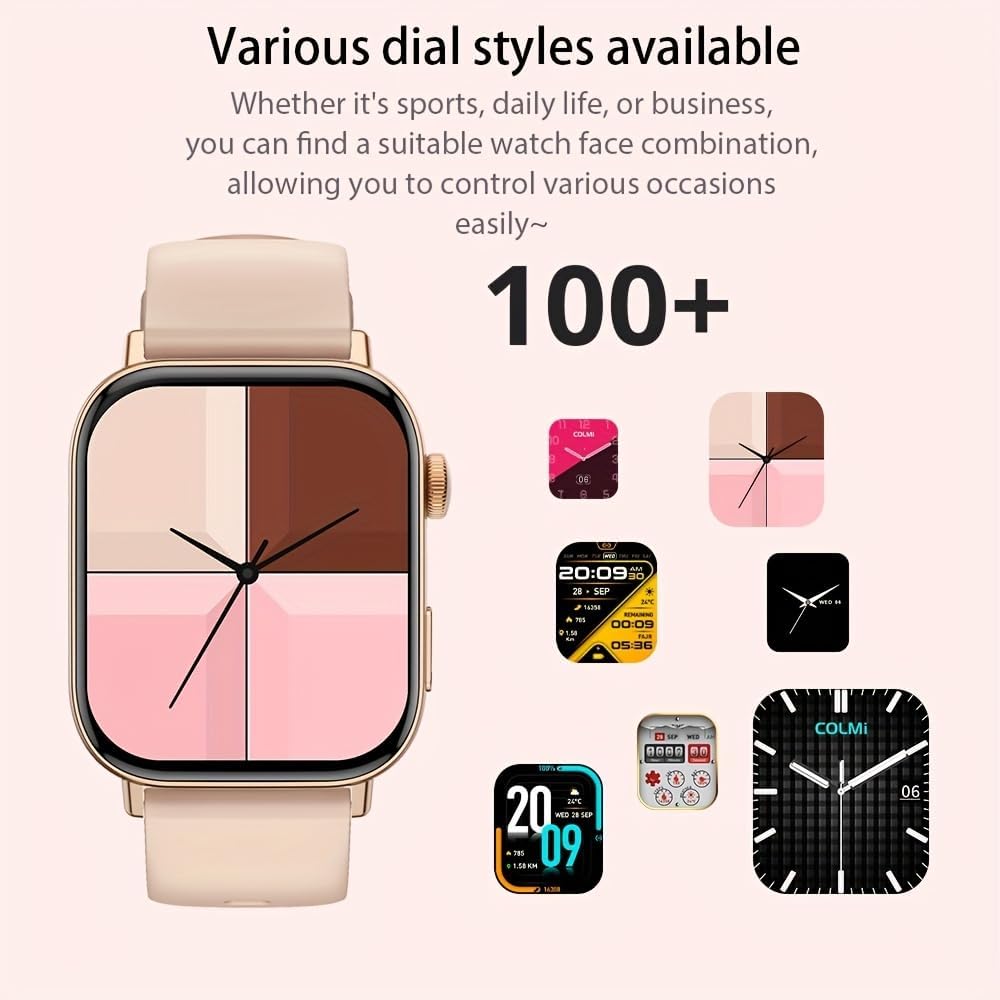
Figure 2: The smartwatch showcasing a selection of its over 100 available dial styles, allowing for personalization.
2.2 Core Features and Functions
The COLMI C8 MAX is equipped with a wide range of features to support your daily activities and health monitoring.
- Fitness Tracking: Monitor steps, distance, calories burned, and active minutes. Includes a pedometer, heart rate monitor, and multi-sport modes (over 100 sports modes available, including walking, running, cycling, football, basketball, table tennis, badminton, mountaineering, rope jumping).

Figure 3: The smartwatch highlighting its extensive range of over 100 sports tracking modes, suitable for various physical activities.
- Sleep Monitoring: Tracks sleep patterns and quality.
- Communication:
- Wireless Calling: Make and receive calls directly from your wrist. Access recent calls, dial pad, and contacts.
- Message Notifications: Receive alerts for SMS, WhatsApp, emails, and other social media applications (Facebook, Snapchat, Twitter, Telegram, Instagram, LinkedIn).

Figure 4: The smartwatch demonstrating its wireless calling feature, showing an incoming call notification on the display.

Figure 5: The watch's ability to synchronize information and notifications from a connected smartphone, including messages from WhatsApp and other platforms.
- AI Voice Assistant: Use voice commands to interact with your watch for tasks like making calls, checking weather, or playing music.

Figure 6: Illustration of the intelligent voice assistant function, showing examples of voice commands and responses on the watch screen.
- Other Features: Calendar, alarm clock, countdown timer, remote camera control, sedentary reminder, menstruation management.
3. Maintenance
3.1 Water Resistance (IP68)
The COLMI C8 MAX Smartwatch has an IP68 water resistance rating, meaning it is protected against dust ingress and can withstand immersion in water up to 1.5 meters for 30 minutes. It is suitable for daily use, hand washing, and light rain. However, it is not recommended for hot showers, saunas, or diving, as steam and hot water can compromise the seals.
3.2 Cleaning Your Smartwatch
To maintain the appearance and functionality of your device:
- Wipe the screen and body with a soft, lint-free cloth.
- For stubborn dirt, slightly dampen the cloth with water. Avoid using harsh chemicals or abrasive materials.
- Clean the charging contacts regularly to ensure efficient charging.
- If the strap gets dirty, clean it according to its material type (e.g., silicone straps can be washed with mild soap and water).
3.3 Battery Life Optimization
The smartwatch offers a battery life of 5-10 days depending on usage, with an average life of 240 hours. To maximize battery life:
- Reduce screen brightness.
- Disable unnecessary notifications.
- Limit continuous heart rate monitoring if not required.
- Turn off "Always-On Display" if available.
4. Troubleshooting
If you encounter issues with your COLMI C8 MAX Smartwatch, refer to the following common problems and solutions:
| Problem | Possible Solution |
|---|---|
| Watch does not power on. | Ensure the watch is fully charged. Connect it to the charger for at least 30 minutes. |
| Cannot pair with smartphone. |
|
| Notifications are not received. |
|
| Inaccurate fitness data. |
|
| Screen is unresponsive. | Restart the watch by pressing and holding the side button until it reboots. |
4.1 Factory Reset
If problems persist, you may need to perform a factory reset. This will erase all data on the watch and restore it to its original settings. Navigate to 'Settings' > 'System' > 'Reset' or 'Factory Reset' on your smartwatch and confirm.
5. Specifications
| Feature | Detail |
|---|---|
| Model Name | C8 Max |
| Brand | COLMI |
| Display | 1.93-inch IPS Touchscreen, 240 x 288 pixels |
| Battery Capacity | 250 mAh Lithium Polymer |
| Battery Life | 5-10 days (typical usage), 240 hours average life |
| Water Resistance | IP68 |
| Memory | 128 MB Storage, 640 KB RAM |
| Connectivity | Bluetooth 5.3 |
| Compatibility | Android & iOS Smartphones/Tablets |
| Dimensions | 10 x 9 x 6.5 cm |
| Weight | 200 g |
| Included Components | Smartwatch, User Manual |
6. Warranty and Support
The COLMI C8 MAX Smartwatch comes with a manufacturer's warranty. Please refer to the warranty card included in your product packaging for specific terms and conditions, including warranty duration and coverage details.
For technical support, product inquiries, or warranty claims, please contact COLMI customer service through their official website or the contact information provided in your product documentation. Ensure you have your product model number (C8 Max) and purchase details ready when contacting support.


