
1. Introduction and Safety Information
This manual provides essential instructions for the safe installation, operation, and maintenance of your Olucia Black Pendant Lamp, Model 1040059. Please read this manual thoroughly before installation and keep it for future reference.
Important Safety Warnings:
- Always disconnect power at the main fuse or circuit breaker before installation, maintenance, or bulb replacement.
- Installation must be performed by a qualified electrician or in accordance with local electrical codes.
- Ensure the mounting surface can support the weight of the fixture.
- Do not exceed the maximum wattage specified for the light bulbs.
- This product is designed for indoor use only. Do not expose to moisture or extreme temperatures.
- Keep packaging materials out of reach of children.
2. Package Contents
Verify that all components are present before beginning installation:
- 1x Olucia Black Pendant Lamp fixture (with 3 shades)
- 1x Mounting bracket/ceiling plate
- Mounting hardware (screws, wall anchors)
- Instruction Manual
Note: Light bulbs are typically not included and must be purchased separately. This fixture requires E27 base bulbs.
3. Setup and Installation
Follow these steps carefully for safe and proper installation.
3.1 Tools Required (Not Included):
- Screwdriver (Phillips head)
- Wire strippers
- Electrical tape
- Drill (if installing new mounting holes)
- Ladder
3.2 Installation Steps:
- Turn off Power: Locate the circuit breaker controlling the light fixture's power supply and turn it off. Verify power is off using a voltage tester.
- Prepare Mounting Surface: If replacing an existing fixture, carefully remove it. Ensure the ceiling junction box is secure and capable of supporting the lamp's weight (1 kg).
- Attach Mounting Bracket: Secure the provided mounting bracket/ceiling plate to the ceiling junction box using the screws.
- Wire Connections: Carefully connect the electrical wires from the ceiling to the lamp's wires.
- Connect the live (usually black or brown) wire from the ceiling to the live wire of the lamp.
- Connect the neutral (usually white or blue) wire from the ceiling to the neutral wire of the lamp.
- Connect the ground (usually green/yellow or bare copper) wire from the ceiling to the ground wire of the lamp.
- Mount the Fixture: Carefully lift the lamp fixture and align it with the mounting bracket. Secure it in place using the provided screws or fasteners.
- Install Bulbs: Screw three E27 base light bulbs into the lamp sockets. Ensure the bulbs do not exceed the maximum wattage rating (refer to specifications).
- Restore Power: Once installation is complete and all connections are secure, turn the power back on at the circuit breaker.
- Test: Turn on the light switch to ensure the lamp functions correctly.

Image: Side view of the black rectangular ceiling mounting bar, showing the cable entry point.
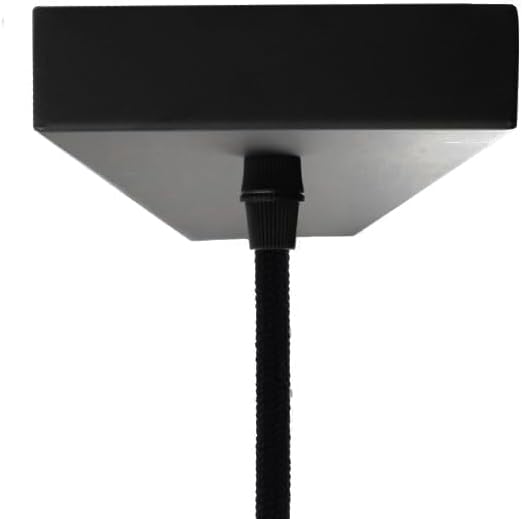
Image: Bottom view of the black rectangular ceiling mounting bar, illustrating the connection point for the pendant cables.

Image: The Olucia Black Pendant Lamp fully assembled and installed, showcasing its three round shades and industrial design.
4. Operating Instructions
The Olucia Black Pendant Lamp is operated via a standard wall switch (push button type) connected to your home's electrical circuit. There are no integrated switches on the fixture itself.
- Turning On/Off: Use the wall switch to turn the lamp on or off.
- Bulb Type: This fixture uses E27 base bulbs. For optimal performance and light quality, use warm white E27 bulbs as specified.
5. Maintenance
Regular maintenance ensures the longevity and appearance of your pendant lamp.
5.1 Cleaning:
- Always turn off the power and allow the lamp to cool before cleaning.
- Wipe the metal surfaces with a soft, dry cloth.
- Do not use abrasive cleaners, solvents, or polishes as they may damage the finish.
5.2 Bulb Replacement:
- Turn off the power at the circuit breaker and allow bulbs to cool completely.
- Carefully unscrew the old E27 bulb.
- Screw in a new E27 bulb, ensuring it is securely seated. Do not overtighten.
- Restore power and test the new bulb.
6. Troubleshooting
If you encounter issues with your Olucia pendant lamp, refer to the following common problems and solutions:
| Problem | Possible Cause | Solution |
|---|---|---|
| Lamp does not turn on. |
|
|
| Light flickers. |
|
|
| Humming noise. |
|
|
If the problem persists after attempting these solutions, please contact customer support.
7. Specifications
| Brand | Olucia |
| Model Number | 1040059 |
| Product Dimensions (L x W x H) | 10L x 90B x 130H centimeters |
| Item Weight | 1 Kilogram |
| Color | Black |
| Material | Metal |
| Style | Industrial |
| Number of Light Sources | 3 |
| Lamp Socket Type | E27 |
| Power Source | Corded Electric |
| Installation Type | Semi-flush mount, Ceiling mount |
| Control Method | Push button (via wall switch) |
| Usage Environment | Indoor |
8. Warranty Information
Olucia provides a two-year warranty for this product from the date of purchase. This warranty covers manufacturing defects and material faults under normal use. It does not cover damage caused by improper installation, misuse, accidents, or unauthorized modifications.
Please retain your proof of purchase for warranty claims.
9. Customer Support
For further assistance, technical support, or warranty claims, please contact Olucia customer service through the retailer where the product was purchased or visit the official Olucia website for contact information.
When contacting support, please have your model number (1040059) and proof of purchase readily available.