
1. Introduction
Thank you for choosing the Vinsetto Massage and Heated Office Chair, Model 921-246V91CW. This manual provides essential information for the safe assembly, operation, maintenance, and troubleshooting of your new office chair. Please read these instructions carefully before use and retain them for future reference.
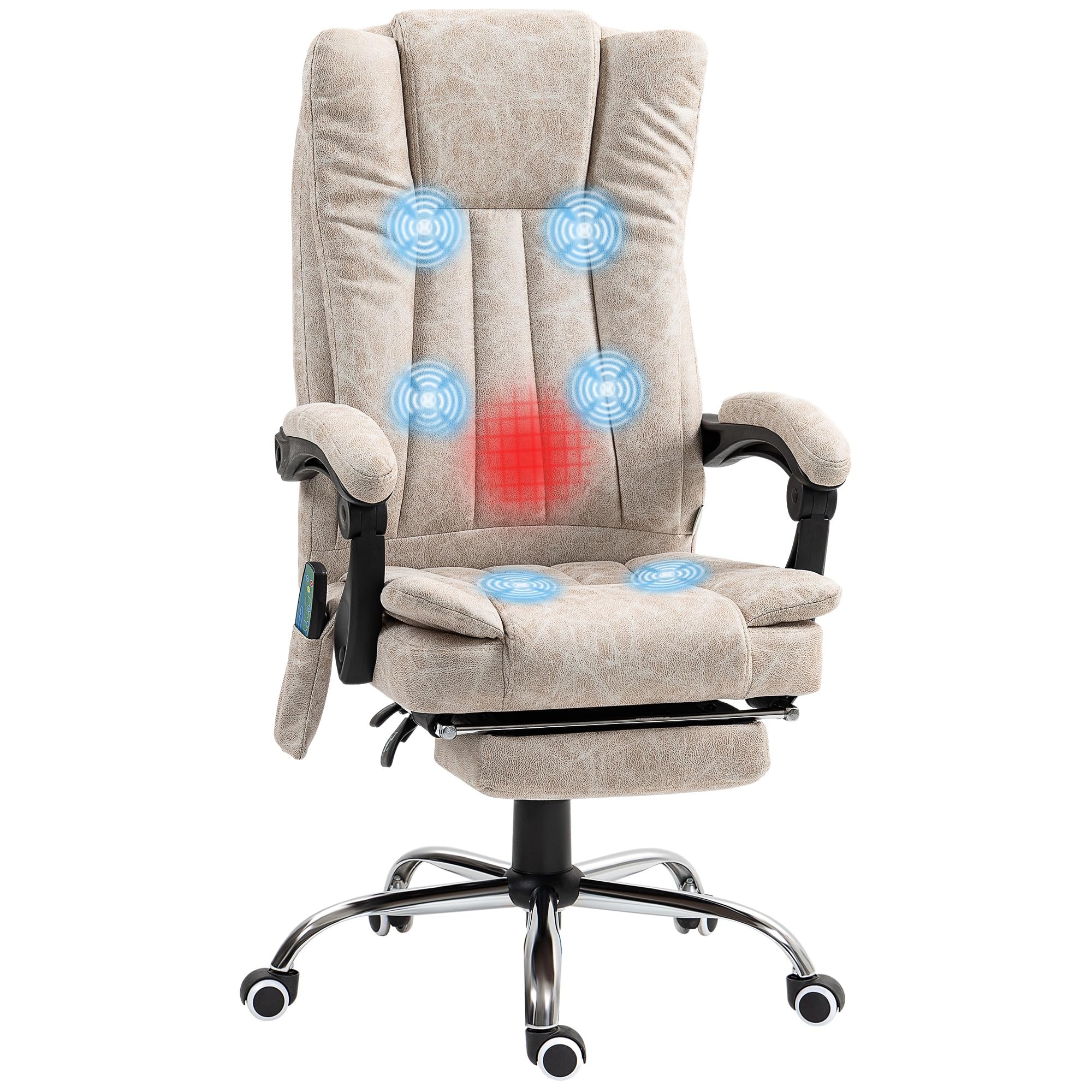
Image 1.1: The Vinsetto Massage and Heated Office Chair in an office environment.
2. Safety Instructions
- Ensure all components are present and undamaged before assembly.
- Follow the assembly instructions precisely to prevent injury or damage to the chair.
- Do not exceed the maximum weight capacity of 120 kg (265 lbs).
- Keep children and pets away from the chair during assembly.
- Avoid using abrasive cleaners or harsh chemicals on the chair's surfaces.
- Disconnect the power adapter for the massage and heating functions when not in use or during cleaning.
- Do not stand on the chair.
3. Package Contents
Verify that all the following components are included in your package:
- Backrest
- Seat with armrests
- Footrest
- Base with wheels
- Assembly hardware and tools
- Wired remote control for massage and heating functions
- Power adapter
4. Assembly Instructions
Assembly is required for this product. Please refer to the illustrated assembly manual included in your package for detailed, step-by-step instructions. Ensure all parts are securely fastened before using the chair.
5. Operating Instructions
5.1. Height Adjustment
To adjust the chair's height, locate the lever on the right side, beneath the seat. While seated, pull the lever upwards to lower the chair. To raise the chair, stand up slightly and pull the lever upwards. Release the lever at the desired height.

Image 5.1: The height adjustment lever allows the seat to be adjusted between 45-52 cm.
5.2. Reclining Function
The backrest can be reclined up to 135 degrees. To recline, pull the lever on the left side of the chair upwards and lean back. Release the lever to lock the backrest in your preferred position. To return to an upright position, pull the lever and lean forward.
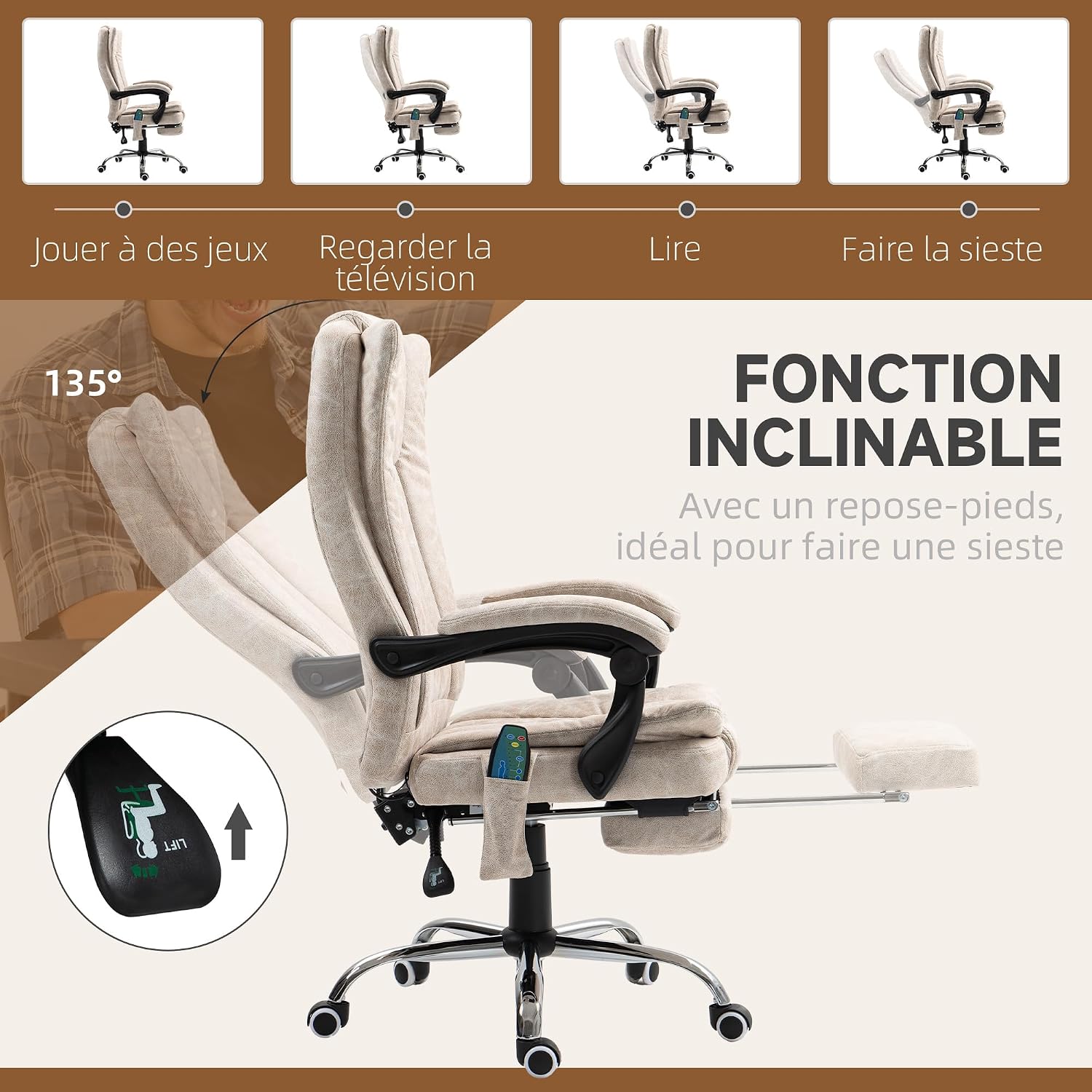
Image 5.2: The chair's reclining function, ideal for various activities including napping.
5.3. Footrest Operation
To extend the integrated footrest, pull it out from beneath the seat. To retract it, push it back until it is fully stored under the seat.
5.4. Massage and Heating Functions
The chair features a 6-point vibration massage system (2 in the upper back, 2 in the lumbar area, and 2 in the thighs) and a heating function. These functions are controlled by the wired remote control, which can be stored in the side pocket.

Image 5.3: Illustration of the 6-point vibration massage system and the remote control storage pocket.

Image 5.4: The wired remote control for massage and heating functions.
Remote Control Functions:
- POWER: Turns the massage function on/off.
- HEAT: Activates/deactivates the heating function.
- INTENSITY: Adjusts the massage intensity (Low, Medium, High).
- MODE: Cycles through different massage modes (Pulse, Press, Wave, Auto, Normal).
- BACK/LUMBAR/THIGH: Selects specific massage zones.
- TIME: Sets the duration of the massage session.
5.5. Swivel Function
The chair is designed to swivel 360 degrees, providing flexibility and ease of movement in your workspace.

Image 5.5: The chair's 360-degree swivel capability.
6. Maintenance
- Cleaning: The chair's polyester fabric requires dry cleaning. Do not use liquid cleaners or immerse any part of the chair in water.
- Inspection: Periodically check all screws and bolts to ensure they are tight. Retighten if necessary.
- Storage: Store the chair in a dry environment, away from direct sunlight and extreme temperatures.
7. Troubleshooting
- Chair does not adjust height: Ensure the gas lift lever is fully engaged. Check for any obstructions under the seat.
- Massage/Heating functions not working: Verify that the power adapter is securely plugged into both the chair and a working power outlet. Check the remote control for proper connection.
- Chair is wobbly: Recheck all assembly bolts and screws to ensure they are tightened correctly.
- Casters not rolling smoothly: Clean any debris or hair from the caster wheels.
If you encounter issues not listed here, please contact customer support.
8. Specifications

Image 8.1: Key dimensions of the Vinsetto Massage and Heated Office Chair.
| Feature | Specification |
|---|---|
| Model Number | 921-246V91CW |
| Overall Dimensions (L x W x H) | 70 x 62 x 120 cm (27.6 x 24.4 x 47.2 inches) |
| Adjustable Height Range | 45 - 52 cm (17.7 - 20.5 inches) |
| Seat Depth | 48.5 cm (19.1 inches) |
| Backrest Height | 72 cm (28.3 inches) |
| Max Recline Angle | 135 degrees |
| Maximum Load Capacity | 120 kg (265 lbs) |
| Material | Polyester fabric, Engineering wood frame, Foam filling |
| Color | Cream |
| Special Features | 6-point vibration massage, heating function, adjustable height, reclining backrest, retractable footrest, 360° swivel, ergonomic design |
9. Warranty and Support
For warranty information or technical support, please refer to the documentation provided with your purchase or contact Vinsetto customer service directly. Keep your purchase receipt as proof of purchase.


