
Introduction
The Canik MECANIK MO4 Micro Enclosed Reflex Sight is designed for precision and durability, offering a versatile aiming solution for various applications. This sight features a 3 MOA dot and a 32 MOA circle reticle, facilitating quick target acquisition. Constructed from aluminum with a corrosion-resistant anodized finish, the MO4 is built to withstand challenging environments. Its enclosed design protects the optical components from dust, moisture, and debris. Key features include adjustable brightness settings, an automatic sleep/wake function for power conservation, and compatibility with the Shield RMSc footprint for broad pistol integration.
Package Contents
- MECANIK MO4 Micro Enclosed Reflex Sight
- Mounting Hardware (screws, tools)
- User Manual (this document)
- Cleaning Cloth (if included)
Setup
1. Mounting the Sight
The MECANIK MO4 is designed with a Shield RMSc footprint, ensuring compatibility with a wide range of pistols. Ensure your firearm's slide is compatible with the Shield RMSc standard before attempting installation.
- Ensure the firearm is unloaded and safe.
- Align the MO4 sight with the RMSc cut on your firearm's slide.
- Secure the sight using the provided mounting screws. Apply appropriate torque as specified by your firearm's manufacturer or the sight's instructions to prevent damage.
- Verify the sight is firmly attached and does not wobble.
2. Battery Installation
The MO4 features a side-loading battery compartment for easy replacement without removing the sight from the firearm.
- Locate the battery compartment cover on the side of the sight.
- Using a small screwdriver or the provided tool, carefully open the battery compartment.
- Insert the correct battery type (e.g., CR2032, refer to packaging for exact type) with the positive (+) side facing up.
- Close the battery compartment cover securely.
3. Initial Zeroing
While the sight may have a factory zero, minor adjustments are typically required for optimal accuracy with your specific firearm and ammunition.
- Use the windage and elevation adjustment screws to fine-tune the reticle's position. Each click typically corresponds to 1 MOA of adjustment.
- Adjustments are made by rotating the screws. Refer to the markings on the sight for direction (e.g., 'U' for Up, 'R' for Right).
- Perform live-fire testing at a safe range to confirm and refine your zero.
Operating the Sight
1. Power On/Off and Automatic Functions
The MO4 features an automatic sleep/wake function to conserve battery life. It also incorporates a solar panel for enhanced power efficiency.
- Automatic Wake-Up: The sight will automatically power on and display the reticle when motion is detected.
- Automatic Sleep Mode: After a period of inactivity, the sight will enter sleep mode to save power.
- Solar Panel: The integrated solar panel assists in powering the reticle, especially in bright conditions, extending battery life.

Image: Top Solar Panel. This image displays the top of the MECANIK MO4 sight, highlighting the solar panel designed to extend battery life.
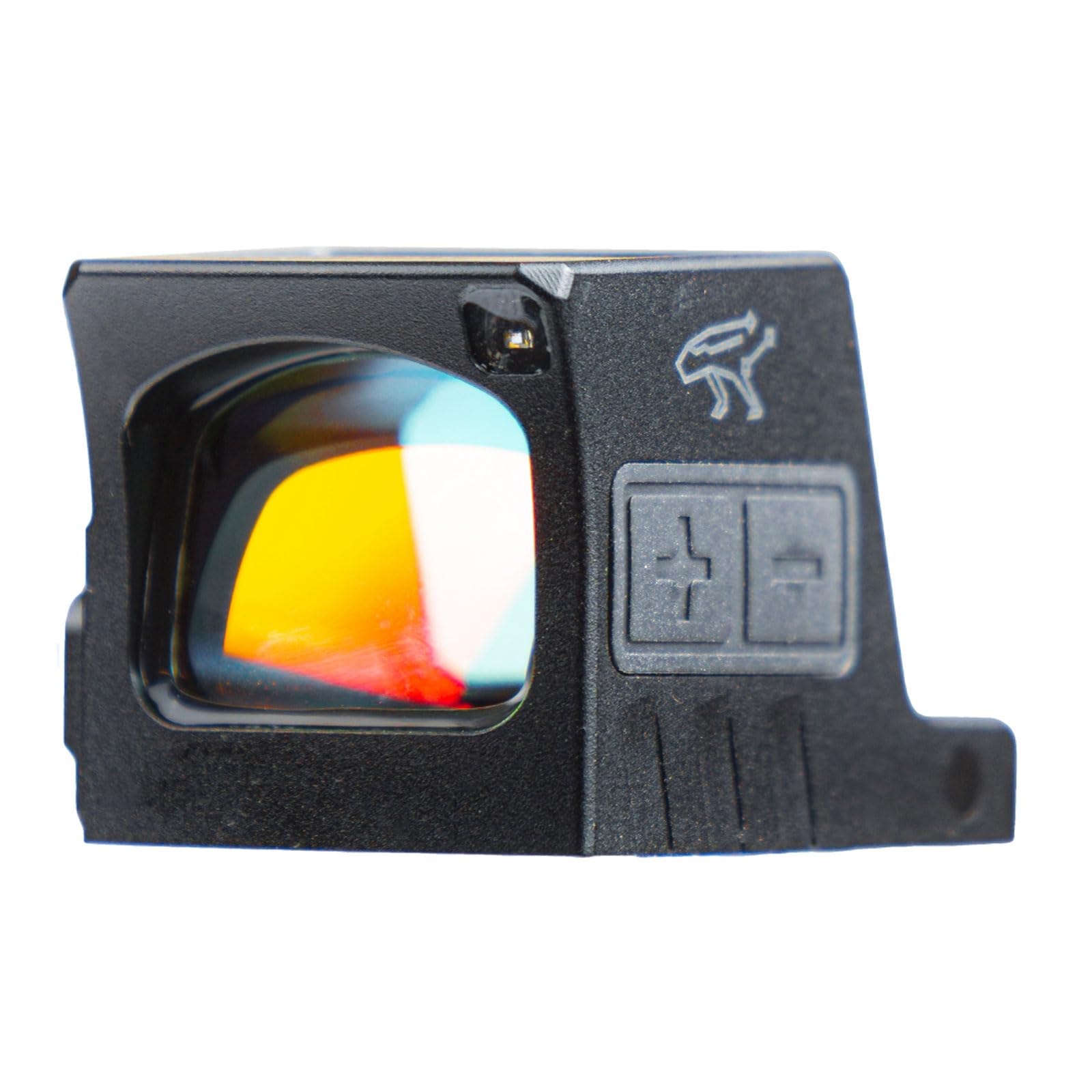
Image: Front Facing Light Sensor. This image shows the front of the MECANIK MO4 sight, indicating the location of the light sensor which aids in automatic brightness adjustment.
2. Reticle Selection and Brightness Adjustment
The MO4 offers a multi-reticle system and adjustable brightness to suit various lighting conditions and user preferences.
- Reticle Options: The sight features a 3 MOA dot and a 32 MOA circle reticle. Consult the product packaging or manufacturer's website for instructions on switching between reticle modes, if applicable.
- Brightness Control: Use the '+' and '-' buttons located on the side of the sight to manually adjust the reticle brightness.
- Automatic Brightness: The sight may also feature an automatic brightness mode that adjusts the reticle intensity based on ambient light conditions.

Image: Automatic or Manual Brightness. This image displays the side of the MECANIK MO4 sight, highlighting the '+' and '-' buttons used for adjusting reticle brightness.
Maintenance
1. Cleaning the Optics
Regular cleaning ensures optimal performance and clear visibility.
- Use a soft, lint-free cloth or lens brush to remove dust and loose debris from the lenses.
- For stubborn smudges or fingerprints, apply a small amount of lens cleaning solution to a microfiber cloth and gently wipe the lenses.
- Avoid using harsh chemicals or abrasive materials, as these can damage the lens coatings.
2. Battery Replacement
Replace the battery when the reticle appears dim or flickers, or if the sight fails to power on. The side-loading compartment allows for easy replacement.
- Follow the battery installation steps outlined in the "Setup" section.
- Always use a fresh, high-quality battery of the specified type.
- Dispose of used batteries responsibly according to local regulations.
3. General Care
- Store the sight in a protective case when not in use to prevent scratches and impacts.
- Avoid exposing the sight to extreme temperatures or prolonged direct sunlight.
- Periodically check mounting screws for tightness and re-torque if necessary.
Troubleshooting
| Problem | Possible Cause | Solution |
|---|---|---|
| Reticle not visible or dim | Low battery; Sight in sleep mode; Brightness too low/high for ambient light. | Replace battery; Move the sight to activate wake-up function; Adjust brightness using '+' or '-' buttons. |
| Reticle flickers or turns off intermittently | Loose battery; Low battery; Faulty battery contact. | Ensure battery is seated correctly; Replace battery; Clean battery contacts. |
| Poor accuracy or loss of zero | Loose mounting screws; Impact to the sight; Improper zeroing. | Check and re-torque mounting screws; Re-zero the sight; Inspect for damage. |
| Sight does not mount securely | Incorrect footprint; Damaged mounting surface/screws. | Verify firearm compatibility with Shield RMSc footprint; Inspect mounting hardware for damage. |
Specifications

Image: MECANIK MO4 Product Details. This image provides a detailed table of product specifications for the MECANIK MO4 sight.
| Feature | Detail |
|---|---|
| Model Name | MECANIK MO4 Micro Enclosed Reflex Sight |
| Manufacturer Part Number | PACN1104 |
| Material | Aluminum |
| Finish | Anodized |
| Reticle Type | 3 MOA Dot / 32 MOA Circle |
| Reticle Color | Red |
| Magnification | 1x |
| Mounting Type | Shield RMSc Footprint |
| Adjustment Increment | 1 MOA per click |
| Power Source | Battery (e.g., CR2032) with Solar Assist |
| Special Features | Automatic Sleep/Wake, Adjustable Brightness, Enclosed Design |
| Item Weight | 6.56 ounces |
Warranty and Support
Specific warranty details for the MECANIK MO4 Micro Enclosed Reflex Sight are not provided in this document. For warranty information, technical support, or service inquiries, please refer to the official Canik website or contact their customer service department directly. Keep your proof of purchase for any warranty claims.
Manufacturer: CANIK
Website: www.canikusa.com (Example link, verify actual manufacturer website)
