
1. Introduction
This manual provides essential instructions for the safe and efficient operation of your Rhino USA Portable Tire Inflator Air Compressor. Please read this manual thoroughly before use and retain it for future reference.
The Rhino USA Portable Tire Inflator is designed for convenient and rapid inflation of various tires and inflatable items. It features a robust 7800mAh Lithium Ion battery, a maximum pressure of 150 PSI, and an airflow of 34 L/Min. Its compact design and automatic shutoff function ensure safe and accurate inflation.
2. Package Contents
Verify that all items listed below are present in your package:
- 1x 150PSI Cordless Inflator
- 1x Air Chuck
- 1x Air Needle
- 2x Air Nozzle
- 1x High Pressure Air Hose
- 1x USB-C Charging Cable
- 1x Camo Drawstring Bag
- 1x User Instruction Manual (this document)
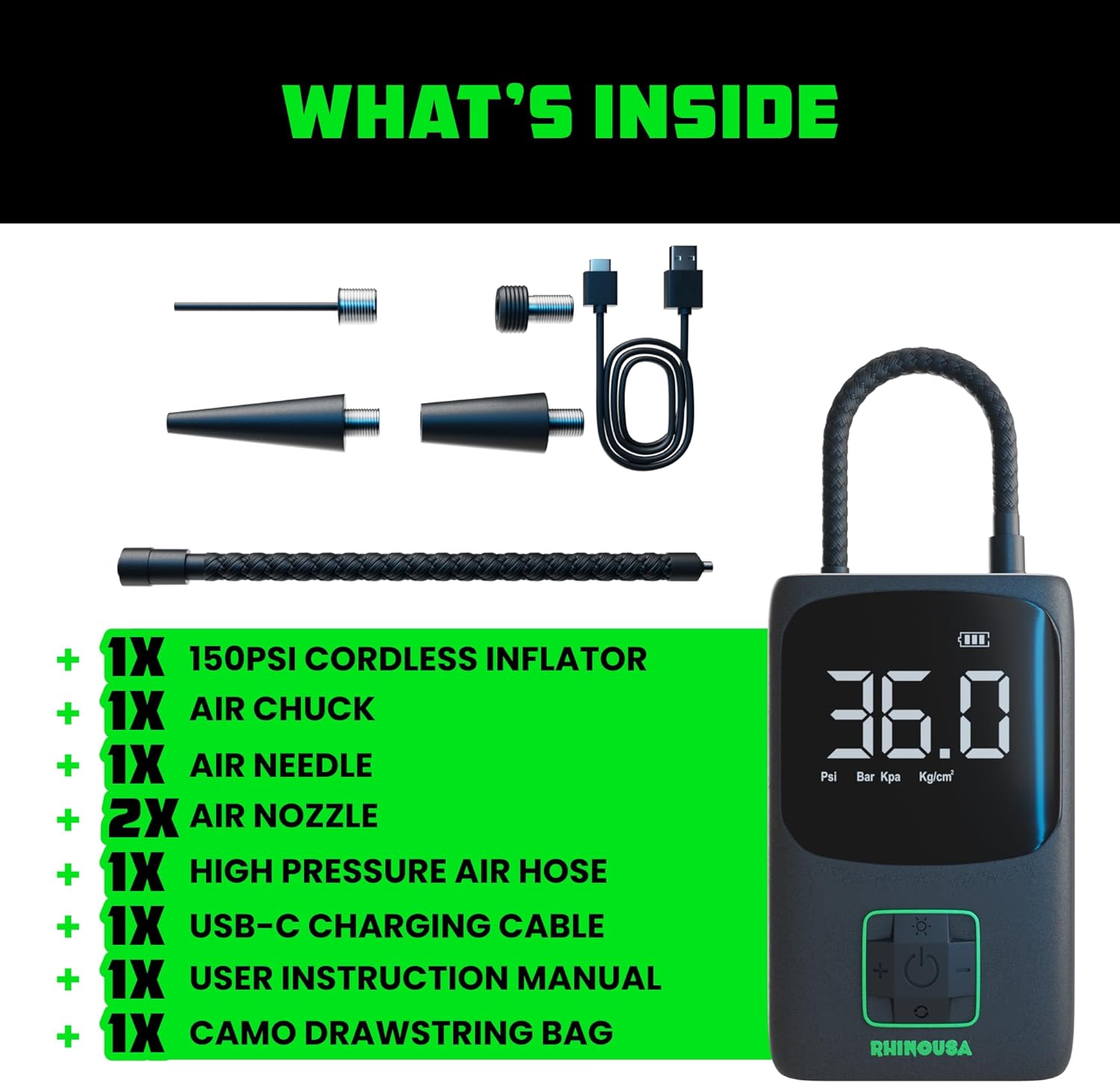
Figure 2.1: Included components of the Rhino USA Portable Tire Inflator.
3. Product Overview
The Rhino USA Portable Tire Inflator is a compact and versatile device designed for various inflation needs. Key features include:
- Digital Pressure Gauge: Dual LCD screen for clear pressure readings.
- Automatic Shutoff: Prevents over-inflation by stopping once the preset pressure is reached.
- Integrated LED Light: For illumination during low-light conditions or roadside emergencies.
- USB Charging Port: Allows the inflator to function as a power bank for other devices.
- Durable Construction: Built with a rugged casing and reinforced high-pressure air hose.
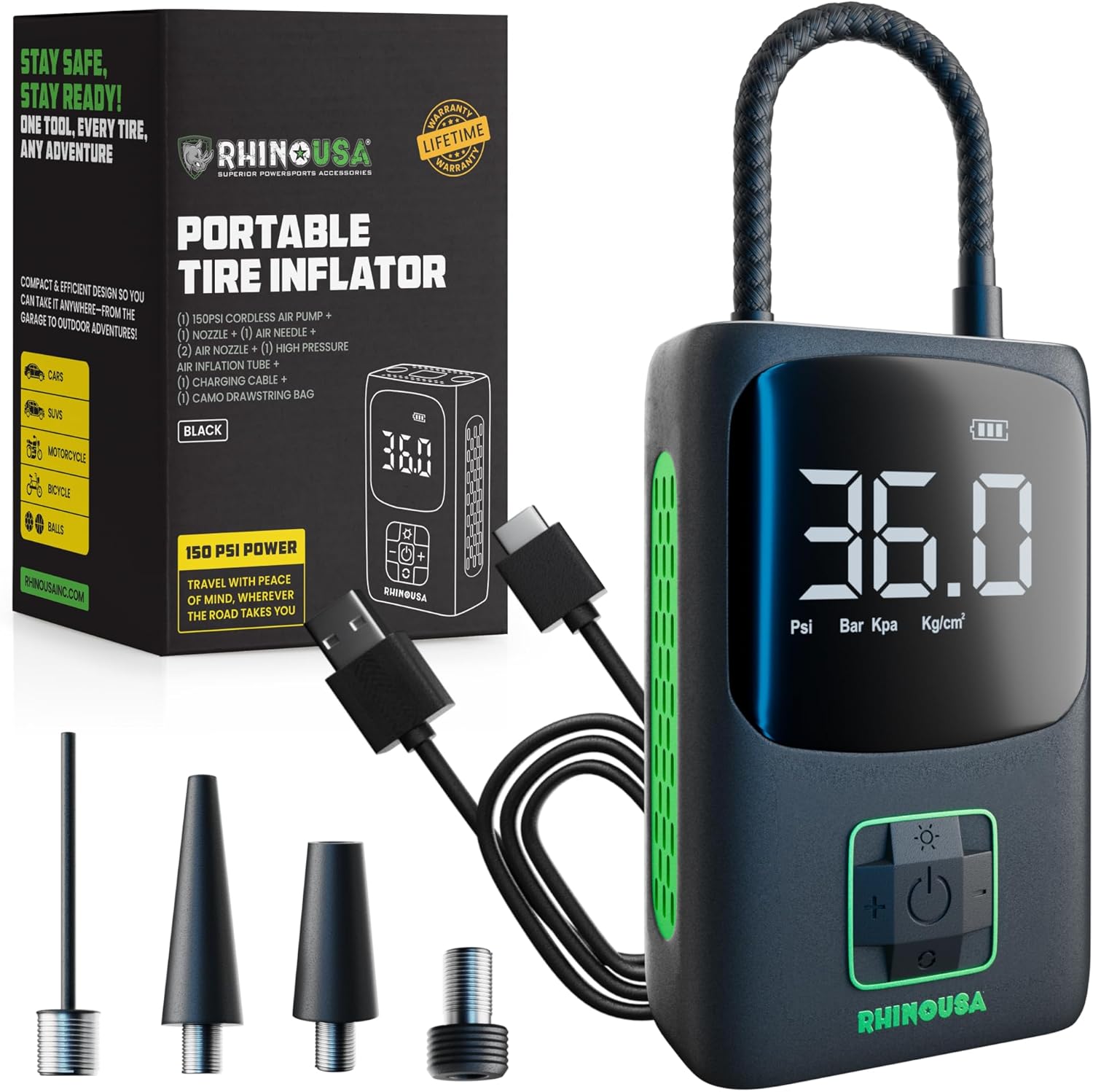
Figure 3.1: The Rhino USA Portable Tire Inflator and its accessories.

Figure 3.2: Close-up view of the inflator's durable casing, long-lasting battery, and reinforced air hose.

Figure 3.3: Features including auto-shutoff, LED flashlight, and USB charging port.
4. Setup and Charging
4.1 Initial Charging
Before first use, fully charge the inflator's internal Lithium Ion battery using the provided USB-C charging cable. Connect the USB-C end to the inflator and the USB-A end to a compatible USB power adapter (not included).
4.2 Attaching the Air Hose
Screw the high-pressure air hose securely onto the inflator's air outlet. Ensure a tight connection to prevent air leakage.
5. Operating Instructions
Follow these steps for quick and easy inflation:
- Power On: Activate the tire inflator by pressing the power button. The digital display will illuminate.
- Attach to Valve: Securely attach the air chuck onto the tire valve stem. For different inflatables, use the appropriate air needle or nozzle.
- Set Pressure: Use the '+' and '-' buttons to set your desired pressure (PSI, Bar, Kpa, or Kg/cm²). The inflator supports up to 150 PSI.
- Start Inflating: Press the start button to begin inflation. The inflator will automatically stop when the set pressure is reached.
- Monitor Progress: The dual LCD screen will display the current pressure during inflation.

Figure 5.1: Visual guide for quick and easy setup and operation.

Figure 5.2: The inflator connected to a car tire, demonstrating its compact and portable nature.

Figure 5.3: The inflator actively inflating a tire, showcasing its fast inflation capability.
6. Safety Information
- Do not leave the inflator unattended during operation.
- Ensure the air hose connection is secure to prevent accidental detachment.
- Avoid over-inflating tires or other items; always refer to the manufacturer's recommended pressure.
- Keep out of reach of children.
- Do not expose the inflator to extreme temperatures or moisture.
- Use only the provided charging cable for recharging.
7. Maintenance
- Clean the exterior of the inflator with a soft, dry cloth. Do not use harsh chemicals or abrasive cleaners.
- Store the inflator and its accessories in the provided drawstring bag in a cool, dry place when not in use.
- Regularly check the air hose and nozzles for any signs of wear or damage. Replace if necessary.
- Ensure the battery is charged periodically, even if not in regular use, to maintain battery health.
8. Troubleshooting
| Problem | Possible Cause | Solution |
|---|---|---|
| Inflator does not turn on. | Battery is depleted. | Charge the inflator using the USB-C cable. |
| Air is leaking during inflation. | Loose connection or damaged hose/nozzle. | Ensure all connections are tight. Inspect hose and nozzles for damage and replace if needed. |
| Inflator stops prematurely. | Desired pressure reached (auto-shutoff). | This is normal operation. Check the set pressure. |
| Inflator is not inflating. | Incorrect mode selected or valve not fully open. | Verify the correct pressure unit (PSI) is selected. Ensure the valve stem is fully open. |
9. Specifications
- Brand: Rhino USA
- Model Name: Portable Tire Inflator
- Part Number: AC-TIPORT-BLK
- Power Source: Battery Powered (Lithium Ion battery)
- Maximum Operating Pressure: 150 PSI
- Air Flow Capacity: 34 Liters Per Minute
- Product Dimensions: 3 x 3.5 x 5.25 inches
- Item Weight: 1.19 pounds
- Included Components: Lithium Ion battery, Dual LCD Screen, Air Chuck, Air Needle, Air Nozzles, High Pressure Air Hose, USB-C Charging Cable, Camo Drawstring Bag.
10. Warranty and Support
Rhino USA products come with a Lifetime Replacement Warranty. If you encounter any issues with your Portable Tire Inflator, please contact Rhino USA customer support for assistance.
For warranty activation and further product information, visit the official Rhino USA website or contact their support team.