
1. Introduction
This manual provides comprehensive instructions for the setup, operation, and maintenance of your SPYPOINT Flex-Dark Cellular Trail Camera. Please read this guide thoroughly to ensure proper use and optimal performance of your device. The SPYPOINT Flex-Dark is designed for outdoor use, capturing high-resolution photos and videos of wildlife with cellular transmission capabilities.
2. Product Overview and Key Features
The SPYPOINT Flex-Dark Cellular Trail Camera offers advanced features for reliable outdoor monitoring:
- No-Glow Night Vision: Equipped with no-glow LEDs, the camera operates discreetly in total darkness, emitting no visible light. Users can remotely switch between no-glow and low-glow settings via the SPYPOINT app for adaptable control.
- High-Resolution Imaging: Captures crystal-clear 40MP photos and 1080p videos with sound. Captured media is transmitted directly to your cell phone via the free SPYPOINT app.
- Advanced Camera Settings: Fine-tune camera performance with features such as Multi-shot, Time-Lapse+, customizable scheduling, and in-app maps.
- Cellular Connectivity: Features cross-carrier cellular coverage, automatically connecting to the best available signal for reliable photo and video transmission without requiring Wi-Fi.
- Durable and Weather-Resistant Design: Built for rugged outdoor environments, the camera features a reinforced ghost grey casing for superior concealment and durability. The semi-flexible antenna with secure brass fittings resists damage, and an upgraded latch ensures easy opening, even in cold weather.
- Included Photo Transmission Plan: A free plan providing 100 photos per month is included. Optional upgrade plans are available for more photos.
3. What's in the Box
Upon unboxing your SPYPOINT Flex-Dark Cellular Trail Camera, verify that all components are present:
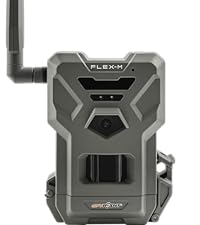
- SPYPOINT FLEX-DARK Camera
- Installation strap

SPYPOINT Flex-Dark Cellular Trail Camera with packaging and strap.
4. Setup Guide
4.1. Physical Setup
- Insert Batteries: The camera requires batteries (not included). Ensure correct polarity when inserting. For optimal performance, consider using SPYPOINT LIT-22 rechargeable lithium batteries.
- Insert MicroSD Card: Open the camera latch and insert a compatible MicroSD card (up to 32GB, not included) into the designated slot.
- Screw in Antenna: Attach the provided antenna to the camera's antenna port by screwing it in clockwise until secure.
- Mounting: Use the included installation strap to securely mount the camera to a tree or other stable surface. Ensure the camera is positioned to capture the desired area.

Diagram illustrating how to screw in the antenna, insert the MicroSD card, and turn on the camera.
4.2. App Setup and Activation
- Download the SPYPOINT App: Download and install the free SPYPOINT app on your smartphone from your device's app store.
- Create an Account: If you are a new user, create a SPYPOINT account and log in.
- Add Your Camera: In the app, navigate to the 'Cameras' section and tap the '+' icon to add a new camera. Follow the on-screen prompts to scan the QR code located inside your camera's battery compartment.

SPYPOINT app interface showing the 'add camera' plus button.

SPYPOINT app showing the device identification screen with QR code scanning instructions.
- Format MicroSD Card: With the camera powered on, press the 'FORMAT' button to format the MicroSD card. This prepares the card for use and ensures compatibility.
- Perform a Test: Press the 'TEST' button on the camera. This initiates a test sequence to verify camera functionality and cellular connection.
- Check App Status: Return to the SPYPOINT app. Your camera's status should update, indicating successful activation and connection.
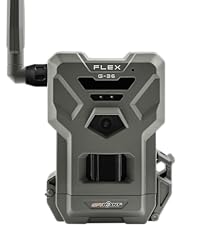
Diagram illustrating how to format the MicroSD card and push the test button on the camera.
SPYPOINT app screenshots showing camera status before and after reporting.
5. Operating Instructions
5.1. Powering On/Off
To power on the camera, slide the ON/OFF switch to the 'ON' position. To power off, slide the switch to the 'OFF' position.
5.2. Camera Modes and Settings
All camera settings, including photo resolution (40MP), video resolution (1080p), multi-shot, time-lapse, and scheduling, are managed remotely through the SPYPOINT app. Access the camera settings within the app to customize its operation.

Smartphone displaying a 40MP photo captured by the SPYPOINT Flex-Dark camera.

Smartphone displaying a 1080p video with sound captured by the SPYPOINT Flex-Dark camera.
5.3. Night Vision Control
The Flex-Dark camera features no-glow LEDs for night vision. You can adjust the night vision settings (no-glow or low-glow) remotely via the SPYPOINT app to suit your specific monitoring needs and avoid disturbing wildlife.

Close-up of the SPYPOINT Flex-Dark camera, illustrating its no-glow LED feature.
5.4. Cellular Transmission
The camera automatically connects to the best available cellular network to transmit captured photos and videos to your SPYPOINT app. Ensure the camera is placed in an area with adequate cellular signal for reliable transmission.

SPYPOINT Flex-Dark camera demonstrating cross-carrier cellular coverage.
6. Maintenance
6.1. Battery Management
Regularly check the battery level via the SPYPOINT app. Replace or recharge batteries as needed to ensure continuous operation. If using rechargeable LIT-22 batteries, follow the manufacturer's charging instructions.
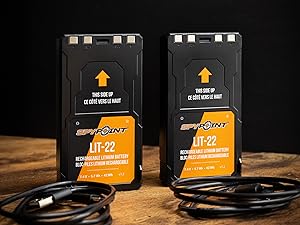
SPYPOINT LIT-22 rechargeable lithium batteries.
6.2. MicroSD Card Management
Periodically format your MicroSD card using the camera's format function or through the app to maintain optimal performance and prevent data corruption. Ensure the card has sufficient space for new captures.

SPYPOINT 32GB Micro SD card.
6.3. Cleaning
Gently clean the camera lens and housing with a soft, damp cloth. Avoid using abrasive cleaners or solvents that could damage the camera's finish or optical components.
7. Troubleshooting
- No Photos/Videos Transmitted:
- Check battery levels.
- Verify cellular signal strength in the camera's location via the app.
- Ensure your photo transmission plan is active and has available photos.
- Confirm the MicroSD card is properly inserted and formatted.
- Poor Image Quality:
- Clean the camera lens.
- Check camera settings in the app to ensure desired resolution is selected.
- Ensure the camera is stable and not subject to excessive movement.
- Camera Not Powering On:
- Ensure batteries are correctly inserted and fully charged.
- Verify the ON/OFF switch is in the 'ON' position.
For further assistance, refer to the SPYPOINT app's help section or visit the official SPYPOINT support website.
8. Specifications
| Feature | Specification |
|---|---|
| Model Name | FLEX-DARK US |
| Photo Resolution | 40MP |
| Video Resolution | 1080p with Sound |
| Night Vision | No-Glow LEDs |
| Detection Range | 100ft |
| Connectivity | Cellular (Cross-Carrier) |
| Power Source | Battery Powered (Batteries Required) |
| Memory | Micro SD (Required, Not Included) |
| Water Resistance Level | Water Resistant |
| Dimensions (L x W x H) | 10 x 2 x 2.7 inches |
| Item Weight | 15.8 ounces |
| UPC | 887157000028 |
9. Warranty and Support
9.1. Warranty Information
The SPYPOINT Flex-Dark Cellular Trail Camera comes with a 2-Year Warranty. Please retain your proof of purchase for warranty claims.
9.2. Customer Support
For technical support, troubleshooting assistance, or warranty inquiries, please contact SPYPOINT customer service through the SPYPOINT app or visit the official SPYPOINT website for detailed support resources and contact information.


