
Fujifilm 16840957
Fujifilm Instax Wide Evo Hybrid Instant Film Camera User Manual
Model: 16840957 | Brand: Fujifilm
1. Introduction
This manual provides detailed instructions for the safe and effective use of your Fujifilm Instax Wide Evo Hybrid Instant Film Camera. This innovative camera combines the charm of analog instant prints with the convenience of digital imaging, offering a versatile tool for capturing and sharing memories. Please read this manual thoroughly before using the camera to ensure proper operation and to maximize your photographic experience.
2. Safety Information
To prevent injury or damage to the camera, please observe the following safety precautions:
- Do not disassemble, modify, or attempt to repair the camera yourself. Refer all servicing to qualified personnel.
- Keep the camera and film out of reach of small children.
- Do not expose the camera to water, moisture, or extreme temperatures.
- Use only the specified battery and charging accessories.
- Avoid direct exposure of the lens to strong light sources, such as the sun, as this may damage the image sensor.
- Handle instant film with care. Do not bend or puncture the film pack.
3. What's in the Box
Upon unpacking, please verify that all the following items are included:
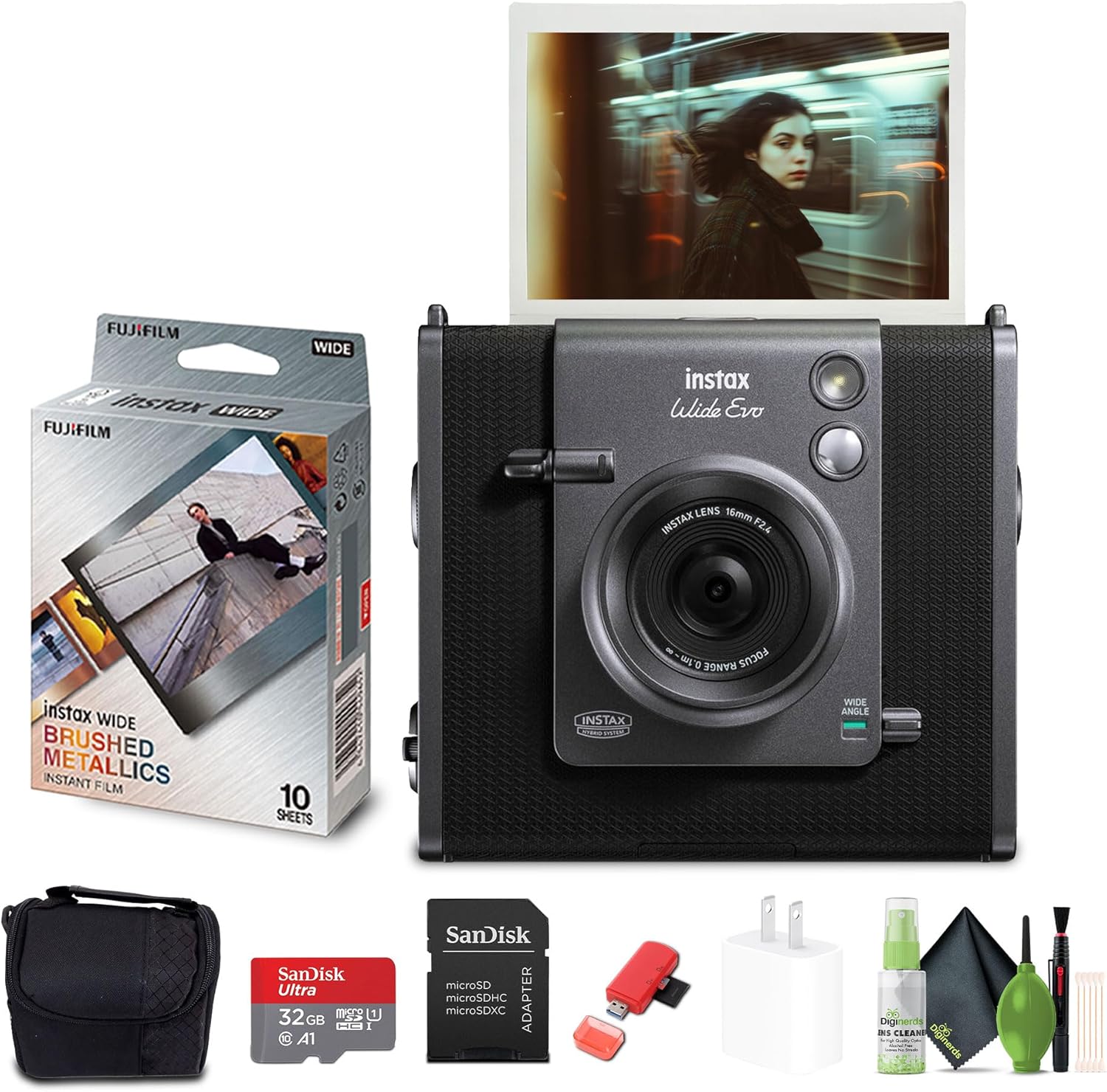
Image: The Fujifilm Instax Wide Evo Hybrid Instant Film Camera shown with its bundled accessories, including a box of Instax Wide film, a camera bag, a 32GB memory card, a USB card reader, a USB wall charging adapter, and a cleaning kit.
- Fujifilm Instax Wide Evo Hybrid Instant Film Camera
- FUJIFILM INSTAX WIDE Brushed Metallics Instant Film (10 Exposures)
- Camera Bag
- 6Ave Camera and Lens Cleaning Kit
- 32GB Memory Card
- USB Card Reader, SD/microSD + Adapter
- USB Wall Charging Adapter
- USB-C Charging Cable (typically included with camera body)
4. Product Overview
Familiarize yourself with the various parts and controls of your Instax Wide Evo camera:

Image: A diagram highlighting key components of the Instax Wide Evo camera, including the Lens Dial, Film Dial, Image Sensor, Wide Angle Switch, and Print Crank.
- Lens Dial: Used to select various lens effects.
- Film Dial: Used to select various film effects.
- Image Sensor: The 16MP sensor captures your images.
- Wide Angle Switch: Activates or deactivates the wide-angle mode for expansive shots.
- Print Crank: A tactile control used to initiate the printing process.
- 3.5" LCD Monitor: For composing shots, reviewing images, and navigating menus.
- MicroSD Card Slot: For additional digital storage of your photos.
- USB-C Charging Port: For charging the camera's internal battery.
- Built-in Flash: Provides illumination in low-light conditions.
- Tripod Mount: Allows for stable shots using a tripod.
- Selfie Mirror: Located on the front for easy self-portraits.
5. Setup
5.1 Charging the Battery
Before first use, fully charge the camera's internal battery. Connect the supplied USB-C cable to the camera's USB-C port and the other end to the USB wall charging adapter. The charging indicator will show the charging status and turn off when fully charged.
5.2 Inserting Instax Wide Film
- Open the film compartment cover on the back of the camera.
- Align the yellow mark on the film pack with the yellow mark on the camera.
- Insert the film pack straight into the compartment. Do not force it.
- Close the film compartment cover firmly until it clicks. The camera will automatically eject the black film cover sheet.
5.3 Inserting a MicroSD Card
The camera has internal memory, but a microSD card is recommended for extended storage of digital images. Locate the microSD card slot (usually on the side or bottom of the camera). Insert the microSD card with the contacts facing down until it clicks into place.
5.4 Powering On/Off
Press and hold the power button (usually located on the side or top) to turn the camera on or off. The LCD monitor will illuminate when the camera is powered on.
6. Operating the Camera
6.1 Taking Photos
Frame your shot using the 3.5" LCD monitor. Press the shutter button to capture the image. The camera will process the image and display it on the screen.
6.2 Using Lens and Film Effects
The Instax Wide Evo offers 10 lens effects and 10 film effects to customize your photos. Rotate the Lens Dial and Film Dial to select your desired effect. The LCD screen will show a preview of the effect applied to your image.

Image: A visual representation of the 10 distinct lens effects available on the Instax Wide Evo camera, as displayed on its screen.

Image: A visual representation of the 10 distinct film effects available on the Instax Wide Evo camera, as displayed on its screen.
6.3 Wide-Angle Mode
Engage the Wide Angle Switch to capture expansive scenes, ideal for landscapes or group photos. This mode broadens the field of view, allowing more of the scene to be included in your shot.
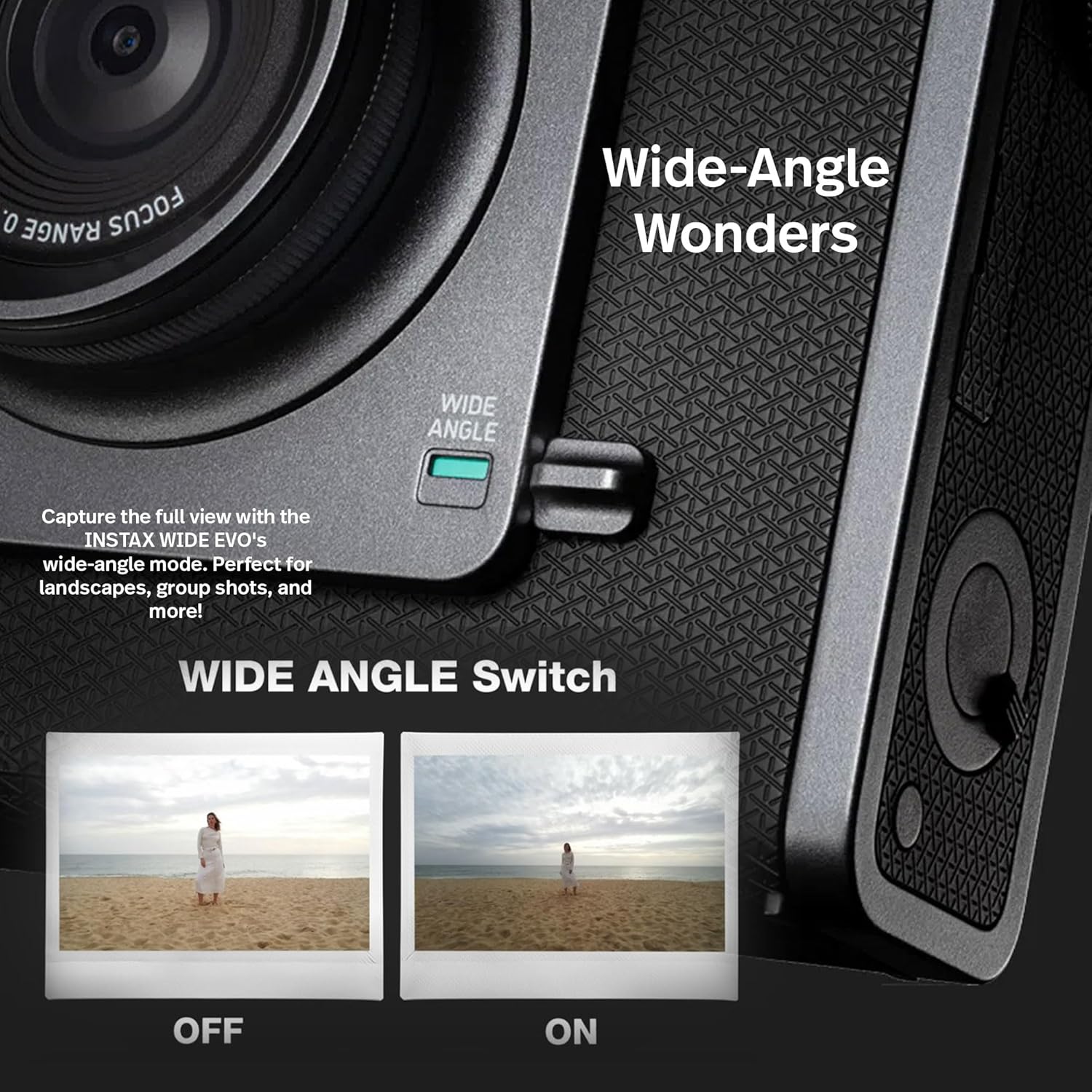
Image: A close-up view of the Wide Angle Switch on the camera, accompanied by two example photos demonstrating the difference between wide-angle mode off and on.
6.4 Printing Photos
After capturing an image, you can choose to print it instantly. Use the Print Crank to initiate the printing process. The camera will eject a 3" x 5" Instax WIDE photo in approximately 90 seconds.

Image: The Instax Wide Evo camera is shown printing an instant photo, with a smartphone displaying digital images, illustrating the blend of instant prints and digital convenience.

Image: A detailed view of the camera's print crank mechanism, alongside a smartphone screen demonstrating the remote shooting feature, highlighting the camera's hybrid functionality.
6.5 Smartphone App Connectivity
Connect your Instax Wide Evo to the companion smartphone app via Bluetooth. The app allows for remote shooting, transferring digital images from the camera to your smartphone, and easy sharing on social media. Refer to the app's instructions for detailed features.
7. Maintenance
7.1 Cleaning the Camera
- Use a soft, dry cloth to clean the camera body.
- For the lens, use a lens cleaning cloth or a blower brush to remove dust. Avoid touching the lens surface with your fingers.
- Do not use alcohol, thinners, or other volatile solvents to clean the camera.
7.2 Storage
When not in use, store the camera in a cool, dry place away from direct sunlight and extreme temperatures. Remove the film pack if the camera will not be used for an extended period.
8. Troubleshooting
If you encounter issues with your camera, refer to the following common problems and solutions:
| Problem | Possible Cause | Solution |
|---|---|---|
| Camera does not power on. | Battery is depleted. | Charge the battery fully. |
| No film ejects after taking a photo. | Film pack is empty or not inserted correctly. | Replace the film pack or reinsert it correctly. Ensure the film compartment cover is closed firmly. |
| Prints are too dark/light. | Incorrect exposure settings or lighting conditions. | Adjust exposure compensation if available, or use the built-in flash in low light. Ensure adequate lighting. |
| LCD screen is dark or unresponsive. | Software glitch or low battery. | Try restarting the camera. If unresponsive, connect to charger. If problem persists, contact support. |
| Cannot connect to smartphone app. | Bluetooth is off or pairing issue. | Ensure Bluetooth is enabled on both devices. Re-pair the camera with the app. Check app permissions. |
If the issue persists after trying these solutions, please contact Fujifilm customer support.
9. Specifications
| Feature | Detail |
|---|---|
| Model Name | 16840957 |
| Brand | Fujifilm |
| Product Dimensions (L x W x H) | 2.47 x 5.46 x 4.92 inches |
| Item Weight | 2.56 pounds |
| Image Sensor | 16MP |
| Lens | Fixed 16mm f/2.4 |
| Film Format Type | Instax Wide |
| Print Resolution | 318 DPI |
| Display | 3.5" LCD Monitor |
| Storage | Internal memory, MicroSD card slot |
| Connectivity | Bluetooth, USB-C |
| Included Components | Camera Body & Accessories |
| UPC | 094148695952 |
10. Warranty and Support
10.1 Warranty Information
Your Fujifilm Instax Wide Evo Hybrid Instant Film Camera is covered by a manufacturer's warranty. Please refer to the warranty card included with your product or visit the official Fujifilm website for detailed warranty terms and conditions specific to your region.
10.2 Customer Support
For technical assistance, troubleshooting beyond this manual, or warranty claims, please contact Fujifilm customer support. You can find contact information and additional resources on the official Fujifilm website or through their Amazon store page:
Related documents16840957


Ask a question about this manual
Ask about setup, troubleshooting, compatibility, parts, safety, or missing instructions. Manuals+ will review the question and use this page’s manual context to help answer it.