
1. Introduction
The Dupray Bloom™ Air Purifier is designed to enhance indoor air quality by reducing airborne pollutants such as dust, smoke, allergens, and pet dander. This unit features H13 HEPA air filtration and is suitable for large rooms up to 1,517 sq. ft. Its unique design incorporates either an integrated planter or an accent table, blending functionality with aesthetics.

Image: Dupray Bloom Air Purifier in Latte with Terrazzo accent table top.
2. Product Features
- Powerful Air Purification: Effectively targets dust, smoke, pet dander, allergens, and odors for cleaner indoor air.
- Integrated Design: Features an integrated planter or accent table add-on, providing dual functionality.
- Smart AutoDetect Mode: Monitors air quality in real-time and automatically adjusts fan speed (up to 10 speeds) for optimal performance.
- Large Room Coverage: Purifies spaces up to 1,517 sq. ft. with 360° air intake and outlet.
- Pet-Friendly Filtration: Designed to reduce common airborne pollutants and allergens in homes with pets, with zero ozone emission.
- Whisper-Quiet Operation: Operates at ultra-low noise levels, starting at just 20 dB, suitable for bedrooms and offices.
- H13 HEPA Filtration: Utilizes a medical-grade H13 HEPA filter with activated carbon for 3-stage filtration, capturing 99.97% of airborne pollutants.
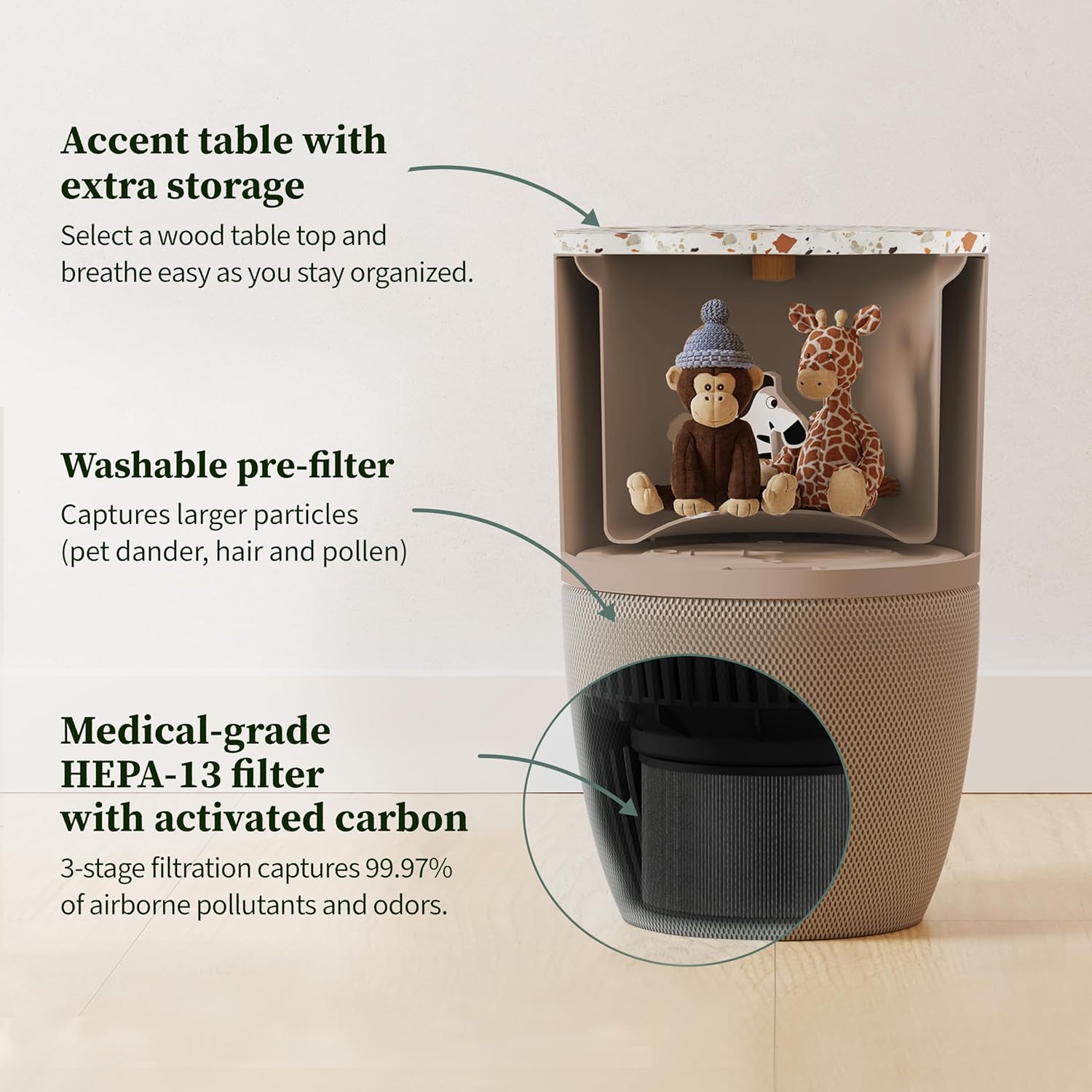
Image: Internal components of the Dupray Bloom Air Purifier, highlighting the washable pre-filter and medical-grade HEPA-13 filter.
3. Setup
- Unpacking: Carefully remove the air purifier from its packaging.
- Filter Installation: The filters are typically pre-installed but may be wrapped in plastic for shipping. Access the filter compartment (usually at the bottom or side) and ensure all plastic packaging is removed from the filters before use.
- Placement: Place the unit on a flat, stable surface in the desired room. Ensure there is adequate space around the unit for optimal air circulation (e.g., not directly against a wall).
- Power Connection: Plug the power cord into a suitable electrical outlet.
Video: An unboxing and setup guide for the Dupray Bloom Air Purifier, demonstrating initial steps.
4. Operating Instructions
The Dupray Bloom Air Purifier features intuitive controls for ease of use.
- Power On/Off: Press the power button located on the control panel to turn the unit on or off.
- AutoDetect Mode: The purifier defaults to AutoDetect mode, which intelligently senses air quality and adjusts fan speed accordingly. This mode is recommended for continuous operation.
- Fan Speed Adjustment: Manually select desired fan speeds (e.g., Low, Medium, High) using the fan speed control button. The unit offers up to 10 fan speeds for precise control.
- Air Quality Indicator: The unit features a real-time air quality indicator, typically displaying different colors to represent air quality levels (e.g., Green for Good, Orange for Moderate, Red/Purple for Poor).
- Quiet Operation: For minimal disturbance, especially during sleep, utilize the lowest fan speed settings. The unit is designed for whisper-quiet operation starting at 20 dB.

Image: Visual representation of pollutants captured and the air quality indicator.
5. Maintenance
Regular maintenance ensures optimal performance and extends the life of your air purifier.
- Pre-Filter Cleaning: The washable pre-filter should be cleaned regularly (e.g., every 2-4 weeks, or as needed depending on usage and environment). Gently remove the pre-filter and wash it with water, then allow it to air dry completely before re-installing.
- H13 HEPA Filter Replacement: The medical-grade H13 HEPA filter with activated carbon requires periodic replacement. The replacement frequency depends on usage and air quality, but typically every 6-12 months. The unit may have an indicator light to signal when replacement is due.
- Replacing the Filter:
- Turn off and unplug the air purifier.
- Access the filter compartment.
- Remove the old filter.
- Insert the new H13 HEPA filter, ensuring it is correctly oriented.
- Close the filter compartment securely.
- Plug in and power on the unit. Reset the filter life indicator if applicable (refer to the control panel for specific instructions).
Video: A tutorial demonstrating how to change the filter in the Dupray Bloom Air Purifier.
6. Troubleshooting
| Problem | Possible Cause | Solution |
|---|---|---|
| Unit does not turn on. | Not plugged in; power outage; power button not pressed. | Ensure power cord is securely plugged in. Check power outlet. Press power button firmly. |
| Airflow is weak or noisy. | Filters are dirty or clogged; fan obstruction. | Clean or replace filters. Check for any obstructions around the fan or air intake/outlet. |
| Air quality not improving. | Filters are old/clogged; unit size too small for room; excessive pollutants. | Replace filters. Ensure unit is appropriately sized for the room. Reduce sources of pollution. |
| Control button unresponsive or jumps settings. | Button sensitivity issue; temporary software glitch. | Try a gentle, precise touch on the button. Unplug the unit for 30 seconds and plug it back in to reset. If issue persists, contact customer support. |
7. Specifications
| Feature | Detail |
|---|---|
| Model Number | AIR030W |
| Product Dimensions | 13"D x 13"W x 19"H (33 x 33 x 48.26 cm) |
| Weight | 10.2 Pounds (4.6 kg) |
| Filter Type | H13 HEPA with Activated Carbon (3-stage filtration) |
| Coverage Area | Up to 1,517 sq. ft. |
| Noise Level | Starts at 20 Decibels |
| Fan Speeds | 10 (including AutoDetect mode) |
| Special Features | Integrated Planter / Accent Table, Real-time Air Quality Monitoring, Zero Ozone Emission |
8. Warranty and Support
The Dupray Bloom™ Air Purifier comes with a 3-Year Limited Warranty. For warranty claims, technical assistance, or customer service inquiries, please refer to the contact information provided in your product packaging or visit the official Dupray website.
Customer service has been noted for its responsiveness and helpfulness in resolving product-related issues.


