
GALAX GALAX REV-05
GALAX REV-05 Computer Case User Manual
Model: GALAX REV-05 | Brand: GALAX
Introduction
The GALAX REV-05 Computer Case is designed for enthusiasts seeking a sleek, professional, and high-performance chassis for their custom PC builds. This tower case features a modern mesh front panel for optimal airflow and comes equipped with four high-quality fixed RGB cooling fans to ensure continuous cooling for your components. Its spacious interior accommodates long graphics cards and various cooling solutions, while offering excellent cable management options for a clean and organized setup. The transparent side panel allows you to proudly display your internal components. This manual provides detailed instructions for setting up, installing components, operating, and maintaining your GALAX REV-05 case.
Safety Information
Please read and understand all safety precautions before installing or operating your computer case.
- Always disconnect the power supply from the wall outlet before performing any installation or maintenance.
- Handle components with care to avoid damage from static electricity. Consider using an anti-static wrist strap.
- Ensure proper ventilation around the case to prevent overheating.
- Keep the case away from liquids, excessive heat, and direct sunlight.
- Do not attempt to modify the case or its components, as this may void your warranty and pose a safety risk.
- Keep small parts and screws out of reach of children.
Package Contents
Verify that all items are present in your package:
- GALAX REV-05 Computer Case (with 4 pre-installed fixed RGB fans)
- Accessory Box (containing screws, cable ties, and other small parts)
- User Manual (this document)
Product Overview
Familiarize yourself with the key features and components of your GALAX REV-05 case.
External Views
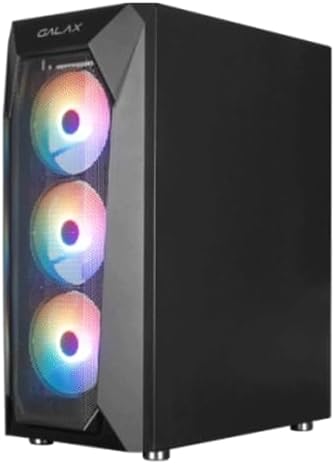
Angled view of the GALAX REV-05 case, showcasing the front mesh panel and the vibrant fixed RGB lighting of the pre-installed fans.

Front view of the GALAX REV-05 case, highlighting the three illuminated RGB fans behind the mesh panel, designed for optimal airflow.

Angled view of the GALAX REV-05 case with the RGB fans unlit, providing a clear look at the mesh front panel and the overall chassis design.

Top view of the GALAX REV-05 case, showing the top ventilation and the front I/O panel with various ports for connectivity.
Internal Views
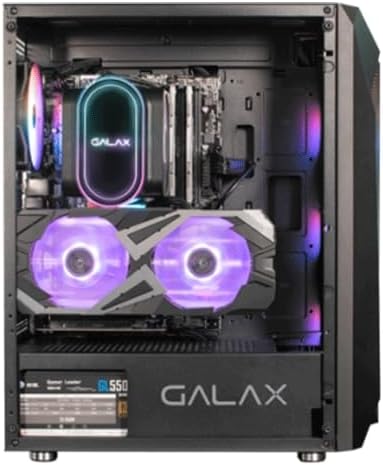
Internal view of the GALAX REV-05 case with example components installed, demonstrating the spacious layout and potential for custom builds.

Rear internal view of the GALAX REV-05 case, showing the motherboard tray cutout and cable routing options for organized builds.
Setup and Installation
Follow these steps to install your PC components into the GALAX REV-05 case.
1. Preparing the Case
- Place the case on a flat, stable surface.
- Remove the side panels by unscrewing the thumbscrews at the rear of the case and sliding the panels off.
2. Motherboard Installation
- Install the I/O shield into the motherboard cutout at the rear of the case.
- Align the motherboard with the standoffs inside the case. Ensure the standoffs match your motherboard's form factor (ATX, Micro-ATX, Mini-ITX).
- Secure the motherboard with the appropriate screws from the accessory box.
3. Power Supply Installation
- Locate the power supply mounting area at the bottom rear of the case.
- Slide the power supply into position.
- Secure the power supply with screws from the rear of the case.
4. Graphics Card (GPU) Installation
- Remove the necessary PCIe slot covers at the rear of the case.
- Insert the graphics card into the appropriate PCIe slot on the motherboard, ensuring it clicks into place.
- Secure the graphics card with screws. The case supports graphics cards up to 160mm in height.
5. Storage Drive Installation (HDD/SSD)
- Identify the 2.5" SSD and 3.5" HDD mounting locations.
- Mount your storage drives using the provided screws.
6. Cable Management
- Route all power and data cables through the designated cutouts and channels behind the motherboard tray.
- Use the included cable ties to bundle and secure cables for a clean look and improved airflow.
Operating Instructions
Once all components are installed and connected, you can power on your system.
- Ensure all cables are securely connected to their respective components and the power supply.
- Connect the power cable from your power supply to a wall outlet.
- Press the power button on the top I/O panel of the case to start your computer.
- The pre-installed RGB fans will illuminate automatically upon power-on, providing fixed RGB lighting.
Maintenance
Regular maintenance helps ensure optimal performance and longevity of your computer case and components.
Cleaning
- Exterior: Wipe the exterior surfaces with a soft, damp cloth. Avoid abrasive cleaners.
- Interior: Periodically use compressed air to remove dust buildup from inside the case, especially from fans and mesh panels. Ensure the system is powered off and unplugged before cleaning.
Fan Maintenance
- Check the pre-installed fans regularly for dust accumulation. Clean them gently with compressed air or a soft brush.
- Ensure fan blades are not obstructed and spin freely.
Troubleshooting
If you encounter issues with your GALAX REV-05 case, refer to the following common problems and solutions.
| Problem | Possible Cause | Solution |
|---|---|---|
| System does not power on. | Loose power connections, faulty power supply, incorrect front panel header connection. | Check all power cables (24-pin, 8-pin CPU, GPU power). Ensure power supply switch is ON. Verify front panel power button header is correctly connected to motherboard. |
| Fans are not spinning or RGB lights are off. | Fan power cable disconnected, faulty fan. | Ensure fan power cables are securely connected to the motherboard or fan controller. If a fan is faulty, it may need replacement. |
| Poor airflow or high temperatures. | Dust buildup, obstructed fans, poor cable management. | Clean dust filters and fans. Ensure no cables are obstructing airflow. Optimize cable routing. |
Specifications
Technical specifications for the GALAX REV-05 Computer Case.
| Feature | Detail |
|---|---|
| Model Name | GALAX REV-05 |
| Case Type | Tower |
| Material | Metal |
| Color | Black |
| Product Dimensions (D x W x H) | 60 cm x 72.9 cm x 67.9 cm |
| Item Weight | 8 grams (Note: This weight seems unusually low for a PC case and may be a data entry error in the source. Please refer to product packaging for accurate weight.) |
| Cooling Method | Air |
| Pre-installed Fans | 4 x Fixed RGB Fans |
| Light Color | RGB |
| Max GPU Length Support | Supports graphics cards up to 160mm in height (Note: Original description states 160mm, which is usually GPU height, not length. Assuming this refers to height clearance for GPU.) |
| Max PSU Length Support | Supports power supplies up to 330mm in length. |
| Recommended Uses | Gaming, Custom PC Builds |
| Country of Origin | China |
Warranty and Support
For warranty information and technical support, please refer to the official GALAX website or contact your local retailer. Keep your proof of purchase for warranty claims.
Online Resources: While specific links are not provided in this manual, searching for "GALAX official website" or "GALAX support" will direct you to relevant resources.
Related documentsGALAX REV-05


Ask a question about this manual
Ask about setup, troubleshooting, compatibility, parts, safety, or missing instructions. Manuals+ will review the question and use this page’s manual context to help answer it.