
1. Introduction
Thank you for choosing the SIGNET 47162 Interchangeable Crimping Plier Set. This tool is designed for precise and stable electrical crimping tasks. It features a robust construction with a locking mechanism and comes with a convenient storage case for its interchangeable dies. This manual provides essential information for the safe and effective use, setup, operation, and maintenance of your crimping plier set.
2. Safety Information
Always observe the following safety precautions when using this tool:
- Wear appropriate personal protective equipment, such as safety glasses, to protect against flying debris.
- Ensure the power is disconnected from any electrical circuits before performing crimping operations.
- Use the correct die for the specific terminal and wire gauge to ensure a secure and reliable crimp.
- Inspect the tool and dies for any damage before each use. Do not use damaged tools.
- Keep hands and fingers clear of the crimping jaws during operation.
- Store the tool and dies in the provided case in a dry, secure place, out of reach of children.
- Do not modify the tool or use it for purposes other than its intended use.
3. Package Contents
Your SIGNET 47162 set includes:
- 1 x Crimping Plier Handle
- 1 x Die for Insulated Terminals
- 1 x Die for Bare Terminals
- 1 x Die for Open Barrel Terminals
- 1 x Storage Case

Image 1: The complete SIGNET 47162 Interchangeable Crimping Plier Set, including the crimping tool, three sets of interchangeable dies, and the durable storage case.
4. Setup
To prepare your crimping pliers for use:
- Select the Correct Die: Identify the type of terminal you will be crimping (insulated, bare, or open barrel) and the corresponding wire gauge. Choose the appropriate die set from your kit.
- Insert the Die: Open the crimping pliers fully. Align the chosen die set with the slots on the plier jaws. The dies are designed to fit securely into place.
- Secure the Die: Gently close the plier handles until the die is firmly seated. Ensure both halves of the die are properly aligned and secured. The pliers feature a mechanism to hold the dies stably during use.

Image 2: The crimping pliers shown alongside the three interchangeable die sets, ready for selection and installation.

Image 3: A close-up view of the crimping pliers with one of the interchangeable dies securely inserted into the jaws, demonstrating proper setup.
5. Operating Instructions
Follow these steps for effective crimping:
- Prepare the Wire: Strip the insulation from the end of the wire to the appropriate length for your terminal. Ensure the wire strands are clean and untwisted.
- Insert Wire and Terminal: Place the terminal into the correct crimping slot on the installed die. Insert the stripped wire into the terminal.
- Perform the Crimp: Squeeze the handles of the crimping pliers firmly and evenly until the ratchet mechanism releases. The pliers are designed to provide efficient leverage for a stable and complete crimp.
- Inspect the Crimp: After crimping, release the handles and remove the terminal. Visually inspect the crimp to ensure it is tight and secure. Gently tug on the wire to confirm it is properly seated in the terminal.
The interchangeable dies are manufactured with high rigidity and precision, ensuring consistent and reliable crimps across various terminal types and sizes.

Image 4: A hand demonstrating the ergonomic grip of the crimping pliers, illustrating how the tool is held during operation.
6. Maintenance
Proper maintenance will extend the life of your tool:
- Cleaning: After each use, wipe down the pliers and dies with a clean, dry cloth to remove any dirt, dust, or debris.
- Lubrication: Periodically apply a light coat of machine oil to the pivot points of the pliers to ensure smooth operation.
- Storage: Always store the crimping pliers and all dies in the provided storage case. This protects them from damage, moisture, and loss. Store in a cool, dry place.
- Inspection: Regularly inspect the dies for wear or damage. Worn dies can lead to poor crimps. Replace damaged dies immediately.
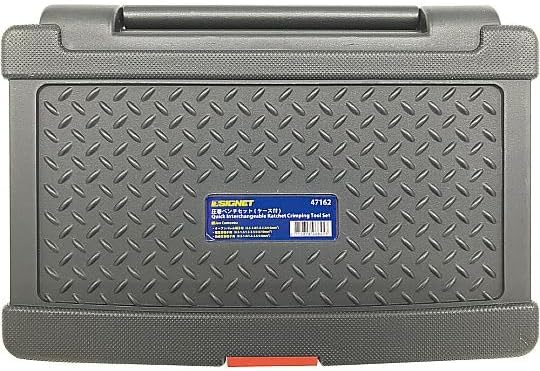
Image 5: The robust storage case for the SIGNET 47162 crimping plier set, designed to protect the tools and dies when not in use.
7. Troubleshooting
If you encounter issues with your crimping pliers, consider the following:
- Poor Crimp Quality:
- Ensure you are using the correct die for the terminal and wire gauge.
- Verify that the wire is stripped to the correct length and fully inserted into the terminal.
- Apply sufficient and even pressure when squeezing the handles until the ratchet mechanism completes its cycle.
- Inspect dies for wear or damage; replace if necessary.
- Dies Not Securing Properly:
- Check for any debris or obstructions in the die slots of the pliers or on the dies themselves.
- Ensure the dies are correctly aligned and fully seated before attempting to crimp.
- Stiff Operation:
- Apply a small amount of machine oil to the pivot points of the pliers.
- Clean any accumulated dirt or grime from the moving parts.
8. Specifications
| Feature | Detail |
|---|---|
| Brand | SIGNET |
| Model Number | 47162 |
| Item Type | Crimping Plier Set (Tools) |
| Crimping Die Type | Interchangeable |
| Insulated Terminal Crimping Size | 0.5 - 1.0 mm², 1.5 - 2.5 mm², 4.0 - 6.0 mm² |
| Bare Terminal Crimping Size | 1.5 mm², 2.5 mm², 6.0 mm², 10 mm² |
| Open Barrel Terminal Crimping Size | 0.5 - 1.0 mm², 1.5 - 2.5 mm², 4.0 - 6.0 mm² |
| ASIN | B0DV5D3W1 |
9. Warranty and Support
For specific warranty information, please refer to the documentation provided with your purchase or contact SIGNET customer support directly.
Regarding returns, this product may be eligible for a 30-day free return period from the date of purchase, subject to the retailer's return policy. Please check your purchase receipt or the retailer's website for detailed return instructions.