
Introduction
This manual provides instructions for the ENWShop replacement LG Magic Remote, model AKB75855501 (also known as MR20GA). This remote is designed to replace original LG Magic Remotes and offers intuitive control over compatible LG Smart TVs, including a magic pointer function and voice control capabilities. Please read this manual carefully before use to ensure proper operation and to maximize your viewing experience.
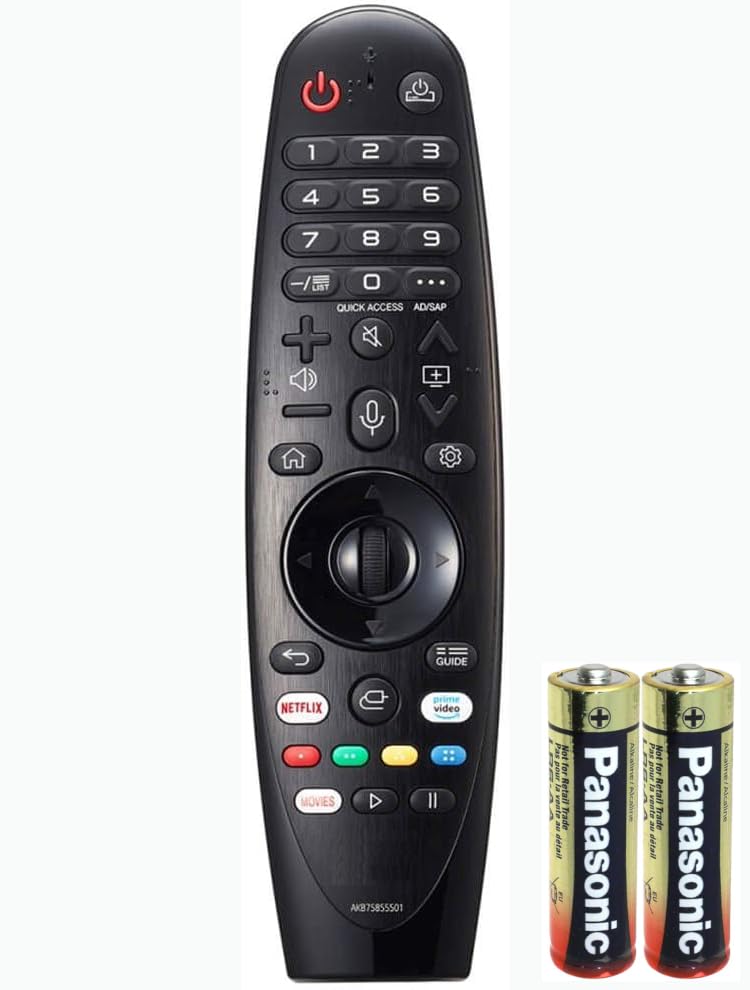
Image of the ENWShop LG Magic Remote AKB75855501, showing its ergonomic design and button layout.
Package Contents
- 1 x ENWShop LG Magic Remote (AKB75855501 / MR20GA)
- 2 x AA Batteries
- 1 x User Manual
Setup
1. Battery Installation
- Locate the battery compartment cover on the back of the remote control.
- Slide the cover downwards or press the latch to open it.
- Insert the two included AA batteries, ensuring the positive (+) and negative (-) terminals align correctly with the markings inside the compartment.
- Replace the battery compartment cover until it clicks securely into place.
2. Pairing the Remote with Your TV
The Magic Remote needs to be paired with your LG Smart TV to enable all its functions, including the magic pointer and voice control.
- Ensure your LG Smart TV is powered on.
- Point the Magic Remote directly at your TV screen.
- Press the Wheel (OK) button on the remote control. The TV should display a message indicating that the remote is registering or pairing.
- Once pairing is complete, a confirmation message will appear on the screen, and the magic pointer will become active.
Note: Only one Magic Remote can be paired with a single TV at a time. If you are replacing an old Magic Remote, the new remote will automatically unpair the previous one upon successful pairing.
Operating Instructions
Magic Pointer Control
The Magic Pointer allows you to navigate your TV's interface by simply pointing and clicking, similar to a computer mouse.
- Activate Pointer: Shake the remote gently or press any navigation button (Up, Down, Left, Right) to make the pointer appear on the screen.
- Move Pointer: Move your wrist to guide the pointer to the desired item on the screen.
- Select Item: Press the Wheel (OK) button to select the item the pointer is hovering over.
- Scroll: Use the Wheel button to scroll through lists or web pages.
- Deactivate Pointer: The pointer will disappear automatically after a few seconds of inactivity. You can also press the Back or Exit button to hide it.
Voice Control Function
The remote supports voice commands through integrated services like Google Assistant or Alexa, depending on your TV model and settings.
- Activate Voice Control: Press and hold the Microphone button on the remote.
- Speak Command: While holding the button, speak clearly into the microphone located on the remote.
- Release Button: Release the Microphone button once you have finished speaking. Your TV will process the command.
Basic Remote Functions
- Power Button: Turns the TV on or off.
- Volume Up/Down: Adjusts the TV volume.
- Channel Up/Down: Changes TV channels.
- Navigation Buttons (Up/Down/Left/Right): Used to navigate menus and selections.
- Back Button: Returns to the previous screen or menu.
- Home Button: Accesses the TV's main smart hub or home screen.
Compatibility
This replacement Magic Remote is compatible with various LG Smart TV models from 2017 to 2021. Please verify your TV's model number for exact compatibility.
Compatible LG Smart TV Models:
- 2021 Models: OLED TV's (G1, C1, A1 series), QNED Mini-LED TV's (QNED99, QNED90 series), NanoCell TV's (NANO99, NANO90, NANO85, NANO80, NANO75 series), UHD TV's (UP80, UP75 series).
- 2020 Models: OLED (ZX, WX, GX, CX, BX series), NanoCell (NANO99, NANO95, NANO91, NANO90, NANO86, NANO81 series), 4K UHD (UN85, UN81, UN80, UN74, UN73, UN71 series).
- 2019 Models: OLED (W9, E9, C9, B9 series), NanoCell (SM99, SM95, SM90, SM86, SM81 series), 4K UHD (UM80, UM75, UM73, UM71, UM6970 series).
- 2018 Models: OLED (W8, E8, C8, B8 series), Super UHD (SK9500, SK9000, SK8070, SK8000 series), UHD 4K (UK7700, UK6570, UK6500, UK6300 series).
- 2017 Models: Specific models including 43UJ6500, 49UJ6500, 43UJ6560, 49UJ6560, 49UJ7700, 55UJ7700, 60UJ7700, 65UJ7700, 55SJ8000, 60SJ8000, 65SJ8000, 55SJ8500, 65SJ8500, 55UJ6520, 65UJ6520, 70UJ6520, 75UJ6520, 55UJ6540, 60UJ6540, 65UJ6540, 55UJ6580, 65UJ6580, 65SJ850A, 65SJ9500, 70UJ6570, 70UJ657A, 75UJ657A, 75SJ8570, 75SJ857A, 75UJ6450, 75UJ6470, OLED55B7A, OLED65B7A, OLED65B7P, OLED55B7P, OLED55C7P, OLED65C7P.
Maintenance
Cleaning
- To clean the remote, gently wipe it with a soft, dry cloth.
- For stubborn dirt, slightly dampen the cloth with water or a mild, non-abrasive cleaner. Do not use harsh chemicals or abrasive materials.
- Ensure no liquid enters the remote's openings.
Battery Replacement
Replace batteries when the remote's response becomes sluggish or stops working. Always replace both AA batteries at the same time with new ones.
Storage
If the remote will not be used for an extended period, remove the batteries to prevent leakage and potential damage to the device.
Troubleshooting
| Problem | Possible Cause / Solution |
|---|---|
| Remote not responding | Check battery installation and replace if necessary. Ensure there are no obstructions between the remote and the TV. |
| Magic Pointer not appearing/working | Ensure the remote is paired correctly. Gently shake the remote or press a navigation button to activate the pointer. If issues persist, try re-pairing the remote. |
| Voice Control not working | Ensure the remote is paired. Check TV settings for voice control activation. Speak clearly and hold the microphone button while speaking. Ensure your TV supports the voice assistant. |
| Remote not pairing | Ensure batteries are fresh and correctly installed. Point the remote directly at the TV. Press the Wheel (OK) button firmly. If unsuccessful, try restarting the TV and then attempting to pair again. |
Specifications
- Model Number: AKB75855501 (MR20GA)
- Power Source: 2 x AA Batteries (included)
- Special Features: Keystroke Sensitivity, Long Distance Signal Stabilization, Pointer Control, Voice Search
- Max Number of Supported Devices: 1 (Television)
- Compatible Devices: LG Smart Televisions (2017-2021 models)
- Color: Black
- Item Weight: 5.9 ounces
- Package Dimensions: 8.35 x 2.52 x 1.46 inches
Warranty and Support
For warranty information, please refer to the documentation provided at the time of purchase or contact the seller directly. For technical support or further assistance, please reach out to the ENWShop customer service team through your purchase platform or their official website.