
ZEBRONICS Zeb-Juke Bar
ZEBRONICS Juke BAR 10000 7.2.4 Home Theatre Soundbar System User Manual
Model: Zeb-Juke Bar
1. Introduction
The ZEBRONICS Juke BAR 10000 is a powerful 7.2.4 home theatre soundbar system designed to deliver an immersive audio experience. Featuring Dolby Atmos, DTS X, and ZEB AcoustiMax technology, this system provides clear dialogues, crisp highs, and deep bass for a spacious soundstage. It includes a soundbar, a dual-driver wireless subwoofer, and dual wireless rear satellites, offering a total output of 1100W RMS. This manual provides essential information for setting up, operating, and maintaining your soundbar system.
Key Features:
- Dynamic Output: Delivers an impressive total output power of 1100W RMS.
- Dolby Atmos and DTS X: For clear dialogues, crisp highs, and deep bass, delivering a spacious and immersive soundstage.
- Powerful Drivers: Soundbar with 10 drivers and subwoofer with dual 16.51 cm drivers and dual 20.32 cm passive radiators.
- Dual Rear Satellites: Offers immersive audio with dual wireless rear satellites (70W x 4 output from each driver).
- 7.2.4 Surround Sound: Experience cinematic audio with multi-directional sound.
- Multi-Connectivity: Includes BT v5.3, AUX, TV (eARC), Optical IN, and USB.
- Wall-Mountable: Designed for space efficiency.
- LED Display: Shows soundbar status, volume levels, and connectivity modes.
- Karaoke Maker: Enables turning any song into a karaoke track with a wireless UHF mic.
2. Package Contents
Please check the box for the following items:
- Sound Bar - 1 unit
- Subwoofer - 1 unit
- Satellite Speakers - 2 units
- Remote Control - 1 unit
- Wireless Microphone - 1 unit
- Input Cable - 1 unit
- HD Cable - 1 unit
- Wall Mount Bracket With Fasteners - 1 unit
- QR Code Guide - 1 unit
- Power Adapter (Satellite) - 2 units
- Power Cord - 2 units
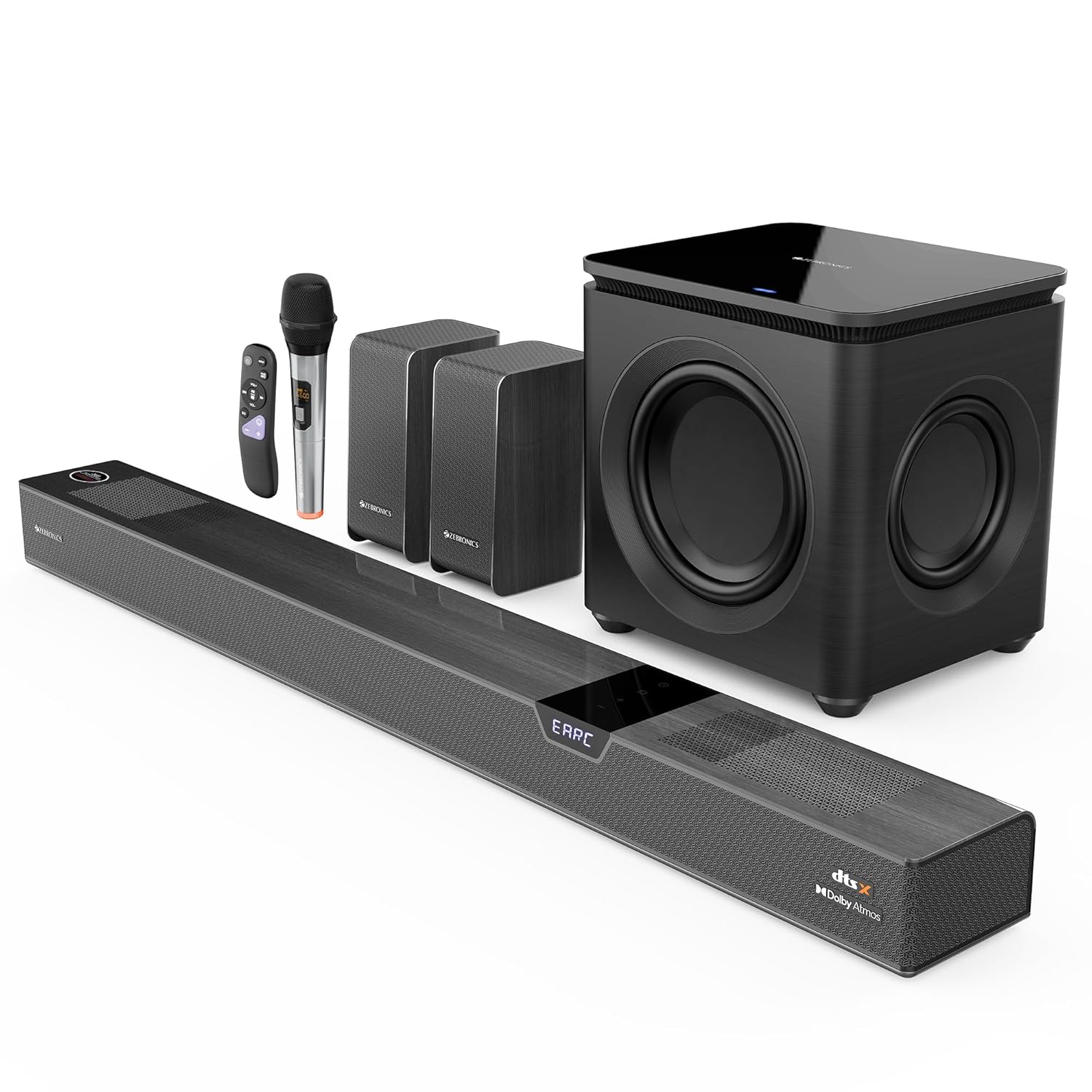
Image: All components of the ZEBRONICS Juke BAR 10000 system, including the soundbar, subwoofer, two satellite speakers, remote control, and wireless microphone.
3. Setup
3.1. Placement
Proper placement of your soundbar system is crucial for optimal audio performance. Consider the following guidelines:
- Soundbar: Place the soundbar centrally below your television. Ensure no objects obstruct the front of the soundbar. It can also be wall-mounted using the provided bracket.
- Subwoofer: Position the wireless subwoofer on the floor, ideally in a corner of the room or near a wall, to enhance bass response. Ensure there is at least 10cm of space from the wall for the rear air vent.
- Satellite Speakers: Place the two wireless satellite speakers behind your listening position, one on the left and one on the right, to create an immersive surround sound experience.

Image: Illustration showing the soundbar mounted on a wall, and the overall placement of the soundbar, subwoofer, and satellite speakers in a room for optimal 7.2.4 surround sound.
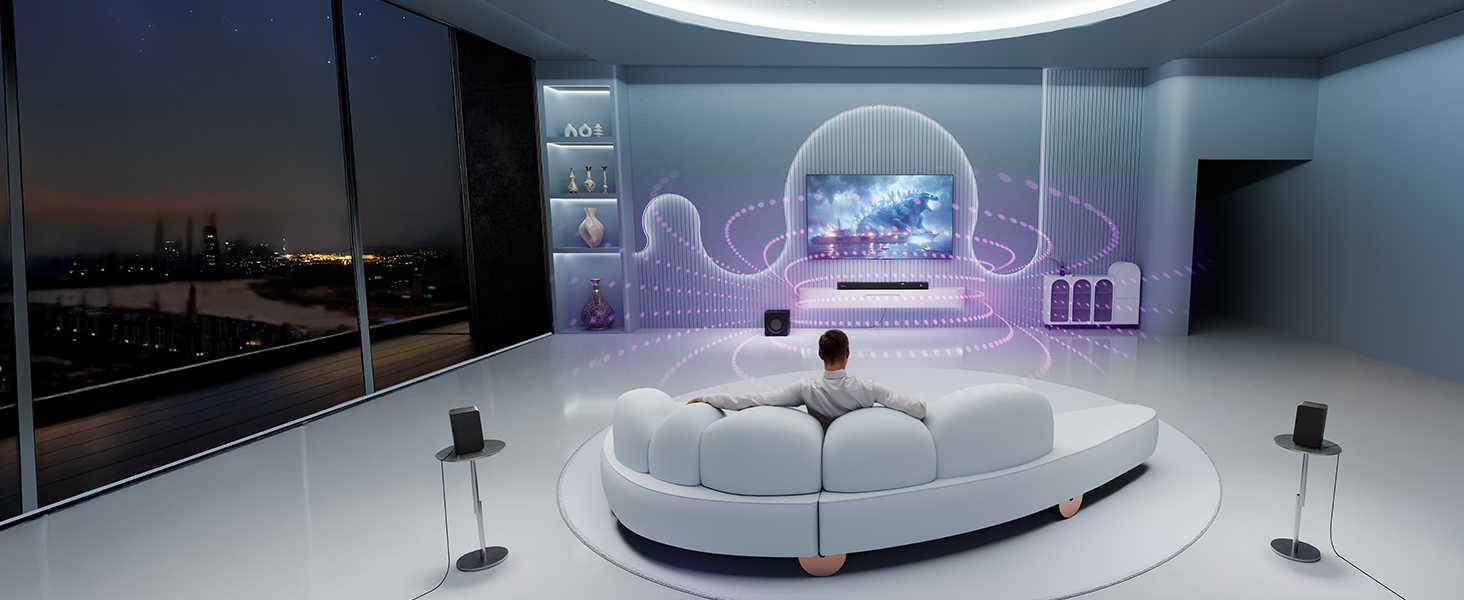
Image: Detailed view of the soundbar's internal drivers and tweeters, along with the dual wireless rear satellites, highlighting their contribution to the immersive audio experience.
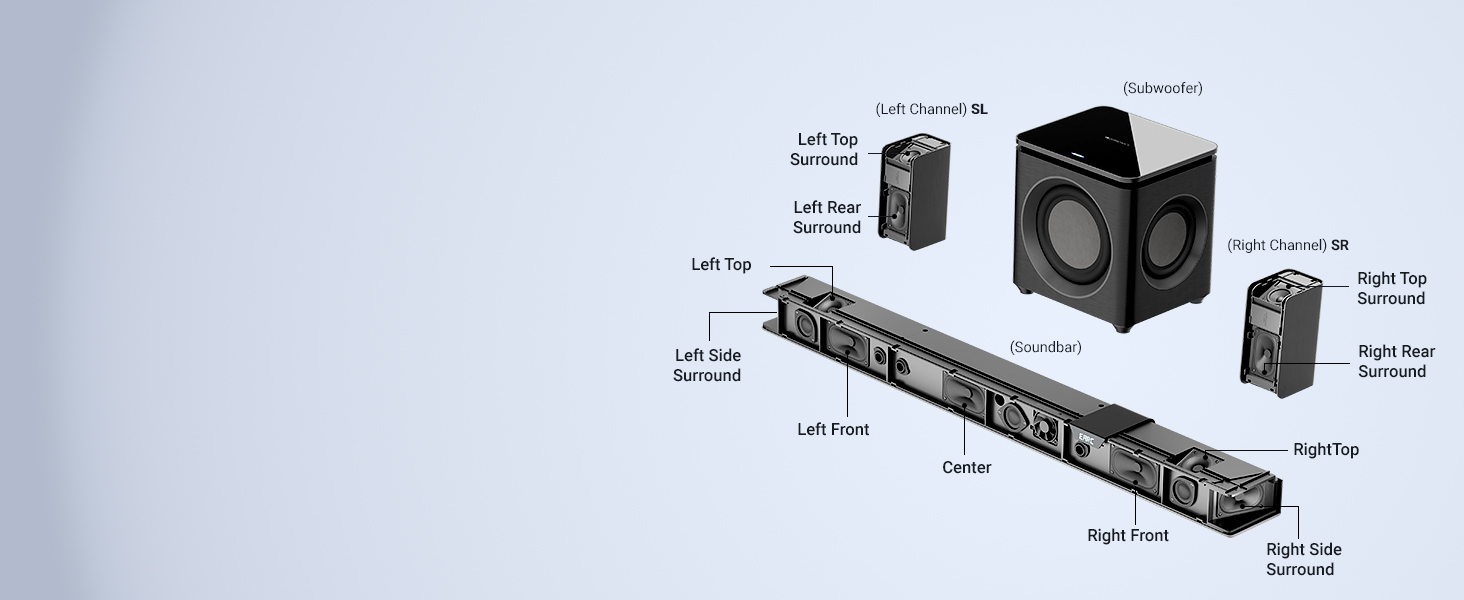
Image: Close-up of the wireless subwoofer, showcasing its dual 16.51 cm active drivers and dual 20.32 cm passive radiators designed for immersive bass.
3.2. Connections
Connect your soundbar system to your audio sources using the available ports:
- HDMI eARC: For the best audio quality and control, connect your TV's HDMI eARC port to the soundbar's TV (eARC) port using the provided HD cable. This allows for high-resolution audio passthrough and TV remote control of the soundbar volume.
- Optical IN: Connect devices with an optical audio output to the soundbar's Optical IN port.
- AUX: Use the AUX port for connecting devices with a 3.5mm audio jack.
- USB: Insert a USB drive into the USB port for music playback. This port is also used for firmware upgrades.
- Bluetooth: For wireless audio streaming from compatible devices.

Image: Close-up view of the soundbar's rear panel showing the Optical, AUX, USB, and TV (eARC) input ports, along with the touch control panel and LED display on top.
3.3. Power Connection
Connect the power cords to the soundbar, subwoofer, and satellite speakers, then plug them into a power outlet. The system will enter standby mode.
3.4. Wireless Satellite Pairing
The dual rear satellites connect wirelessly to the main soundbar. Ensure both satellites are powered on. They should automatically pair with the soundbar. If pairing fails, refer to the troubleshooting section or the QR Code Guide for specific pairing instructions, which typically involve a 'Pair' button on the satellites and/or soundbar.
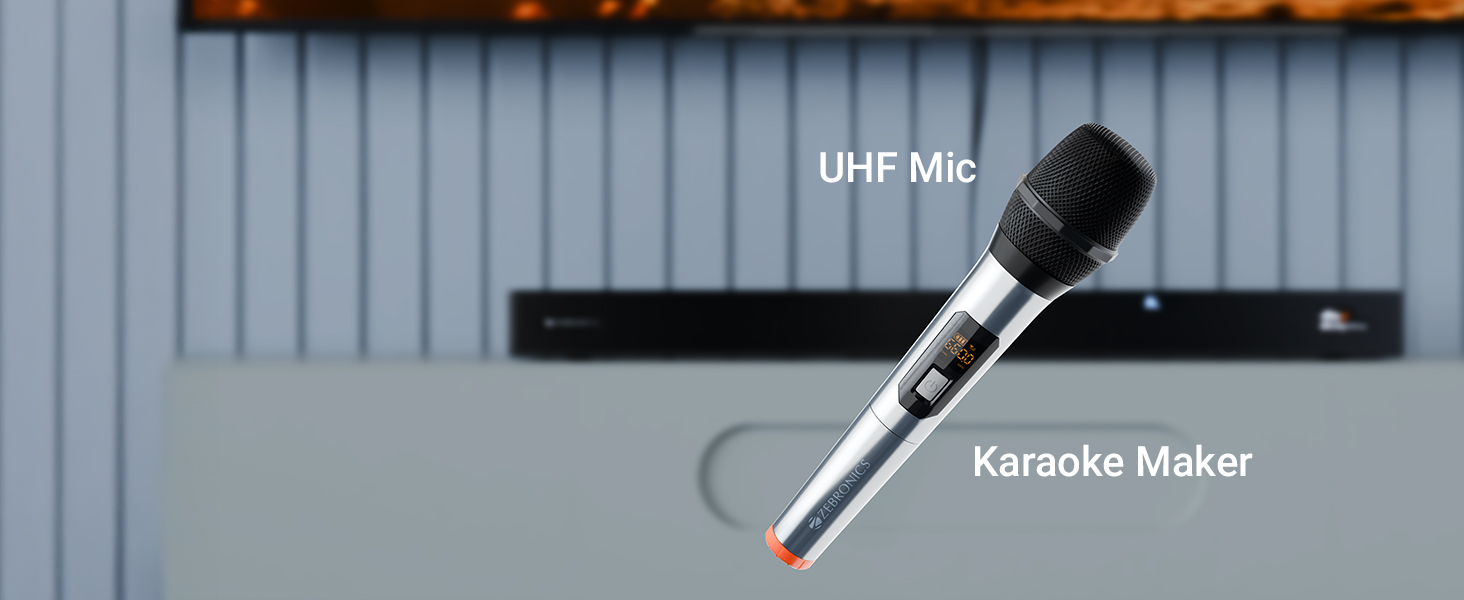
Image: Detail of a satellite speaker's rear panel, showing the 'Pair' button and LED indicator for wireless connection status.
4. Operating Instructions
4.1. Power On/Off
Press the Power button on the remote control or the touch control panel on the soundbar to turn the system on or off.
4.2. Input Selection
Press the "Input" or "Source" button on the remote control or the touch control panel to cycle through the available input modes: BT (Bluetooth), AUX, Optical IN, TV (eARC), and USB. The selected mode will be displayed on the soundbar's LED display.
4.3. Volume Control
Adjust the volume using the Volume Up (+) and Volume Down (-) buttons on the remote control or the touch control panel. The current volume level will be shown on the LED display.
Image: The remote control for the soundbar system, showing buttons for power, volume, input selection, and equalizer presets.
4.4. Bluetooth Pairing
- Switch the soundbar to Bluetooth mode. The LED display will show "BT" and flash, indicating it's in pairing mode.
- On your mobile device, enable Bluetooth and search for "ZEB-JUKE BAR 10000" (or similar name).
- Select the soundbar from the list to pair. Once connected, the "BT" indicator on the soundbar will stop flashing.
4.5. Karaoke Function
The system includes a wireless UHF microphone for karaoke. Simply power on the microphone; it will automatically connect to the soundbar. Use the "Karaoke Maker" feature to convert any song into a karaoke track for endless singing fun.

Image: The wireless UHF microphone included with the system, featuring a display and controls.
5. Maintenance
To ensure the longevity and optimal performance of your ZEBRONICS Juke BAR 10000 system, follow these maintenance guidelines:
- Cleaning: Use a soft, dry cloth to wipe down the surfaces of the soundbar, subwoofer, and satellite speakers. Do not use liquid cleaners or abrasive materials, as they may damage the finish.
- Ventilation: Ensure that all ventilation openings on the soundbar and subwoofer are clear and unobstructed to prevent overheating.
- Storage: If storing the system for an extended period, disconnect it from power, clean it, and store it in a cool, dry place away from direct sunlight and extreme temperatures.
- Cable Management: Keep cables neatly organized and avoid sharp bends or kinks that could damage the wiring.
6. Troubleshooting
If you encounter any issues with your soundbar system, please refer to the following common problems and solutions:
| Problem | Possible Cause | Solution |
|---|---|---|
| No power | Power cord not connected; Power outlet not active. | Ensure all power cords are securely plugged into the system and a working power outlet. |
| No sound | Incorrect input selected; Volume too low; Mute function active; Cables not connected properly. | Select the correct input source. Increase volume. Deactivate mute. Check all audio cables are securely connected. |
| Bluetooth not connecting | Soundbar not in pairing mode; Device too far; Interference. | Ensure soundbar is in BT pairing mode. Move device closer. Avoid strong interference sources. |
| Rear satellites lose connection | Interference; Out of range; Pairing issue. | Ensure satellites are within range and unobstructed. Re-pair satellites if necessary (refer to QR Code Guide for specific steps). Check power adapters for satellites. |
| Distorted sound | Volume too high; Poor audio source quality; Incorrect audio settings. | Lower the volume. Try a different audio source. Adjust EQ settings if available. |
7. Specifications
| Feature | Detail |
|---|---|
| Brand | ZEBRONICS |
| Model Name | JUKE BAR |
| Item Model Number | Zeb-Juke Bar |
| Mounting Type | Wall Mount |
| Speaker Type | Soundbar |
| Surround Sound Channel Configuration | 7.2.4 |
| Total Output Power | 1100 Watts RMS |
| Subwoofer Output | 300W |
| Soundbar Output | 520W |
| Satellite Output | 280W (70W x 4) |
| Subwoofer Driver Size | Dual 16.51 cm active drivers, Dual 20.32 cm passive radiators |
| Soundbar Drivers | 10 drivers (7 drivers and 3 tweeters) |
| Wireless Communication Technology | Bluetooth v5.3 |
| Connectivity Protocol | Auxiliary, Bluetooth, Optical IN, USB, eARC |
| Signal-to-Noise Ratio | 65 dB |
| Control Method | Remote, Touch Control |
| Product Dimensions | 35.1D x 107.5W x 39.8H Centimeters |
| Item Weight | 13 kg |
| Country of Origin | China |
8. Warranty and Support
Your ZEBRONICS Juke BAR 10000 system comes with a Limited Warranty. For detailed warranty terms and conditions, please refer to the QR Code Guide included in your package or visit the official ZEBRONICS website.
For technical support, service, or inquiries, please contact Zebronics India Private Limited:
- Manufacturer Address: No.13/7, Smith Road, Royapettah, Chennai - 600 002, India
- Brand Store: Visit the ZEBRONICS Store on Amazon
Related documentsZeb-Juke Bar


Ask a question about this manual
Ask about setup, troubleshooting, compatibility, parts, safety, or missing instructions. Manuals+ will review the question and use this page’s manual context to help answer it.