
1. Introduction
This manual provides detailed instructions for the installation, operation, and maintenance of your Tackform 20 Series High Strength Magnetic Wireless Charging Phone Holder. This device is designed for secure phone mounting and convenient wireless charging in vehicles, compatible with MagSafe and 20mm ball mounting systems.

Figure 1.1: The Tackform 20 Series Magnetic Wireless Charging Phone Holder.
2. What's Included
Please verify that all components are present in your package:
- Tackform 20 Series Magnetic Wireless Charging Phone Holder with 20mm Ball
- Adhesive Metal Ring (for non-MagSafe compatible devices)
- USB-C Charging Cable
- Car Power Adapter (Cigarette Lighter Adapter)
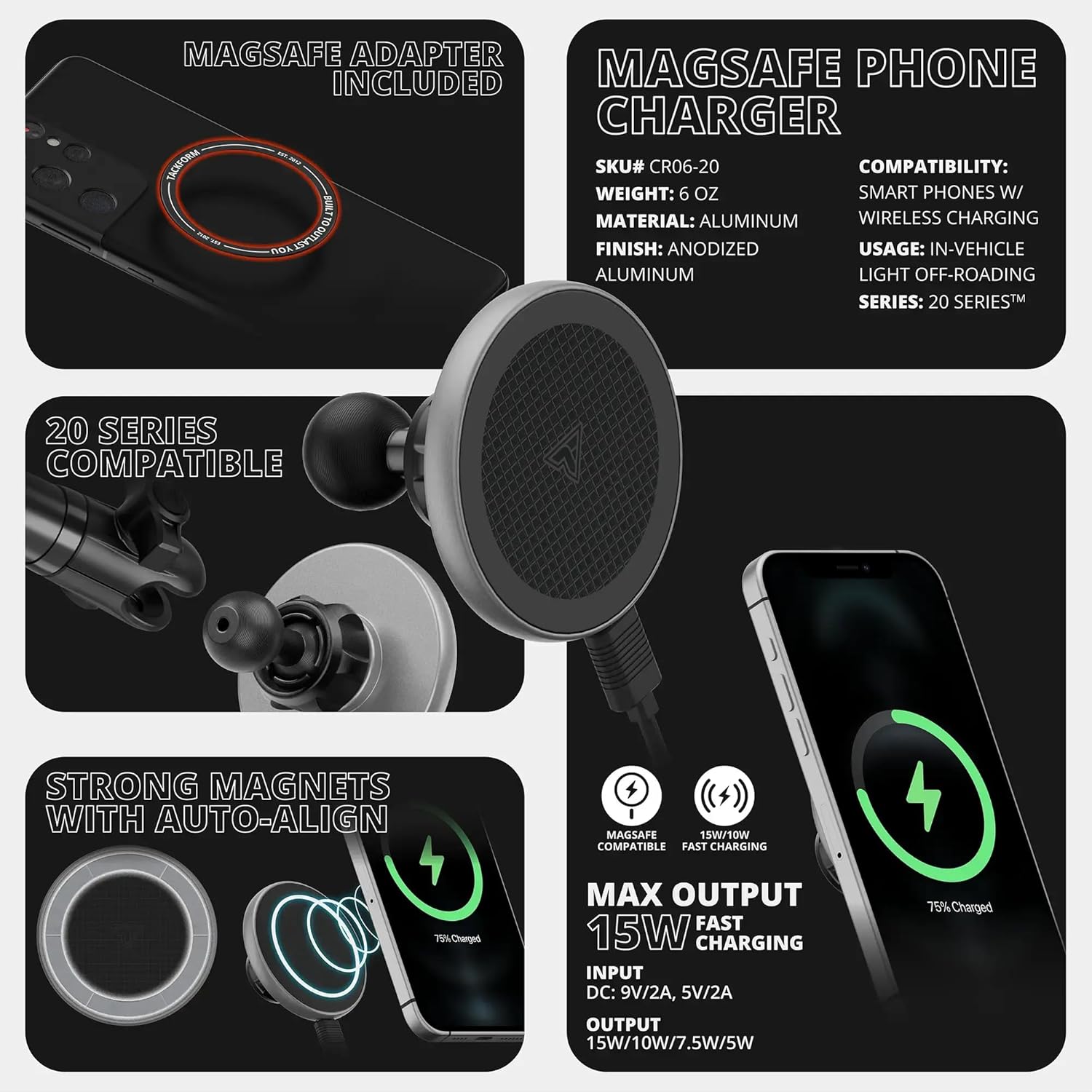
Figure 2.1: Included components of the Tackform 20 Series Phone Holder, showing the magnetic charging pad, 20mm ball mount, and accessories for MagSafe and non-MagSafe phone compatibility.
3. Setup Instructions
3.1 Attaching the Phone Holder to a 20mm Ball System
- Ensure your existing mounting system has a 20mm ball. This product is specifically designed for compatibility with Tackform’s 20 Series Platform and other 20mm ball and socket systems. Note: Not compatible with 25.4mm / 1” / B-Sized ball systems.
- Loosen the collar on your existing 20mm ball arm or base.
- Slide the socket of the Tackform phone holder onto the 20mm ball.
- Tighten the collar securely to fix the phone holder in place.

Figure 3.1: The 20mm ball and socket mechanism for secure attachment to compatible mounting arms.
3.2 Preparing Your Phone for Magnetic Attachment and Wireless Charging
- For MagSafe Compatible Devices (e.g., iPhone 12 and newer, or MagSafe compatible cases): Your device can directly attach to the magnetic charging surface. No additional accessories are needed.
- For Non-MagSafe Compatible Devices (e.g., older iPhones, Android phones, or standard cases):
- Locate the included adhesive metal ring.
- Clean the back of your phone or phone case thoroughly.
- Carefully peel off the adhesive backing from the metal ring.
- Center the metal ring on the back of your phone or phone case. Ensure it does not obstruct the camera or any essential ports. Press firmly for several seconds to ensure a strong bond. This ring enables magnetic attachment and wireless charging for your device.
Figure 3.2: Illustrates how to use the adhesive metal ring for non-MagSafe devices to achieve magnetic compatibility and wireless charging.
3.3 Power Connection
- Connect the USB-C end of the charging cable to the port on the phone holder.
- Plug the other end of the USB-C cable into the provided car power adapter.
- Insert the car power adapter into your vehicle's 12V accessory outlet (cigarette lighter socket).
- The phone holder is now ready to provide wireless charging.
4. Operating Instructions
4.1 Attaching Your Phone
Once the holder is securely mounted and powered, simply bring your MagSafe-compatible phone (or phone with the adhesive metal ring) close to the magnetic charging surface. The magnets will automatically align and secure your phone in place.
4.2 Wireless Charging Functionality
When your phone is correctly aligned on the magnetic surface and the holder is powered, wireless charging will begin automatically. The holder supports up to 15W fast wireless charging for compatible devices.
Video 4.1: Product overview of the Tackform Magnetic Phone Holder, demonstrating its MagSafe compatibility and general use.
Video 4.2: Demonstration of the MagSafe Charging Phone Holder with a 20mm Ball, showing magnetic attachment and charging.
4.3 Adjusting Viewing Angle
The 20mm ball and socket design allows for 360-degree rotation and tilt, enabling you to adjust your phone to the optimal viewing angle. Simply loosen the collar on the mounting arm slightly, adjust the phone holder, and then re-tighten the collar to secure the position.
Video 4.3: A short demonstration of the 20mm ball magnetic phone holder, highlighting its 360-degree swivel and anti-slip features.
Video 4.4: A brief clip showcasing the 20mm ball dash mount magnetic phone holder's magnetic strength and adjustability.
5. Maintenance
- Cleaning: Regularly wipe the magnetic charging surface and the holder's body with a soft, dry cloth to remove dust and debris. Avoid using harsh chemicals or abrasive cleaners.
- Cable Care: Ensure the USB-C cable is not kinked or pinched, which can damage the cable and affect charging performance.
- Adhesive Ring: If using the adhesive metal ring, ensure it remains firmly attached to your phone or case. If it begins to peel, clean the surface and reapply a new adhesive ring if necessary.
6. Troubleshooting
| Issue | Possible Cause | Solution |
|---|---|---|
| Phone not charging wirelessly. |
|
|
| Slow wireless charging. |
|
|
| Phone not holding securely. |
|
|
| Holder is loose on the mounting arm. |
|
|
7. Specifications
- Model Number: CR06-20
- Brand: Tackform
- Mounting System: 20mm Ball and Socket
- Wireless Charging Output: Up to 15W (compatible with 15W/10W/7.5W/5W)
- Input: DC: 9V/2A, 5V/2A
- Compatibility: MagSafe compatible phones/cases, Universal phones with included adhesive metal ring
- Material: Aluminum (ball), other durable materials
- Color: Black
- Item Weight: 4 ounces
- Package Dimensions: 4 x 4 x 3 inches
- Special Features: Magnetic attachment, Wireless Charging, 360-degree adjustability
8. Warranty and Support
Tackform is an American-owned and operated company based in Addison, IL. For warranty information, technical support, or any inquiries regarding your product, please contact Tackform customer service directly. Details can typically be found on the official Tackform website or through your purchase documentation.
Tackform products are engineered for durability and load capacities, featuring a safety factor not guaranteed by other manufacturers.