
1. Introduction
Thank you for purchasing the Trevi RA 7F50 BT Portable Multiband Radio. This device offers versatile audio entertainment with FM, AM, and SW radio bands, wireless connectivity, and MP3 playback via USB and Micro SD. Its integrated solar panel and USB Type-C charging port ensure power availability wherever you go. Please read this manual carefully to ensure proper use and maintenance of your radio.
2. Safety Information
- Do not expose the device to rain, moisture, or extreme temperatures.
- Avoid dropping or subjecting the radio to strong impacts.
- Do not disassemble the unit. Repairs should only be performed by qualified personnel.
- Keep out of reach of children.
- Ensure proper ventilation when charging.
- Use only the provided USB Type-C cable for charging or a certified equivalent.
3. Product Overview
Familiarize yourself with the components and controls of your Trevi RA 7F50 BT radio.
Front View
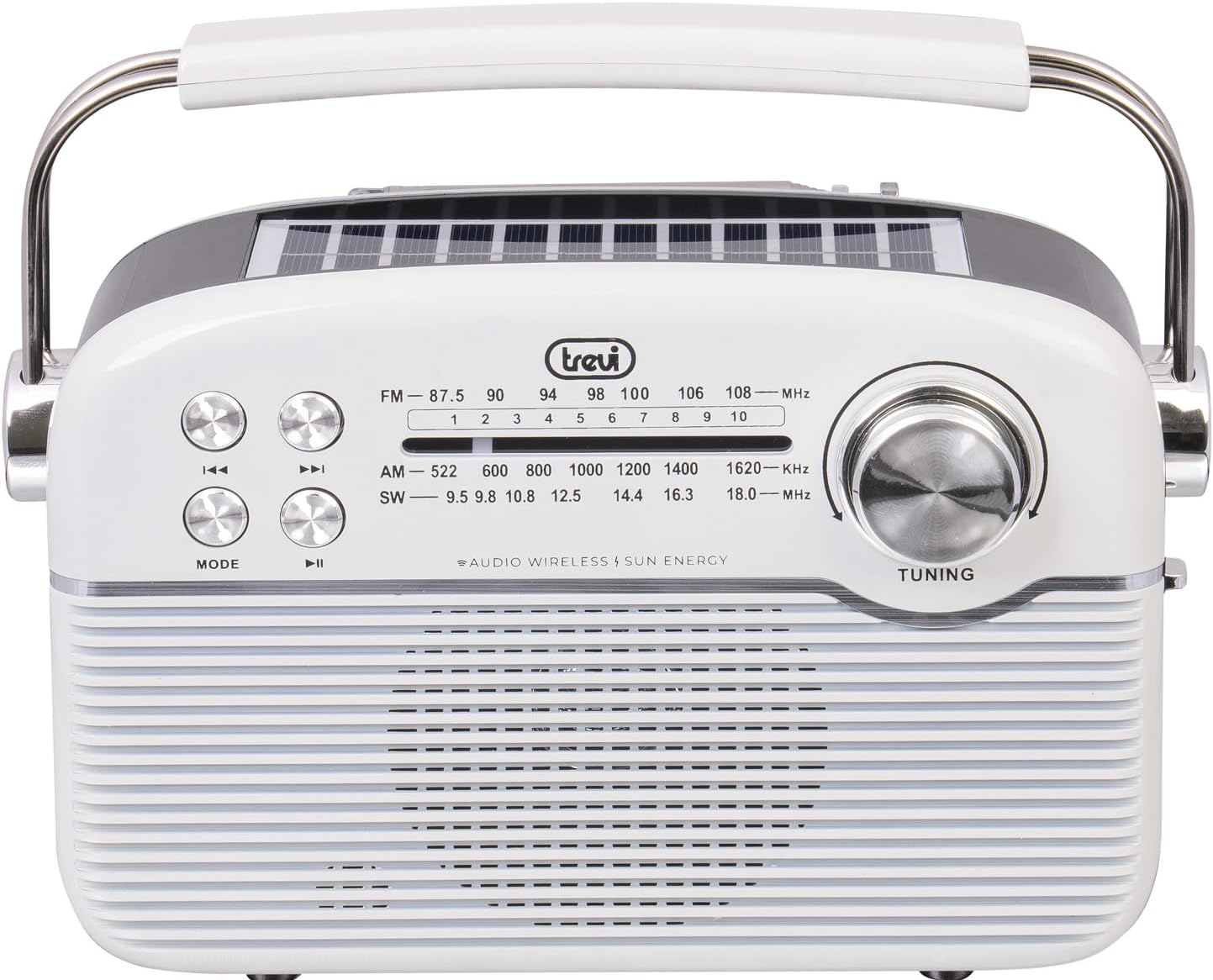
Image: Front view of the Trevi RA 7F50 BT radio. Visible elements include the main speaker grille, frequency display for FM, AM, and SW bands, control buttons for playback and mode selection, and a large tuning dial on the right side. The Trevi logo is centered above the frequency display.
Top and Side View

Image: Top and side view of the Trevi RA 7F50 BT radio. This perspective clearly shows the integrated solar panel on the top surface, designed for charging. The sturdy carrying handle is also prominent, extending across the top of the unit. The side view reveals the rounded edges and overall compact design.
Rear View

Image: Rear view of the Trevi RA 7F50 BT radio. The telescopic antenna is visible at the top. Below it, the various input ports are shown, including a USB port for flash drives, a Micro SD card slot for memory cards, and a USB Type-C port for charging the internal battery. The back panel also features a textured design.
Controls and Ports:
- Tuning Dial: For selecting radio frequencies.
- Mode Button: Switches between radio (FM/AM/SW), Wireless, and MP3 (USB/Micro SD) modes.
- Play/Pause Button: Controls playback in MP3 and Wireless modes.
- Previous/Next Track Buttons: Navigates tracks in MP3 and Wireless modes, or fine-tunes radio frequency.
- Volume Control: Adjusts audio output level.
- USB Port: For connecting USB flash drives.
- Micro SD Card Slot: For inserting Micro SD memory cards.
- USB Type-C Port: For charging the internal battery.
- Telescopic Antenna: For improved radio reception.
- Solar Panel: Integrated on top for solar charging.
4. Setup
4.1 Charging the Battery
The Trevi RA 7F50 BT radio is equipped with a rechargeable lithium battery (1500 mAh) and offers two charging methods:
- USB Type-C Charging: Connect the provided USB Type-C cable to the radio's charging port and the other end to a standard USB power adapter (not included) or a computer's USB port. The charging indicator light will illuminate.
- Solar Charging: Place the radio with its solar panel facing direct sunlight. The integrated 80 mA solar panel will slowly recharge the battery. This method is ideal for maintaining charge or for emergency power in outdoor environments.
It is recommended to fully charge the battery before first use.
4.2 Initial Power On
Locate the Power On/Off switch, usually on the side or back of the unit. Slide it to the "ON" position. The radio will power on, and the display (if available) will light up.
5. Operating Instructions
5.1 Radio Operation (FM/AM/SW)
- Select Radio Mode: Press the MODE button repeatedly until you reach the desired radio band (FM, AM, or SW).
- Extend Antenna: For optimal FM and SW reception, fully extend the telescopic antenna. For AM, the internal ferrite antenna is typically sufficient.
- Tune to a Station: Rotate the TUNING dial to scan for stations. The frequency display will show the current frequency.
- Adjust Volume: Use the volume control knob to set the desired listening level.
5.2 Wireless Connectivity (Bluetooth)
- Enter Wireless Mode: Press the MODE button repeatedly until "BT" or "Wireless" appears on the display (if applicable), or you hear an audible prompt indicating Bluetooth pairing mode.
- Pair with Device: On your smartphone, tablet, or other Bluetooth-enabled device, go to the Bluetooth settings and search for available devices. Select "Trevi RA 7F50 BT" from the list.
- Confirmation: Once paired, the radio will indicate a successful connection (e.g., an audible tone or stable indicator light).
- Play Audio: You can now play audio from your connected device through the radio's speaker. Use the radio's playback controls (Play/Pause, Previous/Next) or your device's controls.
5.3 MP3 Playback (USB/Micro SD)
- Insert Media: Insert a USB flash drive into the USB port or a Micro SD card into the Micro SD slot. Ensure the media contains MP3 audio files.
- Enter MP3 Mode: Press the MODE button repeatedly until the radio automatically switches to MP3 playback mode, or you hear an audible prompt.
- Playback Controls: Use the Play/Pause button to start or pause playback. Use the Previous/Next Track buttons to skip between tracks.
6. Maintenance
- Cleaning: Wipe the radio with a soft, dry cloth. Do not use abrasive cleaners or solvents.
- Battery Care: To prolong battery life, avoid fully discharging the battery frequently. Recharge regularly, especially if the unit will be stored for an extended period.
- Storage: Store the radio in a cool, dry place away from direct sunlight and extreme temperatures.
7. Troubleshooting
| Problem | Possible Cause | Solution |
|---|---|---|
| No power | Battery discharged; Power switch off. | Charge the battery via USB-C or solar panel; Ensure power switch is ON. |
| Poor radio reception | Antenna not extended; Weak signal; Interference. | Fully extend the telescopic antenna; Reposition the radio; Try tuning to a stronger station. |
| Cannot connect via Wireless (Bluetooth) | Radio not in Wireless mode; Device not discoverable; Already connected to another device. | Press MODE to enter Wireless mode; Ensure your device's Bluetooth is on and discoverable; Disconnect from other devices. |
| MP3 files not playing | Incorrect file format; USB/Micro SD not inserted correctly; Corrupted media. | Ensure files are MP3 format; Reinsert USB/Micro SD; Try different media. |
8. Specifications
- Model: RA 7F50 BT
- Radio Bands: FM, AM, SW
- Connectivity: Wireless (Bluetooth), USB, Micro SD
- Power Source: Rechargeable Lithium Battery (1500 mAh), Solar Panel (80 mA max), USB Type-C
- Input Voltage: 3.7V DC
- Dimensions: 25L x 11W x 20H cm (approx.)
- Weight: 0.98 kg (approx.)
- Included Components: USB / Type-C charging cable, User Manual
9. What's in the Box
- Trevi RA 7F50 BT Portable Multiband Radio
- USB / Type-C Charging Cable
- User Manual
10. Warranty and Support
This product is covered by a standard manufacturer's warranty. For detailed warranty information, technical support, or service inquiries, please refer to the warranty card included with your product or visit the official Trevi website. Keep your proof of purchase for warranty claims.


