
1. Important Safety Information
Please read all instructions carefully before using the JAGJOG Walking Pad. Retain this manual for future reference.
- Ensure the walking pad is placed on a flat, stable surface.
- Keep children and pets away from the walking pad during operation.
- Do not use the walking pad if you weigh more than 265 lbs (120 kg).
- Always wear appropriate athletic footwear.
- Unplug the walking pad from the power outlet when not in use or before cleaning.
- Do not operate the walking pad if the power cord is damaged.
- Consult a physician before starting any new exercise program.
2. Product Overview
The JAGJOG Walking Pad JT31 is a portable under-desk treadmill designed for home and office use. It features a 2.5HP motor, adjustable incline, and an LED display to track your workout progress.
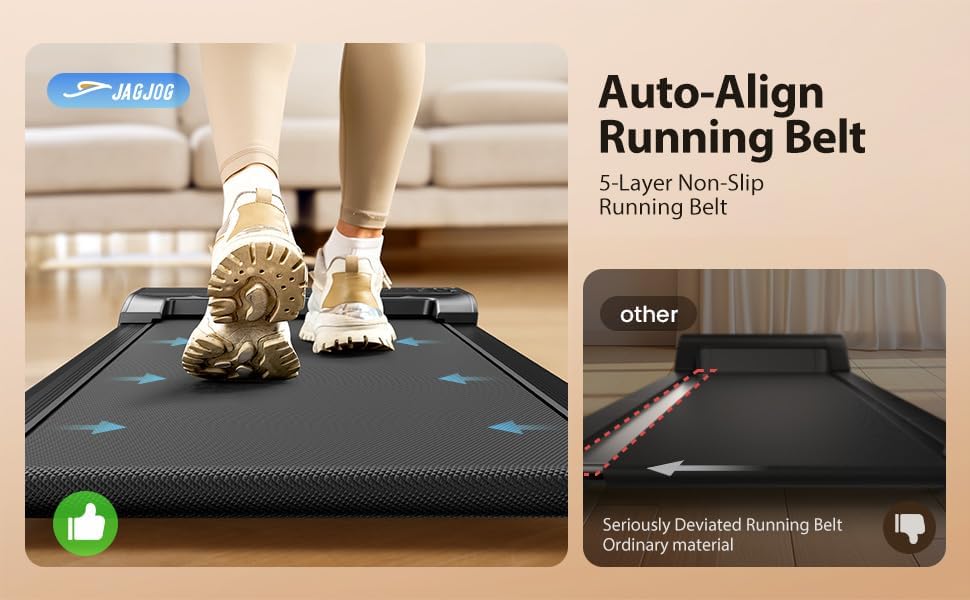
Image 2.1: The JAGJOG Walking Pad JT31, a compact and portable treadmill.
Included Components
The package includes the following items:
- Treadmill (Fully Assembled) x1
- Remote Control (with Built-in Battery) x1
- User Manual x1
- Silicone Oil x1
- L-shaped wrench with Cross Screwdriver x1
- Front Foot Cushion x2

Image 2.2: Visual representation of the included components: treadmill, remote control, user manual, silicone oil, L-shaped wrench, and front foot cushions.
3. Setup
The JAGJOG Walking Pad JT31 comes fully assembled. Follow these steps for initial setup:
- Unpack the walking pad from its packaging.
- Place the walking pad on a level, hard surface. Ensure there is adequate space around the unit for safe operation.
- Connect the power cord to the walking pad and then to a grounded electrical outlet.
- Turn on the main power switch, usually located near the power cord connection point.
- Familiarize yourself with the remote control.
4. Operation
The walking pad is controlled via a wireless remote. The LED display provides real-time workout data.
Using the Remote Control
The remote control allows you to start, stop, and adjust the speed of the walking pad. It also enables switching between display modes.

Image 4.1: The LED display and remote control for the walking pad.
- Start/Stop: Press the power button on the remote to start or stop the treadmill.
- Speed Adjustment: Use the '+' and '-' buttons to increase or decrease the speed. The speed range is 0.6 to 3.8 MPH.
- Mode Selection: Press the 'M' button to cycle through display modes (Time, Distance, Calories, Speed).
Video 4.1: A user demonstrating the walking pad's operation, including speed adjustment via remote control and its compact storage.
LED Display
The integrated LED display shows key workout metrics:
- Time: Duration of your workout.
- Distance: Total distance covered.
- Calories: Estimated calories burned.
- Speed: Current walking/jogging speed.

Image 4.2: Close-up of the smart LED display showing workout metrics.
4-in-1 Smart Modes
The walking pad offers various modes to suit different activity levels:
- Work Mode: 0.6-1.5 MPH (for low-intensity movement while working).
- Walk Mode: 0.6-1.8 MPH.
- Jog Mode: 2.5-3.8 MPH.
- Climb Mode: Utilizes the manual incline for hill-style intensity.

Image 4.3: Illustration of the adjustable speed and multiple modes available on the walking pad.
5. Key Features
Adjustable Incline
The walking pad features a manual 15° incline adjustment. To activate the incline, simply kick open the incline feet located at the front of the unit. This allows for a hill-training effect, targeting leg muscles and increasing cardio intensity.

Image 5.1: The walking pad demonstrating its manual incline feature.
Auto-Align Running Belt
The walking pad incorporates innovative auto-align technology to keep the belt centered during workouts. The wide 40” x 15.3” anti-slip surface is designed to absorb shock, providing a smooth and joint-friendly experience.

Image 5.2: Illustration of the auto-align running belt feature, ensuring the belt remains centered.
Powerful and Quiet Motor
Equipped with a 2.5 HP motor, the walking pad operates quietly (below 45 dB), making it suitable for use in shared spaces or during late hours. Its steel frame and multi-layer belt contribute to durability and minimal vibrations.

Image 5.3: Diagram highlighting the 2.5HP powerful and quiet motor.
Anti-slip & Shock Absorption Design
The walking pad features 8 silicone shock-absorbers and a shock absorption running board, combined with a 5-layer non-slip running belt, to provide knee protection and a comfortable workout experience.

Image 5.4: Visual representation of the anti-slip and shock absorption features for knee protection.
Convenient Storage
The walking pad is designed for easy storage. It can be moved using its damping pulleys and stored under furniture like a bed or sofa when not in use.
Video 5.1: A user demonstrating the walking pad's easy storage under a bed.

Image 5.5: The walking pad being easily moved and stored, highlighting its space-saving design.
6. Maintenance
Regular maintenance ensures the longevity and optimal performance of your walking pad.
Lubrication
The running belt requires periodic lubrication with the provided silicone oil. Refer to the specific instructions in the included user manual for the correct application frequency and method.
Belt Adjustment
If the running belt becomes misaligned, use the L-shaped wrench to adjust it. Consult the detailed instructions in the main user manual for proper belt centering procedures.
Cleaning
Wipe down the walking pad with a damp cloth after each use. Do not use abrasive cleaners or solvents. Ensure the unit is unplugged before cleaning.
7. Troubleshooting
If you encounter any issues with your JAGJOG Walking Pad, refer to the following common problems and solutions:
- Treadmill does not start: Check if the power cord is securely plugged in and the main power switch is on. Ensure the remote control battery is functional.
- Running belt slips or is off-center: The belt may require adjustment. Refer to the "Belt Adjustment" section in this manual or the full user manual for detailed instructions.
- Unusual noise during operation: Ensure the walking pad is on a level surface. Check for any foreign objects under the belt. If the noise persists, contact customer support.
- Remote control not responding: Replace the battery in the remote control. Ensure there are no obstructions between the remote and the walking pad's receiver.
For further assistance, please contact JAGJOG customer support.
8. Specifications
| Feature | Specification |
|---|---|
| Model Number | JT31 |
| Product Dimensions | 106 x 48.5 x 10.6 cm (41.7 x 19 x 4.2 inches) |
| Item Weight | 17 kg (37.5 lbs) |
| Motor Horsepower | 2.5 HP |
| Maximum Speed | 3.8 MPH (6.12 km/h) |
| Weight Capacity | 265 LBS |
| Incline Percentage | 15% (Manual) |
| Display Type | LED |
| Metrics Tracked | Time, Distance, Speed, Calories Burned |
| Frame Material | Alloy Steel |
| Special Features | Lightweight, Manual Incline, Under-desk design, Portable, Shock Absorbent, Running Belt Automatic Correction |
| Power Source | Corded Electric |
| Assembly Required | No |
9. Warranty and Support
For warranty information, product support, or to purchase replacement parts, please refer to the contact details provided in the original packaging or visit the official JAGJOG website. Keep your purchase receipt as proof of purchase for warranty claims.